AdPlug vs Ryze AI: a Ryze AI alternative for PPC specialists and agencies
Quick answer: AdPlug is for PPC specialists, consultants and agencies who want to scale their work with AI and keep control of every account: it plugs Google Ads, Meta Ads, LinkedIn Ads, Microsoft Ads, Reddit Ads and TikTok Ads into Claude, ChatGPT or any AI agent, shows you every Google Ads change before it runs, and starts free. Ryze AI suits people who've never run a PPC campaign and want an AI to run it for them, from $89 a month. AdPlug (adplug.app) is my product, so weigh that.
I've run Google Ads and LinkedIn Ads for B2B companies for 12 years, with over £100M of spend through my hands, and I use AdPlug every day on my own accounts and my agency's clients. For this page I read Ryze AI's pricing, terms and help centre, plus what its users say in public reviews.


AdPlug vs Ryze AI: who should pick which
Both put AI on your ad accounts, and both work in Claude and ChatGPT. The difference is who they're for. Ryze AI is built for people who don't run ads themselves and want to hand the account over, and in its own words it suits "teams without a dedicated PPC operator". AdPlug is built for the people who do run the ads: it plugs your accounts into the AI you already use, and nothing happens until you ask.
 Pick AdPlug if
- You run PPC for a living, in-house, freelance or at an agency, and want AI to do the legwork while you make the calls
- You run more than Google Ads: Meta Ads, LinkedIn Ads, Microsoft Ads, Reddit Ads and TikTok Ads are in the same plan, with Search Console and HubSpot next to them
- You want it to work wherever you do: Claude, ChatGPT, Grok Bot, Hermes Agent or the agents your team builds
- You want control and safety: a preview before every Google Ads change, and a log of every call afterwards
- You manage a team: View only or Can edit for each person on each platform, with more seats as you grow
- You'd rather trust a tool built by a PPC specialist who uses it every day, on his own accounts and his agency's clients
- You'd like to start free, then pay $29 a month rather than $89
 Pick Ryze AI if
- You've never run a PPC campaign and want an AI to run it for you
- You'd rather hand the account over than approve each change
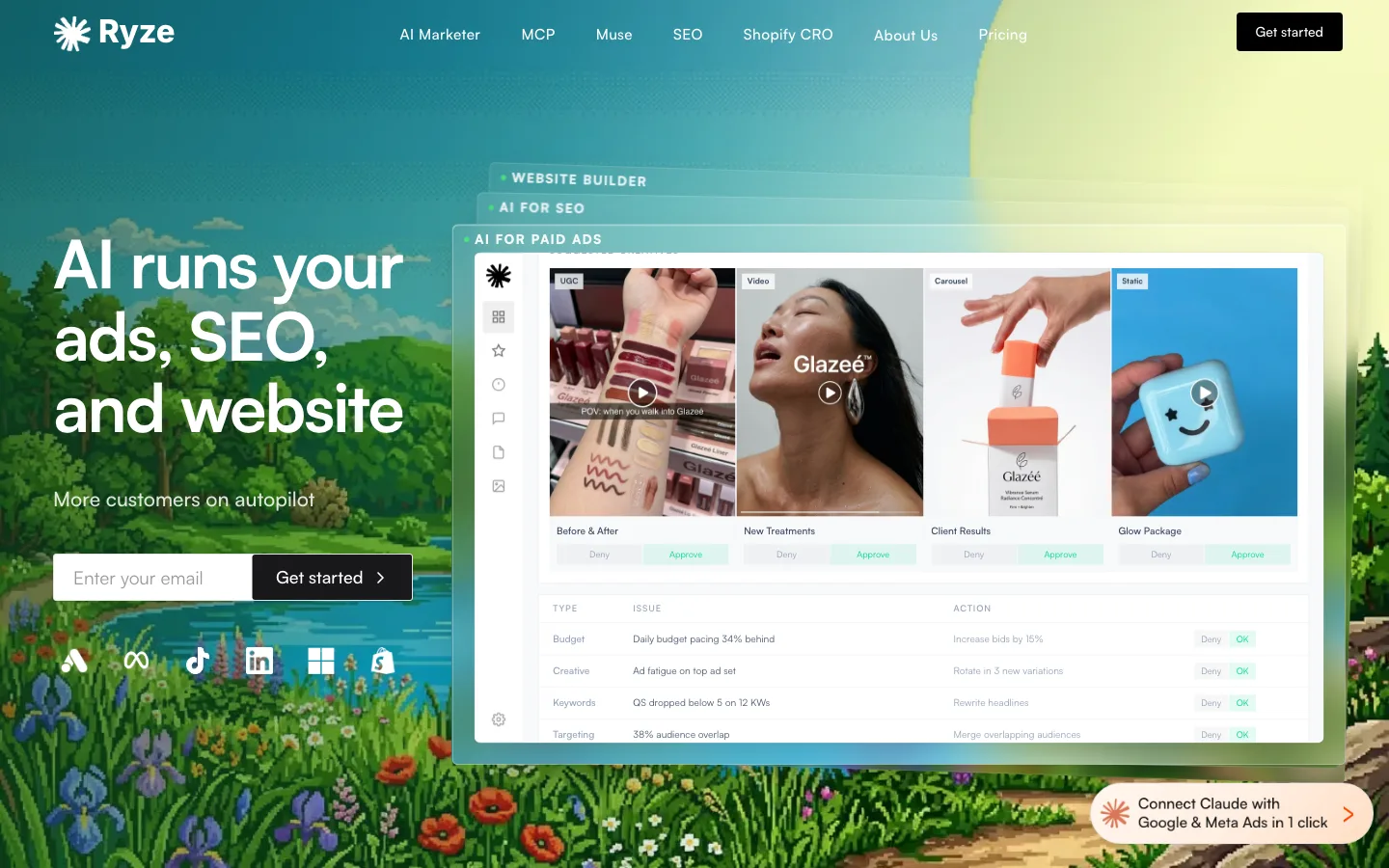
- You want one subscription for your ads, your SEO and your website
- You'd rather work in Ryze's own app than in Claude or ChatGPT
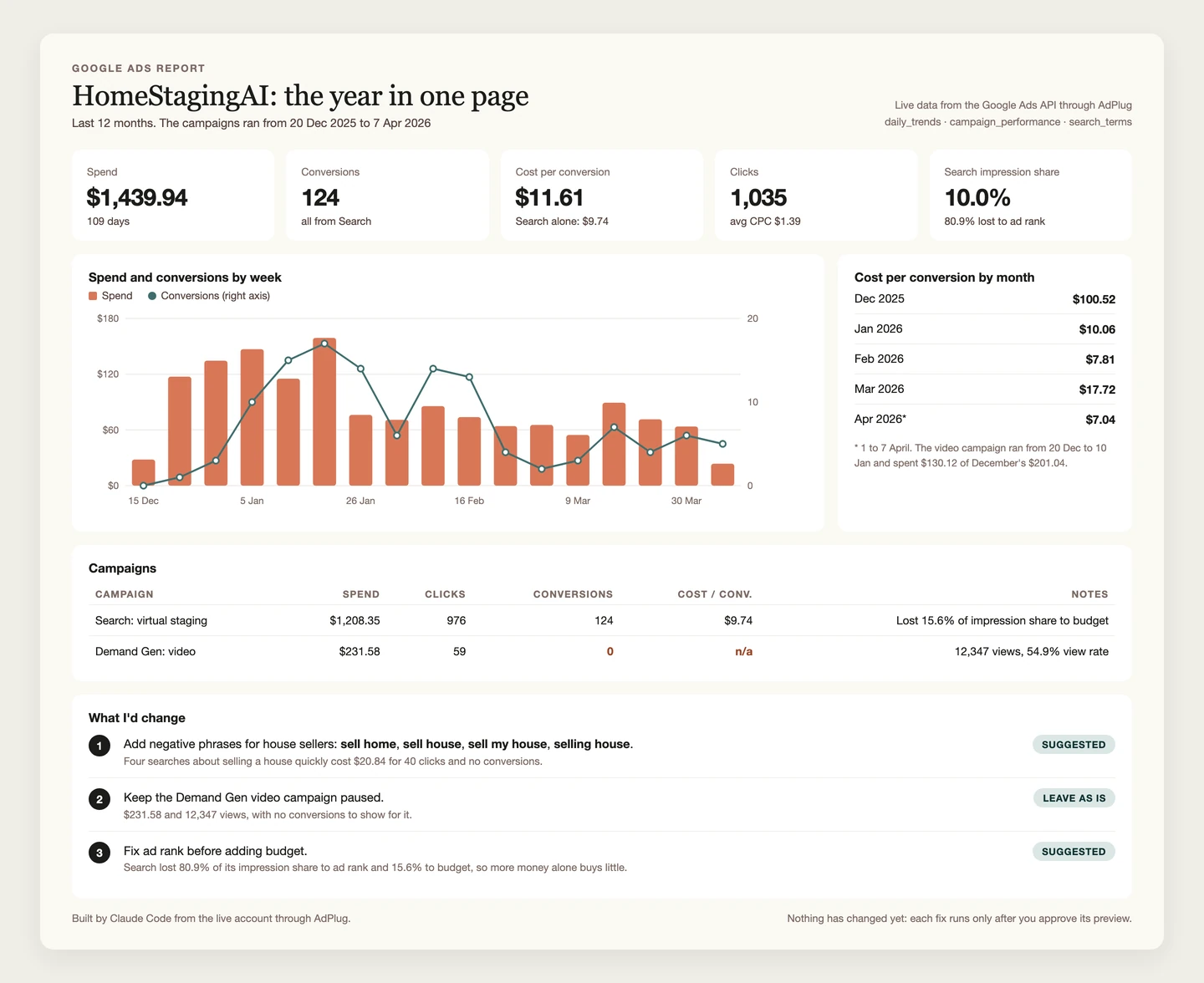
And if all you want is dashboards, you don't need Ryze or a reporting tool for that. AdPlug's free plan reads your accounts, and Claude or ChatGPT turns them into a custom dashboard in seconds. The only case for neither is reading Google Ads alone, with someone technical on the team to host Google's own free server.
The real difference: who presses the button
Feature lists make these two look closer than they are. If you manage other people's money, the question that matters is simpler. When something changes in a live account, who decided it, and did anyone see it first?
How Ryze AI makes changes
Ryze's terms of use open with "Ryze is an autonomous AI agent", and connecting an account authorises it to "take real actions on your behalf", spending your ad budget included.
In Ryze's own app, the chat agent's approvals setting starts on Skip all approvals. Its help centre spells out what that means: the agent can change "budgets, campaigns, content" in your connected accounts "without asking first". You can switch it to approve every change, but you have to know to.
Scheduled tasks are live as soon as you create them and can use every tool the agent has, deleting things included (Ryze's advice: "use at your own risk"). A Managed Campaign launches as soon as you create it, unless you write "Don't launch without my approval" in the brief.
Through its connector in Claude, the safety catch moves to Claude's own tool settings, and Ryze tells you to keep every write and delete tool on Needs approval. Its Google Ads writes go through raw mutate tools, so the AI writes the API call itself, and that raw call is what Claude asks you to approve.
The terms leave no doubt whose problem a bad change is. You're "solely responsible" for the agent's activity and its consequences, ad spend and account suspensions included.
How AdPlug makes changes
AdPlug has no agent of its own, and that's the point. Claude or ChatGPT does the thinking, with everything it already knows about your business, and AdPlug is the plug socket between it and your accounts. On Google Ads a change goes through in two steps, and the second can't run without the first.
- You ask: "Add negatives for the search terms that are wasting money."
- The AI reads the search terms and works out which negatives that means.
- It calls AdPlug's preview, which checks the change against the live account and lists exactly what will happen, in plain words: these keywords, this match type, this campaign or shared list.
- You read it. If it's wrong, you say so, and nothing happens.
- Only then can the execute step run, on that preview. A preview runs once and expires after 15 minutes, so yesterday's yes can't sneak through today.
- The call goes in AdPlug's audit log, and the change shows in Google Ads' own change history.

 Claude
Find the search terms that spent money without converting, and add the right ones as negatives.
google_ads_preview_add_negativesAdPlug - Google AdsPreview · shared list: wasted spend · phrase match
| Negative keyword | Match type | Added to |
|---|---|---|
| free | Phrase | Wasted spend list |
| jobs | Phrase | Wasted spend list |
| template | Phrase | Wasted spend list |
| course | Phrase | Wasted spend list |
| diy | Phrase | Wasted spend list |
That's five phrase-match negatives for your wasted spend list, all from search terms that spent without a single conversion. Nothing changes until you say so. Shall I add them?
Go ahead.
google_ads_execute_add_negativesAdPlug - Google AdsDone. Five negatives added to the wasted spend list. Google Ads' change history shows them too.
The rule that execute needs a preview lives on AdPlug's server, not in a setting someone on your team can switch off. In Claude you can also set the write tools to ask every time (belt and braces). The other platforms have the same preview tool, but it isn't forced there yet, so ask for it in your prompt.
I don't let anything change a live budget without showing me first. The person who answers for that budget is me, not the tool. If you're a founder with nobody to answer to, Ryze's way can make sense. If a client or a finance director reads your change history, I'd want mine.
Look at the search terms in this Google Ads account. Find every term that spent money without converting, group them by theme, and suggest negative keywords with match types. Show me the preview, and don't add anything until I say so.
What Ryze AI users say in their reviews
I'm the last person you should take Ryze AI's faults from, so here's what its users say, read on 23 Oct 2026. The first thing worth knowing is how few independent reviews there are.
| Where | Rating | Reviews |
|---|---|---|
| Trustpilot | 3.9 out of 5 | 17 shown, 31 counted in the past year |
| Shopify App Store (its SEO app) | 5 out of 5 | 1 |
| Capterra | None yet | 0 |
| Product Hunt | None yet | 0 |
| SourceForge | None yet | 0 |
On Trustpilot, 70% of the reviews give five stars and 30% give one or two, with nothing in between. Most of the five-star ones are about Ryze's SEO product rather than ads. Three of the five one- and two-star reviews come from people who run campaigns or checked the numbers against the platform, which is the group this page is for.
What users complain about
Changes it reported but didn't make. This is the one that worries me most. In PPC, a change that didn't land is worse than no change, because you stop looking.
“Lots of ‘actions’ are not reflected in the actual account”
“I explicitly told it to turn off a test ad group and it stayed live instead, burning $$$ on irrelevant keywords”
Numbers that don't match the account. Two reviewers caught it reporting things that weren't true.
“the numbers reported inside the platform were significantly inaccurate.”
“In its recommendation, it says a campaign is paused when it is not.”
Mistakes, and not ready for agency work. Ryze's own terms say much the same: the agent "can and will sometimes make mistakes".
“The AI hallucinates and does not remember things it just did in the same chat.”
“Great potential, but clearly not mature enough for agency production.”
What users like
The praise is real too, and some of it comes from agencies.
“The product itself is intuitive to use and is capable of handling a Google ads campaign from end to end.”
“I had no issue with refund process. Easy and friendly customer service.”
“If you're an agency running 20+ accounts and need write-access automation, the convenience makes sense.”
Nobody I read complained about changes made without their approval, or about billing. If you do try Ryze, check its work the way you'd check a new hire's: Google Ads' change history for what changed, and your own conversion columns for what it reports. That goes for any tool, mine included.
AdPlug vs Ryze AI, side by side
Checked on each company's own pages on 23 Oct 2026. Edge marks the side that wins a row, only where that's a plain fact rather than my opinion.
| Compared | AdPlug | Ryze AI |
|---|---|---|
| Where it works | ||
| Platforms | AdPlugGoogle Ads, Meta Ads, LinkedIn Ads, Microsoft Ads, Reddit Ads and TikTok Ads, plus Google Search Console and HubSpot on connectors of their own. | Ryze AIGoogle Ads, Meta, TikTok, LinkedIn, Microsoft Advertising, Reddit and Snapchat, plus GA4, Search Console and Shopify, on one connector. |
| Google Ads tools | AdPlug17 tools, and 174 named kinds of change, each checked in a preview. | Ryze AI14 tools: 8 reads, including raw GAQL, and 6 writes, including raw mutate. |
| AI clients | AdPlugClaude, ChatGPT, Claude Code, Codex, Grok Bot, Hermes Agent and any AI agent that accepts a remote MCP address. | Ryze AIClaude, ChatGPT, Claude Code, Grok and other MCP clients. |
| Setup | AdPlugSign up, sign in through each platform's own screen, paste one address into your AI. Nothing to host. | Ryze AIPaste one address and sign in with Google. Needs an active Ryze plan or free trial. |
| Built for | AdPlugPPC specialists, consultants and agencies working in Claude, ChatGPT, Grok Bot, Hermes Agent or their own AI agents. | Ryze AIIn its own words, “teams without a dedicated PPC operator”. |
| Sources: Ryze AI's MCP pages, help centre and comparison pages. Checked 23 Oct 2026. | ||
| How changes happen | ||
| Who does the work | AdPlugThe AI you already use, when you ask or on a schedule you set in it. AdPlug never acts on its own. | Ryze AIRyze's own agent, which checks your accounts several times a day. Its connector also works from your AI. |
| Approvals out of the box | AdPlugGoogle Ads: the execute step won't run without a preview of that exact change. Other platforms: a preview when you ask for one. | Ryze AIIn its app, Skip all approvals. In Claude, whatever you set per tool, and Ryze says to set Needs approval. |
| Read-only option | AdPlugThe free plan is view only, and any teammate can be set to View only.Edge | Ryze AINot read-only by design. For a hard guarantee, Ryze suggests connecting a login that can only read. |
| Audit trail | AdPlugEvery tool call logged with who ran it, on which account, and how it went.Edge | Ryze AIIts agency page promises a log of what the AI did and why. Its help centre doesn't document a customer-facing audit log. |
| Sources: Ryze AI's help centre and terms of use. Checked 23 Oct 2026. | ||
| What it costs | ||
| Starts at | AdPlugFree, then Pro at $29 a monthEdge | Ryze AIPaid Ads at $89 a month |
| Free plan | AdPlugYes: view only, one platform, unlimited ad accountsEdge | Ryze AINo. A 7-day trial that needs a card, charges a $1 setup fee and turns into the paid plan unless you cancel |
| At $89 a month | AdPlugMax: unlimited requests and edits on every platform, three team members | Ryze AIPaid Ads: unlimited ad accounts, three workspaces, 750 agent credits |
| Refunds | AdPlugCancel anytime, 14-day refund windowEdge | Ryze AICancel anytime. Payments are final once processed, no partial refunds |
| Sources: Ryze AI's pricing page, billing help and refund policy, and AdPlug's pricing. Checked 23 Oct 2026. | ||
| Teams and agencies | ||
| Manager accounts | AdPlugOne sign-in covers every account under an MCC. Three Google logins on Pro, five on Max and Agency. | Ryze AIConnect the manager login once and it reaches every client account. Separate clients go in separate workspaces. |
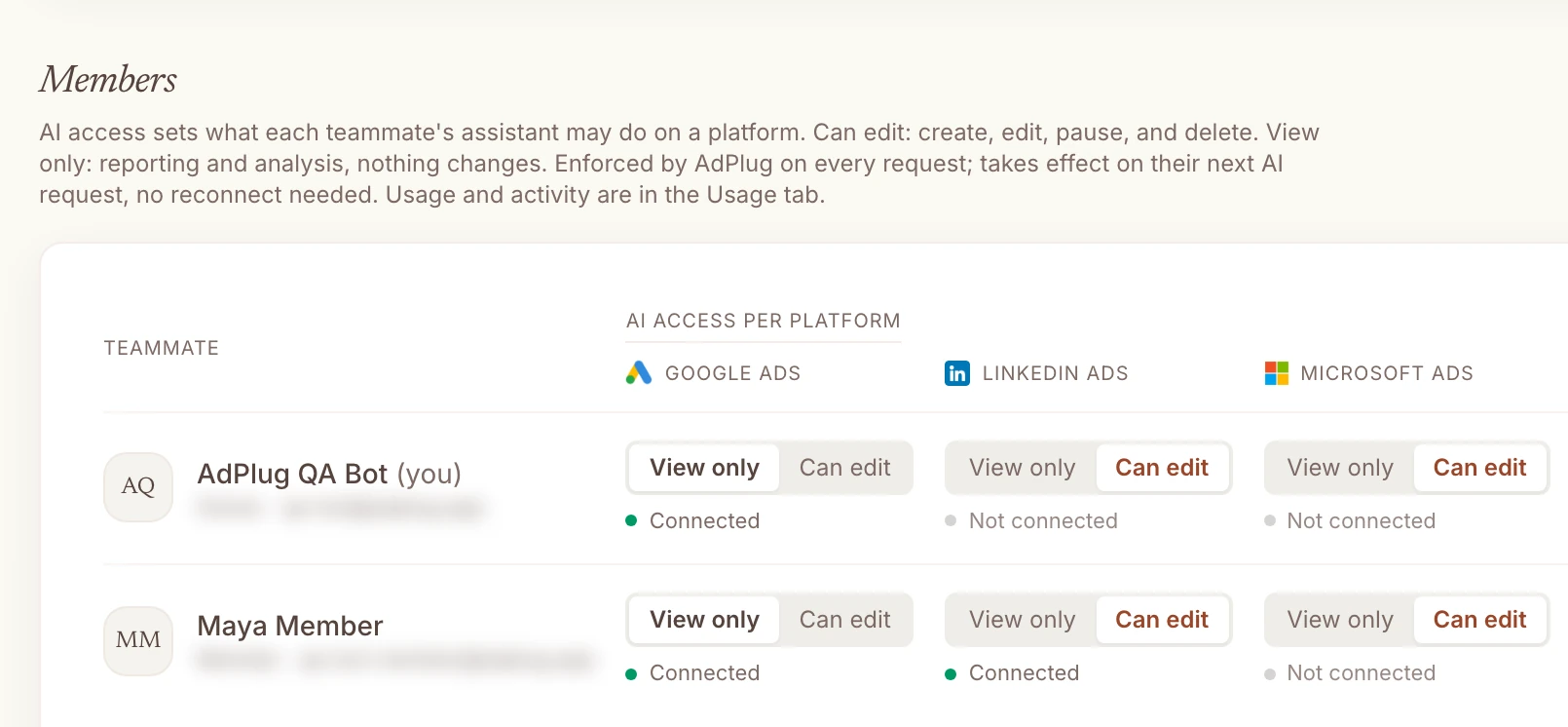
| Access per user | AdPlugView only or Can edit for each teammate on each platform, enforced on every request.Edge | Ryze AITwo roles, owner and member, and anyone in a workspace can invite teammates. |
| CRM and pipeline | AdPlugHubSpot from Pro, with one connector reaching every client portal: three on Pro, ten on Max and Agency. | Ryze AIA HubSpot app in HubSpot's marketplace. |
| Sources: Ryze AI's help centre and HubSpot's marketplace. Checked 23 Oct 2026. | ||
Where Ryze AI is stronger
Fair's fair. There are two good reasons to pick it.
- It goes beyond paid ads. Ryze also sells SEO plans, link building and PR placements, landing pages and Shopify conversion work, so one subscription can cover your ads, your SEO and your website.
- It suits people who've never run a PPC campaign. If you don't know Google Ads and don't want to learn, handing the account to an agent that checks it several times a day is the whole point. You just have to trust it.
Why PPC specialists and agencies pick AdPlug
Ryze AI is built to be the PPC manager. AdPlug is built for the PPC manager.
You don't have to take my word for it. Ryze's own review says to skip it "if you are a hands-on PPC specialist who wants to author every rule", and its llms.txt file says it's "NOT the best fit for: teams that want to hand-approve every bid change". I agree, and I'd add one more name to the list it suggests instead.
If you run the accounts yourself
You don't need an AI to decide your bids. You need one that does the dull 80% fast and leaves the calls to you.
- Your AI, your context. The work happens in the AI you already use, with your notes, your files and your other tools in the same conversation: Claude, ChatGPT, Grok Bot, Hermes Agent or the agents your team builds.
- The whole Google Ads toolbox. 17 tools: account, campaign, keyword, conversion and search term reports, daily trends, Google's own recommendations, keyword ideas with search volumes, and raw GAQL for anything else.
- Named changes, not raw API calls. AdPlug knows 174 kinds of Google Ads change, from negatives and budgets to responsive search ads, experiments and Performance Max asset groups, and the preview says what each one will do in plain words. With a raw mutate tool, what you approve is the API call, and I don't know many PPC people who enjoy reading those.
- Every platform you run. Meta Ads, LinkedIn Ads, Microsoft Ads, Reddit Ads and TikTok Ads sit in the same plan as Google Ads, with Google Search Console and HubSpot on connectors of their own.
- Read-only until you say otherwise. The free plan can't change anything, which is how I'd start with any new tool, and it's plenty for dashboards: ask for one and your AI builds it in seconds.
Report and optimise on pipeline, not just conversions
This is where AdPlug pulls away for B2B agencies and consultants. A Google Ads conversion is a form fill. Pipeline is what the client pays you for.
Connect HubSpot next to Google Ads and the same chat can line up every campaign with the deals it produced and how far each lead got through the lifecycle stages: lead, MQL, SQL, opportunity, customer. Then it can move budget towards the campaigns that make pipeline, with a preview before anything changes.
HubSpot comes with Pro, and one HubSpot connector reaches every client portal you connect: three on Pro, ten on Max and Agency. So the Monday question becomes "which campaigns made pipeline for each client?", not "which campaigns got the cheapest leads?".
 Claude
List my HubSpot portals.
hubspot_list_accountsAdPlug - HubSpot| Portal | Hub ID | Region | Status |
|---|---|---|---|
| Acme Software | 21347856 | NA1 | Active |
| Acme Robotics EU | 25981034 | EU1 | Active |
Both portals are connected. Tell me which client to start with, and I'll line up their Google Ads campaigns with the deals and lifecycle stages in their portal.
Line up my Google Ads campaigns with HubSpot. For each campaign, show how many contacts reached each lifecycle stage and what each SQL cost, then suggest budget moves as a preview. Don't change anything yet.
If you run an agency
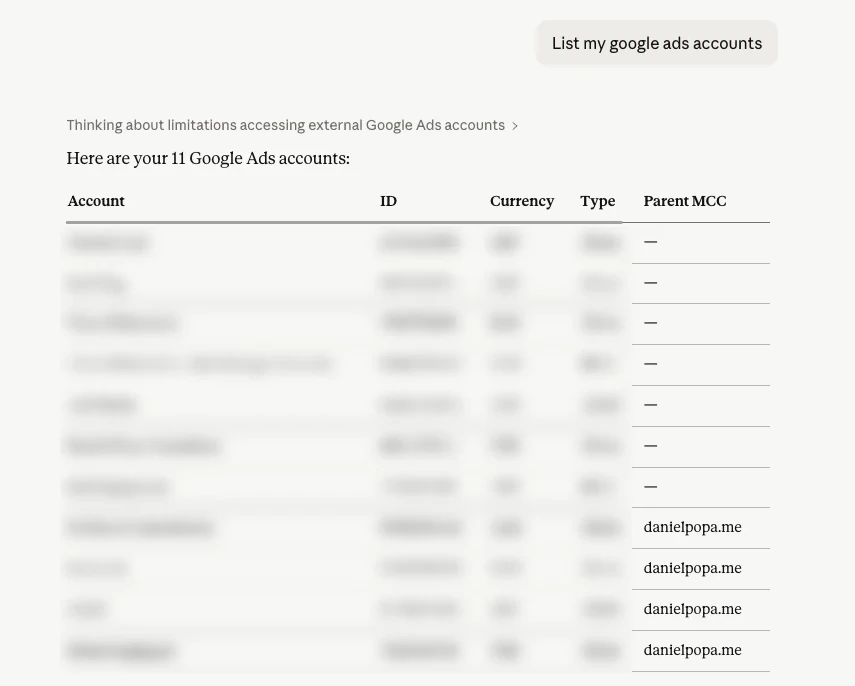
- Every client behind one sign-in. One Google sign-in covers every account under your manager account, and from Pro you can add three Google logins (five on Max and Agency) for clients who sit under different MCCs.
- Access for every user, platform by platform. Each teammate gets View only or Can edit on each platform. The junior can read every client and change none of them, the senior can edit Google Ads and only read LinkedIn, and AdPlug enforces it on every request. Ryze has two roles, owner and member, and anyone in a workspace can invite more people.
- It scales with the team. Max includes three team members, Agency is priced per seat, and every plan has unlimited ad accounts.
- A record of every call. Who ran it, on which account, and how it went. When a client asks what changed and who did it, you have the answer.
- The paperwork agencies get asked for. A data processing agreement you can sign, and tokens encrypted at rest.
Ryze AI pricing
Ryze AI's Paid Ads plan is $89 a month and its Agency plan $279 a month, or 30% less in the first year if you pay annually. There's no free plan: the 7-day trial needs a card, charges a one-time $1 setup fee and turns into the paid plan unless you cancel. Checked on its pricing page and billing help on 23 Oct 2026.
| Plan | Price | What you get |
|---|---|---|
| Ryze AI Paid Ads | $89/mo | Its agent and connector on unlimited ad accounts, three workspaces, 750 agent credits a month |
| Ryze AI Agency | $279/mo | Unlimited client workspaces and 3,000 credits a month |
| Ryze AI Managed Campaigns | 5% of the spend it manages, down to 0.8% | Ryze builds and runs campaigns for you |
| AdPlug Free | $0 | View only, one platform, unlimited ad accounts, 500 requests in the first 10 days, then 50 a month |
| AdPlug Pro | $29/mo | Every platform and HubSpot, 5,000 requests and 200 edits a month, three Google logins, 7-day trial |
| AdPlug Max | $89/mo | Unlimited requests and edits, three team members, five Google logins |
| AdPlug Agency | Custom, per seat | Everything in Max for the whole team, plus a signed DPA |
At the same $89, Ryze's Paid Ads plan buys its agent on unlimited ad accounts. AdPlug Max buys unlimited requests and edits on every platform AdPlug covers, for three people.
Two lines I'd read twice. Ryze's refund policy says "Payments to Ryze are final once processed", and the $1 setup fee isn't refunded even if you cancel during the trial. And two of Ryze's own blog posts say there are no setup fees, while its billing help and its terms say there is one. AdPlug has a 14-day refund window, and the free plan never asks for a card.
Ryze AI alternatives, by the job you need done
The best alternative depends on what you wanted Ryze AI for in the first place. I've compared the Google Ads connectors in more depth in my Google Ads MCP server comparison.
AdPlugMy pick
For PPC specialists, consultants and agencies who want Claude, ChatGPT or their own agents on every ad account they run, with a preview before every Google Ads change and access set per teammate. Free to read on unlimited ad accounts, then Pro at $29 a month.
Pick it if you want the AI to do the legwork and you to make the calls. See how it works on Google Ads.
 Google's Google Ads MCP server
Free and read-only, with three tools: GAQL search, field metadata and the list of accounts you can reach. You run it yourself, on your own machine or Google Cloud project.
Pick it if someone technical can host it and you only ever need to read Google Ads.
Optmyzr, Opteo or Adalysis
Classic PPC platforms with rules, audits and one-click fixes you confirm, from $129 to $209 a month. Ryze itself points people who want to approve every change to Opteo or Optmyzr. I've scored all three in the best AI tools for Google Ads.
Pick one if you'd rather have suggestions in a dashboard than an AI in a chat.
Adspirer
A connector for ad accounts in ChatGPT and Claude, across six ad platforms including Amazon. Free for 15 tasks a month, Plus from $40 a month billed yearly (pricing, checked 23 Oct 2026).
Pick it if Amazon Ads is part of your mix.
Pipeboard
Meta first, with Google Ads, TikTok and LinkedIn on the same account slots. Free for 30 tool runs a week on two accounts, Pro $29.90 a month for three (pricing, checked 23 Oct 2026).
Pick it if Meta is most of your spend and you only run a handful of accounts.
Switching from Ryze AI to AdPlug
It takes about ten minutes. Before you start, open Google Ads' change history for the last 30 days: it shows every change Ryze made, which is worth knowing whichever tool you pick next.
- If Ryze runs Managed Campaigns for you, pause them first. Ryze says they keep running and spending after you cancel, until its next scheduled check.
- Cancel in Ryze under Organization Settings, Billing. A trial simply ends on the date shown, and a paid plan runs to the end of the period you've paid for.
- Remove Ryze's connector from Claude or ChatGPT, then remove its access in your Google account under Security, Third-party connections.
- Sign up for AdPlug and connect your ad platforms through each one's own sign-in screen. Every account behind that login comes with it, manager accounts included.
- Add AdPlug's address to your AI as a custom connector. The guides walk through it with screenshots for Claude, Grok Bot and ChatGPT dots.
- Ask it something you already know the answer to. If it's right, ask the thing you don't.
Who should stay with Ryze AI
- You want the AI to run the account, not help you run it.
- You've never managed a PPC campaign and don't plan to.
- You want your SEO and your website handled by the same tool.
- It's working, your numbers are up and you sleep fine. Don't switch for the sake of it.
P.S. Ryze's pricing page reckons an agency costs $60,000 a year against its $1,068. I'd quibble with the maths, but not with the point underneath it: nobody should be paying a person to pull the Monday report any more. That's the bit I built AdPlug to get rid of.