See every Microsoft Ads account you can reach.
Lists every account your Microsoft sign-in can access, including accounts under a manager account. Work and personal Microsoft accounts both work.
Connect Microsoft Advertising (the old Bing Ads) to the AI you already use. Ask it to audit search terms, check pacing, copy your Google Ads campaigns across, and prepare changes you review before anything touches the account.
Microsoft sign-in, no Azure app or developer token to set up, encrypted platform tokens, and a preview before every write.
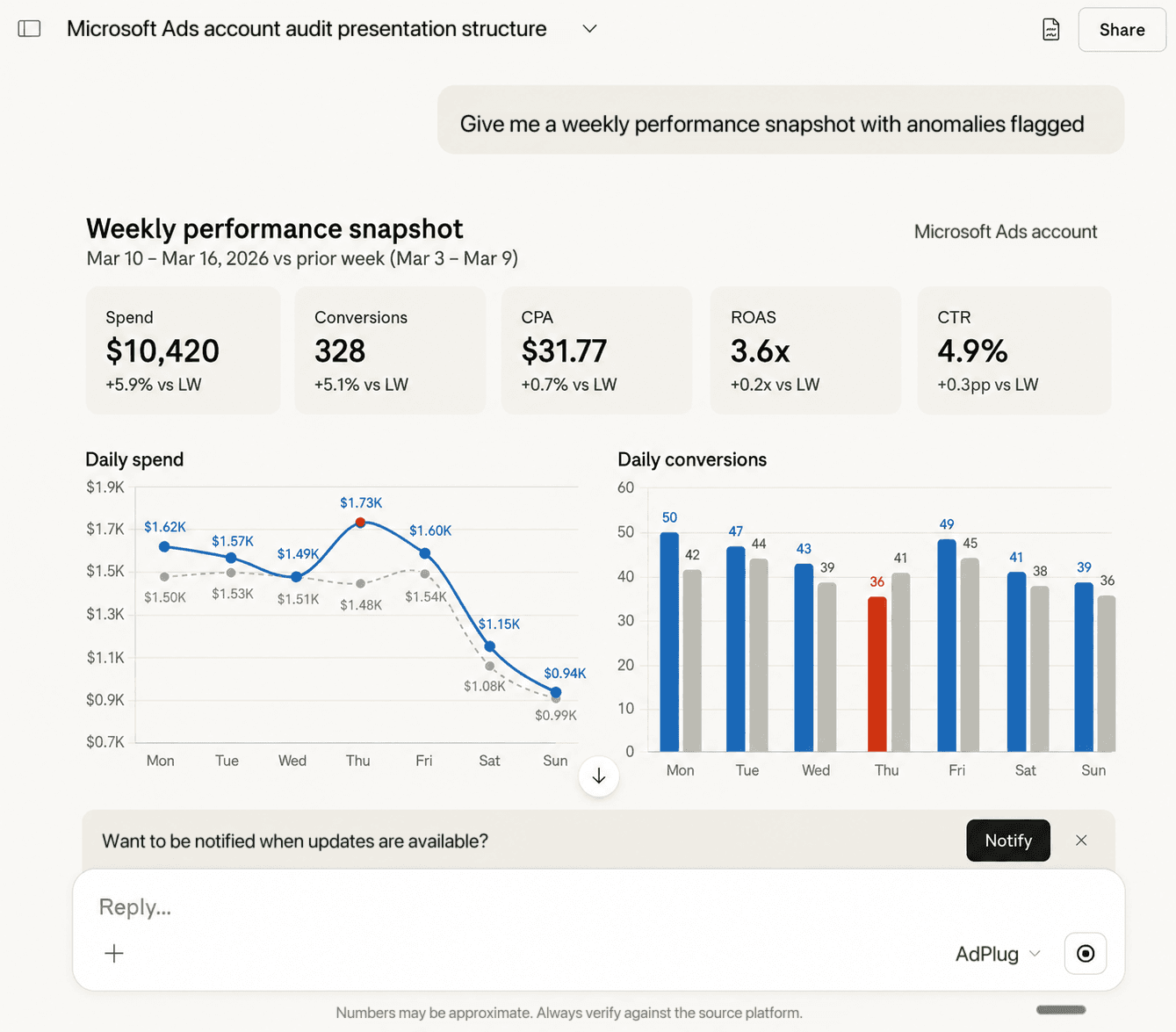
Microsoft Ads usually gets the leftover attention: a copy of the Google account, checked when someone remembers. Eleven tools and 93 operations give your AI the search, audience, conversion, and change-history context to give it a proper weekly look.
Lists every account your Microsoft sign-in can access, including accounts under a manager account. Work and personal Microsoft accounts both work.
Campaign, search query, geographic, audience, auction insights, LinkedIn profile demographics and more, with period-over-period comparisons. Your AI picks the right report.
Search query report sorted by cost. Surface waste, propose negatives at account, campaign, ad group, or list level, and add them through preview.
Copy one Google Ads Search campaign or all of them: structure, bidding, targeting, keywords, ads, negatives and extensions. Everything lands paused for you to check.
Campaigns, ad groups, responsive ads, asset groups, keywords and budgets, from a chat window. Every change is previewed before it runs.
Target or bid on company, industry and job function, alongside locations, radius, age and gender, devices, schedules and audiences.
Keyword ideas, monthly search volumes, and traffic and bid estimates from Microsoft's own planner data.
UET tags, conversion goals, offline conversions and value rules, plus switches for auto-applied recommendations and automated extensions.
User, account, action, outcome, and timestamp, plus Microsoft's own change history report, ready for client reporting.
Your AI pulls the search query report straight from Microsoft Advertising, sorts the spend, and writes back the negative-keyword plan ready for preview. Partner sites and the Audience Network get the same treatment as website exclusions. No CSVs, no exports.
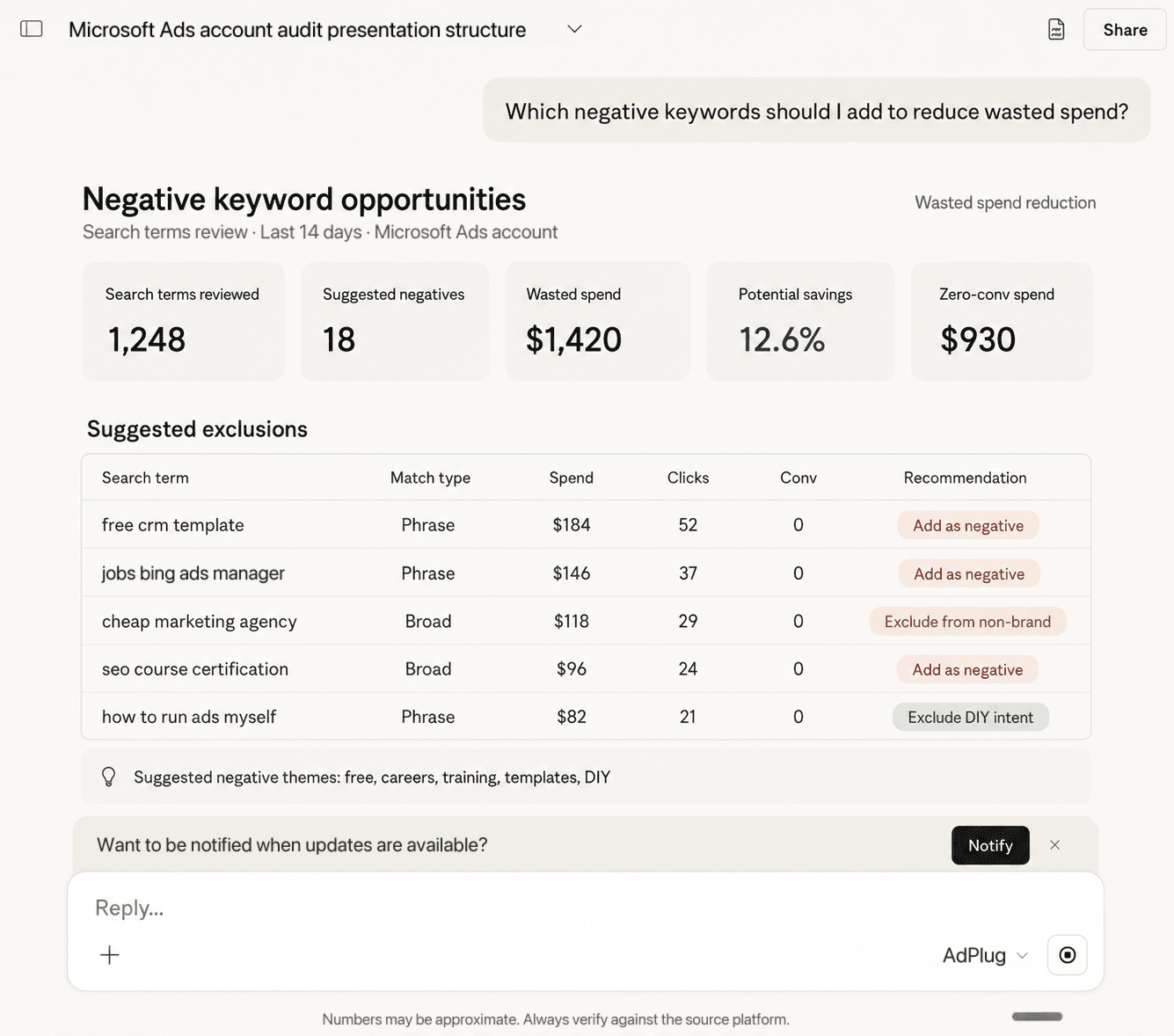
The numbers, account names, and thresholds are placeholders. The shape of the question is the work. Drop these into Claude or ChatGPT once you've connected, then customize.
Copy my best Google Ads Search campaign into Microsoft Ads, paused, and show me what will be created before anything runs.
Drop into your AIWhich Microsoft Ads campaigns lost impression share to competitors in the last 30 days? Use the auction insights report.
Drop into your AIBreak down last month's Microsoft Ads conversions by company, industry and job function from LinkedIn profile data.
Drop into your AIPull the search query report for the last 14 days, flag queries over $20 spend with no conversions, and prep them as negatives. Preview first.
Drop into your AIAdd a 30% seasonality adjustment to my search campaigns for Black Friday weekend. Show me the preview.
Drop into your AIShow me everything that changed in the account last week, who changed it, and what it was before.
Drop into your AIPull keyword ideas for project management software from Microsoft's keyword planner, with monthly volume and suggested bids, clustered by theme.
Drop into your AIWhich search partner sites spent money last month without a conversion? Prep them as website exclusions and preview first.
Drop into your AIConnect Microsoft Ads and run any of these from Claude or ChatGPT in under a minute.
Connect Microsoft AdsStart with Claude or ChatGPT, then bring the same workflow into Cursor, VS Code, or whatever your team adopts next.
Microsoft runs its own Microsoft Advertising MCP server. In June 2026 Microsoft described it as an open pilot with read-only access, and its setup guide has you install the Azure CLI and register your own Entra ID app. It's free, and it's a good fit if you only need reads and someone on the team is comfortable in a terminal. AdPlug is the hosted route, with writes.
| Microsoft's MCP server | AdPlug | |
|---|---|---|
| Changes to the account | Read-only (open pilot) | Reads plus 93 operations, with a preview tool for every change |
| Setup | Azure CLI, your own Entra ID app, a redirect URI per AI client | Sign in with Microsoft, paste one URL |
| AI clients | Copilot Studio, VS Code, ChatGPT, Claude | Claude, ChatGPT, Cursor, VS Code, Codex, any MCP client |
| Google Ads campaign import | Not part of the server | One Search campaign or all of them, created paused |
| Other ad platforms | Microsoft Advertising only | Google Ads and LinkedIn Ads on the same connection |
| Price | Free to connect | Free tier for one platform, paid plans for edits and more platforms |
Sources: Microsoft's June 17, 2026 announcement and its MCP setup guide, updated September 18, 2026.
A Microsoft Ads MCP is an endpoint that lets an AI tool like Claude or ChatGPT read your Microsoft Advertising data and make changes through the Microsoft Advertising API. AdPlug's Microsoft Ads MCP covers search, Performance Max, Audience Network and shopping campaigns, with a preview before every change.
Yes. Microsoft runs a Microsoft Advertising MCP server, which it described in June 2026 as an open pilot with read-only access. Setup means installing the Azure CLI and registering your own Entra ID app. AdPlug is hosted and reads and writes: it can build and edit campaigns, targeting, audiences and conversion goals, and it shows you each change before it runs.
Sign in to AdPlug, click Connect Microsoft Ads, and sign in with the Microsoft account you use for Microsoft Advertising. Then in Claude open Settings, then Connectors, click Add custom connector, and paste https://api.adplug.app/mcp/microsoft-ads. Approve AdPlug's sign-in and the connector is ready. It takes about two minutes.
Yes, ChatGPT adds custom MCP servers through Developer mode, which OpenAI lists for Plus, Pro, Business, Enterprise, and Education accounts on the web. Turn it on under Settings, Apps, Advanced settings, then click Create app, paste https://api.adplug.app/mcp/microsoft-ads as the MCP Server URL, and approve AdPlug's sign-in.
Yes. Bing Ads was renamed Microsoft Advertising in 2019, and most people still say Microsoft Ads or Bing Ads. Ads run on Bing, Yahoo, AOL, DuckDuckGo and partner sites, plus the Microsoft Audience Network, and AdPlug reports on all of it from the same account.
No. AdPlug uses its own developer token and Entra ID app, so you sign in with the Microsoft account that already has access to your ad accounts. There's no Azure app to register and no code to run. It works with work and personal Microsoft accounts.
Yes, on a paid plan. Changes use two tools: a preview that shows the exact change without making it, and an execute tool that makes it. Ask for the preview first, and Claude and ChatGPT ask you to confirm before a tool that changes the account runs. New campaigns, ad groups and ads start paused, so nothing spends until you switch it on.
AdPlug signs in through Microsoft's own consent screen, stores the refresh token encrypted at rest, and logs every tool call with user, account, action, outcome and timestamp. Writes need a preview and your confirmation, and team admins can keep each teammate view only per platform. You can disconnect from the dashboard at any time.
Yes. Connect both platforms and ask your AI to copy one Google Ads Search campaign or all of them. AdPlug copies the structure, budget, bidding, locations, languages, schedule, keywords, responsive search ads, negatives and extensions, creates everything paused, and skips campaigns that already exist, so it's safe to run twice. Other campaign types are listed as skipped.
Yes. Your AI can look up companies, industries and job functions, add them as targeting or bid adjustments, and report performance by those LinkedIn profile dimensions.
Yes. AdPlug's free tier is $0 forever, covers one ad platform so you can pick Microsoft Ads, and connects unlimited ad accounts read-only, with 500 requests in your first month and 50 a month after that. AI editing, a second platform and higher limits come with the paid plans.
Every account your Microsoft sign-in can reach, including accounts under a manager account. AdPlug stores the refresh token encrypted at rest.
More than ninety write operations and twenty report types. Campaigns: create and edit search, Performance Max, Audience Network, Dynamic Search Ads and shopping campaigns, ad groups, ads, keywords, budgets and bid strategies. New campaigns start paused. Performance Max: asset groups, search themes, audience signals and the automation switches. Targeting: locations, radius, LinkedIn profiles, age and gender, devices, schedules, audiences, and bid adjustments on each. Audiences and conversions: UET tags, remarketing, customer match, conversion goals, offline conversions and conversion value rules. Automation: recommendations, auto-apply, automated extensions, seasonality adjustments and data exclusions. Research: keyword ideas, search volumes, traffic and bid estimates, and the change history. Bulk: up to 100 changes in one preview, and Google Ads Search campaigns copied over one by one or all at once. Safety: every write is previewed before it runs, and every tool call is logged with user, account, action, outcome and timestamp.
Still weighing your options? Read the best MCP servers for marketing in 2026, including the Microsoft Ads options and how they compare.
Run search-term audits, pacing checks, and Google Ads imports from the AI you already use. Every change is previewed before it touches the account.