AdPlug vs Composio: a Composio alternative for PPC specialists and agencies
Quick answer: If you're a developer building an agent across many apps, Composio is the better fit: over 1,500 toolkits, sign-in handled, and 100,000 free tool calls a month. If you run PPC for a living and don't write code, AdPlug fits the job better. Composio's Google Ads toolkit is deep, but its LinkedIn Ads tools can't change a campaign, LinkedIn, Microsoft and Meta need developer apps of your own, and by default nothing checks a change before the AI makes it. AdPlug connects Google Ads, Meta Ads, LinkedIn Ads, Microsoft Ads, Reddit Ads and TikTok Ads and HubSpot to Claude, ChatGPT or any AI agent, holds every Google Ads change as a preview on its server, sets access per teammate and platform, and costs $29 a month for unlimited accounts. AdPlug (adplug.app) is mine, so weigh that.
I've run B2B Google Ads and LinkedIn Ads for twelve years, and more than $100M of spend has gone through accounts I manage. I'm a PPC specialist first. So when Composio started telling marketers they could plug every ad account into Claude without code, I checked what that means for someone like me: its docs, toolkit pages, pricing, terms, security write-up and GitHub issues, and every review I could find. Full disclosure: AdPlug is my product, and I use it daily on my own accounts and my agency's clients.


AdPlug vs Composio: who should pick which
Most people searching for Composio alternatives are developers, so let's be plain about that first. Composio is an integration layer for AI agents: in its docs' words, a way to "Build and operate agents with authentication, tool discovery, execution, and 1,600+ toolkits." If you're writing your own agent or building a product where your users connect their accounts, it's a serious option, and the right comparison is with other developer platforms, which I list at the end.
This page is for everyone else: PPC specialists, consultants and agencies who don't write code and want their ad accounts in Claude or ChatGPT. Composio wants you too now. Its homepage says "you can connect Composio to AI assistants like ChatGPT or Claude without writing any code.", and it has a page for marketing teams that promises to "Connect every HubSpot portal, Google Analytics property, and ad account you manage." So I checked how far that goes for the ad accounts.
 Pick AdPlug if
- You run PPC for a living and want a finished connector, not a toolkit to wire up
- You change LinkedIn, Microsoft and Meta campaigns too, without registering your own developer apps
- You want every Google Ads change held as a preview on the server before it can run, with nothing to set up
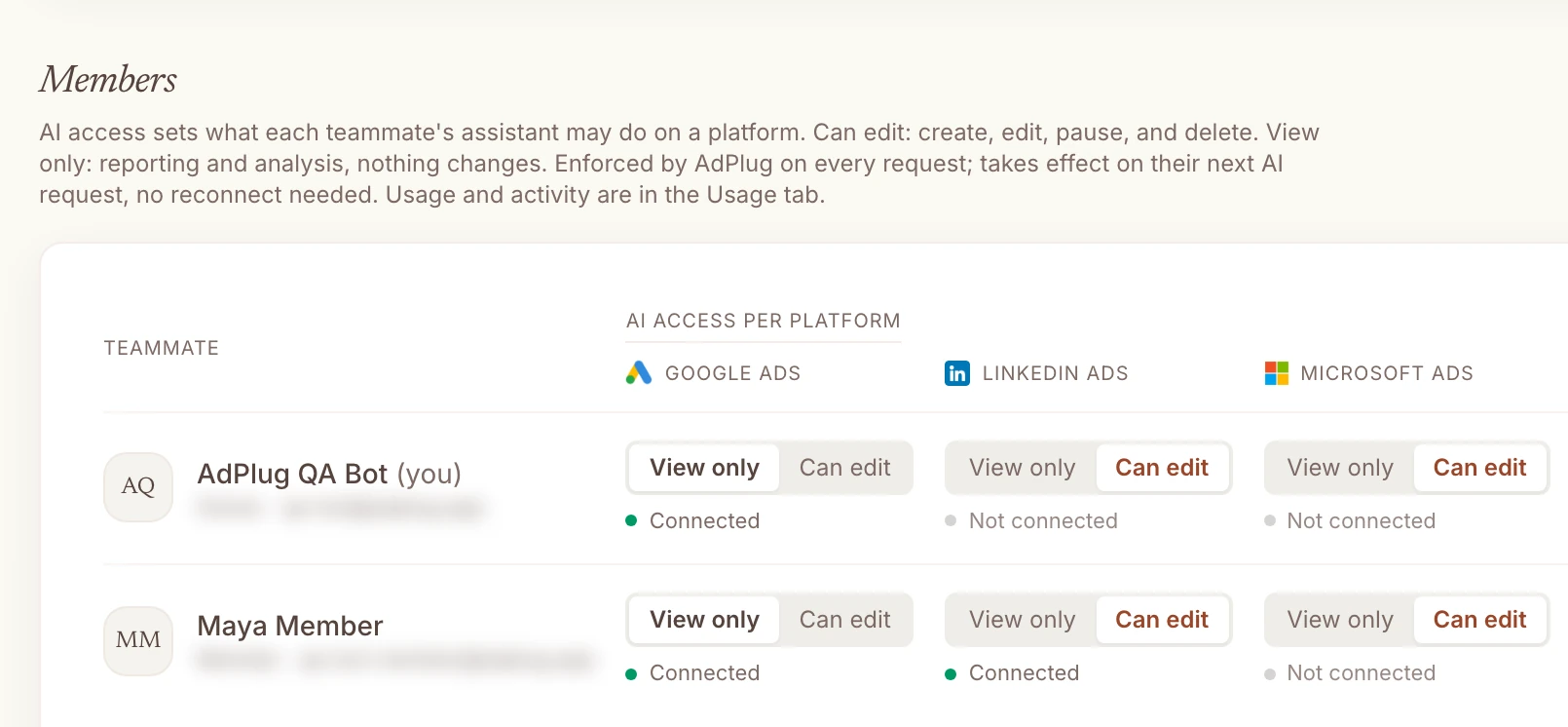
- You want each teammate on View only or Can edit, platform by platform
- You report on pipeline: HubSpot is part of Pro, one connector for every client portal
- You'd rather trust a tool built by a PPC specialist who uses it every day, on his own accounts and his agency's clients
 Pick Composio if
- You're a developer building an agent or a product where your users connect their own accounts
- You want one connector for hundreds of apps (Slack, Gmail, Notion, Shopify), and ads are a small part of it
- You're happy to write your own approval rules for the actions that matter
- You make a lot of tool calls and want the cheapest price per call
What Composio is: a developer platform with a no-code front door
Composio sells two things. Its docs put the split like this: "Default to Composio Platform for application codebases where users or tenants connect their accounts. Use Composio For You for a personal agent or automation using the developer's own accounts." The first is for building software. The second is one MCP address you add to Claude, ChatGPT, Cursor or Grok Bot, and every app you connect sits behind it.
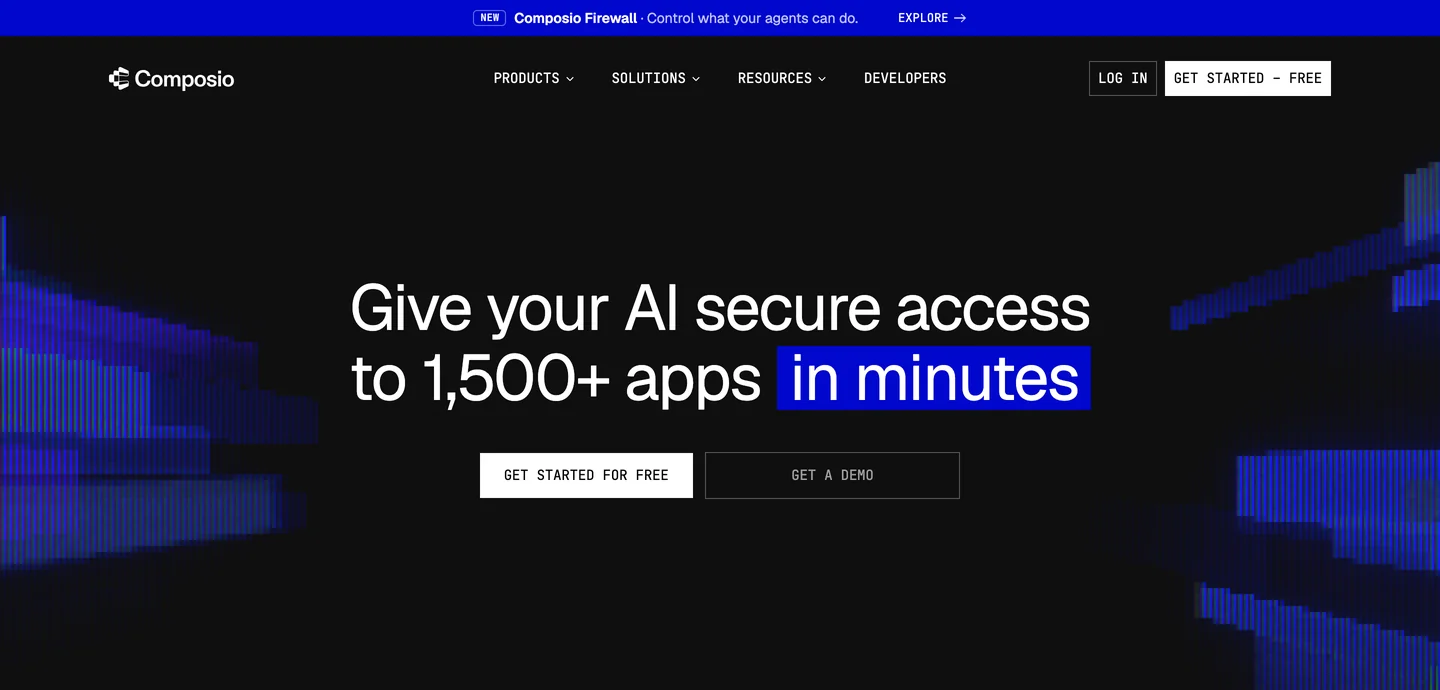
Ads are a small part of that. On its marketing page, Google Ads appears as one of "1,500+ more" tools, and the no-code product is young: it replaced Rube, Composio's earlier MCP for everyday users. In the words of Rube's own page: "Rube was discontinued on May 16, 2026." To Composio's credit, "All payments have been refunded."
AdPlug is the opposite shape. It connects the platforms a PPC specialist runs (Google Ads, Meta Ads, LinkedIn Ads, Microsoft Ads, Reddit Ads and TikTok Ads), plus HubSpot and Google Search Console, and nothing else. Every tool was written for PPC work, by someone who does it every day.
How far its ad toolkits reach, platform by platform
Credit first: Composio's Google Ads toolkit is deep. Its docs list 76 tools that create, change and remove campaigns, budgets, bid strategies, negatives, shared lists, ads, assets and Performance Max asset groups, plus GAQL reports, keyword ideas and offline conversion uploads. (Its own marketing page still says 36, so the docs are ahead.) The other ad platforms are a different story:
| Platform | Composio | Whose app it needs | AdPlug |
|---|---|---|---|
| Google Ads | 76 tools: campaigns, budgets, bidding, negatives, ads, assets, Performance Max, GAQL | Composio's, or your own developer token for production | 174 kinds of change across 17 tools, each one previewed |
| LinkedIn Ads | 28 tools that read campaigns and handle lead forms. No tool creates, edits or pauses a campaign | Your own LinkedIn developer app | Campaign groups, campaigns, creatives and audiences, 25 kinds of change |
| Microsoft Ads | 14 tools: Search campaigns and ad groups only. No keywords, ads or negatives | Your own Microsoft app | About 90 kinds of change, from keywords and negatives to bulk uploads |
| Meta Ads | 78 tools: campaigns, ad sets, ads and creatives | Your own Meta app | Campaigns, ad sets, ads and creatives, everything created paused |
Two things in that table matter more than the counts. First, LinkedIn Ads. Composio describes the toolkit as "LinkedIn Marketing and Advertising API for managing ad campaigns, analytics, and organization social content", but none of its 28 tools can create, edit or pause a campaign. Second, "your own app" on LinkedIn, Microsoft and Meta means registering a developer app with each platform and getting it approved for advertising access. For a PPC specialist that's weeks of forms before the first question. AdPlug's own LinkedIn and Microsoft apps already have that access; LinkedIn granted AdPlug its Standard tier in June 2026.
Google Ads is easier on Composio, because it lends you its own developer token. Its knowledge base still advises that for production "customers should use their own Google Ads developer token where possible.", and a Composio engineer confirmed on GitHub that the no-code product can't take yours: "Unfortunately Composio For You does not support customer-provided Google Ads credentials today". With AdPlug you sign in with Google and that's it.
Here's the kind of LinkedIn question I ask every week, which AdPlug answers and can then act on:

 Claude
Cost per demo request by job seniority on LinkedIn, last 90 days. Where are we paying for people who can't buy?
linkedin_ads_performanceAdPlug - LinkedIn AdsLast 90 days · Northwind Labs · by job seniority
| Seniority | Spend | Clicks | Demo requests | Cost per demo request |
|---|---|---|---|---|
| Entry | $3,840 | 412 | 9 | $427 |
| Training | $610 | 74 | 0 | None |
| Senior | $5,120 | 498 | 21 | $244 |
| Manager | $6,310 | 541 | 38 | $166 |
| Director | $4,270 | 322 | 31 | $138 |
| VP | $1,980 | 141 | 14 | $141 |
| CXO | $1,150 | 77 | 6 | $192 |
Entry level took $3,840 for 9 demo requests, $427 each, about three times what a director costs you, and Training spent $610 for none. Before excluding anyone, check whether those 9 became pipeline: if they did, the price is fine. If they didn't, I'd exclude Entry and Training seniority from the two prospecting campaigns. LinkedIn's demographic figures are approximate and hide small groups, so read this as direction, not decimals. Want me to check the 9 in HubSpot, then preview the exclusion?
Which LinkedIn campaigns and ads are wearing out their audience: frequency up, click-through rate and leads down? Suggest what to test instead.
What stands between the AI and your account
If you manage other people's money, read this bit. Composio's own approvals documentation opens with the default: "By default, your agent can run any tool in a session as soon as it decides to."
There are checks you can add, and here's what each one does today:
- Approvals. Shipped on 16 Oct 2026, and the docs say "Approvals are experimental." You set them up yourself, by naming tools or by tags "which Composio assigns on a best-effort basis.", and once someone approves a tool, "their approval lasts for the rest of the session." Whether you even see the question depends on your AI client.
- Firewall. The new feature on the homepage banner. Today it screens what tools send back: "Composio Firewall reads every tool result before your agent does and blocks results carrying instructions hidden in emails, pages and files". That's a good idea, but the part that would check an outgoing change ("Each call's action, account, destination, and payload are checked against your policies and task context.") is marked Coming soon. On Pro it costs extra, per million tokens screened.
- Your AI's own prompt. Composio's Google Ads guide for ChatGPT says to "keep manual confirmation enabled". That's sound advice, and it's the only check most people will have.
- Google's test mode. Many Google Ads tools accept Google's validate-only flag, a dry run, but the AI has to choose to use it. The toolkit's own warning on campaign removals: "deleted campaigns cannot be recovered".
How AdPlug holds a change
AdPlug's check isn't something you set up. On Google Ads, every change takes two tool calls, and the server refuses the second without the first. The preview tool checks the change and stores it under an ID, exactly as it will run; the execute tool runs that stored change, once, within 15 minutes, and nothing else. Try it on a setting most PPC specialists switch off on day one:
 Claude
Is Google auto-applying recommendations in this account? Switch off any that add keywords or change bidding, and show me the preview first.
google_ads_preview_mutationAdPlug - Google AdsPreview · Northwind Labs · 3 changes
| Auto-apply | Now | After |
|---|---|---|
| Add new keywords | On | Off |
| Use broad match keywords | On | Off |
| Bid with target CPA | On | Off |
Auto-apply is on for these three; every other keyword and bidding type is already off. Google's change history shows 23 keywords it added in the last 30 days, 17 of them broad match: $1,860 spent for 2 conversions, $930 each against the account's $118. I'd switch all three off, then look at those 23 keywords together. Nothing changes until you say so.
Switch them off.
google_ads_execute_mutationAdPlug - Google AdsDone. Google won't auto-apply those three any more, and the account's auto-apply settings show them as off. Want me to go through the 23 keywords next?
To be straight with you, AdPlug doesn't check that a human said yes. If you set your AI's change tools to Always allow, AdPlug can't stop that either. What it does force is the stored preview, on every Google Ads, HubSpot and Search Console change, on every plan, with nothing to configure. On Meta, LinkedIn and Microsoft Ads there's a preview tool too, but the server doesn't force it yet, so ask for it in your prompt. And whichever connector you use, keep your AI's change tools on Needs approval.
Audit this Google Ads account I've just inherited: structure, conversion tracking, settings, wasted spend and quick wins. Show me the preview before you fix anything.
Who holds your tokens and your campaign data
Every hosted connector holds your platform tokens, AdPlug included (ours are encrypted in the database). So the question isn't whether, it's what else gets kept. Composio's marketing page says "Composio never sees your contacts, campaigns, or anything else." Its own security docs say otherwise: "In the default Composio Cloud deployment, Composio has custody of those credentials.", and "Tool arguments and results are stored in execution logs by default." Its terms add that "Payload Data that Composio stores is retained for up to one year and then automatically deleted." Not keeping them is a paid add-on.
It also had a bad spring. In its own words: "In May 2026, an attacker accessed internal Composio systems and compromised customer credentials." Its write-up says the leaked connections were about 0.3% of the total, and that it rebuilt how credentials are stored afterwards, with SOC 2 Type II and ISO 27001 behind it. It also makes a point I'd put on every connector's homepage: "Credential isolation does not prevent an agent from misusing permissions it legitimately has." That's why the check before a change matters.
Composio pricing
Composio is cheaper than AdPlug for raw volume, and it's worth saying plainly. Its free plan includes "100,000 tool calls, 50,000 triggers, and 3 team members included free each month.", and Pro is $29 a month as a usage credit. Checked on its pricing page, in US dollars, on 28 Oct 2026:
| Plan | Price | What you get |
|---|---|---|
| Composio Hobby | $0 | 100,000 tool calls a month, of which 20,000 on Composio's own app logins; hard-capped, no card |
| Composio Pro | $29/mo, as a usage credit | Then $0.0003 a tool call, or $0.0005 on Composio's own app logins; Firewall and zero data retention as paid add-ons |
| Composio Enterprise | Quote | Self-hosting, Firewall included, custom terms |
| AdPlug Free | $0 | View only, one platform, unlimited ad accounts, 500 requests in the first 5 days, then 50 a month |
| AdPlug Pro | $29/mo | Every platform and HubSpot, unlimited ad accounts, 5,000 requests and 200 edits a month, 7-day trial |
| AdPlug Max | $89/mo | Unlimited ad accounts, requests and edits, three team members, five Google logins |
One catch for no-code users: the free allowance on Composio's own app logins, which is how Google Ads connects without your own developer token, is 20,000 calls, not 100,000. Its pricing page calls those logins "Easy to get started, not recommended for scaling". Even so, 20,000 calls a month is a lot of questions, and the free plan "never produces a surprise bill."
The prices have moved around. In July 2024 Starter was $39 a month for 100,000 executions. By May 2025 it was $29 for 100,000, with a $229 tier. In March 2026, $29 bought 200,000 calls. The current plans started on 15 August 2026, and a harsher plan some sites still quote was announced and never shipped. Today's pricing page and terms don't state a refund or cancellation policy; in May 2025 the answer was "We do not offer refunds for monthly subscriptions."
So what does AdPlug's $29 buy that the cheaper calls don't? Everything in this page's first sections: LinkedIn, Microsoft and Meta changes without your own developer apps, a preview you don't have to build, and the access controls below. If those don't matter to you, Composio is the better deal.
My rating: Composio vs AdPlug
Six things a PPC specialist would weigh, scored out of 10. It's my opinion, built on the facts on this page, and one of these is my own product, so read it with that in mind. Composio wins two rows clearly.
| Compared | AdPlug | Composio |
|---|---|---|
| Scored out of 10 | ||
| Set-up for someone who doesn't code | AdPlug9/10Sign in to each platform, paste one address into your AI, and every account behind the login comes with it. | Composio6/10Google Ads is no-code, but LinkedIn, Microsoft and Meta need developer apps of your own. |
| Google Ads depth | AdPlug9/10174 kinds of change, each checked and previewed before it can run. | Composio8/1076 tools that can create, change and remove almost anything. The AI has to get Google's request shape right. |
| LinkedIn, Microsoft and Meta Ads | AdPlug8/10Changes on all three, from campaigns to creatives. The previews there aren't forced yet. | Composio3/10LinkedIn campaigns are read only, Microsoft stops at Search campaigns, and each needs your own app. |
| The check before a change | AdPlug8/10A stored preview on every Google Ads, HubSpot and Search Console change, with nothing to set up. | Composio3/10None by default. Approvals are opt-in and experimental, and Firewall doesn't check outgoing changes yet. |
| Apps beyond ads | AdPlug3/10Ad platforms, HubSpot and Search Console. For Slack or Gmail you add another connector. | Composio10/10Over 1,500 apps behind one address. Nothing else on this site comes close. |
| Price for the calls you make | AdPlug7/10$29 for every platform and HubSpot with 5,000 requests and 200 edits; the free plan is a taster. | Composio9/1020,000 free calls a month on its own logins, 100,000 on yours, then fractions of a cent. |
| My opinion, scored from the facts on this page, which come from each company's own pages, docs and GitHub, and Composio's public reviews. Checked 28 Oct 2026. | ||
If Google Ads is your only platform and you're comfortable setting up your own approvals, Composio is closer than this table suggests. If you run LinkedIn or Microsoft for clients, or you want the check built in, the middle rows decide it.
AdPlug vs Composio, side by side
Checked on each company's own pages on 28 Oct 2026. Edge marks the side that wins a row, only where that's a plain fact rather than my opinion.
| Compared | AdPlug | Composio |
|---|---|---|
| What it's for | ||
| Built for | AdPlugPPC specialists, consultants and agencies working in Claude, ChatGPT, Grok Bot, Hermes Agent or their own AI agents. | ComposioDevelopers building agents and products, plus a no-code version for “a personal agent or automation using the developer's own accounts”. |
| Main job | AdPlugReading and changing ad accounts from the AI you already use. | ComposioConnecting AI agents to over 1,500 apps, with sign-in, tool discovery and execution handled. |
| Ad platforms | AdPlugGoogle Ads, Meta Ads, LinkedIn Ads, Microsoft Ads, Reddit Ads and TikTok Ads, plus Google Search Console and HubSpot on connectors of their own. | ComposioToolkits for Google Ads, LinkedIn Ads, Microsoft Advertising, Meta Ads, Reddit Ads, TikTok Ads and more, of very different depth. |
| AI clients | AdPlugClaude, ChatGPT, Claude Code, Codex, Grok Bot, Hermes Agent and any AI agent that accepts a remote MCP address. | ComposioClaude, ChatGPT, Cursor, Grok Bot, Hermes, OpenClaw or your own agent, through its MCP address or SDKs. |
| Sources: Composio's homepage, llms.txt, docs and toolkit pages. Checked 28 Oct 2026. | ||
| How changes happen | ||
| Default | AdPlugGoogle Ads, HubSpot and Search Console: the server won't run a change without a stored preview of that exact change.Edge | Composio“your agent can run any tool in a session as soon as it decides to.” |
| Approvals | AdPlugBuilt in, nothing to set up. Meta, LinkedIn and Microsoft previews aren't forced yet.Edge | ComposioOpt-in and experimental since 16 Oct 2026, set per tool or by tags, lasting the rest of the session once given. |
| Changing LinkedIn campaigns | AdPlugYes: campaign groups, campaigns, creatives and audiences.Edge | ComposioNo. Its LinkedIn Ads tools read campaigns and handle lead forms. |
| Developer apps you need | AdPlugNone. Sign in through each platform's own screen.Edge | ComposioNone for Google Ads. Your own app for LinkedIn Ads, Meta Ads and Microsoft Advertising. |
| Sources: Composio's approvals docs, changelog, managed-auth list and toolkit pages. Checked 28 Oct 2026. | ||
| Data and price | ||
| Payload logs | AdPlugEvery call logged with the user, action, outcome and time. | ComposioTool arguments and results kept by default, up to a year. Zero retention is a paid add-on. |
| Starts at | AdPlugFree to read one platform, then Pro at $29 a month | ComposioFree for 100,000 tool calls a month (20,000 on Composio's own logins)Edge |
| Refunds | AdPlugCancel anytime, 14-day refund window | ComposioNo policy published today |
| Sources: Composio's pricing page, terms and security docs, and AdPlug's pricing. Checked 28 Oct 2026. | ||
| Teams and agencies | ||
| Access per person | AdPlugView only or Can edit for each teammate on each platform, enforced on every request. | ComposioLimits on which actions the AI can take in each app you connect. |
| CRM and pipeline | AdPlugHubSpot from Pro, read and changed with a preview: three portals on Pro, ten on Max and Agency. | ComposioA HubSpot toolkit with 295 tools, on its own login. |
| Sources: Composio's homepage and toolkit pages. Checked 28 Oct 2026. | ||
Composio reviews, and what its GitHub issues say
Composio has few reviews, and most are from developers in 2024 and 2025. Read on 28 Oct 2026:
| Where | Rating | Reviews |
|---|---|---|
| G2 | 4.8 | 8, seven of them from late 2024 to early 2025 |
| Capterra | 5.0 | 15, all from 2025, some sharing text with G2 reviews under other names |
| Trustpilot | 2.9 | 2, both one star, from July and August 2026 |
| Product Hunt | 5.0 | 13, on its AgentAuth launch |
The newest G2 review makes a point that applies to every connector, AdPlug included: "users are still bound by the rate limits and API restrictions of those individual platforms." On Trustpilot, one reviewer in July 2026 wrote "impossible to connect to it´s MCP from any agent.". I found marketers on LinkedIn using it to pull Google Ads and Meta reports into Claude, but no hands-on account of it making ad changes.
The better record is its public GitHub repo, where users file bugs. Four issues stood out for anyone letting an AI touch an ad account:
- Every Google Ads tool failed from 29 March to 10 May 2026 on Composio's default login. Its reply: "Our credentials have expired, so we need to change the default creds."
- A proxy silently dropped false, zero and empty fields from requests, one user found: "there is no error, no warning, no log." The issue was closed as stale in July 2026. In an ad account, a zero is often the whole point.
- Retries can repeat a write, still open since June 2026: "The action runs twice."
- The Google Ads tool search used by AI sessions missed tools that are in the catalogue. Composio's reply on that one: "We're treating this as a search/catalog parity gap on the `googleads` toolkit and are working on it."
Where Composio is the better pick
Credit where it's due. These are real reasons to pick it.
- Apps beyond ads. Over 1,500 of them behind one address. If your agent needs Slack, Gmail, Notion, Shopify and Google Ads in the same workflow, nothing else on this site does that.
- A real developer platform. SDKs, sign-in handled for your users' own accounts, triggers when something happens in an app, and self-hosting on Enterprise. If you're building a product, that's months of plumbing you don't write.
- A deep Google Ads toolkit. 76 tools, from campaign builds to offline conversion uploads and experiments, for a developer who knows exactly which calls they want.
- Firewall's idea. Screening what tools send back for hidden instructions is a sensible guard for any agent that reads emails, files and web pages.
If PPC is the job, here's what you'd be building anyway
A developer could build most of what AdPlug does on top of Composio: register the LinkedIn, Microsoft and Meta apps, write the approval rules, add team access, and keep it all running as each platform changes its API. That's what AdPlug already is. Three pieces matter most to agencies.
Every client account behind one sign-in
AdPlug works on unlimited ad accounts on every plan, the free one included. One Google sign-in covers every account under your MCC, and from Pro you can add Google logins for clients under other MCCs: three on Pro, five on Max and Agency.
Access by teammate and by platform
Each teammate gets View only or Can edit on each platform. The junior reads every client and changes none, the senior edits Google Ads and only reads LinkedIn, and AdPlug checks it on every request.
HubSpot next to the ad data
AdPlug includes HubSpot from Pro, one connector for every client portal (three on Pro, ten on Max and Agency), so the same chat follows a campaign from the click to the deal, then moves budget towards what makes pipeline, with a preview before anything changes.
Composio alternatives, for developers and for PPC teams
If you're a developer
The platforms other comparison pages name are Nango, Arcade, Merge Agent Handler, Paragon and Pipedream Connect. Every one of those pages was written by one of those vendors, so treat them the way you'd treat this one, and try two on your own use case.
If you run PPC
These are the tools I've compared for PPC work, and my Google Ads MCP server comparison goes wider.
AdPlugMy pick
For PPC specialists, consultants and agencies who want Claude, ChatGPT or their own agents working in every account they run: changes on every platform without developer apps of your own, a server-checked preview before every Google Ads change, access per teammate and platform, and HubSpot next to the ad data. Free to read, then Pro at $29 a month.
Pick it if you want the AI doing the account work and you making the calls. See how it works on Google Ads.
 Optmyzr
A PPC suite for agencies with audits, rules and reports, and an MCP that turns AI changes into change requests a person applies. Priced by ad spend, from $209 a month billed yearly. I've compared it in AdPlug vs Optmyzr.
Pick it if you want a full PPC toolkit in its own app.
 Supermetrics
A reporting bridge into Looker Studio, Sheets, Power BI, Claude and ChatGPT, priced per destination, which can now change campaigns in early access. I've compared it in AdPlug vs Supermetrics.
Pick it if your clients' reports live in Looker Studio.
 Windsor.ai
A data pipeline from over 350 sources into BI tools, warehouses and AI chats, from $23 a month, with basic campaign changes since May 2026. I've compared it in AdPlug vs Windsor.ai.
Pick it if you need ad data in a warehouse.
 Pipeboard
A hosted MCP server that started on Meta, with a fee for every ad account: three on Pro at $29.90 a month, then $10 each. I've compared it in AdPlug vs Pipeboard.
Pick it if Snapchat or Pinterest is part of your mix and you run a handful of accounts.
 Markifact
A no-code marketing automation suite with workflows, agents and an MCP across 14 ad platforms, charged in credits from $79 a month. I've compared it in AdPlug vs Markifact.
Pick it if you'd rather build automations on a visual canvas than in a chat.
 AdKit
AdKit
An ads toolbox for founders, with a competitor ad library, AI-made static ads and an MCP server, from $49 a month for one ad account per platform. I've compared it in AdPlug vs AdKit.
Pick it if competitor research and creative matter more to you than account depth.
 Adspirer
A hosted connector for six ad platforms including Amazon and ChatGPT Ads, charged by the tool call. I've compared it in AdPlug vs Adspirer.
Pick it if Amazon Ads is part of your mix.
 Ryze AI
An autonomous agent that runs your ads, from $89 a month. I've compared it in AdPlug vs Ryze AI.
Pick it if you want to hand the account over rather than approve each change.
Switching from Composio to AdPlug, or using both
If you connected your ad accounts through Composio's no-code product, the move takes about ten minutes:
- Remove the ad platform connections in Composio, then revoke its access in your Google account's third-party connections and in each other platform's list of connected apps.
- Sign up for AdPlug and connect your ad platforms through each one's own sign-in screen. Every account behind that login comes with it, manager accounts included.
- Add AdPlug's address to your AI as a custom connector. The guides walk through it with screenshots for Claude, Grok Bot and ChatGPT dots.
- Ask for last month's spend by campaign and check it against the platform. Once the numbers match, move on to the real work.
Using both is a good set-up too. Keep Composio for Slack, Gmail and the rest, and point your agent at AdPlug for the ad accounts: it's a remote MCP address like any other, so a custom agent can call it the same way Claude does. Just switch off Composio's ad toolkits, so one place makes the ad changes.
P.S. Composio's docs say "By default, your agent can run any tool in a session as soon as it decides to." For an agent that sorts emails, fine. For a client's Google Ads account at four on a Friday afternoon, I'd like a word first.