AdPlug vs Supermetrics: a Supermetrics alternative for PPC specialists and agencies
Quick answer: Supermetrics is a reporting bridge first: it pipes ad data into Looker Studio, Sheets, Excel, Power BI, Claude and ChatGPT, priced per destination with a cap on sources and accounts. Since April 2026 it can also create, pause and edit campaigns on seven ad platforms, in what its own docs call early access, with approval optional. If you run PPC for a living, AdPlug fits the account work better: it connects Google Ads, Meta Ads, LinkedIn Ads, Microsoft Ads, Reddit Ads and TikTok Ads to Claude, ChatGPT or any AI agent, holds every Google Ads change as a preview on its server, sets access per teammate and platform, and works on unlimited accounts from $29 a month. AdPlug (adplug.app) is mine, so weigh that.
Twelve years running B2B Google Ads and LinkedIn Ads, with more than $100M of spend through my hands, and before AI I was a heavy Supermetrics user: Google Sheets exports for client reports, and Looker Studio reports built on top. Now it says its Claude connector can create and pause campaigns, which is the other half of my job. So I checked that claim against its own changelog, then read its pricing, terms and docs, and its reviews on G2, Capterra and Trustpilot. Fair warning: AdPlug is my product, and I use it every day on my own accounts and my agency's clients.

AdPlug vs Supermetrics: who should pick which
Supermetrics built its name as a reporting bridge. Its own summary still reads that way: a platform that "connects marketing, ecommerce, and sales data sources to business intelligence tools, data warehouses, cloud storage, and spreadsheets." Its Google Ads connector page sells "The easiest way to move all your Google Ads data to your reporting tools."
Its homepage has moved on. It now says "Ask your marketing data what is working, then create and manage campaigns from the same conversation", and its Claude page promises you can "Create, start, stop, or modify existing campaigns with a single prompt." That's my side of the job, so I checked it.
Supermetrics says its Claude product is for "marketing teams, performance marketers, analysts, and data teams". AdPlug is narrower on purpose: PPC specialists, consultants and agencies who run accounts every day and want the AI to do the legwork while they make the calls.
 Pick AdPlug if
- You run PPC for a living, in-house, freelance or at an agency, and want the AI working in the accounts, not just reporting on them
- You look after lots of accounts: every AdPlug plan works on unlimited ad accounts, where Supermetrics' Starter stops at three per platform
- You want every Google Ads change held as a preview on the server, paused campaigns included, with no mode that skips it
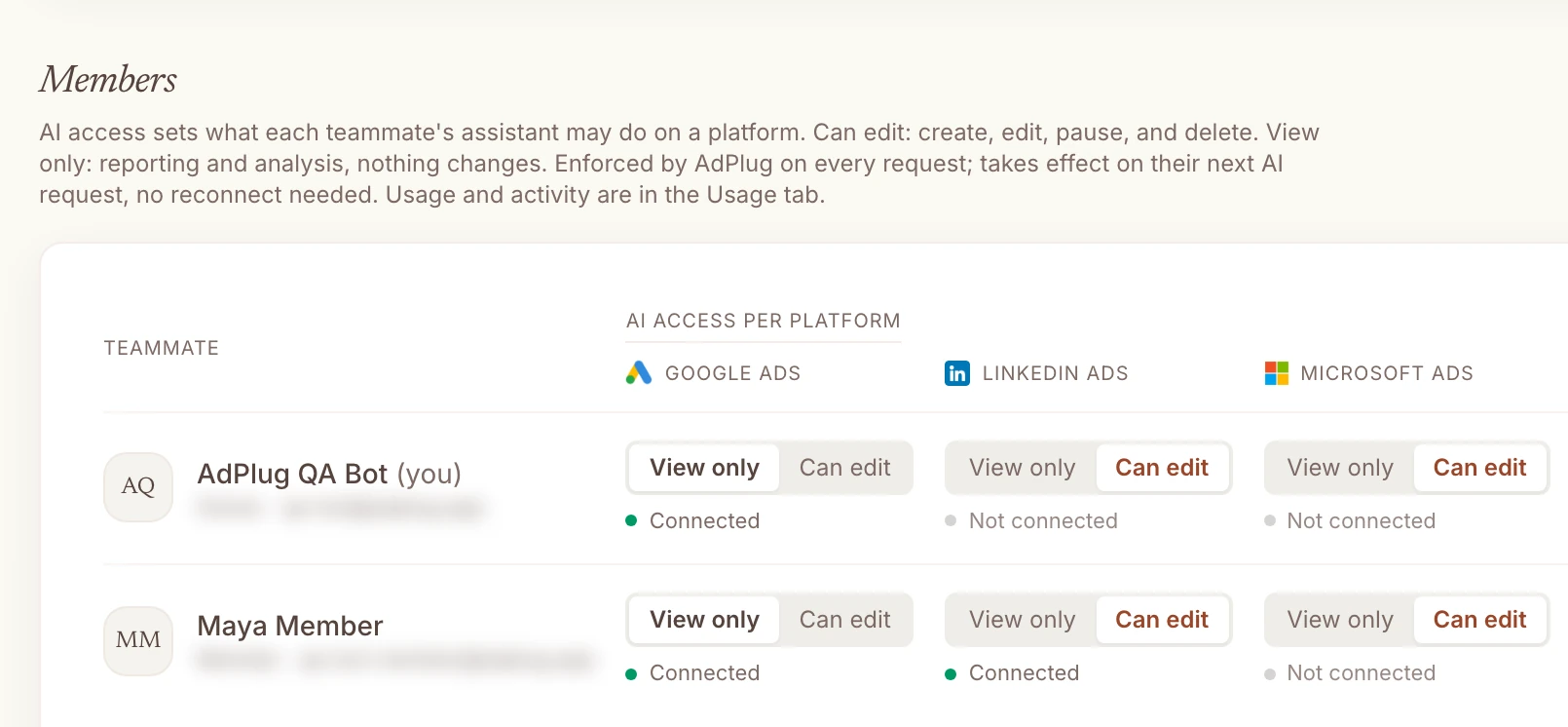
- You want each teammate on View only or Can edit for each platform, without a support ticket to change it
- You'd rather pay $29 a month for every platform than per destination, per source and per account
- You'd rather trust a tool built by a PPC specialist who uses it every day, on his own accounts and his agency's clients
 Pick Supermetrics if
- Your clients already open Looker Studio, Sheets, Excel or Power BI reports built on Supermetrics
- You want a person to click Approve on a page outside the chat before a live campaign changes
- ChatGPT Ads or Snapchat is part of your mix
- Your company works in Microsoft Copilot or Gemini Enterprise
- You don't mind paying $55 a month for three accounts per platform when $29 covers all of them (it's your money)
A confession before we go on: before AI, I was a heavy Supermetrics user. It fed the Google Sheets exports behind my client reports and the Looker Studio reports I built on top, and at the time it was a lifesaver, because there wasn't anything better. Times have changed. Claude or ChatGPT can now read the account and build the dashboard itself, and with AdPlug you can do that for free: the free plan reads every account on one platform, with no card.
Can Supermetrics create and pause campaigns? I checked its changelog
Short answer: yes. Its MCP server has a campaign tool, manage_campaign, that can "Create new ad campaigns or update existing ones across Google, Meta, Microsoft, TikTok, LinkedIn, ChatGPT and Snapchat Ads", from budgets and targeting to ad groups and ads. Here's how it got there, from its own MCP changelog:
| Date | What changed |
|---|---|
| 2 Apr 2026 | “New campaign management tools in beta” for Google Ads, Meta Ads, Microsoft Ads and TikTok Ads, by request to support |
| 14 Apr 2026 | “Campaign management tools beta is now opened to everyone”, and LinkedIn Ads added |
| 15 Apr 2026 | “Supermetrics MCP server is out of beta.” The campaign tool stayed in beta |
| 18 May 2026 | ChatGPT Ads campaigns |
| 29 Jun 2026 | Approval for changes that go live, through a link |
| 8 Sep 2026 | A fix for Meta, where “an ad created without an explicit status can start serving immediately” |
| 10 Sep 2026 | Snapchat Ads |
So the claim is true. What the marketing pages don't say is what the docs do. The MCP docs list manage_campaign under "Tools in beta testing:", and the help centre says "This feature is currently in early access and is free to use with your existing Supermetrics subscription." Its terms say what early access means for you: "Customer assumes all risks and all costs associated with the use of the Early Access Service."
Its own pages don't agree on the platforms, either. The founder's July blog answers the LinkedIn question with "No, LinkedIn is supported for analytics only.", three months after the changelog added LinkedIn. Its connect pages name five platforms, the MCP docs seven. And the same connect pages call it "The only Claude integration with write access." It isn't. AdPlug is one of several.
One release note made me sit up. That Meta fix in September came with this advice: "if you relied on the documented default rather than setting the status, check whether those ads are live." That's the kind of default you only find out about from the bill.
What happens between "pause it" and the pause
Supermetrics' homepage demo shows the whole flow in a few lines. Someone asks which campaigns wasted budget, the AI names one, the user types "Pause it.", and the reply is "Done. The campaign is now paused."
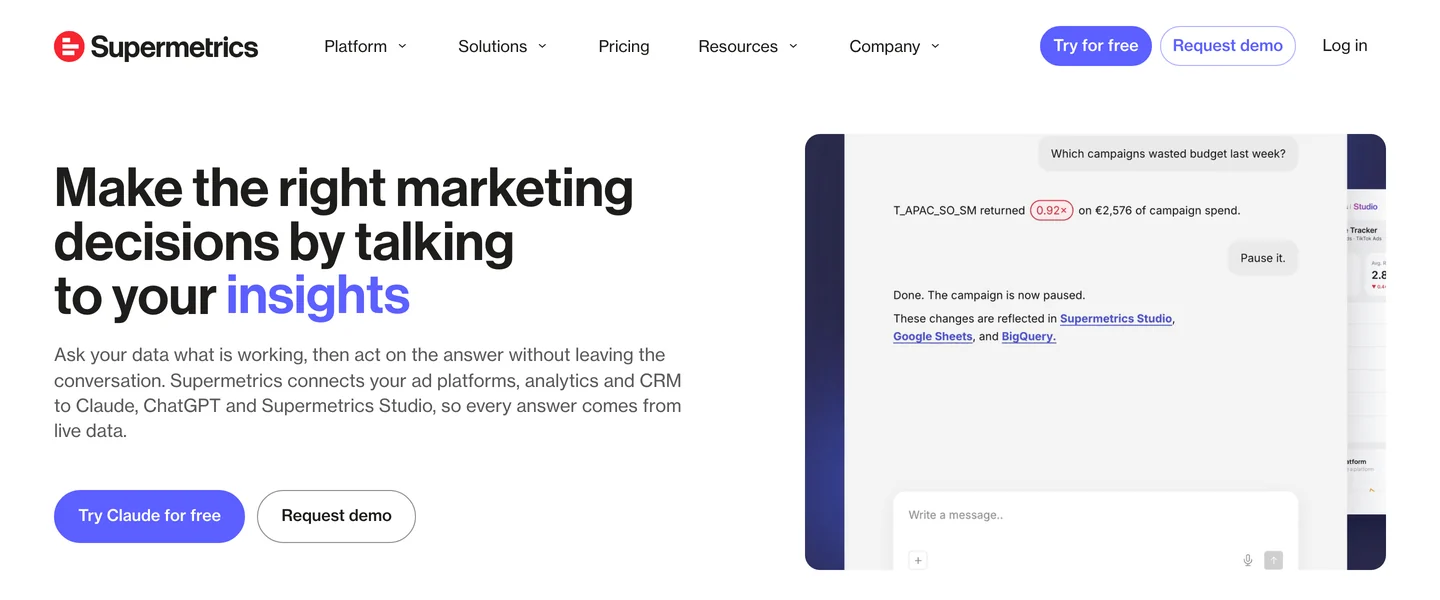
How Supermetrics approves a change
There's more to it than the demo shows, and some of it is good. Writes are off until you switch them on for each ad account, and only the person who connected an account can do that. New campaigns are always created paused. Every change is logged against the person who made it, and most edits can be put back.
Then, per ad account, you pick one of four approval modes. In Supermetrics' own words: "No human approval applies changes immediately; Going live requires approval before enabling or unpausing a campaign; Budget + going live also requires approval for budget changes on live campaigns; All live changes requires approval for every change to a live campaign, including enabling it."
When a mode applies, you get an approval link. It opens a summary of the change and applies it "only after you click Approve". That's a real hold, outside the chat, and I like it. Three things to know before you rely on it:
- One mode skips it. "No human approval" does what it says, and its marketing page still promises it "asks you to confirm before anything is applied".
- Even the strictest mode only covers live campaigns. "Approve any change to a live campaign" leaves edits to paused ones, the campaigns you're building, to the chat.
- The rules you write in a prompt are only advice. Its blog says so: "These are instructions for the agent's judgment, not enforced limits on what it can change." Its docs add "You are responsible for your interactions with AI and any actions taken by it".
And if you want the whole thing off for your team, it isn't a switch: you contact support "to have the feature disabled on your account".
How AdPlug previews a change
AdPlug has no modes. On Google Ads every change, live or paused, takes two tool calls, and the server won't run the second without the first. The preview tool checks the change and stores it under an ID, exactly as it will run. The execute tool runs that stored change and nothing else, once, within 15 minutes. The AI shows you the preview in the chat, and nothing happens until you say yes.

 Claude
Our brand campaign is losing impression share to budget while Performance Max underspends. Check whether PMax is buying our brand searches, suggest a budget change and show me the preview first.
google_ads_preview_mutationAdPlug - Google AdsPreview · Acme Software · 2 changes
| Change | Campaign | Now | After |
|---|---|---|---|
| Daily budget | Search · Brand | $120.00 | $160.00 |
| Brand exclusion | Performance Max · All products | None | Acme Software |
Search · Brand lost 18% of its impressions to budget in the last 30 days, at $9.40 a conversion. Performance Max picked up 610 clicks from searches for your own brand in the same period, so it's been taking clicks Brand should get. I'd raise Brand by $40 a day and exclude your brand from Performance Max. Nothing changes until you say so.
Go ahead.
google_ads_execute_mutationAdPlug - Google AdsDone. Brand's budget is $160 a day, Performance Max no longer bids on your brand, and Google Ads' change history shows both.
To be straight with you: Supermetrics' approval link is a stronger hold for a live campaign than a yes in the chat, because a person has to open a page and click. AdPlug's preview covers every Google Ads change on every plan, with no mode that skips it, but the yes still lives in your chat. HubSpot and Search Console changes work the same way. On Meta, LinkedIn and Microsoft Ads there's a preview tool too, but the server doesn't force it yet, so ask for it in your prompt.
Whichever you use, keep your AI's change tools on Needs approval. And if you're on Supermetrics, don't pick "No human approval" for a client's account.
Which campaigns are limited by budget while hitting their CPA or ROAS target, and which underspend? Suggest budget moves and show me the preview before anything changes.
Supermetrics pricing
Supermetrics prices like a bridge. In its own words: "Supermetrics charges per destination and includes a certain number of data sources, accounts, and users in each package." A destination is where the data goes: Claude, ChatGPT, Copilot, Looker Studio, Sheets, Excel or Power BI. Each paid plan includes one. Checked on its pricing page, in US dollars, on 27 Oct 2026.
| Plan | Price | What you get |
|---|---|---|
| Supermetrics Starter | $55/mo, or $44/mo billed yearly | 1 destination, 3 data sources, 3 accounts per source, 1 user, 14-day trial |
| Supermetrics Growth | $222/mo, or $177/mo billed yearly | 1 destination, 6 data sources, 7 accounts per source, 2 users |
| Supermetrics Enterprise | Quote | Data warehouses such as BigQuery, Data API access, custom terms |
| AdPlug Free | $0 | View only, one platform, unlimited ad accounts, 500 requests in the first 5 days, then 50 a month |
| AdPlug Pro | $29/mo | Every platform and HubSpot, unlimited ad accounts, 5,000 requests and 200 edits a month, 7-day trial |
| AdPlug Max | $89/mo | Unlimited ad accounts, requests and edits, three team members, five Google logins |
| AdPlug Agency | Custom, per seat | Everything in Max for the whole team, plus a signed DPA |
The meter is what catches agencies. Here's what the same job costs on each, at list prices:
| What you need | Supermetrics | AdPlug |
|---|---|---|
| Google Ads, Meta and LinkedIn, up to 3 accounts each, in Claude | $55 on Starter ($44 billed yearly) | $29 on Pro |
| The same, plus client dashboards in Looker Studio | $117: Starter plus a second destination at $62 | $29: Claude or ChatGPT builds the dashboard |
| Up to 6 platforms, 7 accounts each, 2 people | $222 on Growth ($177 billed yearly) | $29 on Pro, or $89 on Max with three team members |
| Up to 15 accounts per platform | Growth plus $14 a month for each extra account | Same as above |
| More than 15 accounts per platform | A quote: “Pricing is customized based on the scale of your agency.” | Same as above |
Go over and the reporting can stop: "If you exceed your package limits, Supermetrics will notify you and may pause your data transfers until you upgrade your package or remove the extra usage." In Claude it reads "You've reached your plan's limit of 3 Facebook Ads accounts". AdPlug doesn't count accounts at all.
Prices have climbed. In May 2023 Looker Studio started at $39 a month and Sheets at $69, and the pricing page said "We don't use any kind of credit or point system". In January 2025 each destination started at $29. In April 2026 Starter was $47 a month, or $37 yearly, and every plan listed "Data API & MCP access". By early May Starter was $55, by a third-party price tracker, and today Data API access sits on the Enterprise card, while its AI dashboards run on metered "AI Credits".
Three things I'd read before signing:
- Renewals. Subscriptions renew automatically, "You can't cancel an invoiced subscription by not paying the invoice", and "Your agreement may include a minimum notice period to cancel a subscription." Its terms let it raise fees by 8% a year at renewal.
- Refunds. "We don't refund the remaining days of your current subscription period."
- Early access risk. Campaign changes are early access, and early access is at your own risk under its terms. Its AI terms go further, putting AI features "at the sole risk of Customer".
AdPlug is $29 a month for every platform and every account, you can cancel anytime, there's a 14-day refund window, and the free plan never asks for a card. To be fair to Supermetrics, its price includes reporting destinations AdPlug doesn't have, and its Studio dashboards.
AdPlug vs Supermetrics, side by side
Checked on each company's own pages on 27 Oct 2026. Edge marks the side that wins a row, only where that's a plain fact rather than my opinion.
| Compared | AdPlug | Supermetrics |
|---|---|---|
| What it's for | ||
| Built for | AdPlugPPC specialists, consultants and agencies working in Claude, ChatGPT, Grok Bot, Hermes Agent or their own AI agents. | Supermetrics“marketing teams, performance marketers, analysts, and data teams”, by its Claude page. |
| Main job | AdPlugReading and changing ad accounts from the AI you already use. Reports and dashboards come from the AI. | SupermetricsMoving data from over 150 sources into Looker Studio, Sheets, Excel, Power BI, Claude, ChatGPT and, on Enterprise, warehouses. |
| Platforms it can change | AdPlugGoogle Ads, Meta Ads, LinkedIn Ads, Microsoft Ads, Reddit Ads and TikTok Ads, plus Google Search Console and HubSpot on connectors of their own. | SupermetricsGoogle Ads, Meta, Microsoft Ads, TikTok, LinkedIn, ChatGPT Ads and Snapchat, in beta. HubSpot is read only. |
| AI clients | AdPlugClaude, ChatGPT, Claude Code, Codex, Grok Bot, Hermes Agent and any AI agent that accepts a remote MCP address. | SupermetricsClaude, ChatGPT, Microsoft Copilot (set up by your admin) and Gemini Enterprise (a limited group), plus Cursor, n8n and others through its MCP. |
| Sources: Supermetrics' homepage, llms.txt, Claude page, MCP docs and help centre. Checked 27 Oct 2026. | ||
| How changes happen | ||
| Status | AdPlugPart of every paid plan. | Supermetrics“currently in early access”, by its help centre, and listed under “Tools in beta testing” in its MCP docs. |
| The check before a change | AdPlugGoogle Ads: the server won't run a change without a stored preview of that exact change, on every plan, with no setting to turn it off. | SupermetricsOne of four modes per ad account, from “No human approval” to an approval link for every change to a live campaign. |
| Changes to paused campaigns | AdPlugPreviewed like every other Google Ads change.Edge | SupermetricsNot covered by any approval mode. |
| Undo | AdPlugNo undo button. The AI previews the change back, like any other. | SupermetricsRestores budget, status, name, dates, bidding and targeting. “Removed campaigns can’t be recovered.”Edge |
| Change log | AdPlugEvery call logged, and the change shows in the platform's own history. | SupermetricsEvery change logged against the person who made it. |
| Sources: Supermetrics' MCP docs, changelog, help centre and campaign management page. Checked 27 Oct 2026. | ||
| What it costs | ||
| Starts at | AdPlugFree, then Pro at $29 a monthEdge | Supermetrics$55 a month, or $44 billed yearly. No free plan, a 14-day trial. |
| Ad accounts | AdPlugUnlimited on every plan, the free one includedEdge | Supermetrics3 per data source on Starter, 7 on Growth, up to 15 with extras, then a quote |
| Reports in Looker Studio as well as Claude | AdPlugNo Looker Studio feed. Claude or ChatGPT builds the report. | SupermetricsA second destination: $62 a month on Starter, $187 on Growth. |
| Refunds | AdPlugCancel anytime, 14-day refund windowEdge | SupermetricsNo refund for the rest of the period when you cancel |
| Renewal | AdPlugCancel anytime from your account. | SupermetricsRenews automatically, may carry a notice period, and fees can rise 8% a year at renewal. |
| Sources: Supermetrics' pricing page, terms and help centre, and AdPlug's pricing. Checked 27 Oct 2026. | ||
| Teams and agencies | ||
| Access per user | AdPlugView only or Can edit for each teammate on each platform, enforced on every request.Edge | SupermetricsWrites switched on per ad account and per team, only by whoever connected the account. No edit rights per person. |
| Turning changes off | AdPlugSet anyone to View only on the Team page.Edge | SupermetricsUntick an ad account, or ask support to disable the feature for your account. |
| CRM and pipeline | AdPlugHubSpot from Pro, read and changed with a preview: three portals on Pro, ten on Max and Agency. | SupermetricsHubSpot contacts, deals and lifecycle stages as a read-only data source, which counts towards your sources. |
| Sources: Supermetrics' help centre, HubSpot docs and campaign management page. Checked 27 Oct 2026. | ||
My rating: Supermetrics vs AdPlug
Six things I'd weigh as a PPC specialist, scored out of 10. It's my opinion, drawn from the facts on this page, and one of these is my own product, so read it with that in mind. Supermetrics wins the reporting row by a distance (I'd know, I used it for exactly that).
| Compared | AdPlug | Supermetrics |
|---|---|---|
| Scored out of 10 | ||
| Campaign changes from the chat | AdPlug8/10174 kinds of Google Ads change, plus changes on every other platform it connects. No ChatGPT Ads or Snapchat. | Supermetrics6/10Seven platforms since April, created paused, with undo for most edits, but still beta in its own docs. |
| The check before a change | AdPlug8/10Every Google Ads, HubSpot and Search Console change waits as a stored preview, live or paused. On the other platforms it isn't forced yet. | Supermetrics6/10The approval link is a real hold, but it's optional, one mode applies changes at once, and paused campaigns are never covered. |
| Reports where clients already look | AdPlug5/10Claude or ChatGPT builds a good report from live numbers, but nothing lands in Looker Studio or Sheets. | Supermetrics9/10Over a decade of connectors into Looker Studio, Sheets, Excel and Power BI. This is what it's for. |
| Price as you add clients | AdPlug9/10$29 for every platform and every account. A team needs Max at $89 or Agency. | Supermetrics3/10One destination, three accounts per platform on Starter, $14 for each account past seven, then a quote. |
| Contract and billing | AdPlug8/10Cancel anytime, a 14-day refund window and a free plan with no card. | Supermetrics3/10Auto-renewal with possible notice periods, 8% a year allowed at renewal, no refunds on cancelling, and a 1.5 on Trustpilot. |
| Control for an agency team | AdPlug9/10View only or Can edit for every teammate on every platform, changed in a click. | Supermetrics5/10Writes on per ad account by whoever connected it, off for the team only through support, and no per-person edit rights. |
| My opinion, scored from the facts on this page, which come from each company's own pages and Supermetrics' public reviews. Checked 27 Oct 2026. | ||
If your clients live in Looker Studio, that third row may be the only one that matters to you, and that's a fair reason to keep Supermetrics. If the job is the accounts themselves, the other five decide it.
Supermetrics reviews: strong on G2, rough on Trustpilot
I built a rival, so don't take Supermetrics' faults from me. Here's what its users say, read on 27 Oct 2026. The two biggest review sites and the third tell different stories.
| Where | Rating | Reviews |
|---|---|---|
| G2 | 4.4 | 824, with 8 of the 10 on the first page marked incentivised |
| Capterra | 4.4 | 109, customer service rated 3.8; 18 of the 25 on the first page incentivised |
| Trustpilot | 1.5 | 31, with no recent invitations and no replies to negative reviews |
| Product Hunt | No reviews | Launch pages from 2015 and 2019 only |
What users like
Time saved on reporting. That's the theme of almost every positive review, and it's fair: moving data from a dozen platforms into one sheet by hand is miserable work.
“It connects multiple marketing and analytics platforms seamlessly and allows users to automate reporting workflows that would otherwise take hours to do manually.”
On the Claude connector, the posts I found from PPC people were positive and about reading, not changing. A Google Ads specialist on LinkedIn: "Of course, AI doesn't replace the experience and strategy of a Google Ads specialist. But it definitely helps speed up reporting, auditing, and finding improvement opportunities." I couldn't find a single independent hands-on review of its campaign changes.
What goes wrong
On Trustpilot, the complaints are about money, and renewals most of all. This one appears word for word on G2 too:
“Our contract auto renews unless you cancel 60 days before the end date. In two years we never got a single reminder that the renewal was coming up.”
The answer they got, as they tell it: "Finance said no, and told us they have no obligation to send a reminder." Others report being billed after cancelling ("They keep billing you even after cancellation.") and price rises on renewal for long-standing customers:
“For us, that meant 3x the cost for essentially the same usage.”
On G2 and Capterra, the complaints are about the product. A head of marketing who calls the unified view "invaluable for marketing" adds that "many metrics that cannot be combined, can in fact be selected in Supermetrics, leading to failed reports". A head of search marketing on Capterra, back in 2022: "Connectors break way too often than we'd like." And the account limits get their own complaints on Trustpilot: "Buggy. Only 3 accounts."
Where Supermetrics wins
Credit where it's due. These are real reasons to pick it.
- Reports where clients already look. Looker Studio, Sheets, Excel and Power BI, plus its own Studio dashboards, where you "choose which data and controls each of them can use" when you share with a client. It's what my own Sheets and Looker Studio reports ran on before AI, and it did the job. AdPlug feeds none of them: the AI builds the report.
- An approval link outside the chat. For a live campaign, a person opening a page and clicking Approve is a stronger hold than a yes typed into a chat. Pick a mode that uses it.
- Undo, and a log by person. It can restore a previous budget, status, schedule, bidding or targeting, and it logs every change against whoever made it.
- Platforms AdPlug doesn't connect. ChatGPT Ads and Snapchat Ads, both in its campaign tool. If either is a real part of your spend, that counts.
- Microsoft and Google workplaces. It runs inside Microsoft Copilot and Gemini Enterprise, if that's where your company works, and it reads well beyond ads: analytics, CRM, ecommerce.
What a PPC team gets from AdPlug instead
Supermetrics charges by where the data goes and how many accounts it reads, keeps its changes in early access, and sets write access per account rather than per person. If PPC is your job, those three get in the way. Here's what AdPlug does instead.
Every client account, one price
AdPlug works on unlimited ad accounts on every plan, the free one included. One Google sign-in covers every account under your MCC, and from Pro you can add Google logins for clients under other MCCs: three on Pro, five on Max and Agency. So the questions you ask across clients cost nothing extra.
 Claude
Which client accounts are pacing over or under their monthly budget, and are conversions keeping up? Flag only what needs me.
google_ads_account_performanceAdPlug - Google AdsMonth to date · client accounts under one MCC, against their account budgets
| Account | Monthly budget | Spend so far | Month at this pace | Conversions against last month |
|---|---|---|---|---|
| Northwind Labs | $10,000 | $8,420 | $9,640 | +6% |
| Acme Software | $7,000 | $6,980 | $8,620 | -12% |
| Bluebird Dental | $4,000 | $1,150 | $1,198 | -71% |
Two need you. Acme Software will finish about $1,620 over its $7,000 budget while conversions are down 12%, so the extra spend isn't buying anything. Bluebird Dental has nearly stopped spending, $12 a day this week, and its conversions went with it. The rest are on track. Want me to find out why Bluebird stalled, and preview a budget fix for Acme?
Every Monday morning, check all my client accounts: last week against the week before for spend and conversions, anything pacing off its monthly budget, conversion tracking that's gone quiet, and disapproved ads. Flag only what needs me.
Access for every person, platform by platform
Each teammate gets View only or Can edit on each platform. The junior reads every client and changes none, the senior edits Google Ads and only reads LinkedIn, and AdPlug checks it on every request. On Supermetrics, its own docs say team roles "don't impact someone's ability to use a subscription in a data destination", and write access is set per ad account, by whoever connected it.
HubSpot that can act, not just report
Credit to Supermetrics here: it reads HubSpot properly, contacts, deals and lifecycle stages included, as one of your data sources. AdPlug includes HubSpot from Pro, one connector for every client portal (three on Pro, ten on Max and Agency), so the same chat can follow each campaign from the click to the deal. Then it can move budget towards the campaigns that make pipeline, or update a deal in HubSpot, with a preview before anything changes.
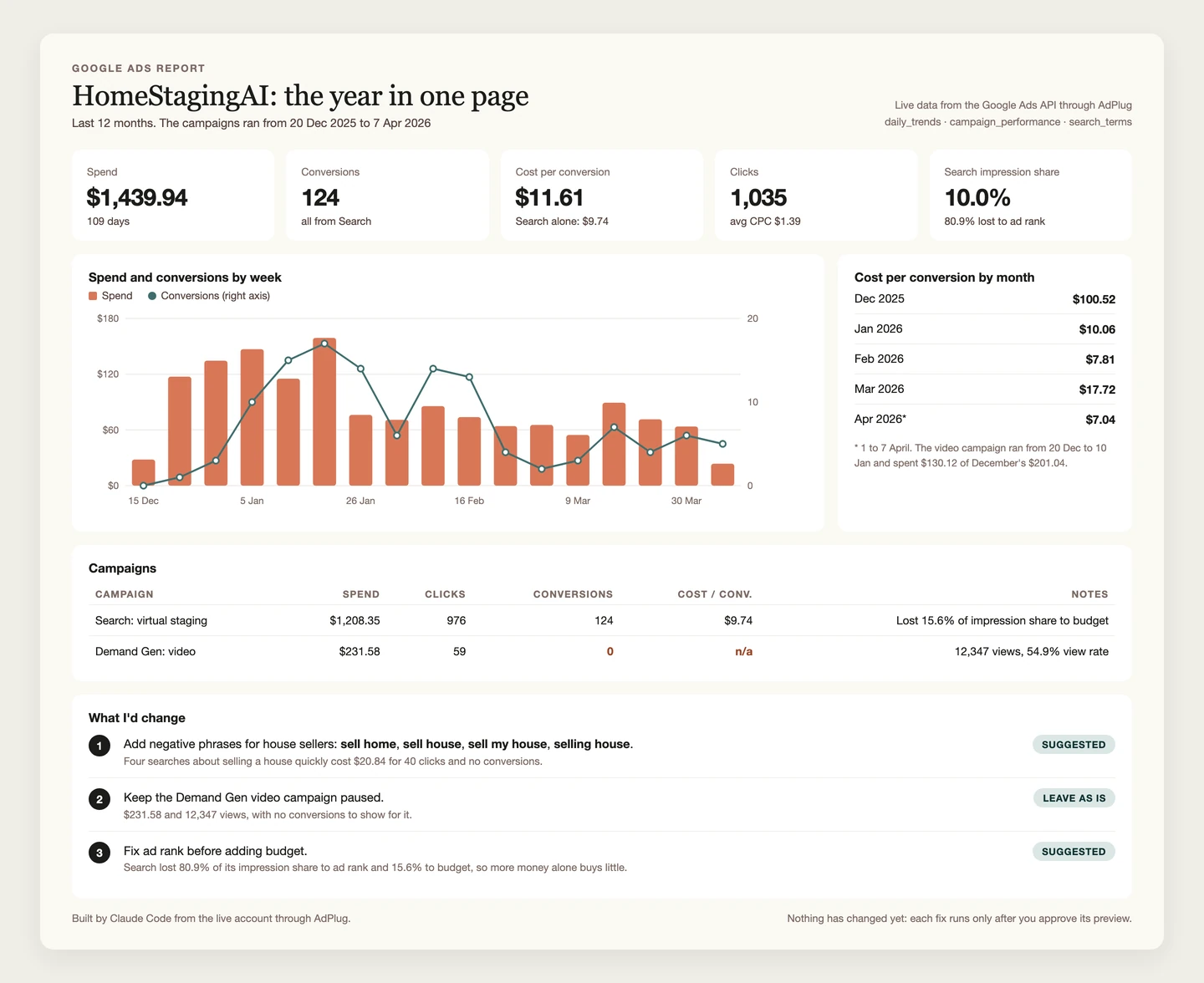
Supermetrics alternatives, by the job you need done
The right alternative depends on why you're looking. If it's Looker Studio feeds, look at another bridge. If it's the AI working in your accounts, these are the ones I've compared, and my Google Ads MCP server comparison goes wider.
AdPlugMy pick
For PPC specialists, consultants and agencies who want Claude, ChatGPT or their own agents working in every account they run: unlimited accounts on every plan, a server-checked preview before every Google Ads change, access per teammate and platform, and HubSpot next to the ad data. Free to read, then Pro at $29 a month.
Pick it if you want the AI doing the account work and you making the calls. See how it works on Google Ads.
 Windsor.ai
The other big data pipeline: over 350 sources into BI tools, warehouses and AI chats, priced by sources and accounts from $23 a month, with every destination included. It can change campaigns too, with your AI's confirm prompt as the check. I've compared it in AdPlug vs Windsor.ai.
Pick it if you need ad data in a warehouse without paying per destination.
 Optmyzr
A PPC suite for agencies with audits, rules and reports, and an MCP that turns AI changes into change requests a person applies. Priced by ad spend, from $209 a month billed yearly. I've compared it in AdPlug vs Optmyzr.
Pick it if you want a full PPC toolkit in its own app.
 Composio
An integration layer for developers building AI agents, with toolkits for over 1,500 apps, Google Ads among them, and a no-code version for Claude and ChatGPT. I've compared it in AdPlug vs Composio.
Pick it if you're building your own agent across many apps.
 Pipeboard
A hosted MCP server that started on Meta and now covers eight ad platforms, with a fee for every ad account: three on Pro at $29.90 a month, then $10 each. I've compared it in AdPlug vs Pipeboard.
Pick it if Snapchat or Pinterest is part of your mix and you run a handful of accounts.
 Markifact
A no-code marketing automation suite with workflows, agents and an MCP across 14 ad platforms, charged in credits from $79 a month. I've compared it in AdPlug vs Markifact.
Pick it if you'd rather build automations on a visual canvas than in a chat.
 AdKit
AdKit
An ads toolbox for founders, with a competitor ad library, AI-made static ads and an MCP server, from $49 a month for one ad account per platform. I've compared it in AdPlug vs AdKit.
Pick it if competitor research and creative matter more to you than account depth.
 Adspirer
A hosted connector for six ad platforms including Amazon and ChatGPT Ads, charged by the tool call. I've compared it in AdPlug vs Adspirer.
Pick it if Amazon Ads is part of your mix.
 Ryze AI
An autonomous agent that runs your ads, from $89 a month. I've compared it in AdPlug vs Ryze AI.
Pick it if you want to hand the account over rather than approve each change.
Switching from Supermetrics to AdPlug
The setup takes about ten minutes. The contract is the slow part, so start there.
- Find your renewal date and notice period before anything else. Its help centre says an agreement may include a minimum notice period, and one reviewer's contract needed 60 days.
- In Supermetrics' write settings, untick every ad account, so nothing changes while you move. Then remove its connector from Claude, ChatGPT or Copilot.
- Cancel the subscription. Only an Owner, Admin or Finance role can. Then remove its access in Google's third-party connections, Facebook's Business Integrations and each other platform's list of connected apps.
- Sign up for AdPlug and connect your ad platforms through each one's own sign-in screen. Every account behind that login comes with it, manager accounts included.
- Add AdPlug's address to your AI as a custom connector. The guides walk through it with screenshots for Claude, Grok Bot and ChatGPT dots.
- Ask for last month's spend by campaign and check it against the platform. Once the numbers match, move on to the real work.
Keeping Supermetrics for the Looker Studio reports? That works. Switch its write access off and let changes go through one place.
Who should stay with Supermetrics
- Your clients open Looker Studio, Sheets or Power BI reports built on Supermetrics, and they work.
- You need data in BigQuery or another warehouse, and you're on Enterprise already.
- ChatGPT Ads or Snapchat is a real part of your spend.
- Your company runs on Microsoft Copilot or Gemini Enterprise.
P.S. The demo on Supermetrics' homepage goes from "Pause it." straight to "Done. The campaign is now paused." It's a slick demo. In a client's account I'd want one more line in between, and it's the one AdPlug was built around.