AdPlug vs Windsor.ai: a Windsor.ai alternative for PPC specialists and agencies
Quick answer: Pick by the job. If you need ad data loaded into BigQuery, Snowflake, Looker Studio or Power BI next to hundreds of other sources, Windsor.ai is built for that, from $23 a month for three sources. If you run PPC for a living and the job is the change after the report, AdPlug fits better: it connects Google Ads, Meta Ads, LinkedIn Ads, Microsoft Ads, Reddit Ads and TikTok Ads to Claude, ChatGPT or any AI agent, stores every Google Ads change as a preview on its server before it can run, and costs $29 a month for every platform and unlimited accounts. Windsor.ai can change campaigns too since May 2026, but the only check is your AI's confirm prompt, and writes are on by default for new accounts. AdPlug (adplug.app) is mine, so bear that in mind.
I've run B2B Google Ads and LinkedIn Ads for twelve years, and more than $100M of other people's budgets has gone through accounts I manage. I've also pulled more Monday reports than I'd like to count, so a good data pipeline sounds lovely to me. Before comparing Windsor.ai with AdPlug, I read its pricing, docs, terms, changelog and GitHub readme, and every review I could find. AdPlug is mine, for the record, and I use it daily on my own accounts and my agency's clients.

AdPlug vs Windsor.ai: who should pick which
Windsor.ai started as plumbing, and it's good plumbing. Its homepage promises to "Automatically pull data from 350+ business platforms and send it to your BI tools, spreadsheets, warehouses, and AI chats", and its terms still describe the whole service as "an analytics and reporting solution that helps customers collect their online data and create reports."
Since May 2026 it can also change your ad accounts from Claude and ChatGPT. That's why this comparison is worth writing: both tools now plug your ads into the AI, but one was built to move data and the other was built to work in the account. Windsor.ai pitches itself to "Analysts", "Agencies" and "Data teams". AdPlug is built for PPC specialists, consultants and agencies who know what good looks like and want AI to do the legwork.
 Pick AdPlug if
- You run PPC for a living, in-house, freelance or at an agency, and the job is the change you make after the report
- You want every Google Ads change stored as a preview on the server before it can run, not just a confirm button in your AI
- You want Google Ads depth: 174 named kinds of change, Performance Max asset groups and shared negative lists included
- You run four or more platforms: AdPlug Pro is $29 a month for all of them, HubSpot included, where Windsor.ai's Standard plan is $118
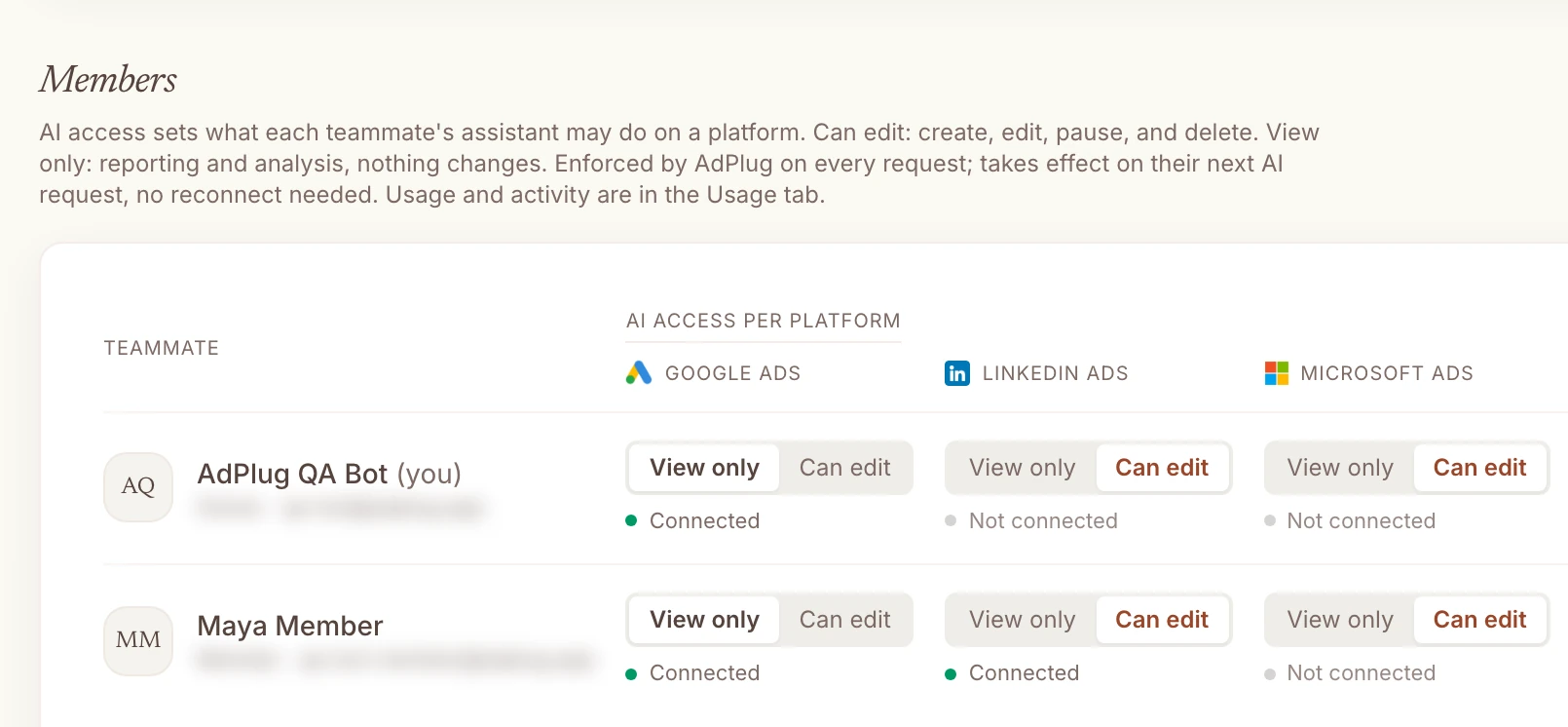
- You want each teammate on View only or Can edit for each platform, set in one place, not by juggling read-only logins on every ad platform
- You'd rather trust a tool built by a PPC specialist who uses it every day, on his own accounts and his agency's clients
 Pick Windsor.ai if
- You need ad data loaded into BigQuery, Snowflake, Power BI or Looker Studio, next to GA4, your CRM and your shop
- Your data team owns reporting, and ads are a handful of sources among dozens
- You want up to ten years of history in a warehouse, refreshed on a schedule
- The AI only needs to pause, enable or nudge a budget now and then, and you'll keep its confirm prompt switched on
- You don't mind paying $118 a month once you add a fourth platform, when $29 covers all six (it's your money)
And if a client dashboard is the main reason you're looking at Windsor.ai, you may not need a pipeline at all. AdPlug's free plan reads every account on one platform, and Claude or ChatGPT turns what it reads into a dashboard you can share. More on that below.
The real difference: a data pipeline that has started making changes
Windsor.ai's core job is moving data. It connects ad platforms, analytics, CRMs and shops, then syncs them into Google Sheets, BigQuery, Snowflake, Amazon S3, Redshift, Azure, PostgreSQL, MySQL and Databricks, with "up to 10 years of history" on paid plans. Its own Google Ads page still sells it as "a powerful no-code ETL connector". If your reporting lives in a warehouse, that's a real product, and AdPlug doesn't try to be one.
Then, on 22 May 2026, its changelog added write actions. Today its docs open with "Windsor.ai isn't just a data pipeline, it can act on your connected platforms too", and count "137 write actions across 19 connectors, and growing." It even warns that any comparison page calling it read-only is "now outdated". Fair enough. One of mine said so, and I've corrected it.
So the question isn't whether Windsor.ai can change your campaigns. It can. It's how deep those changes go for PPC work, and who checks them. On depth, here's what its own action list covers on the platforms most PPC people run:
| Platform | Windsor.ai | AdPlug |
|---|---|---|
| Google Ads | 34 actions: status, budgets, bids, keywords, campaign and ad group negatives, Customer Match, and new Search or Display campaigns | 174 kinds of change, from negatives and shared negative lists to Performance Max asset groups, experiments and responsive search ads |
| Microsoft Ads | 5 actions: enable and pause campaigns and ad groups, and set daily budgets | Campaigns, ad groups, ads, keywords, negatives, budgets, bid strategies and editorial appeals |
| LinkedIn Ads | 12 actions: enable and pause campaign groups, campaigns and creatives, and set budgets | Campaign groups, campaigns, creatives, targeting, audiences, conversion rules and Thought Leader Ads |
| Meta Ads | 20 actions | Campaigns, ad sets, ads and creatives, all created paused |
| HubSpot | Read only | Contacts, companies and deals, each change previewed first |
For a pipeline, that's a lot. For an account you run every day, it's the easy end of the job. On Google Ads, new campaigns can only be "Search or Display", Performance Max audience signals "are not supported here", and there's no action for shared negative keyword lists, the ones you apply across every campaign. Microsoft Ads gets five actions in total.
One more thing worth knowing if you check numbers before you act. Windsor.ai's help pages say "Query results are cached for 6 hours", with a Clear Cache button you can press "at most once every two hours", while its MCP's own readme promises everything "in real-time". AdPlug asks the ad platform each time the AI asks. When I'm judging whether a pause worked, I want this morning's numbers, not last night's.
Do you need a data pipeline for client dashboards?
I've said it before: reporting was relentless every week. The same questions, every week, forever, and none of it the job I'm paid to do. A pipeline into Looker Studio was the old fix. The AI you already pay for is the new one.
AdPlug's free plan reads every ad account on one platform, with no card. Ask Claude or ChatGPT for a dashboard and it pulls the numbers live, works out what changed and why, and lays it out the way you'd want a client to see it: a summary up top, results against last month, and what changes next. With Pro, the same chat pulls in every platform and HubSpot.

 Claude
Build a dashboard I can share with Acme on last month's Google Ads: a short summary, results against the month before, and what we change next.
google_ads_campaign_performanceAdPlug - Google AdsAcme Software · October against September
| Campaign | Spend | Conversions | Cost per conversion | Against September |
|---|---|---|---|---|
| Search · Brand | $1,240 | 96 | $12.92 | -4% |
| Search · Generic | $3,880 | 71 | $54.65 | +31% |
| Performance Max · All products | $2,610 | 38 | $68.68 | +12% |
Your dashboard is ready as a page you can share. The short version: 205 conversions, level with September, on 9% more spend. Nearly all of the extra cost is Search · Generic, where cost per conversion is up 31% since the 14th. Want me to find out why before you send it?
To be fair to Windsor.ai, that's a snapshot. It's rebuilt when you ask, or on a schedule you set in Claude, not a feed that refreshes itself in Looker Studio every hour. If your client logs in to a Looker Studio dashboard every morning and expects it to be current, that's a pipeline's job, and Windsor.ai does it well. For the monthly report and the "how are we doing" email, I'd rather have the AI that can also tell me why the numbers moved.
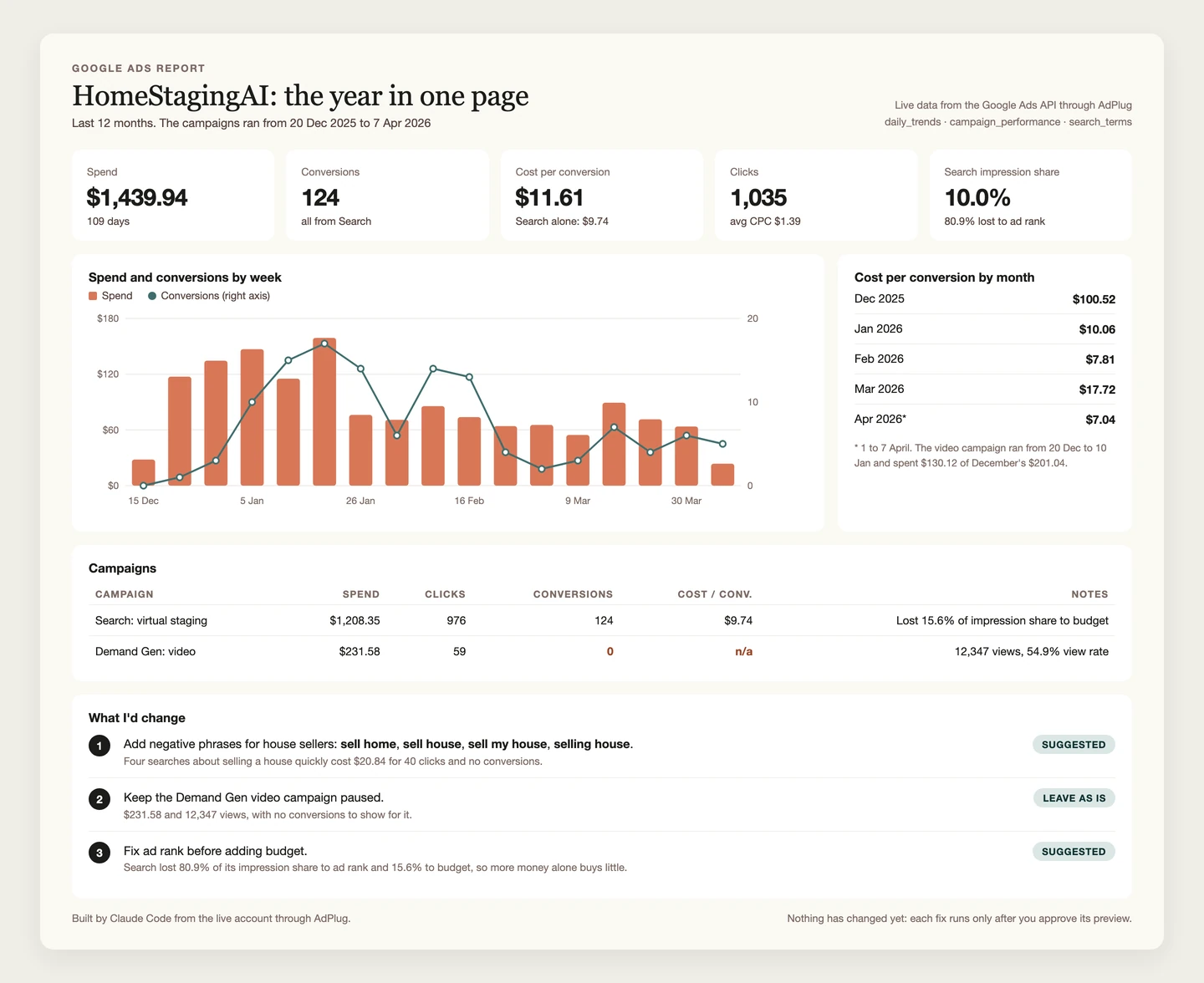
Build a client-ready dashboard on last month's Google Ads: a short summary, results against the month before and the same month last year, why they moved, and what we change next.
Who checks a change before it runs
If you manage other people's money, this is the section that matters. Both tools let the AI change campaigns. What differs is what stands between the AI's idea and your client's account.
How Windsor.ai makes changes
Every write goes through one tool, execute_action, which its readme describes as "Run a write action (e.g. pause/enable a campaign, change a budget) against a connected account." There's no preview step on Windsor.ai's side. The check is your AI's: "Windsor flags write actions as operations that modify live accounts, and AI clients such as Claude, ChatGPT, and Copilot ask you to confirm before they're executed."
That confirm prompt is a setting in your AI, and Windsor.ai's own Claude setup guide suggests switching it off: "For quicker connector access and use, you can choose" Always allow. The very next line warns that the connector "reads and writes to your connected accounts". In Windsor.ai's own Google Ads demo video, the presenter adds the check by hand: "I also asked Claude to confirm the action before executing".
Three more details from its changelog and docs:
- Since 16 October, "Write actions are now enabled by default for new accounts." The way to keep an ad account read-only is to "connect it in Windsor.ai with a platform user that has read-only or reporting access, so the platform rejects any write request."
- New campaigns start paused, which is right. But new keywords default to "enabled", and social posts are "published when the action runs".
- Creating things can't be undone in one step: "Creation actions (new campaigns, ads, posts) are not reversible via a single action."
Credit where it's due: since July every write is recorded in an audit log, and since October it guards against running the same action twice. Both are things I'd want too.
How AdPlug makes changes
AdPlug splits every Google Ads change into two tool calls, and the server won't run the second without the first.
- You ask, in plain words: which asset groups are wasting money, and what would you fix or pause.
- The AI reads the numbers and works out what it would change.
- It calls the preview tool. AdPlug's server checks the change and stores it under an ID, exactly as it will run. Nothing has changed in Google Ads yet.
- The AI shows you the preview. Wrong asset group? Say so, and it never runs.
- The execute tool runs only that stored preview, only once, and only within 15 minutes, so an old yes can't turn into a new change.
- AdPlug logs the call, and Google Ads' own change history shows it.
 Claude
Which Performance Max asset groups are spending without bringing in conversions or value, allowing for conversion lag? Suggest what to fix or pause and show me the preview first.
google_ads_preview_mutationAdPlug - Google AdsPreview · Acme Software · pause 1 asset group
| Asset group | Spend, 30 days | Conversions | Conversion value | Now | After |
|---|---|---|---|---|---|
| Gift guides | $388.90 | 0 | $0 | Enabled | Paused |
Gift guides spent $388.90 in the last 30 days with no conversions and no value, and it's been live for three months, so lag doesn't explain it. Pausing it moves that spend to the campaign's other asset groups, which convert at $38.20, and its products still serve through All products. Summer clearance converts, just expensively, so I'd fix its assets before touching it. Nothing changes until you say so.
Pause Gift guides.
google_ads_execute_mutationAdPlug - Google AdsDone. Gift guides is paused, and Google Ads' change history shows it.
I won't pretend AdPlug can stop you clicking Always allow in Claude. It can't, and the yes still lives in your chat. What it can do is make the AI write the exact change down first, as a preview it has to show you, and refuse to run anything else. On AdPlug's free plan, and for any teammate set to View only, there's nothing to allow at all: the server turns the write down. HubSpot and Search Console changes work the same way. On Meta, LinkedIn and Microsoft Ads there's a preview tool too, but the server doesn't force it yet, so ask for the preview in your prompt.
Whichever tool you pick, my advice is the same: allow the reading tools, and keep anything that changes an account on Needs approval.
Check where my Performance Max spend goes, by asset group and channel, and which asset groups aren't earning their share of conversions. Suggest changes and show me the preview first.
My rating: Windsor.ai vs AdPlug
Here's how I'd score the two on what a PPC specialist needs, out of 10. It's my opinion, from the facts on this page, and I built one of them, so read it that way. Windsor.ai wins two rows outright.
| Compared | AdPlug | Windsor.ai |
|---|---|---|
| Scored out of 10 | ||
| Changing campaigns safely | AdPlug9/10Every Google Ads change waits as a stored preview, and View only users can't write at all. Not a 10, because the yes still lives in the chat. | Windsor.ai4/10137 actions, but the only check is your AI's confirm prompt, its own guide suggests Always allow, and writes are on by default. |
| Google Ads depth | AdPlug9/10174 kinds of change, Performance Max and shared negative lists included. Google's API keeps Video campaigns read-only for everyone. | Windsor.ai5/10The everyday basics, but new campaigns are Search or Display only, and nothing for shared lists or Performance Max signals. |
| Client dashboards | AdPlug7/10Claude or ChatGPT builds a sharp one from live numbers, even on the free plan, but it's a snapshot unless you schedule it. | Windsor.ai9/10Its home ground: scheduled feeds into Looker Studio, Power BI and Sheets, every 15 minutes on its top self-serve plan. |
| Warehouses and data teams | AdPlug2/10Not what it's for. AdPlug loads nothing into a warehouse. | Windsor.ai9/10BigQuery, Snowflake, Redshift, Databricks and more on every plan, with up to ten years of history. |
| Price and terms for an agency | AdPlug9/10$29 for every platform and every account, a free plan with no card, and a 14-day refund window. | Windsor.ai4/10Cheap for three platforms at $23, $118 from the fourth, and no refunds, even for a plan bought by mistake. |
| Control for a team | AdPlug9/10View only or Can edit for each person on each platform, checked on every request. | Windsor.ai3/10Three roles, writes switched on for the whole account, and read-only means a read-only login on each ad platform. |
| My opinion, scored from the facts on this page, which come from each company's own pages and Windsor.ai's public reviews. Checked 27 Oct 2026. | ||
Read it by the job. If you need a warehouse, Windsor.ai is the better tool, and nothing in my scores should talk you out of it. If the job is running PPC accounts, it's not close.
AdPlug vs Windsor.ai, side by side
Checked on each company's own pages on 27 Oct 2026. Edge marks the side that wins a row, only where that's a plain fact rather than my opinion.
| Compared | AdPlug | Windsor.ai |
|---|---|---|
| What it's for | ||
| Built for | AdPlugPPC specialists, consultants and agencies working in Claude, ChatGPT, Grok Bot, Hermes Agent or their own AI agents. | Windsor.aiAnalysts, agencies and data teams, by its homepage. Its terms call it “an analytics and reporting solution”. |
| Main job | AdPlugReading and changing ad accounts from the AI you already use. Reports and dashboards come from the AI. | Windsor.aiMoving data from over 350 sources into BI tools, spreadsheets, warehouses and AI chats. |
| Platforms | AdPlugGoogle Ads, Meta Ads, LinkedIn Ads, Microsoft Ads, Reddit Ads and TikTok Ads, plus Google Search Console and HubSpot on connectors of their own. | Windsor.aiOver 350 sources to read. Write actions on 19, including Google Ads, Meta, LinkedIn, TikTok, Microsoft Ads, Amazon Ads and ChatGPT Ads. |
| AI clients | AdPlugClaude, ChatGPT, Claude Code, Codex, Grok Bot, Hermes Agent and any AI agent that accepts a remote MCP address. | Windsor.aiClaude, ChatGPT, Copilot, Gemini, Perplexity, Grok and Manus, plus Cursor, Windsurf and others. |
| How fresh the numbers are | AdPlugAsked from the ad platform each time the AI asks.Edge | Windsor.ai“Query results are cached for 6 hours”. Scheduled syncs run daily on Free and Basic, hourly from Standard. |
| Sources: Windsor.ai's homepage, help pages, terms and MCP readme. Checked 27 Oct 2026. | ||
| How changes happen | ||
| Who does the work | AdPlugThe AI you already use, when you ask or on a schedule you set in it. AdPlug never acts on its own. | Windsor.aiThe AI you already use, through one generic write tool for every platform. |
| The check before a change | AdPlugGoogle Ads: the server won't run a change without a stored preview of that exact change, on every plan. | Windsor.aiYour AI's own confirm prompt. Its Claude guide suggests choosing Always allow “for quicker connector access”. |
| Default for a new account | AdPlugThe free plan is view only. Paid plans preview every Google Ads change.Edge | Windsor.ai“Write actions are now enabled by default for new accounts.” (16 Oct 2026) |
| Read-only option | AdPlugThe free plan, and View only for any teammate on any platform. | Windsor.aiWrites switched off for the whole account in its settings, or each ad account connected with a read-only platform login. |
| Change log | AdPlugEvery call logged, and the change shows in the platform's own history. | Windsor.aiAn audit log of every write action since July 2026. |
| Sources: Windsor.ai's write actions docs, Claude guide, help pages and changelog. Checked 27 Oct 2026. | ||
| What it costs | ||
| Starts at | AdPlugFree for one platform and every account on it, then Pro at $29 a month | Windsor.aiFree for one data source and one account, then Basic at $23 a month ($19 billed yearly) |
| Google Ads, Meta, LinkedIn, Microsoft Ads and HubSpot | AdPlug$29 a month on ProEdge | Windsor.ai$118 a month on Standard ($99 billed yearly) |
| Client accounts | AdPlugUnlimited on every plan, the free one includedEdge | Windsor.ai75 on Basic and Standard, 200 on Plus ($299), 500 on Professional ($598). Each account under an MCC counts. |
| Refunds | AdPlugCancel anytime, 14-day refund windowEdge | Windsor.ai“All sales are final, and Windsor.ai will not issue refunds, including for prepaid monthly fees.” |
| Warehouses | AdPlugNone | Windsor.aiBigQuery, Snowflake, S3, Redshift, Azure, PostgreSQL, MySQL and Databricks on every planEdge |
| Sources: Windsor.ai's pricing page, help pages and terms, and AdPlug's pricing. Checked 27 Oct 2026. | ||
| Teams and agencies | ||
| Access per user | AdPlugView only or Can edit for each teammate on each platform, enforced on every request.Edge | Windsor.aiTeam member, team owner and subscription manager. Hiding other members' accounts needs Professional or Enterprise. |
| CRM and pipeline | AdPlugHubSpot from Pro, read and changed with a preview: three portals on Pro, ten on Max and Agency. | Windsor.aiHubSpot as a read-only data source, which counts towards your plan's sources. |
| Reaching client accounts | AdPlugOne Google sign-in covers every account under your MCC, and from Pro you can add Google logins for clients under other MCCs. | Windsor.aiOne login per source, plus an authorisation link clients can use to connect their own accounts under yours. |
| Sources: Windsor.ai's help pages and pricing page. Checked 27 Oct 2026. | ||
Windsor.ai reviews: what its users praise, and the refund problem
I built a rival, so don't take Windsor.ai's faults from me. Here's what its users say, read on 27 Oct 2026.
| Where | Rating | Reviews |
|---|---|---|
| G2 | 4.4 | 90 |
| Trustpilot | 3.6 | 84, 54 of them in the last 12 months |
| Capterra | 4.4 | 9, under its old name, Attribution Insights, mostly from 2019 and 2020 |
| Product Hunt | 3.0 | 2 |
What users like
The setup, and the people. G2 reviewers like how quickly it connects, and Trustpilot's happy reviews keep mentioning a human on the other end of support.
“They provide fast-response support with real human agent (not AI chatbot) and straight solutions.”
“Ridiculously easy to implement a MCP server”
The fairest outside view I found came from an agency founder who used its Facebook connector in Claude for clients' Meta accounts. His verdict, in a LinkedIn post: "You're working with what Windsor.ai exposes rather than native Ads Manager depth. But for reporting and anomaly detection, it holds up." That's about where I'd land too.
What goes wrong
Billing, mostly. Trustpilot's own summary says some reviewers "experienced frustrating billing practices", and most of the one-star reviews since August are about billing and refunds. Windsor.ai's terms are clear that there aren't any refunds, and its support sticks to them.
“US$5,988 gone, no refund, no escalation.”
A staff member had bought an annual Professional plan by mistake. The agency offered to pay for two months and was told "There is no additional management or billing escalation process available for this request." A smaller one, from October:
“I thought I was starting a free trial, but I was charged $23.”
The other theme is freshness and accuracy, which matters more for a data tool than for most. Two G2 reviewers mention how up to date the data is, one of them "It could be better in terms of what data it fetches and how up to date it is on my end". On Google's own Looker Studio forum, a user chasing a Facebook numbers gap wrote "This mismatch is not due to the acquisition window, we have already checked it." Windsor.ai's own docs say a data integrity investigation "takes time (1-3 days)".
What Windsor.ai does better
Credit where it's due. If any of these is your job, Windsor.ai is the better tool for it.
- Warehouses and BI tools. It loads data into BigQuery, Snowflake, Redshift, Databricks, PostgreSQL and more, and it "does not charge per destination". AdPlug doesn't load anything anywhere: the AI reads it live.
- Dashboards that refresh themselves. Looker Studio, Power BI and Sheets feeds on a schedule, every 15 minutes on Professional. If a client opens the same dashboard every morning, that's what you want.
- Far more than ads. GA4, CRMs, shops, payments and social, with write actions on Google Business Profile, WordPress and organic social too. AdPlug sticks to ad platforms, Search Console and HubSpot.
- Platforms AdPlug doesn't connect. Amazon Ads and ChatGPT Ads, both with write actions. If either is a real part of your spend, that counts.
- Years of history. Up to ten years on paid plans, kept in your warehouse. AdPlug reads as far back as each platform's API allows, on demand.
If you run a PPC agency
Agencies are where the two part ways most, because Windsor.ai counts things AdPlug doesn't: data sources, accounts and, for read-only access, logins.
- Every client account, at no extra cost. AdPlug works on unlimited ad accounts on every plan. On Windsor.ai, "Twenty client accounts under one MCC count as 20 accounts", and past 75 the next plan is $299 a month. "Facebook Ads and Facebook Pages are two data sources", too.
- Access for every person, platform by platform. Each AdPlug teammate gets View only or Can edit on each platform. The junior reads every client and changes none, the senior edits Google Ads and only reads LinkedIn. Windsor.ai has three roles, and writes are on or off for the whole account.
- One sign-in for the MCC. One Google sign-in covers every account under your manager account, and from Pro you can add Google logins for clients under other MCCs: three on Pro, five on Max and Agency.
- Pipeline, not just conversions. Windsor.ai can read HubSpot as one of your data sources. AdPlug includes HubSpot from Pro, one connector for every client portal, so the same chat can follow a campaign from the click to the deal, then move budget towards what makes pipeline, with a preview first.
Windsor.ai pricing
Windsor.ai prices by data sources and accounts. Every plan includes every destination, and a setup that needs more sources or accounts "moves to the next plan", because there are no add-ons. Checked on its pricing page and help pages on 27 Oct 2026.
| Plan | Price | What you get |
|---|---|---|
| Windsor.ai Free | $0 | After a 30-day trial: one user, one data source, one account |
| Windsor.ai Basic | $23/mo, or $19/mo billed yearly | 3 data sources, 75 accounts, daily syncs |
| Windsor.ai Standard | $118/mo, or $99/mo billed yearly | 7 data sources, 75 accounts, hourly syncs |
| Windsor.ai Plus | $299/mo, or $249/mo billed yearly | 10 data sources, 200 accounts |
| Windsor.ai Professional | $598/mo, or $499/mo billed yearly | 14 data sources, 500 accounts, 15-minute syncs |
| Windsor.ai Enterprise | On request | Up to 200 data sources and 50,000 accounts, SSO, custom connectors |
| AdPlug Free | $0 | View only, one platform, unlimited ad accounts, 500 requests in the first 5 days, then 50 a month |
| AdPlug Pro | $29/mo | Every platform and HubSpot, unlimited ad accounts, 5,000 requests and 200 edits a month, 7-day trial |
| AdPlug Max | $89/mo | Unlimited ad accounts, requests and edits, three team members, five Google logins |
| AdPlug Agency | Custom, per seat | Everything in Max for the whole team, plus a signed DPA |
To be fair to Windsor.ai, if three platforms and 75 accounts cover you, its Basic plan is cheaper than AdPlug Pro: $23 a month against $29, or $19 billed yearly. Add Microsoft Ads and HubSpot to Google Ads, Meta and LinkedIn and you're on Standard at $118, where AdPlug is still $29. And on Windsor.ai the AI's changes come free on every plan, the free one included, by its own answers page.
Prices have barely moved: Plus was $298 in June 2024 and is $299 now. What has changed is the small print. In March 2026 warehouse loads were metered in "monthly active rows", and that's gone. Downgrades used to wait for the end of the billing cycle, and now "The downgrade takes effect immediately".
Three things I'd read before paying:
- No refunds. "All sales are final, and Windsor.ai will not issue refunds, including for prepaid monthly fees." An annual plan "stops renewing at the end of the year, and the remaining months are not refunded."
- Cancelling deletes your history. Its answers page says so in five words: "Cancelling deletes your historical data." Export first.
- Liability is capped at €100. Its maximum total liability "is limited to 100 EUR." Worth knowing now that it changes accounts as well as reading them, because the terms still describe a reporting service and say nothing about write actions.
AdPlug has a 14-day refund window, and the free plan never asks for a card.
Windsor.ai alternatives, by the job you need done
The best alternative depends on what you wanted Windsor.ai for. If it was a warehouse, stay where you are. If it was the AI, here are the options I've compared, and my Google Ads MCP server comparison goes wider.
AdPlugMy pick
For PPC specialists, consultants and agencies who want Claude, ChatGPT or their own agents working in every account they run: unlimited accounts on every plan, a server-checked preview before every Google Ads change, access per teammate and platform, and HubSpot pipeline next to the ad data. Free to read, then Pro at $29 a month.
Pick it if the job is the change after the report. See how it works on Google Ads.
 Supermetrics
The other big reporting bridge, priced per destination with a cap on sources and accounts, from $55 a month. Its Claude connector can create and pause campaigns on seven platforms, in what its docs call early access. I've compared it with AdPlug in AdPlug vs Supermetrics.
Pick it if your clients already live in Looker Studio dashboards built on it.
 Optmyzr
A PPC suite for agencies with audits, rules and reports, and an MCP that turns AI changes into change requests a person applies. Priced by ad spend, from $209 a month billed yearly. I've compared it in AdPlug vs Optmyzr.
Pick it if you want a full PPC toolkit in its own app.
 Composio
An integration layer for developers building AI agents, with toolkits for over 1,500 apps, Google Ads among them, and a no-code version for Claude and ChatGPT. I've compared it in AdPlug vs Composio.
Pick it if you're building your own agent across many apps.
 Pipeboard
A hosted MCP server that started on Meta and now covers eight ad platforms, with a fee for every ad account: three on Pro at $29.90 a month, then $10 each. I've compared it in AdPlug vs Pipeboard.
Pick it if Snapchat or Pinterest is part of your mix and you run a handful of accounts.
 Markifact
A no-code marketing automation suite with workflows, agents and an MCP across 14 ad platforms, charged in credits from $79 a month. I've compared it in AdPlug vs Markifact.
Pick it if you'd rather build automations on a visual canvas than in a chat.
 AdKit
AdKit
An ads toolbox for founders, with a competitor ad library, AI-made static ads and an MCP server, from $49 a month for one ad account per platform. I've compared it in AdPlug vs AdKit.
Pick it if competitor research and creative matter more to you than account depth.
 Adspirer
A hosted connector for six ad platforms including Amazon and ChatGPT Ads, charged by the tool call. I've compared it in AdPlug vs Adspirer.
Pick it if Amazon Ads is part of your mix.
 Ryze AI
An autonomous agent that runs your ads, from $89 a month. I've compared it in AdPlug vs Ryze AI.
Pick it if you want to hand the account over rather than approve each change.
Switching from Windsor.ai to AdPlug, or running both
You don't have to pick one. Plenty of agencies will keep Windsor.ai feeding the warehouse and use AdPlug for the account work. If you do that, switch Windsor.ai's write actions off, so changes only go through one door. If you're moving across completely, it takes about ten minutes:
- Export anything you want to keep first. Cancelling deletes your history, and the data in your warehouse is yours, but Windsor.ai's cache isn't.
- Turn off write actions in Windsor.ai's settings, and remove its connector from Claude, ChatGPT or wherever else you added it.
- Cancel the subscription, after checking when an annual plan renews, because the remaining months aren't refunded. Then remove Windsor.ai's access in Google's third-party connections, Facebook's Business Integrations and each other platform's list of connected apps.
- Sign up for AdPlug and connect your ad platforms through each one's own sign-in screen. Every account behind that login comes with it, manager accounts included.
- Add AdPlug's address to your AI as a custom connector. The guides walk through it with screenshots for Claude, Grok Bot and ChatGPT dots.
- Ask for last month's spend by campaign and check it against the platform. Once the numbers match, ask for the dashboard.
When Windsor.ai is still the right call
- Your reporting lives in a warehouse or a BI tool, and a data team depends on the feed.
- Your clients open a Looker Studio dashboard every morning and expect it to be current.
- You blend ads with dozens of other sources, and three of them cover your ad platforms.
- Amazon Ads or ChatGPT Ads is a real part of your spend.
P.S. Windsor.ai's MCP page says "If Claude flags a leaking budget at 2 AM, you fix it right there." I admire the optimism. At 2 AM I can barely read a search terms report, which is exactly why I want the change written down as a preview first.