AdPlug vs Pipeboard: a Pipeboard alternative for PPC specialists and agencies
Quick answer: AdPlug is for PPC specialists, consultants and agencies who want AI to speed up the work and keep control of every account: it plugs Google Ads, Meta Ads, LinkedIn Ads, Microsoft Ads, Reddit Ads and TikTok Ads into Claude, ChatGPT or any AI agent, checks every Google Ads change in a preview on its own server, and works on unlimited ad accounts on every plan, starting free. Pipeboard started on Meta and charges by the ad account: Pro covers three for $29.90 a month, 25 cost $199 on its Agency plan, and every extra account is $10 a month. AdPlug (adplug.app) is my product, so weigh that.
Twelve years of running B2B Google Ads and LinkedIn Ads, with over $100M of spend through my hands, taught me to read the small print before I connect anything to a client's account. So for this page I went through Pipeboard's pricing, guides, terms, status page and GitHub repos, every public review I could find, and a friend's plan page. AdPlug is my product, and I use it daily on my own accounts and my agency's clients.


AdPlug vs Pipeboard: who should pick which
Both plug your ad accounts into Claude and ChatGPT, and both can change campaigns as well as read them. Pipeboard started as a Meta Ads server (its browser tab still says "Meta Ads MCP") and now covers eight ad platforms. The difference is what you pay for, and who it's built for.
Pipeboard sells "AI for paid marketing teams". Its guides pitch business owners on managing ads "without hiring experts", and its customer page celebrates a paid search build that "was briefed out to specialists" before Claude took it over.
AdPlug is built for the specialists: PPC specialists, consultants and agencies who know what good looks like and want AI to do the legwork. It plugs your accounts into the AI you already use, every call stays yours, and it doesn't charge you by the ad account.
 Pick AdPlug if
- You run PPC for a living, in-house, freelance or at an agency, and want AI to do the legwork while you make the calls
- You look after lots of accounts: every AdPlug plan, the free one included, works on unlimited ad accounts, with no slots to buy
- You'd rather not pay per client: Pipeboard's Pro covers three ad accounts and charges $10 a month for each one after that
- You want every Google Ads change checked in a preview on the server before it runs, not just a question from the AI
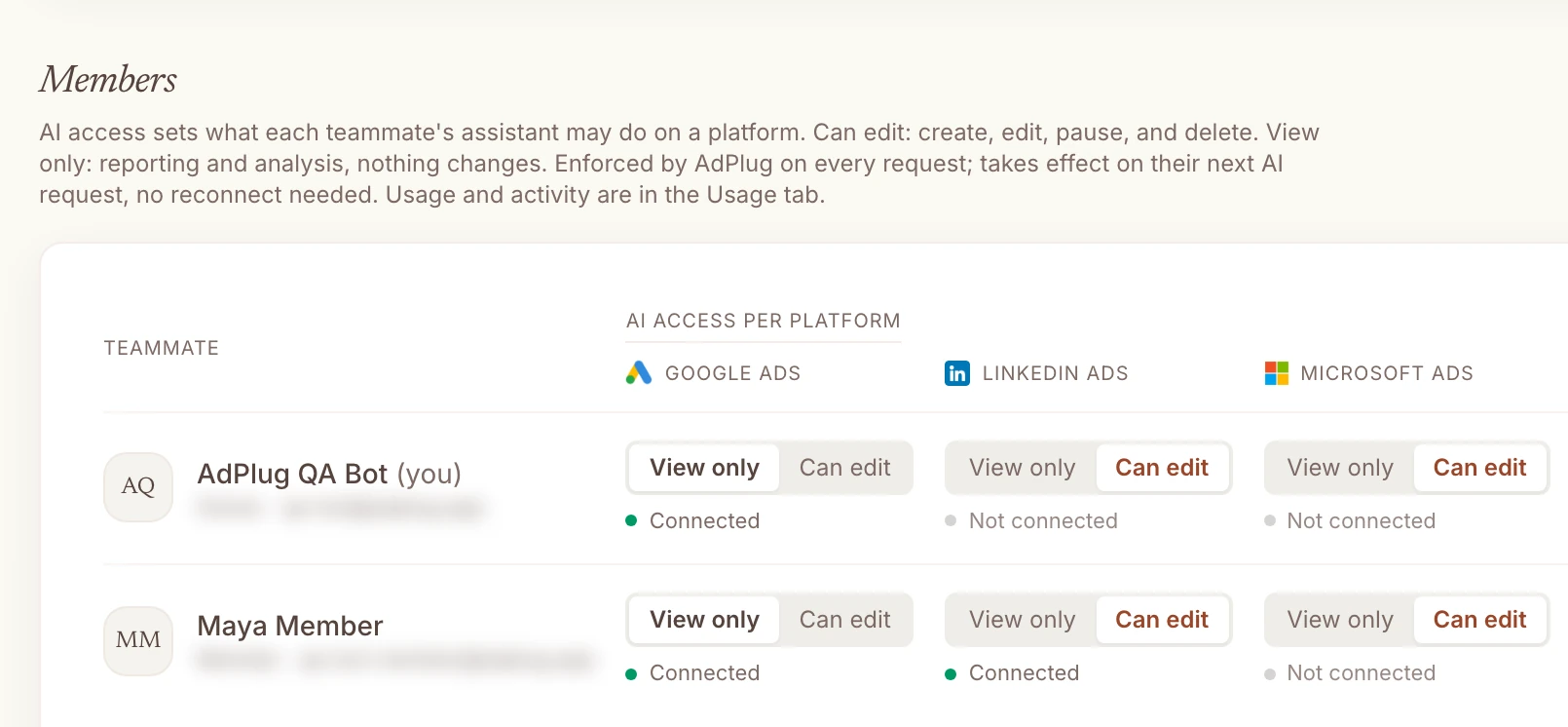
- You manage a team: View only or Can edit for each person on each platform, not one switch for everything
- You report on pipeline: Google Ads and HubSpot in the same chat, with every client's portal behind one connector
- You'd rather trust a tool built by a PPC specialist who uses it every day, on his own accounts and his agency's clients
 Pick Pipeboard if
- Snapchat, Pinterest, Amazon DSP or AppLovin is part of your mix
- You're technical and want a source-available Meta server, a command-line tool and API tokens for your own scripts
- You run a handful of accounts and want unlimited commands on them
- You don't mind paying $199 a month for 25 ad accounts when $89 covers unlimited ones (it's your money)
And if all you're after is a client dashboard, you don't need to pay either of them for it. AdPlug's free plan reads your accounts, and Claude or ChatGPT builds the dashboard from what it reads, laid out the way you want.
The real difference: you pay for every ad account
Pipeboard doesn't meter what your AI does. Since May its paid plans run unlimited commands. It meters something else, in its own words: "Paid plans do not meter commands; they meter accounts."
Each plan includes a few slots, and a slot is "one distinct ad account you run commands against in a billing cycle", on any platform. Pro includes three for $29.90 a month, Premium ten for $99 and Agency 25 for $199. Every account after that is $10 a month, at any volume.
A friend sent me their plan page, and it spells out something the pricing page doesn't. "Each ad account counts as one", so "two Google Ads accounts under one MCC are two. The MCC itself doesn't use a slot." Which I suppose is something.
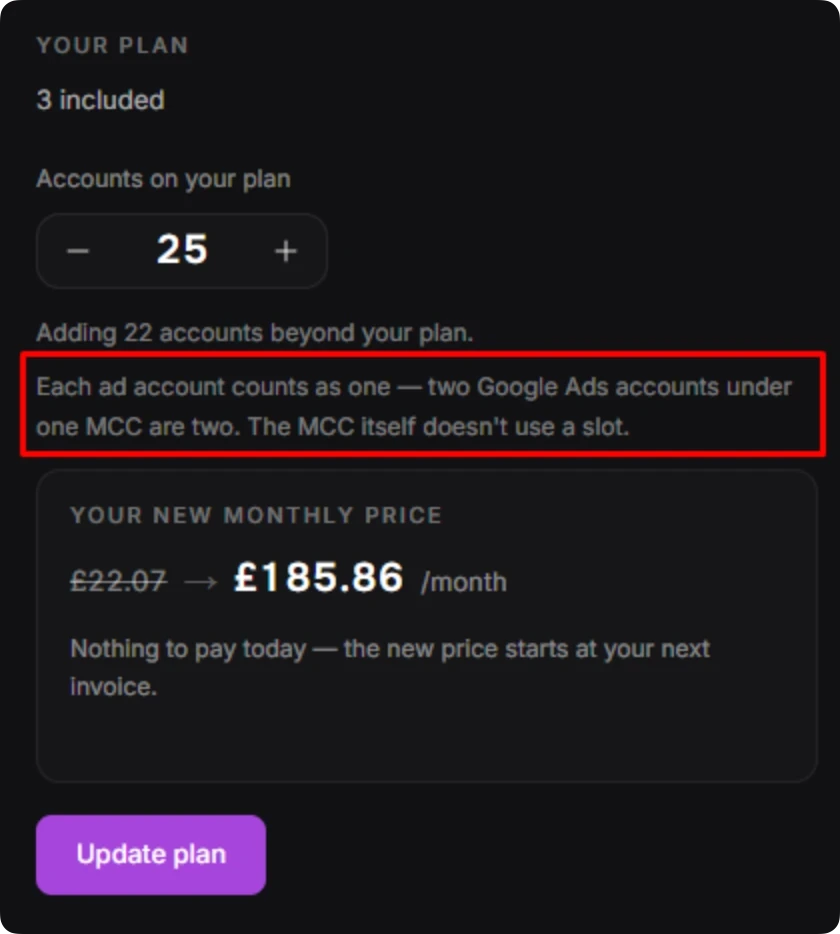
That's Pro plus 22 extra slots, $249.90 in dollars. They'd pay less on Agency, which includes 25 accounts for $199. Here's what an agency pays as it grows, at Pipeboard's list prices on the cheapest plan for each size.
| Ad accounts | Pipeboard | AdPlug |
|---|---|---|
| 3 | $29.90 on Pro | $29 on Pro, $89 on Max |
| 10 | $99 on Premium | $29 on Pro, $89 on Max |
| 25 | $199 on Agency | $29 on Pro, $89 on Max |
| 50 | $449 on Agency plus 25 slots | $29 on Pro, $89 on Max |
| 100 | $949 on Agency plus 75 slots | $29 on Pro, $89 on Max |
AdPlug doesn't count accounts at all. Every plan works on unlimited ad accounts, the free one included, and the AI can move between them in one chat. What Pro meters is usage, 5,000 requests and 200 edits a month, and Max has no meter at all. To be fair to Pipeboard, its Agency plan includes unlimited teammates, where AdPlug Max includes three and AdPlug Agency is priced per seat.
Pricing by the account works for a brand with three of them. For an agency it's a tax on growth: every new client puts your tools bill up before they've paid you anything.
How a change reaches your account
Both tools say you approve the changes. If you manage other people's money, two details matter more than the promise: where that approval is checked, and what exactly you're saying yes to.
How Pipeboard makes changes
Pipeboard leaves the asking to your AI. Its comparison page calls this "Human-in-the-loop by design", and the next words say whose loop it is: "your LLM asks before acting". I couldn't find a preview or a dry run on Pipeboard's server for ordinary Meta or Google Ads changes, in its guides or in the code of its source-available Meta server. Its advice is to build the check into your prompt: "List them first and wait for my OK."
New campaigns start paused on Meta, Google Ads, Reddit and Snapchat, and as drafts on LinkedIn. Its guide to its All Ads server is honest about the rest: "TikTok and Pinterest have no such default", so "an assistant asked for an active campaign will create an active campaign." Budget, bid and status changes apply straight away, and Google Ads has a raw tool for "Any Google Ads API mutate operation the named tools do not cover."
LinkedIn and Merchant Center get an optional dry run. And one line from its Warp guide I'd read twice: "Pipeboard cannot undo a destructive call once Meta or Google accepts it."
Where it's strong is read-only access, on the plans that have it: read-only API tokens from Pro, a read-only address for analysis, and on Agency a cap that keeps a teammate to read-only, enforced on Pipeboard's server. That cap is all or nothing: "One switch. Every MCP. Every token."
How AdPlug makes changes
AdPlug has no agent of its own, on purpose. Claude or ChatGPT does the thinking, and AdPlug is the plug socket between it and your accounts. On Google Ads a change takes two separate tool calls, and the server won't run the second without the first.
- You ask: "Find the keywords that are spending without converting, and pause the worst ones."
- The AI reads spend and conversions for each keyword and works out which to pause.
- It calls AdPlug's preview tool. The server checks the change and stores it exactly as it will run, under an ID: which keywords, in which ad groups. Nothing has changed in Google Ads yet.
- You read it. Wrong keyword, wrong campaign? Say so, and it never runs.
- Only after your yes can the execute tool run, and only on that stored preview. It runs once and expires after 15 minutes, so last week's yes can't turn into this week's change.
- AdPlug logs the call, and the change shows in Google Ads' own change history.

 Claude
Find the keywords that are spending without converting, and pause the worst ones.
google_ads_preview_mutationAdPlug - Google AdsPreview · Acme Software · pause 3 keywords
| Keyword | Match type | Spend, 30 days | Conversions |
|---|---|---|---|
| free crm | Phrase | $212.40 | 0 |
| what is crm | Broad | $168.90 | 0 |
| crm template | Broad | $154.10 | 0 |
These three spent $535.40 between them in the last 30 days without a single conversion, all in Search · Generic. Pausing them leaves the rest of the ad groups alone. Nothing changes until you say so. Shall I pause all three?
Pause all three.
google_ads_execute_mutationAdPlug - Google AdsDone. All three keywords are paused, and Google Ads' change history shows it.
The AI can't skip that step, because the rule lives on AdPlug's server, not in a prompt or a client setting someone can change. HubSpot and Search Console changes work the same way. On Meta, AdPlug's preview runs campaign, ad set and ad changes through Meta's own validate-only check, so Meta itself reports what would fail before anything changes, and an update shows each field before and after. It isn't forced on Meta yet, so ask for it in your prompt. And everything AdPlug creates on Meta starts paused, as new Google Ads campaigns do unless you say otherwise.
Both approaches stop most accidents. Where they differ is the bad day: a long session, a vague prompt, an AI that's sure it already asked. On that day I want the check in the server, not in the model's memory. If a client or a finance director reads your change history, I suspect you do too.
Find the keywords in this Google Ads account that are spending money without converting. Show me each one with its spend and match type, suggest which to pause, and show me the preview. Don't change anything until I say so.
What Pipeboard users say, and what its own records admit
I built a rival, so don't take Pipeboard's faults from me. Here's what its users, its status page and its GitHub repo say, read on 26 Oct 2026. Start with how little there is.
| Where | Rating | Reviews |
|---|---|---|
| Trustpilot | None yet, unclaimed profile | 0 |
| G2 | No listing | 0 |
| Product Hunt | No listing | 0 |
| SourceForge | No listing | 0 |
Hardly anyone has written about Pipeboard in public, so the best record of what goes wrong is the one anyone can read: the bug reports on its GitHub repo, and its status page.
What users report
Paying for unlimited, getting a limit. In July a Pro customer filed this on Pipeboard's GitHub, invoice attached. Thirty a week is the free plan's allowance, and Pro is sold as unlimited. It still had no reply on 26 Oct 2026.
“I keep encountering the error ‘MCP usage limit exceeded 30/30’ when using Google Ads MCP”
Campaigns that read as live when they aren't. A March report on its Meta server, also still open with no reply from Pipeboard:
“In my account, Ads Manager shows 3 active campaigns. The get_campaigns tool with status_filter: ‘ACTIVE’ returns 25+ campaigns.”
In PPC that's the difference between three live campaigns and twenty-five, and the AI acts on whichever list it's given. To be fair, Pipeboard's founder often fixes reported bugs fast: a WhatsApp ad set bug in February got "I'll fix this right away" and a fixed version the same day.
What its status page and code history admit
- 14 to 20 July 2026. "Reddit has suspended Pipeboard's Reddit Ads API access, with no prior warning or message to us." For six days, none of Pipeboard's Reddit Ads features worked.
- 5 August 2026. API tokens were rejected across all its MCP servers for about 35 minutes. "The cause was a backend change that shipped before a required database update had been applied."
- February 2026. A fix to its Meta server's account tools, which had been "causing get_ad_accounts to return 40438 instead of 404.38 for a USD account": spend and balances a hundred times too high.
The fixed ones are fixed, and every tool has bugs (mine included). But a wrong list of live campaigns, or the wrong spend, is the kind of bug that hurts in PPC, because you act on it. Whatever you use, check the AI's numbers against the platform before you change anything.
What users like
The praise I found is short, and mostly about running its Meta server yourself, for free.
“They have a paid server but you can just install it locally and use your own api keys from meta so it's free”
“Pipeboard is the open-source incumbent with the deepest tool surface.”
AdPlug vs Pipeboard, side by side
Checked on each company's own pages on 25 Oct 2026. Edge marks the side that wins a row, only where that's a plain fact rather than my opinion.
| Compared | AdPlug | Pipeboard |
|---|---|---|
| Where it works | ||
| Platforms | AdPlugGoogle Ads, Meta Ads, LinkedIn Ads, Microsoft Ads, Reddit Ads and TikTok Ads, plus Google Search Console and HubSpot on connectors of their own. | PipeboardMeta, Google Ads, TikTok, LinkedIn, Pinterest, Snapchat, Reddit and Microsoft Ads, whose guide can't decide whether it writes yet. GA4, Search Console, Merchant Center, Google Drive and Dropbox on top. |
| Google Ads tools | AdPlug17 tools, and 174 named kinds of change, each checked in a preview. | Pipeboard35+ by its Google Ads guide, 59 by its GitHub page, including a raw tool for any change the named ones don't cover. |
| AI clients | AdPlugClaude, ChatGPT, Claude Code, Codex, Grok Bot, Hermes Agent and any AI agent that accepts a remote MCP address. | PipeboardClaude, ChatGPT, Claude Code, Cursor, Codex, n8n, Warp, OpenClaw and LangChain, plus its own command-line tool. |
| Setup | AdPlugSign up, sign in through each platform's own screen, paste one address into your AI. Nothing to host. | PipeboardSign up, connect each platform, paste one address into your AI, or one per platform. Nothing to host. |
| Built for | AdPlugPPC specialists, consultants and agencies working in Claude, ChatGPT, Grok Bot, Hermes Agent or their own AI agents. | PipeboardIn its own words, “AI for paid marketing teams”, and in its guides, business owners who want to manage ads “without hiring experts”. |
| Sources: Pipeboard's homepage, integrations page, guides and GitHub repo. Checked 25 Oct 2026. | ||
| How changes happen | ||
| Who does the work | AdPlugThe AI you already use, when you ask or on a schedule you set in it. AdPlug never acts on its own. | PipeboardThe AI you already use, when you ask. Pipeboard says it “never makes autonomous changes”, and its scheduled reports only read. |
| Approving a change | AdPlugGoogle Ads: the server won't run a change without a stored preview of that exact change. Other ad platforms: a preview when you ask. | PipeboardYour AI asks first: “your LLM asks before acting”. No server preview for Meta or Google Ads changes, and an optional dry run on LinkedIn and Merchant Center. |
| New campaigns | AdPlugPaused on Google Ads unless you say otherwise, and always paused on Meta. | PipeboardPaused on Meta, Google Ads, Reddit and Snapchat, drafts on LinkedIn. TikTok and Pinterest take whatever status the AI asks for. |
| Read-only option | AdPlugThe free plan is view only, and any teammate can be set to View only on each platform. | PipeboardRead-only API tokens from Pro, a read-only address, and on Agency a read-only cap per teammate that covers every platform at once. |
| Log of calls | AdPlugEvery tool call logged, with your latest calls in the dashboard and each teammate's usage for the team owner. | PipeboardEvery command kept for 90 days, viewable in Settings and exportable as a CSV, by its data processing agreement. |
| Sources: Pipeboard's guides, comparison pages, data processing agreement and the code of its Meta server. Checked 25 Oct 2026. | ||
| What it costs | ||
| Starts at | AdPlugFree, then Pro at $29 a month | PipeboardFree, then Pro at $29.90 a month |
| Ad accounts | AdPlugUnlimited on every plan, the free one includedEdge | Pipeboard2 on Free, 3 on Pro, 10 on Premium, 25 on Agency, then $10 a month for each one |
| 25 ad accounts | AdPlug$29 on Pro, or $89 on Max with unlimited requests and editsEdge | Pipeboard$199 a month on Agency |
| Free plan | AdPlugView only, one platform, unlimited ad accounts, 500 requests in the first 5 days, then 50 a month | Pipeboard30 commands a week on two ad accounts |
| Usage | AdPlugPro: 5,000 requests and 200 edits a month. Max: unlimited. | PipeboardUnlimited commands on every paid plan. It meters accounts instead. |
| Refunds | AdPlugCancel anytime, 14-day refund window | PipeboardCancel anytime. A refund within 7 days of your first monthly payment, or 30 days of a yearly one, once per plan |
| Sources: Pipeboard's pricing page and terms, and AdPlug's pricing. Checked 25 Oct 2026. | ||
| Teams and agencies | ||
| Manager accounts | AdPlugOne sign-in covers every account under an MCC, at no extra cost. Three Google logins on Pro, five on Max and Agency.Edge | PipeboardManager accounts work, but every account under one takes a slot. Several Facebook, Microsoft, Reddit and Snapchat logins per account. |
| Access per user | AdPlugView only or Can edit for each teammate on each platform, enforced on every request.Edge | PipeboardOn Agency only: a read-only cap per teammate, one switch for every platform. API tokens can be limited to chosen tools, and to chosen accounts on Agency. |
| Team members | AdPlugThree on Max, then priced per seat on Agency. | PipeboardNone on Free and Pro, up to five on Premium, unlimited on Agency. |
| CRM and pipeline | AdPlugHubSpot from Pro, with one connector reaching every client portal: three on Pro, ten on Max and Agency. | PipeboardNo CRM. GA4, Search Console and Merchant Center, which don't use a slot. |
| Sources: Pipeboard's pricing page, team access guide, token guide and agency guide. Checked 25 Oct 2026. | ||
Where Pipeboard is stronger
Credit where it's due. There are three good reasons to pick it.
- Platforms AdPlug doesn't connect. Pipeboard reads and changes Snapchat and Pinterest campaigns, works with Amazon DSP and AppLovin on its All Ads address, and connects GA4 and Merchant Center without using a slot. If those are a real part of your spend, that settles it.
- It's built for people who script. Its Meta server is source-available on GitHub under a Business Source License, it has a command-line tool for Meta and Google Ads, and its API tokens can be limited to a list of tools. If your team wants to host the Meta server itself or script against it, that's a real head start.
- It suits teams that want to skip the specialist. Pipeboard's guides pitch business owners on managing ads "without hiring experts", and its customer story is a paid search campaign that went from research brief to live in 35 minutes, built by Claude in the live account. If that's the job, it's made for you.
Why PPC specialists and agencies pick AdPlug
Pipeboard charges for every ad account, leaves the yes to the AI, and keeps read-only teammates to its $199 Agency plan, with one switch for every platform. If PPC is your job, all three get in the way. Here's what AdPlug does instead.
If PPC is your job
- The AI you already use, with what it already knows. The work happens in Claude, ChatGPT, Grok Bot, Hermes Agent or your own agents, next to your notes, your briefs and your other tools.
- Changes with names, not raw API calls. AdPlug knows 174 kinds of Google Ads change, from negatives and budgets to responsive search ads, experiments and Performance Max asset groups, and every one of them goes through the same preview. There's no raw mutate tool for the AI to reach for.
- Every platform you run. Meta Ads, LinkedIn Ads, Microsoft Ads, Reddit Ads and TikTok Ads sit in the same plan as Google Ads, with Google Search Console and HubSpot on connectors of their own. Microsoft Ads comes with its reports, from campaigns down to search queries, and the AI can change campaigns there too.
- Read-only until you say otherwise. The free plan can't change anything, which is how I'd start with any new tool.
Report and optimise on pipeline, not just conversions
For B2B accounts this is where the gap is widest. A Google Ads conversion is a form fill. Pipeline is what the client is paying for.
Pipeboard connects GA4, Search Console and Merchant Center, but no CRM. AdPlug connects HubSpot next to Google Ads, so the same chat can follow each campaign from the click to the deal: the contacts it brought, how far they got through the lifecycle stages, and the pipeline they made. Then it can move budget towards the campaigns that make pipeline, with a preview before anything changes.
HubSpot comes with Pro, and one HubSpot connector reaches every client portal you connect: three on Pro, ten on Max and Agency.
 Claude
Which Google Ads campaigns made pipeline for Acme Robotics this quarter, and which only made leads?
hubspot_reportAdPlug - HubSpotAcme Robotics · paid search contacts by campaign
| Campaign | Contacts | SQLs | Pipeline |
|---|---|---|---|
| Search · Generic | 188 | 14 | $151,200 |
| Search · Competitors | 41 | 9 | $118,000 |
| Search · Brand | 96 | 4 | $38,500 |
Generic makes the most pipeline overall, but Competitors makes about $2,880 of pipeline per contact, against $804 for Generic and $401 for Brand. Want me to pull the spend from Google Ads, work out what each SQL cost, and suggest budget moves as a preview?
Line up my Google Ads campaigns with HubSpot. For each campaign, show the contacts, SQLs and pipeline it made and what each SQL cost, then suggest budget moves as a preview. Don't change anything yet.
If you run an agency
- Every client account, at no extra cost. AdPlug works on unlimited ad accounts on every plan, the free one included, and the AI can move between them in one chat. On Pipeboard every ad account is a slot: 25 cost $199 a month, and each one after that is $10.
- One sign-in for the MCC. One Google sign-in covers every account under your manager account, all of them included, and from Pro you can add Google logins for clients under other MCCs: three on Pro, five on Max and Agency. On Pipeboard, two accounts under one MCC are two slots.
- Access for every user, platform by platform. Each teammate gets View only or Can edit on each platform. The junior can read every client and change none of them, the senior can edit Google Ads and only read LinkedIn, and AdPlug enforces it on every request. On Pipeboard, capping a teammate needs the Agency plan, and it's one switch for every platform.
- A record of the work. AdPlug logs every tool call, your dashboard shows your latest ones, and a team owner sees each teammate's usage platform by platform. Google Ads' change history fills in the rest.
Pipeboard pricing
Pipeboard charges by the ad account, not by the command. Free covers two accounts and 30 commands a week. Pro is $29.90 a month for three accounts, Premium $99 for ten and up to five teammates, and Agency $199 for 25 and unlimited teammates. Every extra account is $10 a month. Yearly plans cost ten months' price, and monthly Pro and Premium start with a 7-day trial. Checked on its pricing page on 25 Oct 2026.
| Plan | Price | What you get |
|---|---|---|
| Pipeboard Free | $0 | 30 commands a week, two ad accounts |
| Pipeboard Pro | $29.90/mo, or $299/yr | Unlimited commands, three ad accounts, tokens limited to chosen tools, 7-day trial |
| Pipeboard Premium | $99/mo, or $990/yr | Ten ad accounts, bulk edits, up to five teammates, 7-day trial |
| Pipeboard Agency | $199/mo, or $1,990/yr | 25 ad accounts, read-only caps per teammate, tokens limited to chosen accounts, unlimited teammates |
| Pipeboard extra accounts | $10/mo each | On any paid plan, at any volume |
| Pipeboard Secure Enterprise | Custom, yearly | Single sign-on, security reviews, a custom contract |
| AdPlug Free | $0 | View only, one platform, unlimited ad accounts, 500 requests in the first 5 days, then 50 a month |
| AdPlug Pro | $29/mo | Every platform and HubSpot, unlimited ad accounts, 5,000 requests and 200 edits a month, 7-day trial |
| AdPlug Max | $89/mo | Unlimited ad accounts, requests and edits, three team members, five Google logins |
| AdPlug Agency | Custom, per seat | Everything in Max for the whole team, plus a signed DPA |
At three accounts the two cost the same, give or take 90 cents. After that they part ways. Ten accounts cost $99 a month on Pipeboard, 25 cost $199 and 50 cost $449, while AdPlug Pro stays at $29 and Max at $89 with no meter at all.
Two lines I'd read twice. Refunds come "within 7 days of your first payment" on a monthly plan, or 30 days on a yearly one, and the guarantee "applies once per plan tier". After that, subscriptions "are non-refundable". And by default its terms let Pipeboard use your company name and logo "as a reference on the Pipeboard website, marketing materials, and customer lists". You can revoke that, but you have to know to. AdPlug has a 14-day refund window, and the free plan never asks for a card.
Pipeboard alternatives, by the job you need done
The best alternative depends on why you looked at Pipeboard in the first place. I've compared the Google Ads connectors in more depth in my Google Ads MCP server comparison.
AdPlugMy pick
For PPC specialists, consultants and agencies who want Claude, ChatGPT or their own agents on every account they run, unlimited accounts on every plan with nothing to buy per client, a server-checked preview before every Google Ads change and access set per teammate. Free to read, then Pro at $29 a month.
Pick it if you want the AI to do the legwork and you to make the calls. See how it works on Google Ads.
Meta's own Ads MCP server
Hosted by Meta, for any AI agent that accepts a remote MCP address. It reads and changes Meta campaigns, ad sets and ads, and Meta's page lists no price. Pipeboard's own guide notes that not every ad account has access yet.
Pick it if Meta is all you run and you don't need anything else in the same chat.
 Markifact
A no-code marketing automation suite with workflows, agents and an MCP across 14 ad platforms, charged in credits from $79 a month. I've compared it with AdPlug in AdPlug vs Markifact.
Pick it if you'd rather build automations on a visual canvas than in a chat.
 Adspirer
A hosted connector for six ad platforms including Amazon and ChatGPT Ads, charged by the tool call: 15 a month free, then $49 a month for 150. I've compared it with AdPlug in AdPlug vs Adspirer.
Pick it if Amazon Ads is part of your mix.
 Ryze AI
An autonomous agent that runs your ads, and sells SEO and website work on the side, from $89 a month. I've compared it with AdPlug in AdPlug vs Ryze AI.
Pick it if you want to hand the account over rather than approve each change.
Switching from Pipeboard to AdPlug
It takes about ten minutes. Before you start, open Google Ads' change history and Meta's activity log to see what was changed through Pipeboard. That's worth knowing whichever tool you pick next.
- If anything runs on Pipeboard's API, its command-line tool or an n8n workflow, switch it off first, so nothing changes while you move.
- Cancel your Pipeboard subscription. Access runs to the end of the period you've paid for, and if you're inside the refund window, Pipeboard handles refunds at billing@pipeboard.co.
- Delete your Pipeboard API tokens and remove its connectors from Claude, ChatGPT or Cursor. Then remove its access in Facebook's Business Integrations, in your Google account under Security, Third-party connections, and in each other ad platform's list of connected apps.
- Sign up for AdPlug and connect your ad platforms through each one's own sign-in screen. Every account behind that login comes with it, manager accounts included.
- Add AdPlug's address to your AI as a custom connector. The guides walk through it with screenshots for Claude, Grok Bot and ChatGPT dots.
- Start with a question you can check, like last month's spend by campaign. Once the numbers match the platform, move on to the real work.
Who should stay with Pipeboard
- You run a handful of accounts, mostly on Meta, and the slots fit.
- Snapchat, Pinterest, Amazon DSP or AppLovin is a real part of your spend.
- You're building your own automation on its API, its command-line tool or its Meta server.
- It's working, your numbers are up, and its changes match your change history. Don't switch for the sake of it.
P.S. Pipeboard's founder once wrote about giving Claude Code SSH access to Pipeboard's production servers to chase a memory leak. I won't let an AI change a client's daily budget without seeing the number first. Call it twelve years of PPC paranoia.