Grok Bot for PPC: how to run Google, Meta, LinkedIn and Microsoft Ads with a team of Bots
Quick answer: Grok Bot can report on and change your Google Ads, LinkedIn Ads, Microsoft Ads, Meta Ads and Reddit Ads once you add a connector such as AdPlug, and its routines run in the cloud while your laptop is closed. For PPC, I'd set up five Bots: one each for Google Ads, LinkedIn Ads and Microsoft Ads, one for Meta and Reddit, and a Watcher that checks every account each morning and never changes anything. With the setup messages on this page, each specialist shows you AdPlug's preview and waits for your yes before any change.
The Grok Bot facts here come from the docs of SpaceXSI (formerly xAI) and Grok Bot's help pages, checked on 28 October 2026, and from my own runs in the Grok Bot app. The jobs are the ones I'd hand any PPC assistant after 12 years in PPC and over $100M in ad spend managed. I also built AdPlug, the connector these Bots use, so weigh what I say about it accordingly.

Grok Bot for PPC works best as a small team: a Bot for each channel, and one that watches the lot.
Give a Bot a connection to your ad accounts and it can read Google Ads, LinkedIn Ads, Microsoft Ads, Meta Ads and Reddit Ads, flag what needs you each morning and make the changes you approve.
This guide sets up five Bots for paid media: four channel specialists and a Watcher that checks every channel. After the team comes an eight-step setup, then a section per Bot with its setup message (the first thing it gets) and routines to paste, and its approval rule.
Grok Bot for PPC: the five Bots I'd set up
Grok Bot's own guide to Bots says a job deserves its own Bot when it has a distinct goal, set of tools, working style, approval boundary or schedule. It also says to “start with the smallest useful roster”.
Paid media splits along those lines. Each ad platform has its own reports and quirks, so each channel gets a specialist that makes changes when you say yes. Checking that everything is fine is a different job, on a different schedule and with no permission to change anything, so it gets its own Bot: the Watcher.
| Bot | Platforms | What it owns | When it runs | What it can change |
|---|---|---|---|---|
| Google Ads Bot | Google Ads | Search terms and negatives, ads and assets, budgets and bids, conversion tracking | A Monday routine, and whenever you ask | Keywords, negatives, ads, budgets and bids, after AdPlug's preview and your yes |
| LinkedIn Ads Bot | LinkedIn Ads | Lead forms and cost per lead, audiences, creative fatigue, budgets and pacing, the Ad Library | A Monday routine, and whenever you ask | Campaigns, audiences, budgets and ads, after the preview and your yes. New things start as drafts |
| Microsoft Ads Bot | Microsoft Advertising | Search queries and negatives, the Google import, LinkedIn profile targeting, share of voice, Audience Network placements | A Monday routine, and whenever you ask | Keywords, negatives, exclusions, ads and budgets, after the preview and your yes. New things start paused |
| Meta and Reddit Ads Bot | Meta Ads, Reddit Ads | Ads that aren't delivering, creative fatigue, budgets, Reddit communities and keywords | A Monday routine, and whenever you ask | Campaigns, ad sets, budgets and targeting, after the preview and your yes. Anything new starts paused |
| The Watcher | Every platform above, plus HubSpot | What needs you each morning, the Monday report, and the pipeline the ads create | Every morning, every Monday, and at the start of each month | Nothing. It tells you which Bot should look |
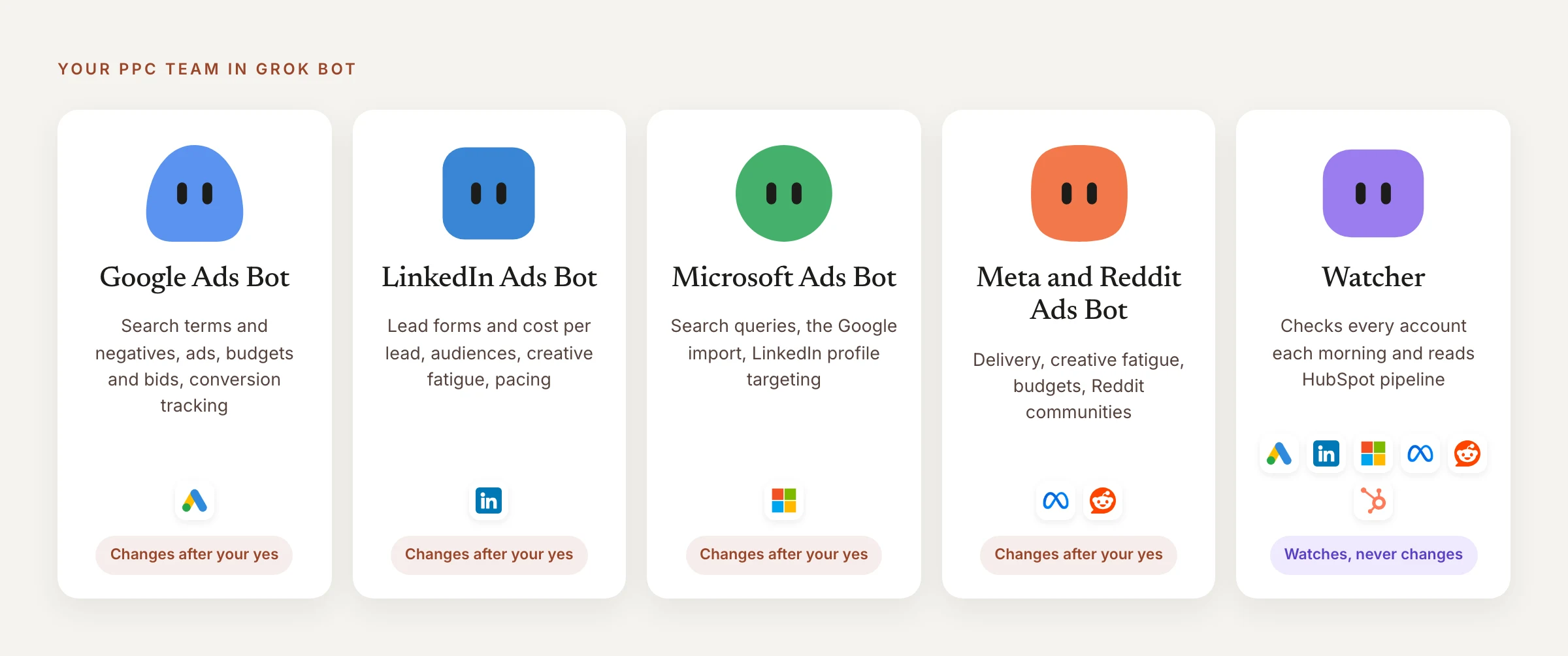
The Watcher reads on a schedule. The specialists make changes while you're in the chat, because an approval raised by a routine expires if nobody answers it (more in keeping changes safe).
Start smaller if your accounts are smaller. If you only run Google Ads, I'd begin with the Google Ads Bot and the Watcher, and add a specialist when another platform gets a real budget.
How to set up a PPC team in Grok Bot, step by step
Setting up a PPC team in Grok Bot takes eight steps, done in this order, and most of them are a message you paste. The detail for each connection and each Bot is further down.
- Connect your ad accounts to AdPlug. Create a free AdPlug account and connect each platform you run on the Connections page: Google Ads, LinkedIn Ads, Microsoft Ads, Reddit Ads, Meta Ads and HubSpot. The free plan covers one platform and can't make changes, so a five-Bot team needs a paid plan (see what it costs).
- Add AdPlug to Grok Bot. Send your primary Bot the three messages in connect once, one per connection, and approve each sign-in. Grok Bot shares connected apps between Bots, so the Bots you create next can use them too.
- Add the Ask first rule. In Grok Bot's settings, add a Custom Rule that puts any AdPlug tool that changes your ad accounts or HubSpot on Ask first, as keeping changes safe explains. It's the guard that doesn't rely on a Bot remembering its setup message, so it goes in before any Bot gets one.
- Ask your primary Bot to create the five. Grok Bot's guide to Bots says “Your existing Bots can also suggest or create a focused Bot”, so you can ask for the whole team in one message. Leave out any Bot you don't need, and the HubSpot part of the Watcher's message if you don't use HubSpot:
Prompt Create these Bots for my PPC work, with the names below. Send each one the message after its name as its first message, word for word. Then put them all in a group chat called PPC team. 1. Google Ads Bot: You're my Google Ads specialist. Use AdPlug for every Google Ads account I have. You own search terms and negatives, ads and assets, budgets and bids, and conversion tracking. Keep everything new paused and never switch on anything that's paused. Before any change, show me AdPlug's preview and wait for my yes. Only a yes from me counts, never one from another Bot. Remember all of this. 2. LinkedIn Ads Bot: You're my LinkedIn Ads specialist. Use AdPlug for every LinkedIn ad account I have. You own lead forms and cost per lead, audiences and their size, creative fatigue, campaign budgets and pacing, and what competitors run in the Ad Library. Keep everything new as a draft and never switch on anything that's paused. Before any change, show me AdPlug's preview and wait for my yes. Only a yes from me counts, never one from another Bot. Remember all of this. 3. Microsoft Ads Bot: You're my Microsoft Ads specialist. Use AdPlug for every Microsoft Advertising account I have. You own search queries and negatives, what Microsoft's Google import brought over or missed, LinkedIn profile targeting, share of voice and Audience Network placements. Keep everything new paused and never switch on anything that's paused. Before any change, show me AdPlug's preview and wait for my yes. Only a yes from me counts, never one from another Bot. Remember all of this. 4. Meta and Reddit Ads Bot: You're my paid social specialist for Meta Ads and Reddit Ads. Use AdPlug - Meta Ads for Meta and AdPlug for Reddit. You own ads that should be running but aren't, creative fatigue, budgets, and the Reddit communities and keywords that spend without converting. Keep everything new paused and never switch on anything that's paused. Before any change, show me AdPlug's preview and wait for my yes. Only a yes from me counts, never one from another Bot. Remember all of this. 5. Watcher: You watch all my ad accounts through AdPlug and AdPlug - Meta Ads, and HubSpot through AdPlug - HubSpot. Each morning, message me only what needs me: spend or conversions far from normal, ads that should be running but aren't, tracking gone quiet, rejected ads, landing pages that don't load. If nothing does, say so. You never change anything: tell me which Bot should look. Remember all of this. When you're done, list the Bots you created and what each one owns, and tell me anything you couldn't do.
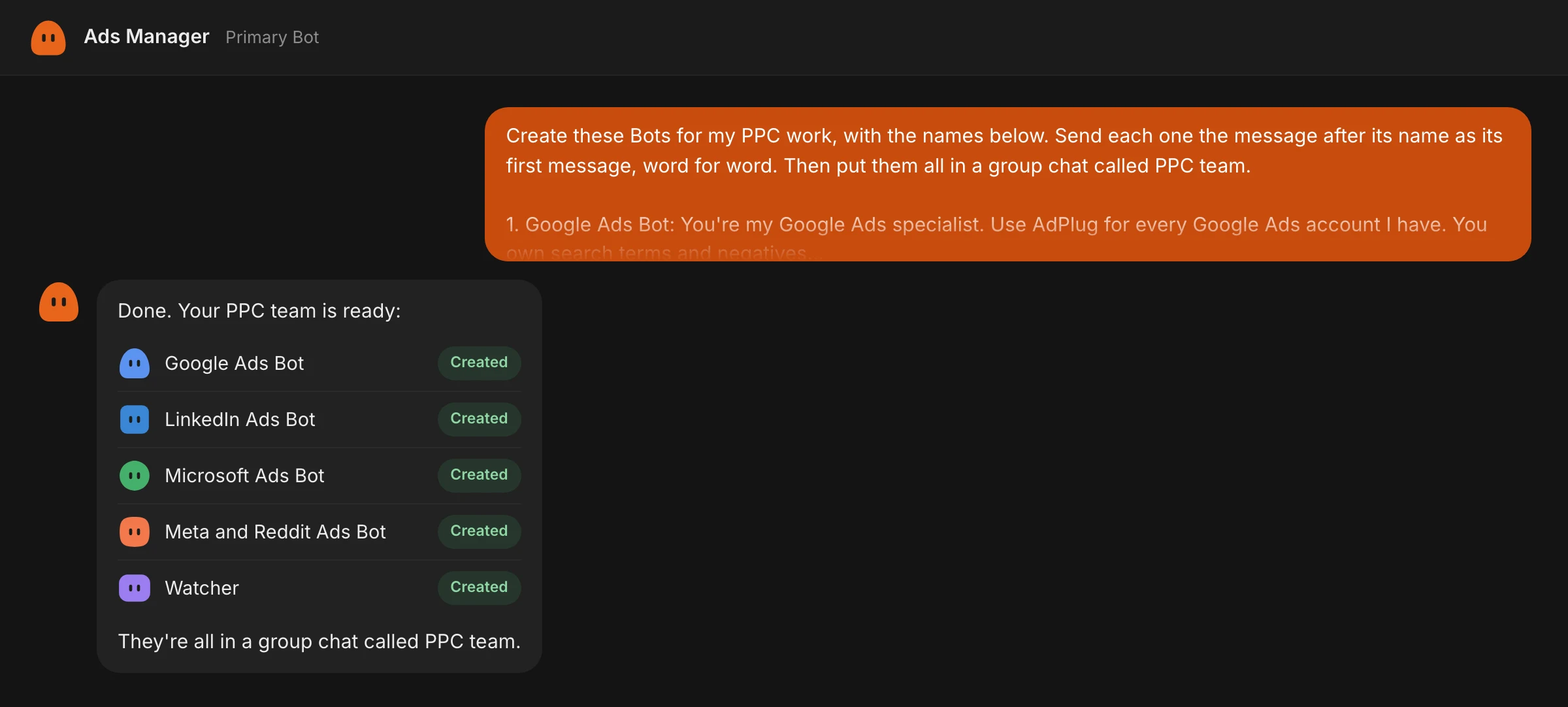
The reply to aim for: the primary Bot, here called Ads Manager, lists the five Bots and the PPC team group chat. Check each Bot in the next step. If it tells you it couldn't do part of it, do that part by hand. To create a Bot yourself, choose New Bot (the + at the top of the sidebar, or Create a Bot from that menu on a team), name it and choose Create, then send its setup message from its section below as your first message.
- Check each Bot knows its job. If your primary Bot created them, this is where you check its homework. Open each Bot and ask:
Prompt What's your job, which AdPlug connections do you use, and what are your rules for changes?
If a Bot gets any part of it wrong, paste its setup message again.
- Put the five in one group chat. Skip this if your primary Bot already made the PPC team group. Otherwise, choose New chat, or New group chat from the command palette, and add the five Bots in the To: field (a group holds two to six Bots). To call it PPC team, on desktop, right-click it in the sidebar and choose Rename chat. Grok Bot's chat docs say “Bots can post into the group and pass work among themselves”. When one Bot owns a request, type @ and pick it.
- Set the routines. In each Bot's own chat, paste its routines from its section below, one message each, and the Bot sets them up. A new routine waits for its next scheduled time, so on desktop, open each routine and choose Test to run it once now. A test does real work, which is fine here because every routine only reports.
- Do a first run. In the PPC team chat, ask the Watcher for a check:
Prompt @Watcher, run your morning check now and tag the Bot that should look at anything you find.
If it tags a Bot, open that Bot's own chat, tell it what the Watcher found and make any change there. Grok Bot's chat docs say approval requests don't appear in a group (more in the Watcher).
Connect once, and every Bot uses it
Grok Bot's apps are shared: a connected app is available to every Bot on your account, according to Grok Bot's computer and apps docs. So you add AdPlug once, not once per Bot.
SpaceXSI's own Grok Bot for Performance Marketing guide says paid media is “a lot of clicking around” and “there's no single API that covers all of it”, so its Bots work inside each platform the way a person would. This setup goes through the APIs instead, with four ad platforms behind one AdPlug address.
Three AdPlug connections cover all five Bots, and you add each one by sending any Bot a single message.
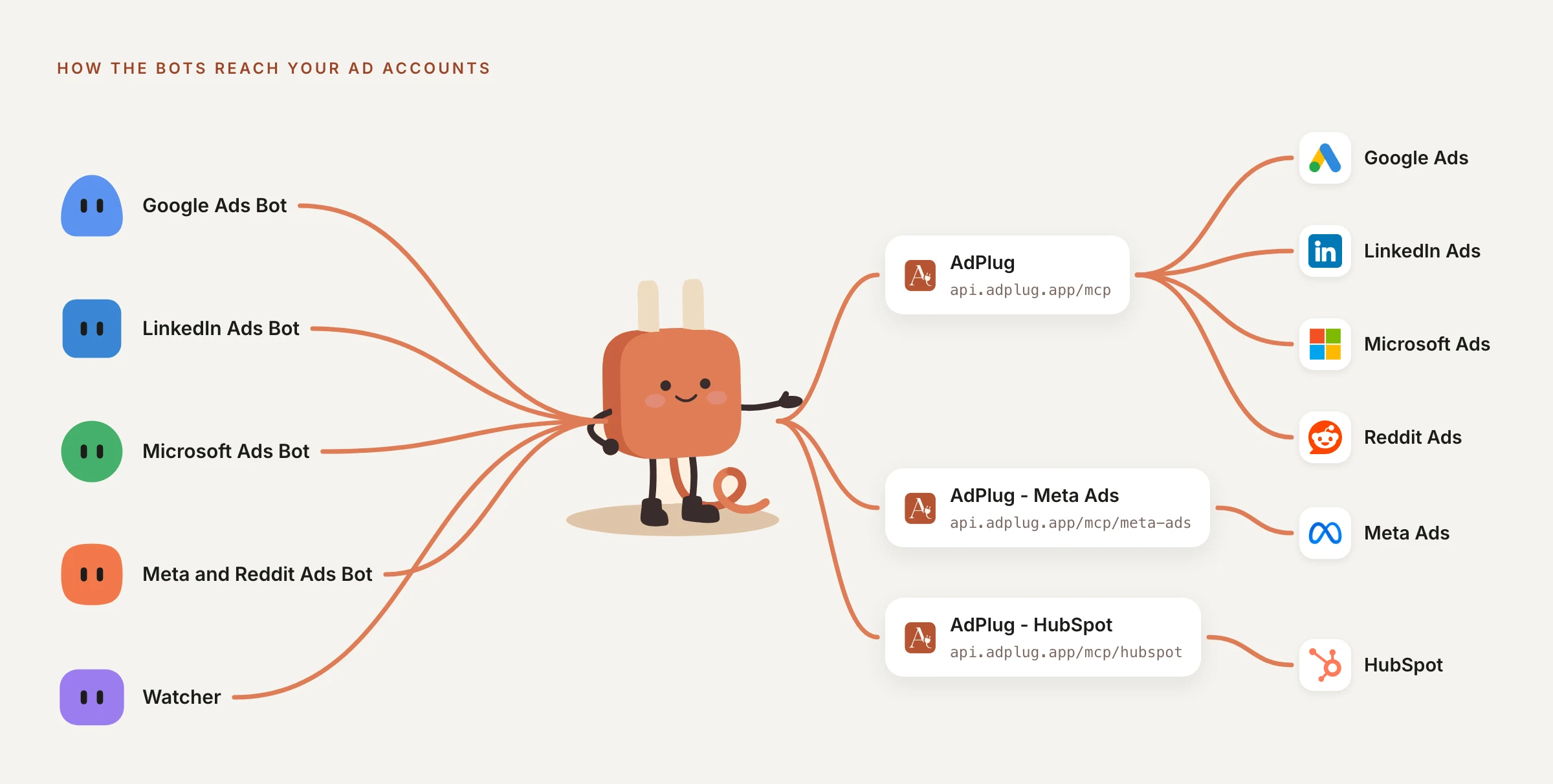
AdPlug: Google Ads, LinkedIn Ads, Microsoft Ads and Reddit Ads on one address.
Add a custom MCP server called AdPlug at https://api.adplug.app/mcp
AdPlug - Meta Ads: Meta Ads has its own address.
Add a custom MCP server called AdPlug - Meta Ads at https://api.adplug.app/mcp/meta-ads
AdPlug - HubSpot: one connection reaches every HubSpot portal you connect in AdPlug, on AdPlug's paid plans. The Watcher uses it to see the pipeline.
Add a custom MCP server called AdPlug - HubSpot at https://api.adplug.app/mcp/hubspot
Each message posts an Authorize card, and you approve AdPlug's sign-in in your browser. The guides have every step with screenshots: connect Google Ads to Grok Bot, connect LinkedIn Ads to Grok Bot and connect Meta Ads to Grok Bot.
The Google Ads Bot: run Google Ads with Grok Bot
The Google Ads Bot owns the jobs that fill a Google Ads week:
- Search terms and negatives, with the match type and level for each (the report we've all been meaning to get to since March).
- Ads and assets, including anything Google has disapproved.
- Budgets and bids, against the targets you give it.
- Conversion tracking, so a tag that stops firing doesn't pass for a bad week.
Its setup message:
You're my Google Ads specialist. Use AdPlug for every Google Ads account I have. You own search terms and negatives, ads and assets, budgets and bids, and conversion tracking. Keep everything new paused and never switch on anything that's paused. Before any change, show me AdPlug's preview and wait for my yes. Only a yes from me counts, never one from another Bot. Remember all of this.
And its routine:
Every Monday morning, list last week's Google Ads search terms that don't fit or spent without converting, with the negative, match type and level you'd use. Change nothing. When I pick, show me AdPlug's preview.
Approval rule: AdPlug won't run a Google Ads change that wasn't previewed, and a preview expires after 15 minutes. If you reply later, AdPlug tells the Bot to preview the change again first.
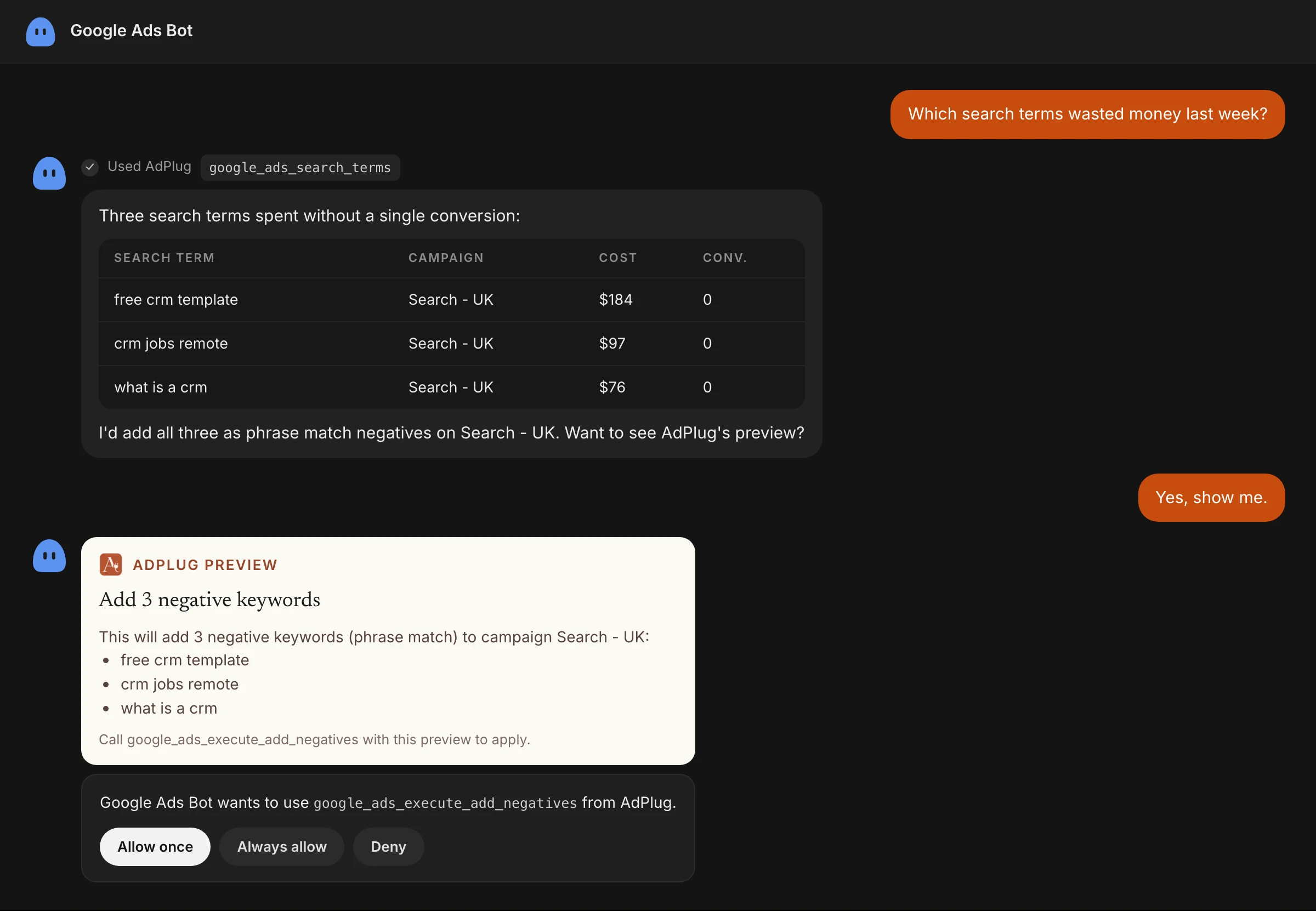
Full setup: connect Google Ads to Grok Bot. A good first job: the playbook for wasted-spend search terms into negatives.
The LinkedIn Ads Bot: manage LinkedIn Ads with Grok Bot
The LinkedIn Ads Bot owns the LinkedIn work that needs a weekly eye:
- Lead forms: completion rate and cost per lead, by campaign and ad set.
- Audiences and their size, checked before anything launches.
- Creative fatigue, campaign budgets and pacing.
- What competitors run in LinkedIn's Ad Library.
Its setup message:
You're my LinkedIn Ads specialist. Use AdPlug for every LinkedIn ad account I have. You own lead forms and cost per lead, audiences and their size, creative fatigue, campaign budgets and pacing, and what competitors run in the Ad Library. Keep everything new as a draft and never switch on anything that's paused. Before any change, show me AdPlug's preview and wait for my yes. Only a yes from me counts, never one from another Bot. Remember all of this.
And its routine:
Every Monday morning, compare lead form completion rate and cost per lead by LinkedIn campaign and ad set with the week before. Flag what changed and why, or say if there are too few leads to tell. Change nothing.
Approval rule: ask for AdPlug's preview before any LinkedIn change. The setup message makes that the Bot's habit, and has it keep anything new as a draft.
Full setup: connect LinkedIn Ads to Grok Bot. A good first job: the LinkedIn Ads performance recap.
The Microsoft Ads Bot: run Microsoft Advertising with Grok Bot
The Microsoft Ads Bot looks after Microsoft Advertising (Microsoft Ads, formerly Bing Ads). Some of its jobs mirror Google Ads, and some only exist on Microsoft:
- Search queries and negatives (Microsoft's name for search terms).
- What Microsoft's Google import brought over, and what it missed.
- LinkedIn profile targeting: which companies, industries and job functions convert on search.
- Share of voice, and placements on the Microsoft Audience Network.
Its setup message:
You're my Microsoft Ads specialist. Use AdPlug for every Microsoft Advertising account I have. You own search queries and negatives, what Microsoft's Google import brought over or missed, LinkedIn profile targeting, share of voice and Audience Network placements. Keep everything new paused and never switch on anything that's paused. Before any change, show me AdPlug's preview and wait for my yes. Only a yes from me counts, never one from another Bot. Remember all of this.
And its routine:
Every Monday morning, review last week's search queries and Audience Network placements, and propose negatives and exclusions. Don't apply them.
Approval rule: AdPlug shows a preview of any Microsoft Ads change whenever the Bot asks for one, and the setup message has it ask every time. New campaigns, ad groups and ads start paused.
Microsoft Ads comes through the AdPlug connection, and the Microsoft Ads MCP page covers what the Bot can do there. A good first job: the playbook for Microsoft Ads wasted-spend negatives.
The Meta and Reddit Ads Bot: run paid social with Grok Bot
The Meta and Reddit Ads Bot is the paid social specialist. On Reddit, the community and keyword reports do the job that search terms do on Google. It owns:
- Meta ads that should be running but aren't, and what's blocking them.
- Creative fatigue: frequency up, click-through rate down, cost per result up.
- Budgets, daily or lifetime, on the ad set or the campaign.
- Reddit communities and keywords that spend without converting.
Its setup message:
You're my paid social specialist for Meta Ads and Reddit Ads. Use AdPlug - Meta Ads for Meta and AdPlug for Reddit. You own ads that should be running but aren't, creative fatigue, budgets, and the Reddit communities and keywords that spend without converting. Keep everything new paused and never switch on anything that's paused. Before any change, show me AdPlug's preview and wait for my yes. Only a yes from me counts, never one from another Bot. Remember all of this.
And its routine:
Every Monday morning, flag Meta ads wearing out (frequency up, click-through rate down, cost per result up) and Reddit communities spending without conversions. Change nothing.
Approval rule: AdPlug shows a preview of any Meta or Reddit change whenever the Bot asks for one, and the setup message has it ask every time. Anything AdPlug creates on Meta or Reddit starts paused.
Full setup: connect Meta Ads to Grok Bot. Reddit Ads comes through the AdPlug connection, and the Reddit Ads MCP page covers what the Bot can do there.
The Watcher: one Bot that checks every channel
The Watcher is the cross-channel Bot. Each morning it reads every ad account through AdPlug and AdPlug - Meta Ads, messages you only about what needs you, and tells you which specialist should look. It runs on its own schedule and never changes anything, which is why it's a separate Bot.
With AdPlug's HubSpot MCP connected, the Watcher also sees what the ads created: leads, the lifecycle stage each reached, and the deals and deal value behind them.
Its setup message (leave out the HubSpot part if you don't use HubSpot):
You watch all my ad accounts through AdPlug and AdPlug - Meta Ads, and HubSpot through AdPlug - HubSpot. Each morning, message me only what needs me: spend or conversions far from normal, ads that should be running but aren't, tracking gone quiet, rejected ads, landing pages that don't load. If nothing does, say so. You never change anything: tell me which Bot should look. Remember all of this.
Its three routines. Every morning:
Each morning, message me only what needs me: spend or conversions far from normal, ads that should be running but aren't, tracking gone quiet, rejected ads, landing pages that don't load. If nothing does, say so.
Every Monday:
Every Monday morning, a short client-ready PDF across every platform: spend, conversions, cost per result and, where there's revenue, ROAS, each against the week before. Lead with what changed and why. Don't add the platforms' conversions together.
And every month, for B2B and sales-led SaaS:
At the start of each month, a PDF from HubSpot for last month: ad leads by platform and campaign, the lifecycle stage each reached, and the deals and deal value they created, next to each platform's spend.
Two lines in there matter more than they look. With “If nothing does, say so”, a quiet morning still gets a message, so silence means something went wrong. And because two platforms can claim the same sale, the weekly report keeps their conversions apart.
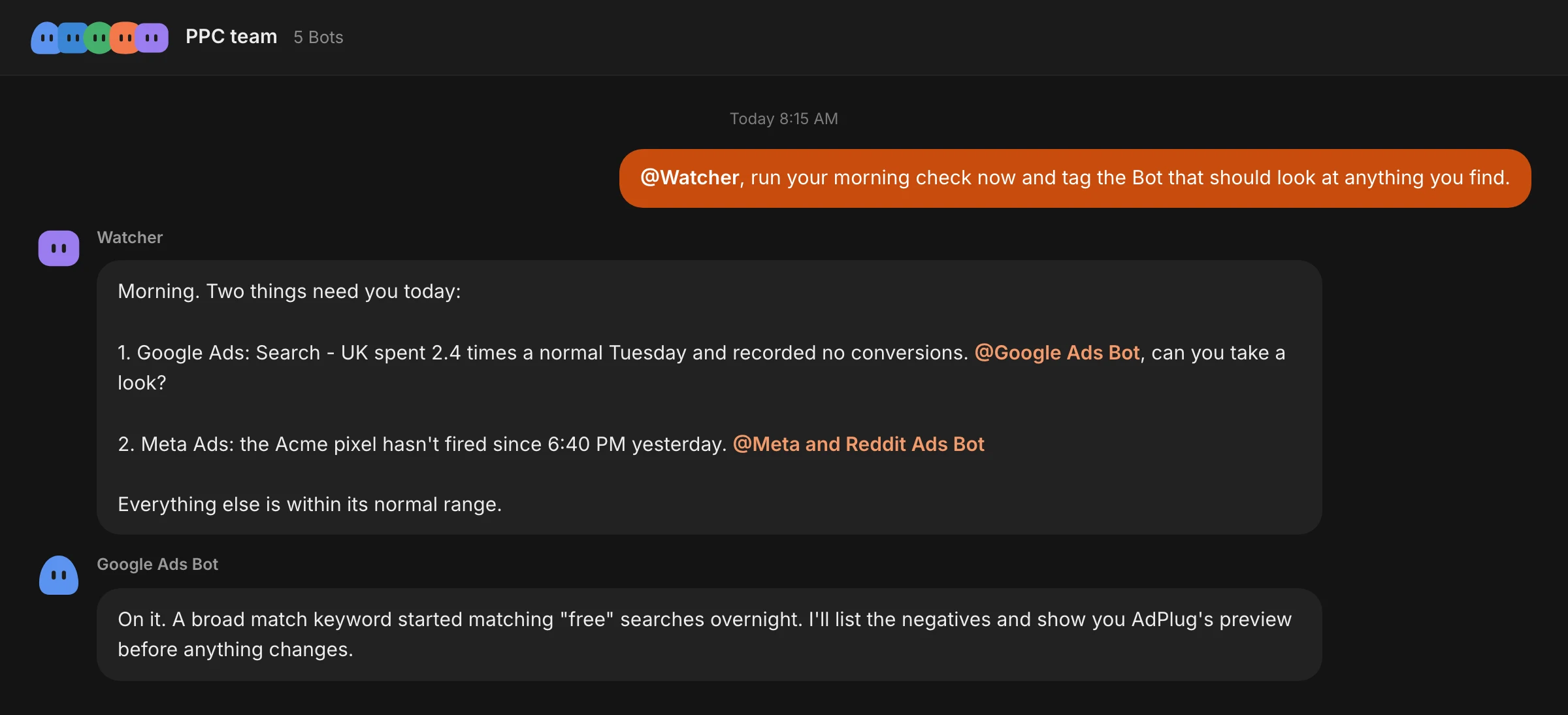
Grok Bot's routine docs show a routine's results in the Bot's own chat, so expect the morning check in the Watcher's chat. If you'd rather read it in the PPC team group, ask the Watcher to post it there when you set the routine up, then see where the next morning's run lands (a Test result shows in the Bot's own chat).
When a specialist picks something up, open its own chat and ask for the change there, so its approval card comes to you. Grok Bot's chat docs say approval requests don't appear in a group.
If the Watcher goes quiet after you've been away, check its routines. The routine docs also say Grok Bot may ask whether to keep routines running after a long period away, and pause them if nobody answers.
Approval rule: the Watcher never changes anything, and the Ask first rule in keeping changes safe stops it if it ever tries.
Good first jobs: ad spend against pipeline and revenue, which ad platform brings the best leads and the cross-platform weekly digest.
What each Bot focuses on: B2B lead gen, ecommerce and SaaS
The Grok Bots stay the same whatever you sell, except that a shop can skip the LinkedIn one. What each Bot watches changes with the number that matters: pipeline in B2B, sales in a shop and paying customers in SaaS.
| Bot | B2B lead gen | Ecommerce | SaaS |
|---|---|---|---|
| Google Ads Bot | Negatives from search terms (jobs, free, training) and cost per lead by campaign and keyword. | Shopping and Performance Max products that spend without selling, and ROAS by campaign and product. | Trial and demo sign-ups by keyword, and the competitor terms that convert. |
| LinkedIn Ads Bot | Lead form completion and cost per lead, and the job titles on your form leads. | Rarely worth it for ecommerce. Skip this Bot. | Account-based company lists, audience size before launch, founder posts as Thought Leader Ads once they approve. |
| Microsoft Ads Bot | Which companies, industries and job functions convert on search, through LinkedIn profile targeting. | Shopping campaigns from the Google import, and what didn't come across. | Share of voice on competitor and category terms. |
| Meta and Reddit Ads Bot | Meta cost per qualified lead from HubSpot, and Reddit keyword targeting on the problem you solve. | Creative fatigue, ROAS by ad set and placement, catalogues and product sets. | Meta cost per trial, Reddit communities your buyers read, and cutting those without sign-ups. |
| The Watcher | Ad leads by lifecycle stage in HubSpot, and deals by source. | Revenue each platform reports against Shopify's own orders (Shopify's app in Connect apps). | For sales-led SaaS: demos from each platform that became customers, through HubSpot deals. |
B2B lead gen
In B2B lead gen, the cheapest lead is rarely the one sales wants. HubSpot knows which form fills turned into deals, so the Watcher's monthly HubSpot report is the one I'd read first.
Have the LinkedIn Ads Bot read job titles from the form responses (if your form asks for them), because LinkedIn's job title reports leave out Lead Gen Form leads. And since all of this needs HubSpot to know where each lead came from (UTM tags, or ad accounts connected in HubSpot), ask the Watcher to check that before you trust the numbers.
Ecommerce
For a shop, skip the LinkedIn Ads Bot. The trap is trusting each platform's own ROAS, because each one will happily claim the same sale. Add Shopify's app in Connect apps and tell the Watcher to use it, and it can check what each platform reports against Shopify's own orders.
Meanwhile, the Google Ads Bot looks for products in Shopping and Performance Max that spend without selling, and the paid social Bot watches creative fatigue, catalogues and product sets.
SaaS
In SaaS, a trial or a demo isn't a customer yet. So the Bots track sign-ups by keyword, campaign and community, and in sales-led SaaS the Watcher follows each demo through HubSpot deals.
Competitor terms get extra attention: the Google Ads Bot checks which ones convert, and the Microsoft Ads Bot watches share of voice on them. On LinkedIn, founder posts can run as Thought Leader Ads once the founder approves them. Counting Reddit sign-ups needs the Reddit Pixel or Conversions API in place.
What you still do yourself
A connected Grok Bot takes on a lot of the weekly work, but a few jobs stay with you, mostly because of what the platforms' APIs allow:
- Auction Insights. Google keeps it out of the Google Ads API for almost every tool, so ask the Google Ads Bot for impression share instead, and open Auction Insights in Google Ads when you need competitor names.
- Job titles on LinkedIn leads. LinkedIn's job title and seniority reports leave out Lead Gen Form leads, so read job titles from the form responses.
- Thought Leader Ads. The post's author approves sponsorship in Campaign Manager first. After that, the LinkedIn Ads Bot can build the ad.
- Competitors on Meta. Meta's Ad Library API only returns a competitor's everyday ads if they ran in Europe, so a Bot searching through AdPlug won't see a US-only advertiser. Open the Ad Library in your browser for those, since it shows every advertiser's active ads.
- Saying yes. The Bots prepare changes, and you approve each one.
Keeping Grok Bot's changes safe
Grok Bot can change your campaigns once AdPlug is connected on a paid plan, so this setup puts several guards in the way.
Routines only report
Grok Bot's routines run in the cloud while your laptop is closed. An approval raised by a routine expires after 30 minutes if nobody answers it, and the action doesn't run, according to Grok Bot's approvals docs. So every routine here ends at a report, and the Bot builds AdPlug's preview when you reply.
Every specialist carries the same line
Each specialist's setup message says to keep everything new paused and never to switch on anything that's paused. Turning things on stays your job.
Ask first for AdPlug's changes
AdPlug splits almost every change into a preview and an execute step. In Grok Bot, open Settings, then General, check that Auto-review is on in the Bot section, and open Custom Rules. Describe the action in plain words, such as “any AdPlug tool that changes my ad accounts or HubSpot, including bulk uploads and conversion events”, and choose Ask first. That catches AdPlug's execute steps, Microsoft Ads bulk uploads, LinkedIn conversion events and HubSpot changes. Do the same for any other connected app that can make changes (check Shopify's, if you added it).
Grok Bot's docs say “Ask first rules always stop matching actions”, and Ask first wins when an Allow rule matches too. Keep AdPlug's change tools on Ask first, never Always allow, which saves a rule that lets similar actions run on their own.
AdPlug's previews, platform by platform
| Platform | Before a change | Anything new |
|---|---|---|
| Google Ads | AdPlug refuses a change that wasn't previewed, and the preview expires after 15 minutes | Paused, as the setup message says |
| LinkedIn Ads | Ask for the preview first. The setup message makes it the Bot's habit | A draft, as the setup message says |
| Meta Ads | A preview whenever you ask | Starts paused |
| Microsoft Ads | A preview whenever you ask | Starts paused |
| Reddit Ads | A preview whenever you ask | Starts paused |
Teammates and the audit log
On AdPlug's Max and Agency plans, the team owner sets each teammate to View only or Can edit, platform by platform, and AdPlug enforces it on every request made with that teammate's own AdPlug login. A shared Grok Bot uses its owner's AdPlug login instead, so it doesn't follow that setting (see Grok Bot for PPC agencies). Every report call and every executed change lands in AdPlug's Usage and Audit Log, so you can see what your Bots did overnight.
Grok Bot for PPC agencies
Grok Bot works for agencies, with two boundaries to think about first: what your Bots share, and who you share a Bot with.
- Group Bots by client. Grok Bot's sidebar sections group Bots by project, client or business.
- Know what's shared. Every Bot on your account shares one cloud computer, its logins and every connected app, and Grok Bot's docs call the Bots' screens “separate work surfaces, not separate security boundaries.” So a Bot set up for one client can reach every client account your AdPlug connection reaches. Name the client's accounts in each setup message, and check that fits your client contracts.
- Sharing Bots with teammates. Grok Bot's shared Bots docs say “A shared Bot uses the apps and secrets its owner added. Those work the same for everyone who chats with it.” So a teammate chatting with your shared Bot uses AdPlug through your AdPlug login, with your access, and their View only setting in AdPlug doesn't apply. They also answer its approval cards themselves, and Grok Bot's approvals docs say personal rules, like your Ask first rule, apply only to you. A Cursor team admin's team rules always apply. Don't share a Bot that has AdPlug with someone who should only view. Have them set up their own Bots and add AdPlug signed in as themselves.
- One HubSpot connection for every client. AdPlug's HubSpot MCP reaches every client portal you connect: 3 on Pro and 10 on Max and Agency. HubSpot's own app in Connect apps works with one HubSpot account.
- Several Google logins. AdPlug connects up to 3 Google accounts on Pro and 5 on Max and Agency, behind the same address, and every plan includes unlimited ad accounts.
Grok Bot templates for PPC
A Grok Bot template shares a Bot's instructions, skills and routines. You choose Share, then Create a copy, publish it and send the link, and the person who opens it chooses Add to Grok Bot.
The catch for PPC is that custom MCP servers don't travel. SpaceXSI's Templates for Grok Bot guide (8 September 2026) says “If there are non-standard plugins like MCP servers or other scripts or code, those also aren't included in the template bot.” So a template can't bring AdPlug with it (a new hire with no logins, basically). That's why this page gives you setup messages to paste instead.
Grok Bot's Marketplace has ads templates that work from the exports you hand them:
- Paid Media Report Desk “turns your Google Ads, Meta, and LinkedIn exports into one weekly report”.
- Ad Spend Watch flags spend and performance problems from an export you paste in.
- Marketing Analyst is a Google Ads-first analyst that “turns exports into weekly and monthly reports”.
They're a fair start if exports are all you have. With a connection, the same jobs run on live numbers.
What a PPC team of Grok Bots costs
Grok Bot comes with The X Subscription on Premium, Super and Ultra, for individuals and team seats, but not on Plus or Free. Some older routes still work, such as legacy Cursor plans and linked SuperGrok or X Premium+ subscriptions. Grok Bot's plans page has the current terms. On The X Subscription, your Bots draw on the same weekly usage pool as the Grok apps, so a busy Watcher and a long Grok chat share one allowance.
AdPlug's plans, checked on 28 October 2026:
| Plan | Price | What you get |
|---|---|---|
| Free | $0 | One platform, view only. 500 requests in your first 5 days, then 50 a month |
| Pro | $29 a month | 5,000 AI requests and 200 AI edits a month, every platform, HubSpot for 3 portals, up to 3 Google accounts |
| Max | $89 a month | Unlimited requests and edits, HubSpot for 10 portals, 3 team members, up to 5 Google accounts |
| Agency | Custom | Unlimited requests and edits, HubSpot for 10 portals, per-seat pricing |
Five Bots on five platforms need a paid AdPlug plan, because the free plan covers one platform and can't make changes. Every routine run uses AdPlug requests, and so does every question you ask, so after the first five days the free plan's 50 requests a month won't keep a daily Watcher going. Max takes the count away and adds team members. The pricing page has the details.
Grok Bot or Claude for PPC?
You don't have to choose between Grok Bot and Claude. Both reach your ad accounts through a connector, so with AdPlug connected they read the same numbers and make the same previewed changes, from one AdPlug account. Claude is where I'd do the thinking, like an audit or a client report. Grok Bot is built around Bots that keep working on their own, so it's where I'd park the morning checks. The full comparison is in Claude Duet vs OpenAI Dots, Grok Bot and Meta Muse.
Ways to connect Grok Bot to your ad accounts
Grok Bot can reach an ad platform in three ways, and Grok chat on grok.com is a fourth route if you'd rather ask than run Bots. Grok Bot's docs say a connected app is more reliable than clicking through a website when one exists.
| Route | What the Bot gets | Fits |
|---|---|---|
| The Bot's browser | Any platform's interface, after you sign in on the Bot's cloud computer | One-off checks, and screens no API reaches |
| Apps in Connect apps | Cursor's Google Ads app, and a Meta Ads app that runs on Meta's own server, may show there, each for one platform. HubSpot's app covers one portal, and Shopify's app reads orders, products and sales. There's no official LinkedIn Ads, Microsoft Advertising or Reddit Ads app | One platform on its own |
| AdPlug | Google Ads, LinkedIn Ads, Microsoft Ads and Reddit Ads on one address, Meta Ads and HubSpot on their own, previews before changes, and the same AdPlug account in Claude and ChatGPT | A team of Bots across several platforms |
| Grok chat | The same AdPlug addresses, added as connectors on grok.com | Questions in a chat, rather than Bots that run on their own |
What each ad app does, in its own listing: Cursor's Google Ads app and the Meta Ads app on Meta's server.