Hermes Agent for Google Ads: connect it in 3 steps, plus 10 prompts and 5 routines
Quick answer: Hermes Agent, the open-source AI agent from Nous Research, can check and report on your Google Ads accounts and make the changes you approve, once you connect Google Ads to it with AdPlug. Setup takes three steps: install AdPlug's Hermes plugin, add AdPlug's Google Ads server with one command and sign in, then connect Google Ads in AdPlug. AdPlug refuses any Google Ads change that wasn't previewed, and with trust: untrusted on the server, Hermes asks before any change runs, so the scheduled routines can only read and report.
The skills Hermes uses here are how I run my clients' Google Ads, written down after 12 years in PPC and over $100M in ad spend: the morning check, the Monday search terms, an audit on every new account. I also built AdPlug, so weigh what I say about it accordingly.

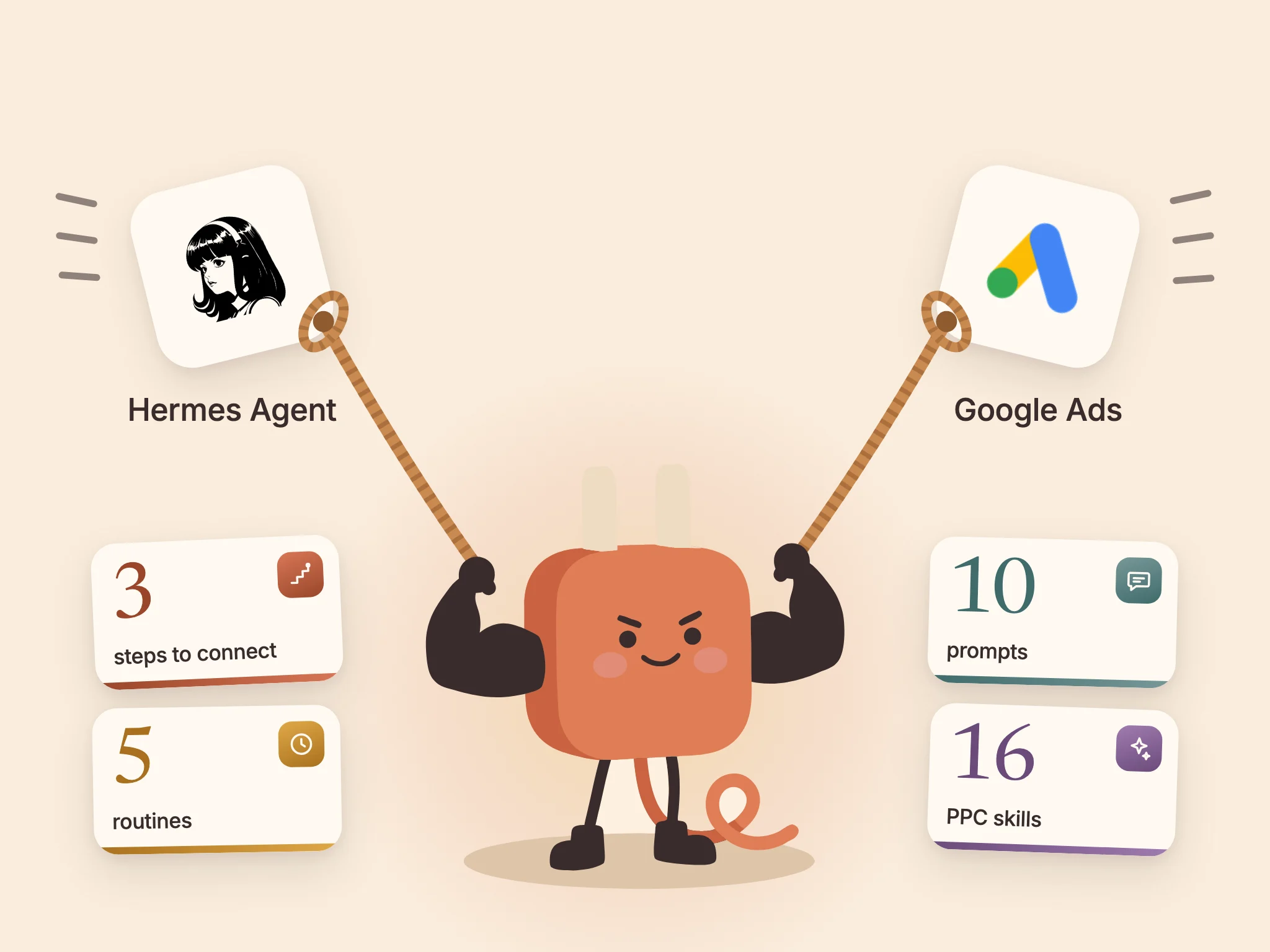
Hermes Agent can take on the Google Ads jobs nobody fights over, starting with the Monday search terms.
Yes, the 8,000 you've been “getting to” since March. Then the morning check and the client report that's due by 9am, each on its own schedule, sent to Telegram or Slack after you've closed the chat.
That last bit is what makes PPC people nervous. Google has already taught most of us to dread overnight changes (auto-applied recommendations, mostly). With the setup on this page, the scheduled jobs only read and report, and nothing changes until you've seen AdPlug's preview and said yes.
Connect Hermes Agent to Google Ads in 3 steps
You need Hermes Agent 0.21.6 or later (see Hermes' install guide) and a Google login with access to your Google Ads accounts, directly or through a manager account (MCC).
- Install AdPlug's plugin. In a terminal where Hermes runs:
hermes plugins install adplug-app/adplug-hermes-plugin --enableThat's 16 PPC skills: how I run accounts, written down, with no code or scripts (public repo on GitHub).
- Add AdPlug's Google Ads server and sign in.
hermes mcp add adplug-google-ads --url https://api.adplug.app/mcp/google-ads \ --auth oauth --connect-timeout 300A browser tab opens on AdPlug's sign-in. Sign in (or create a free account), click Approve, then answer Y to enable the 17 tools. No API key or Google Cloud project.
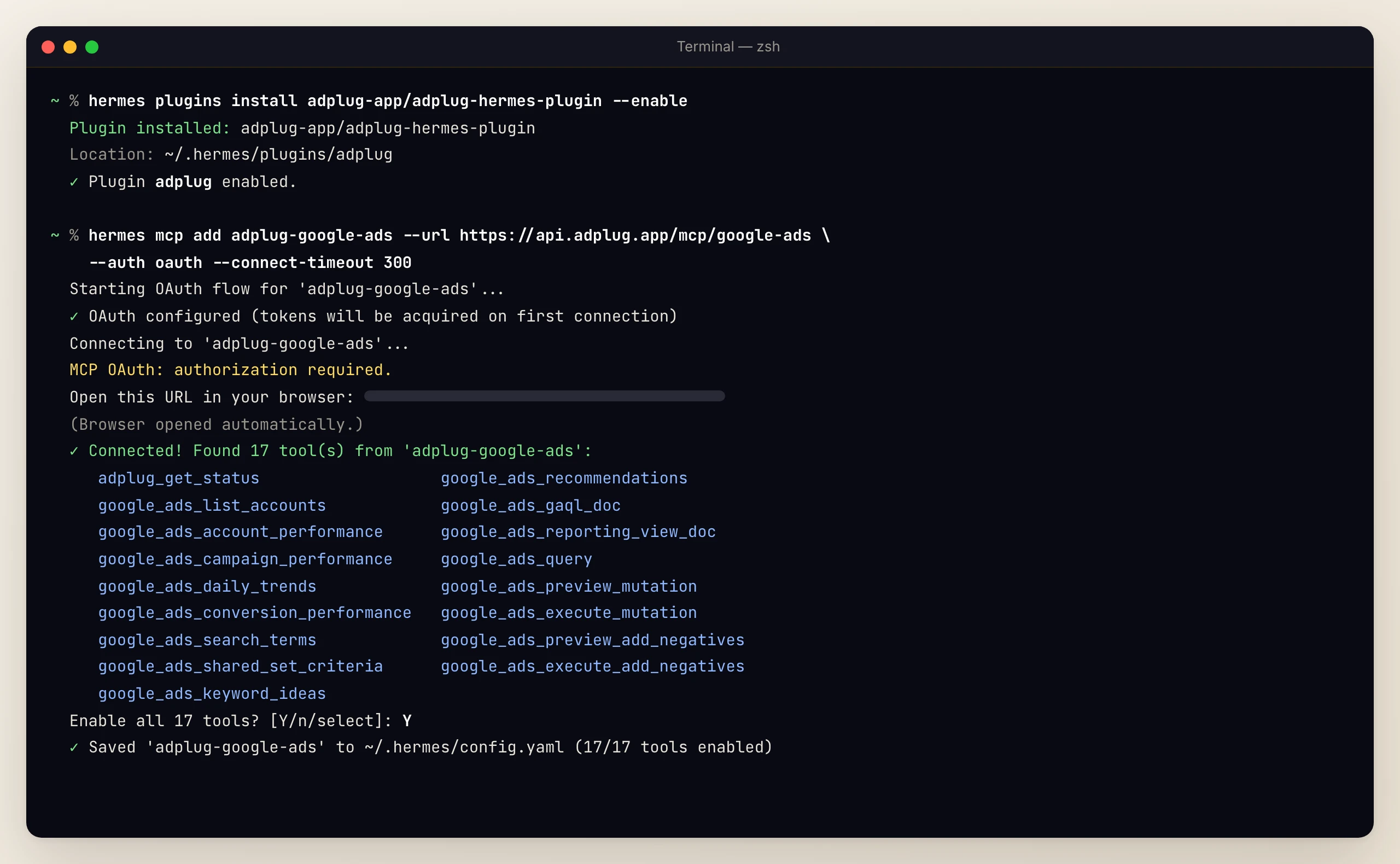
Steps 1 and 2 in one terminal: the plugin installed, then one sign-in, 17 Google Ads tools and the server saved. - Connect Google Ads in AdPlug. On the Connections page, sign in with that same Google login.
Then type /reload-mcp in Hermes and ask which Google Ads accounts it can see. If it lists them by name, you're connected.
Before you ask for any change, add trust: untrusted to the server so Hermes asks you first. It's one line, shown under how Google Ads changes stay safe.
On a server or VPS with no browser, add the entry to ~/.hermes/config.yaml yourself, run hermes mcp login adplug-google-ads and follow Hermes' OAuth over SSH guide.
Running Meta Ads or LinkedIn Ads too? Add https://api.adplug.app/mcp as adplug instead, which carries Google, Meta, LinkedIn, Microsoft and Reddit Ads (see Hermes Agent for marketing). Don't add both, or Hermes sees every Google Ads tool twice.
10 Google Ads prompts I'd start with
Anything that changes the account stops at AdPlug's preview, and the rest of what AdPlug can do (more than 170 kinds of change) is on the Google Ads MCP page.
Every morning
1. The morning check. The one I'd never skip, because a tag that stops firing looks exactly like a bad week.
Morning check on my Google Ads: spend, clicks and conversions against a normal day, campaigns that stopped spending or converting, tracking gone quiet, disapproved ads and landing pages that don't load. Flag only what needs me.
Search terms and negatives
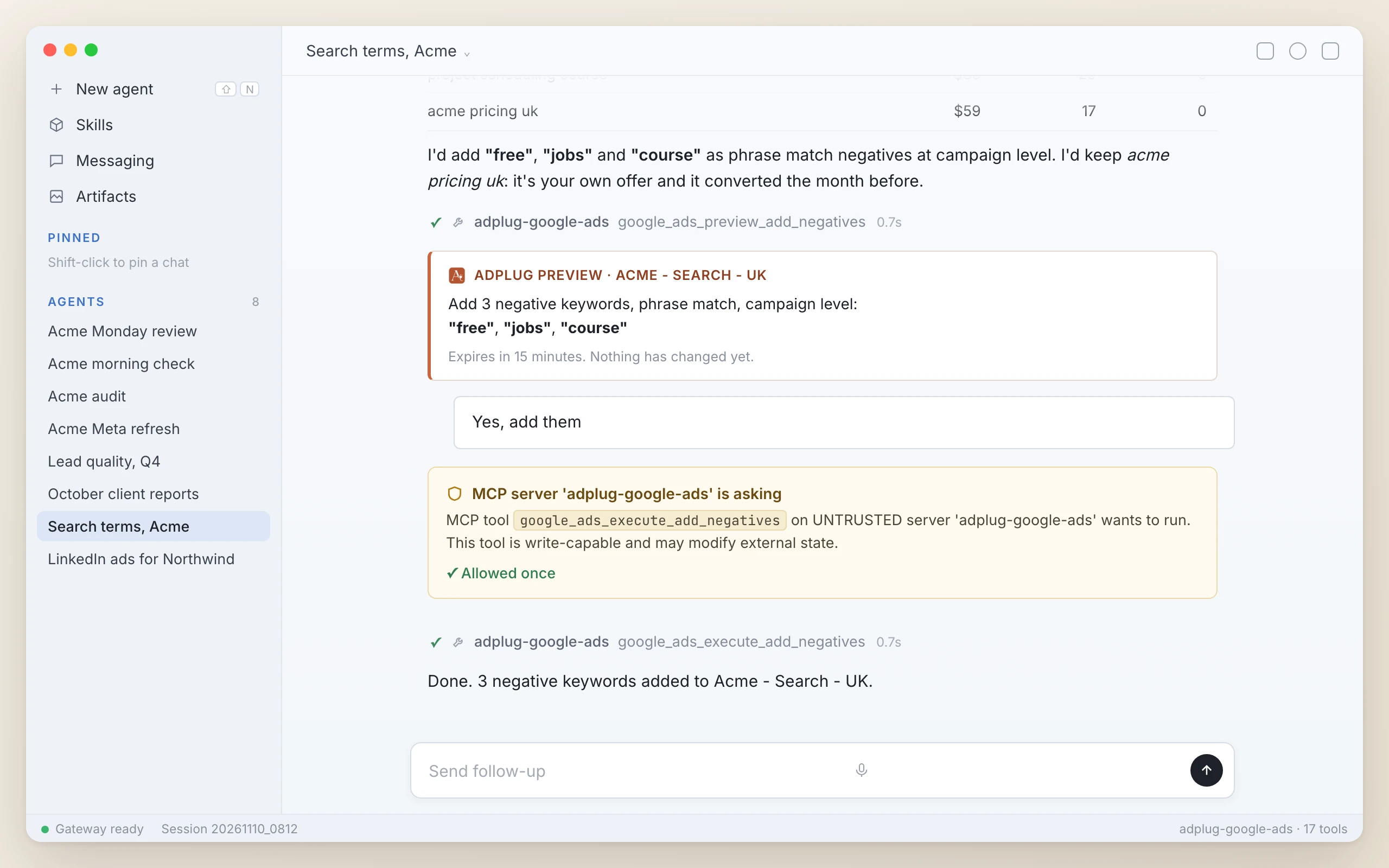
2. Search terms into negatives. The plugin has Hermes check tracking first, so a broken tag doesn't make every search term look like wasted spend.
Which search terms spent enough to judge without converting, or don't fit what we sell? Propose negatives with the match type and level, and show me the preview first.
3. Converting search terms that aren't keywords. Phrase or exact only. Broad match is the last stage, and not worth it for most accounts.
Which search terms convert but aren't keywords yet? Suggest each one as a phrase or exact match keyword in the right ad group, and show me the preview first.
Performance Max
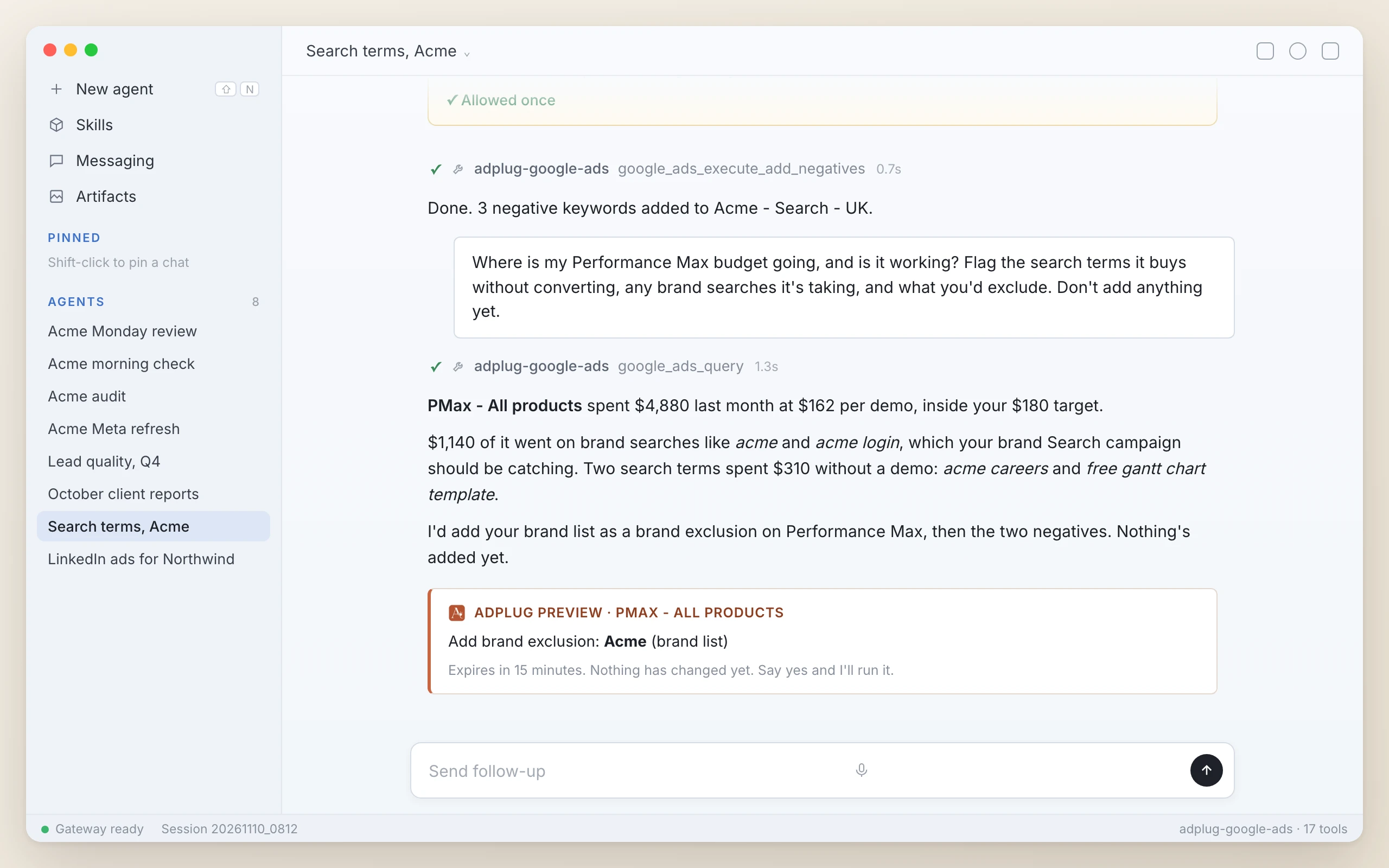
4. Where Performance Max spends. Left alone, Performance Max can show on your own brand searches, which your brand Search campaign should be catching. Brand searches usually convert cheapest, so mixed in with the rest they flatter its cost per conversion (the brand exclusions playbook has the fix).
Where is my Performance Max budget going, and is it working? Flag the search terms it buys without converting, any brand searches it's taking, and what you'd exclude. Don't add anything yet.
Responsive search ads
5. New responsive search ads. Written from each ad group's keywords and landing page, with my rules for pins and keyword insertion:
- Brand ad groups: the brand pinned to headline 1, no keyword insertion.
- Generic ad groups: keyword insertion, no pins.
- Competitor ad groups: neither, or keyword insertion puts their name in your ad.
Which ad groups in my Search campaigns have the weakest responsive search ads? Write a challenger for each from its keywords and landing page, and show me the preview first.
Budgets and pacing
6. Pacing. One heavy day isn't a fault. Google can spend up to twice the average daily budget in a day, but for most campaigns it bills no more than 30.4 times that budget in a month.
Which campaigns will overspend or underspend this month, and which are losing impression share to budget while beating their target?
Audits and reports
7. An audit. It's the checklist I go through on every account I take on. It audits against the client's brief, so ask for adplug:client-brief first.
Audit Acme's Google Ads against the brief: tracking, structure, settings, search terms, ads and bidding. Rank what you find by severity, with a week-by-week plan to fix it.
8. The monthly client report. A PDF, never a spreadsheet, for you to read before it goes anywhere near the client.
Build a client-ready PDF report on last month's Google Ads: a short summary, results against target and the month before, the insights behind them, and what changes next.
Leads, with HubSpot
Prompts 9 and 10 need AdPlug's HubSpot MCP in Hermes too (paid plans), added the same way:
hermes mcp add adplug-hubspot --url https://api.adplug.app/mcp/hubspot \
--auth oauth --connect-timeout 3009. Keywords that create pipeline. A keyword can look cheap per lead and never create a deal.
Which Google Ads campaigns and keywords created deals in HubSpot, and which spent without creating any? Say which recent months are too young to judge.
10. Qualified leads back to Google Ads. They give Smart Bidding something better to chase than form fills. Each lead needs a stored click ID (usually the GCLID), and Hermes warns you before sending UK and EEA leads (Google expects consent signals AdPlug's upload doesn't carry).
Find last month's qualified leads in HubSpot that came from Google Ads, check no Google Ads conversion action already imports them, and preview the offline conversion upload.
5 Google Ads routines for Hermes Agent
A routine is a job Hermes runs on a schedule, with its built-in cron. These five end with “Change nothing”, so they read, report and leave every change for you in a chat.
| Routine | When |
|---|---|
| 1. Morning check | Weekdays, 8am |
| 2. Search terms | Mondays, 8am |
| 3. Weekly review and pacing | Mondays, 9am |
| 4. Client report | The 1st of each month, 9am |
| 5. Audit and growth | 1 Jan, Apr, Jul, Oct, 10am |
Paste one into Hermes in Telegram or Slack and it reports back to that chat. Each run starts with no memory of your chat, so the prompt names the client (swap Acme for yours).
Every weekday at 8am, check Acme's Google Ads: spend, clicks and conversions against a normal day, campaigns that stopped spending or converting, tracking gone quiet, disapproved ads and pages that don't load. Message me only what needs me. If nothing does, say so. Change nothing.
Every Monday at 8am, find Acme's Google Ads search terms, Performance Max included, that spent enough to judge without converting. Give the negative, match type and level you'd use. Change nothing. I'll pick in chat.
Every Monday at 9am, review Acme's Google Ads: last week against the week before, what moved and why, pacing for the month, and what you'd change next. Change nothing.
At 9am on the 1st of each month, build Acme's client-ready PDF report on last month's Google Ads: a short summary, results against target and the month before, the insights behind them, and what changes next. Change nothing.
At 10am on the 1st of January, April, July and October, audit Acme's Google Ads against the brief and size the growth opportunities that matter most. Change nothing.
Or from the terminal, with the morning check going to Telegram:
hermes cron create "0 8 * * 1-5" "Google Ads morning check for Acme: message me only what needs me. If nothing does, say so. Change nothing." --skill adplug:ppc-agent --skill adplug:performance-review --name "Acme morning check" --deliver telegramKeep --deliver, or a terminal job only saves to a file. Hermes' gateway runs the schedule, so start it once (hermes gateway install, then hermes gateway start). Every run uses AdPlug requests, so match the schedule to the money at stake.
Google Ads manager accounts (MCC) and agencies
One Google sign-in in AdPlug reaches every account under your manager account, and AdPlug works out which manager account to go through for each one. Clients under different logins? Pro connects up to 3 Google logins, Max and Agency up to 5, with unlimited ad accounts on every plan.
The plugin's adplug:client-brief skill keeps one brief per client (goal, targets, budget, brand voice, competitors, which accounts are theirs), and every skill reads it first, scheduled runs included.
On Max and Agency, the team owner sets each teammate to View only or Can edit for Google Ads, and each one signs Hermes in as themselves. The agency morning digest is in the marketing guide's routines.
How Google Ads changes stay safe
AdPlug refuses any Google Ads change that wasn't previewed. Hermes shows you the account and exactly what will change, then waits for your yes (the preview is the part that lets me sleep).
A preview expires after 15 minutes, so if you say yes later, Hermes previews it again. New campaigns, responsive search ads, Demand Gen ads and asset groups start paused. Ad groups, keywords and assets added to a live campaign go live on your yes, and the plugin has Hermes tell you so before you answer.
Then add Hermes' own check, one line on the server's entry:
mcp_servers:
  adplug-google-ads:
    url: https://api.adplug.app/mcp/google-ads
    auth: oauth
trust: untrustedAfter /reload-mcp, Hermes asks before any tool that can change something, and reading and previews run as before. When it asks, pick Once, never Always, and leave /yolo off. Hermes' own MCP config reference suggests untrusted for any server you don't fully control.
A scheduled run has nobody there to answer, so with that line set (and Hermes' cron approvals left on their default, deny), Hermes refuses the change rather than make it.
Two yeses for one change sounds like a lot. On a client's account, I'd take the extra click every time.
The free plan can't apply changes, and every call lands in AdPlug's Usage and Audit Log. The rest is in the safeguards on every platform.
What Hermes can't do in Google Ads
- Auction Insights. Google's API doesn't offer it. Ask for impression share lost to budget and rank, and open Google Ads for competitor names.
- Video campaigns. The API can't create or change them, so Hermes reports on yours and builds YouTube ads as Demand Gen.
- Some settings. AdPlug reads AI Max on Search, automatically created assets and final URL expansion, but you switch those in Google Ads.
What it costs
Hermes Agent is free and open source, and you pay your model provider.
AdPlug's free plan covers one ad platform, so Google Ads alone, view only, with 500 requests in your first 5 days and then 50 a month. Pro ($29 a month, 5,000 requests, 200 edits) and Max ($89 a month, unlimited) both start with a 7-day free trial (checked 10 November 2026, see pricing).
A daily check soon outgrows the free plan, and applying changes needs a paid one.