Meta Ads MCP servers compared: what each one can change
Quick answer: A Meta Ads MCP server connects Claude, ChatGPT or another AI to your Meta ad account, so it can read your results and, on most servers, make changes. AdPlug (my product) suits client accounts and anyone running Meta next to other ad platforms: unlimited ad accounts on every plan, new campaigns created paused, and AdPlug tells your AI to preview each change. Meta's official Ads MCP server is fine for a solo advertiser with an account or two, and its draft mode keeps most changes in Ads Manager until they're published. Pipeboard, Ryze AI, AdKit and GoMarble differ most in how a change gets approved and what you pay per account.
I've spent 12 years in PPC and managed over $100M of ad spend, and I built AdPlug, one of the six servers here.


Most guides to Meta Ads MCP servers stop at how to connect one.
This one is about what comes after: what each server can change in your ad account, and what stands between your AI and a live budget.
I've had all six connected to live ad accounts, and I checked every price on each vendor's own page on 8 November 2026. Here's what each one reads, what it can change, what it costs, and who I'd give it to.
Meta Ads MCP explained in 60 seconds
MCP, the Model Context Protocol, is the open standard Anthropic released in November 2024. It lets an AI app such as Claude or ChatGPT use tools inside other software. I think of it as a plug socket for AI (I'm biased about plug metaphors, for obvious reasons).
A Meta Ads MCP server is the adapter between that socket and Meta's Marketing API. You ask which ad sets spent money last week with nothing to show for it, your AI calls the server, the server asks Meta, and the answer comes from Meta's own numbers rather than the model's memory.
You'll also see it called a Meta MCP or a Facebook Ads MCP. Same thing: Facebook and Instagram ads both run from one Meta ad account.
All six servers here can read. They differ on what they can change, and on what has to happen before a change reaches a live campaign.
Judge a Meta Ads MCP server the way you'd judge a new freelancer's access: by what it can change, and who signs off first.
The short answer
- You run client accounts, or Meta next to other ad platforms: AdPlug, which I built. Unlimited ad accounts on every plan, new campaigns created paused, and AdPlug tells your AI to preview each change before it runs.
- You're a solo advertiser with one or two smaller accounts: Meta's official Ads MCP server, if Meta has switched it on for your account. It reads well, and with draft mode on it saves changes as drafts in Ads Manager.
- You run a handful of your own accounts, mostly on Meta: Pipeboard. It does the job and stays cheap until the account count climbs.
- You want a drafts queue between the AI and the account: AdKit, switched to Draft only.
- You're new to paid ads and want the AI to follow a set structure: Ryze AI.
- You want analysis and never changes: AdPlug's Free plan, which reads unlimited ad accounts on one platform for $0, or GoMarble's Copilot plan, which can't touch a live campaign.
If the accounts belong to clients, pick a server that shows you each change before it goes live.
Meta Ads MCP servers side by side
| Meta Ads MCP server | Ad accounts and cost | Write access | Read access |
|---|---|---|---|
| AdPlug (mine) | Unlimited ad accounts on every plan. Free plan read-only on one platform, Pro $29/mo, Max $89/mo | 37 kinds of change, everything new created paused. AdPlug tells your AI to preview each change, and Claude and ChatGPT ask for your OK | Ten report types with conversions and purchase ROAS, delivery check, targeting search, Ad Library. Google, LinkedIn, Microsoft and Reddit Ads on the same connector on paid plans |
| Meta's official Ads MCP server | Only ad accounts Meta has switched on. No price listed during the open beta | Campaigns, ad sets, ads, creatives, audiences, catalogues, pixel rules, tests. In draft mode, saved as Ads Manager drafts until published. A pause applies at once | Spend and results, an opportunity score, delivery errors, Event Match Quality, Ad Library, benchmarks against peers |
| Pipeboard | 2 ad accounts free, then 3, 10 or 25 by plan, plus $10/mo per extra account. Free has 30 AI tool runs a week. Pro $29.90/mo, Premium $99/mo, Agency $199/mo | Creates campaigns, ad sets and ads (paused by default), budgets, pause and resume. Promises confirmation on every write | Insights with breakdowns, campaigns, ad sets, ads, creatives, targeting search |
| Ryze AI | Unlimited ad accounts, 3 workspaces on Paid Ads. Paid Ads $89/mo, Agency $279/mo. 7-day trial, no free plan | Creates and updates campaigns, ad sets, ads, creatives and budgets. Approval per tool in Claude, off by default in its own chat | Reporting, lead forms and lead export, Ad Library |
| AdKit | 1 ad account per platform, or unlimited for $49/mo. Single $29/mo. 7-day trial, no free plan | Every change is a draft first. On the default level the AI can publish it, on Draft only you do | Reporting, its own ad library, competitor tracking |
| GoMarble | 1 ad account free, then 5, 15 or 40 by plan. Copilot $139/mo (1 seat), Operator $399/mo (5 seats), Scale $799/mo (10 seats) | None on Copilot. Operator makes changes with your approval | Read-only agents, audits and creative breakdowns. A free, read-only open-source server |
Prices are from each vendor's own page on 8 November 2026, billed monthly. I go deeper on two of them in the Pipeboard alternatives breakdown and the AdKit alternatives comparison.
AdPlug

AdPlug was built by a PPC veteran for PPC specialists and agencies. No tool on the market did what I needed for my own agency and clients, so I built it, and I use it on those accounts every day.
You sign in with Facebook, pick the ad accounts and Pages to share, and paste one address into Claude, ChatGPT or another AI app that takes a custom connector. Your own accounts and your clients' sit in the same place, with no limit on how many. The Meta Ads MCP integration page has the setup, and the Meta Ads guide walks through it in Claude.

Here's what stands between your AI and a client's budget. It's the part I care about most.
- Meta's own sign-in. AdPlug goes through Meta's Marketing API, and you sign in on Facebook's own page. AdPlug never sees your password, there's no token to paste, and no bot clicking around Ads Manager as you.
- A preview before each change. AdPlug tells your AI to show you the exact change and wait for your OK. Most campaign, ad set and ad previews also go through Meta's own dry run, so a change Meta would reject shows up before anything in the account moves.
- New things start paused. New campaigns, ad sets and ads are created paused, and switching one on is a separate change you approve.
- A learning-phase warning. Change an ad set's conversion event and the preview warns that Meta will restart its learning, and checks the new event has fired on your pixel in the last 7 days.
- View only per teammate. On Max and Agency, set any teammate to View only on Meta, and AdPlug blocks their AI from changing anything there.
- Customer data hashed. Customer lists are SHA-256 hashed on AdPlug's server before they reach Meta.
- Paced to Meta's limits. After each change, AdPlug checks how much of Meta's rate limit the ad account has used, and past about three quarters it tells your AI to batch its requests or pause, instead of hammering the API like a bot.
- Free means read-only. On the Free plan your AI can preview changes but can't apply them.
- A record, and an off switch. Every tool call is logged, access tokens are stored encrypted, and you can disconnect in AdPlug or remove it in Facebook at any time. Agency includes a data processing agreement.
Your AI gets ten tools, each covering a whole job, and the preview tool alone handles all 37 kinds of change.
| AdPlug tool | What it does |
|---|---|
| meta_ads_list_accounts | Your ad accounts, Facebook Pages and linked Instagram accounts, with currency, status and spend cap |
| meta_ads_performance | Ten report types with spend, reach, frequency, CTR, CPC, CPM, results, conversions and purchase ROAS, by campaign, ad set, ad, day, age and gender, placement, device or country |
| meta_ads_diagnose | Why ads aren't delivering: the ad account's status and spend cap, each ad's effective status and Meta's review issues |
| meta_ads_list | Campaigns, ad sets, ads, creatives, audiences, pixels, custom conversions, lead forms, catalogues, automated rules, Meta's recommendations and the activity log |
| meta_ads_get | One campaign, ad set, ad, creative, audience, catalogue or lead form in full |
| meta_ads_targeting_search | Interests, behaviours, demographics, job titles, employers and locations, plus Meta's audience size estimate |
| meta_ad_library_search | Competitors' ads in Meta's Ad Library: commercial ads that ran in the EU or the UK |
| meta_ads_preview_mutation | Shows any of the 37 kinds of change before it runs, with Meta's own dry run on most campaign, ad set and ad changes |
| meta_ads_execute_mutation | Makes the change you approved |
| adplug_get_status | What's connected, what your plan allows, and whether you're set to View only |
Here are the 37, grouped by area.
| Area | What your AI can change |
|---|---|
| Campaigns | Create and duplicate (both start paused), and edit |
| Ad sets | Create, edit and duplicate: budget, schedule, targeting, placements and the conversion event |
| Ads and creatives | Upload images and videos, build creatives (a single image or video with copy variations, a carousel of 2 to 10 cards, or an existing Facebook or Instagram post), create, edit and duplicate ads, swap a live ad's creative |
| Status and spend | Pause, switch on or archive, set the ad account spending limit, delete |
| Audiences | Customer lists, website and engagement audiences, lookalikes |
| Catalogues | Catalogues, product feeds, products and product sets |
| Measurement | Create and edit custom conversions |
| Automation and tests | Automated rules, A/B tests, and applying Meta's recommendations |
| Lead forms | Create instant lead forms on your Pages, build lead ads on them, switch an ad to another form, and archive a form or bring it back |
| Bulk | Create up to 200 items of one kind, or edit up to 50, in one previewed batch |
My verdict: the one I'd hand a PPC specialist or agency running Meta for clients: unlimited ad accounts on every plan, a preview before each change, and on paid plans, Meta in the same chat as Google, LinkedIn, Microsoft and Reddit Ads.
Meta's official Ads MCP server

Meta's official Ads MCP server is the native one, built and hosted by Meta. It launched in open beta on 29 April 2026 as part of what Meta calls its ads AI connectors, alongside an ads command-line tool, and it lives at mcp.facebook.com/ads.
Claude and ChatGPT connect to it without a developer app. Since 16 July 2026 any other AI app can too, through your own Meta developer app.
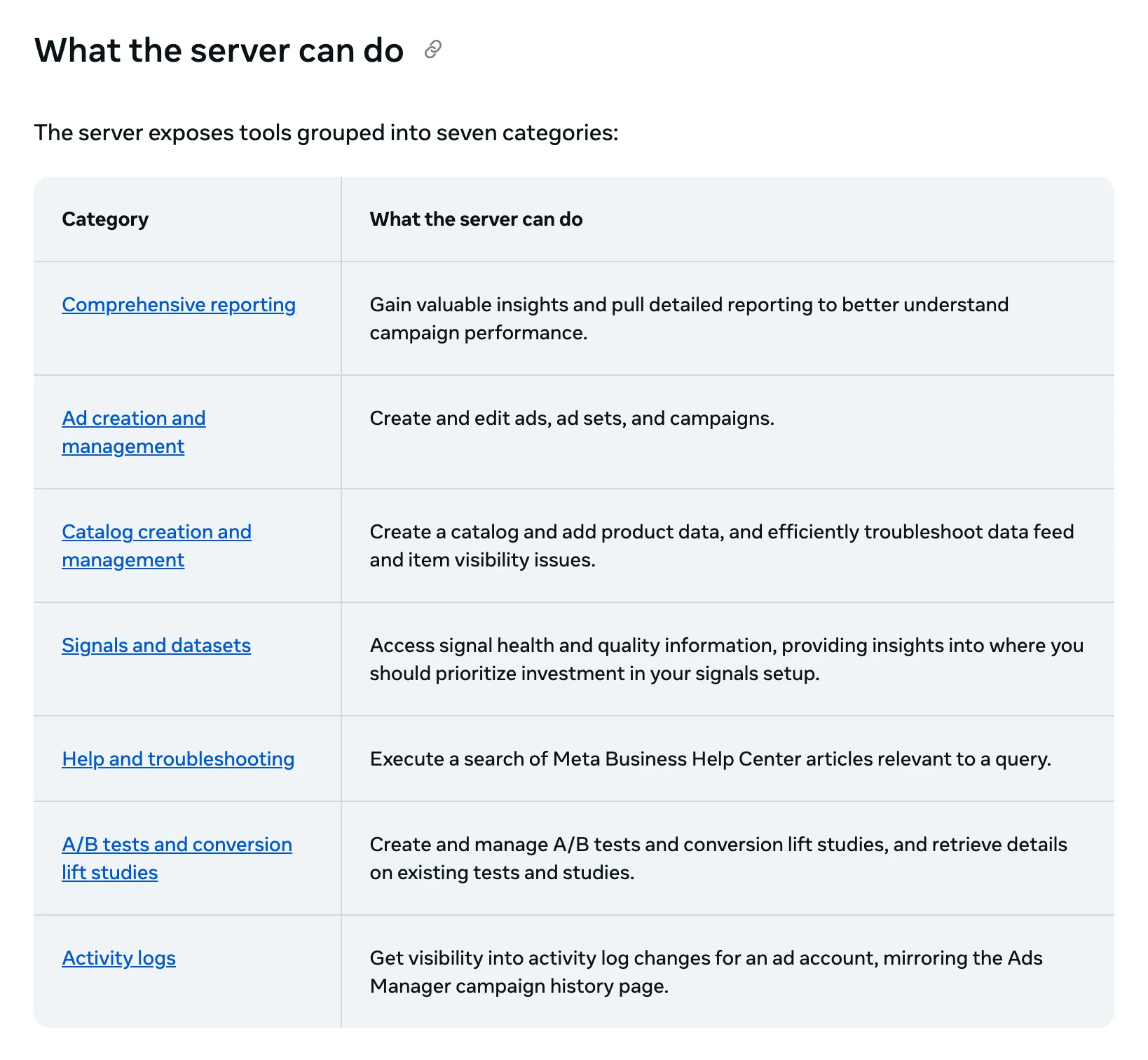
I have it connected. It reads well: spend, CTR, CPA, conversion breakdowns, delivery errors, Event Match Quality, all grounded in Meta's own numbers. In my connection it lists over 100 tools, including catalogues, pixel event rules, A/B and lift tests and Instagram boosts.
Writes changed on 6 October 2026, when Meta added draft mode. New work and edits to live campaigns are staged as a draft in Ads Manager and only go live when they're published, and Meta's tool tells the AI never to publish without your explicit approval.
Two exceptions are worth knowing. A pause skips the draft and applies to the live item straight away. And a new campaign published from the draft goes live switched on, not paused.
The catch is access. Meta switches it on ad account by ad account, and accounts outside the rollout return a hard "not enabled" error with no self-serve fix. I hit that on two of five accounts. Meta lists no price for it during the open beta.
My verdict: good for a solo advertiser running one or two smaller accounts. With no seats, no view across client accounts and a rollout you can't hurry, it's not the one I'd hand an agency or a big account.
Pipeboard

Pipeboard is a hosted server for Meta Ads and a few other ad platforms, Google Ads included. It counts 42 tools for Meta: insights with breakdowns, campaigns, ad sets, ads, creatives and targeting search on the read side. On the write side it creates campaigns, ad sets and ads, changes budgets, and pauses and resumes.
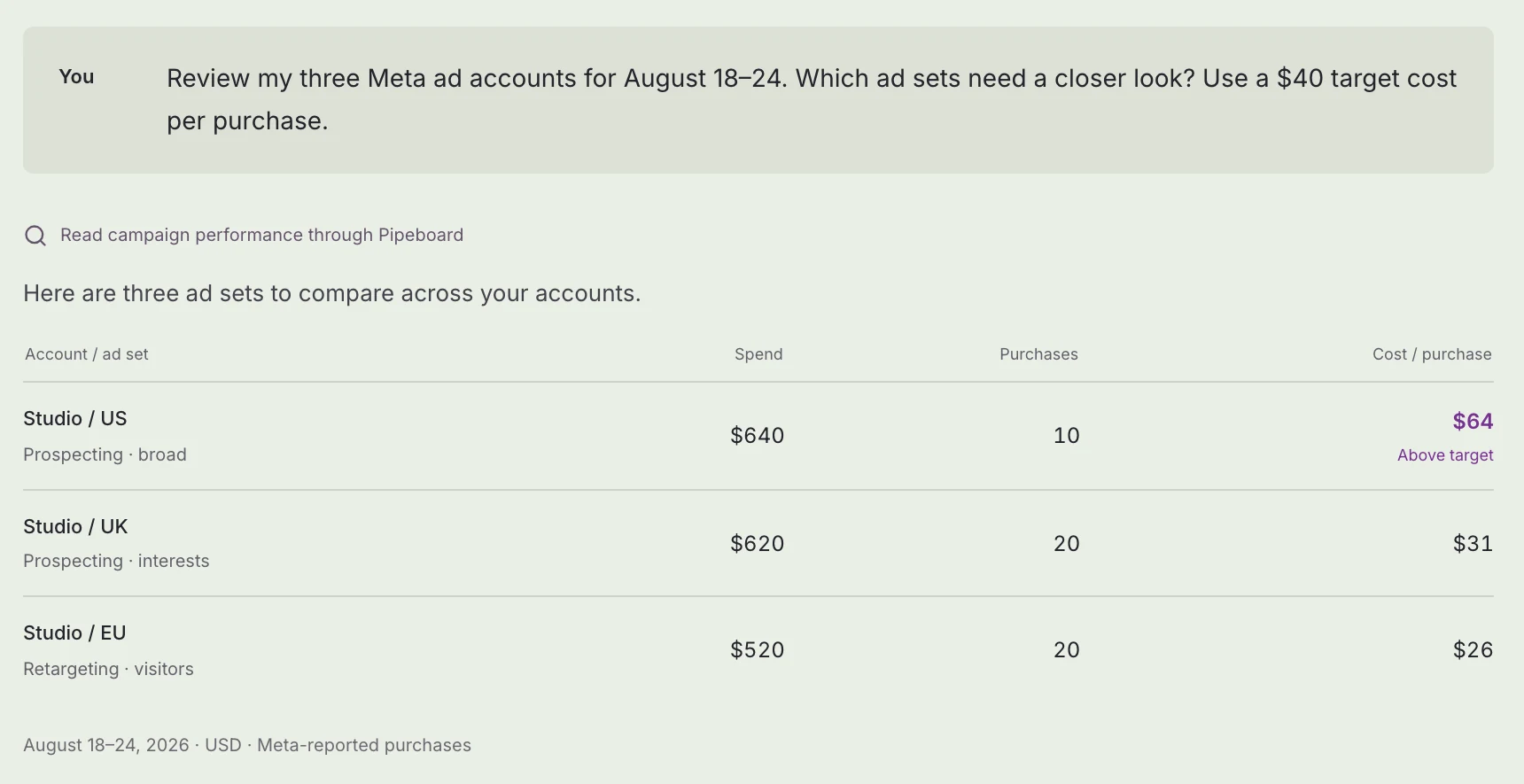
New items are created paused by default, though the AI can override that. There's no preview step on Pipeboard's side. Pipeboard promises explicit confirmation on every write, and in practice that's your AI app asking you, so keep its approval prompt on.
I ran it across client accounts. It did the job, and two things annoyed me. The onboarding took three attempts before a token worked where I expected it, and the tool surface was thinner than I needed for Meta-specific work.
Where I wanted a check, the agent had no tool for it and improvised.
The cost is fine at one account and silly at twenty-five. You land on the top tier and then pay ten dollars a month for every account past it, which is a per-client tax on an agency that already bills per client.
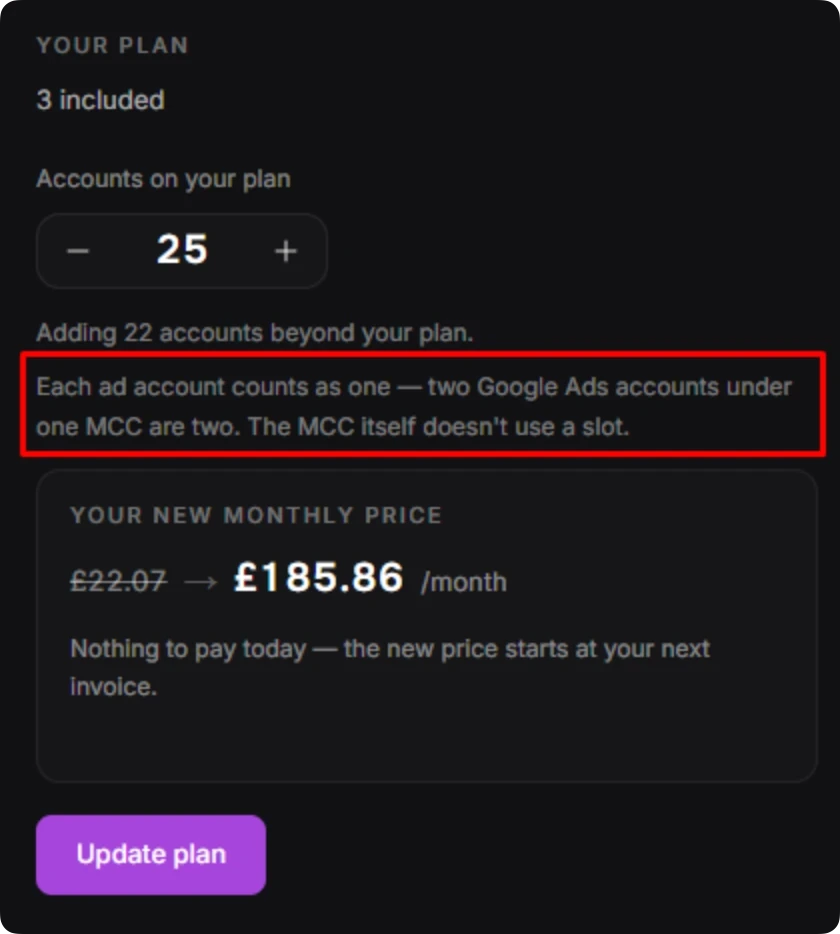
My verdict: fine for a handful of Meta accounts. Past its included slots, the bill grows with every client you sign.
Ryze AI

Ryze AI has 12 Meta tools: nine read and three write (a general write tool, a delete tool and an image upload). Ryze says you can create and update campaigns, ad sets, ads, creatives and budgets through per-tool approval, and it also reads lead forms, exports leads and searches the Ad Library.
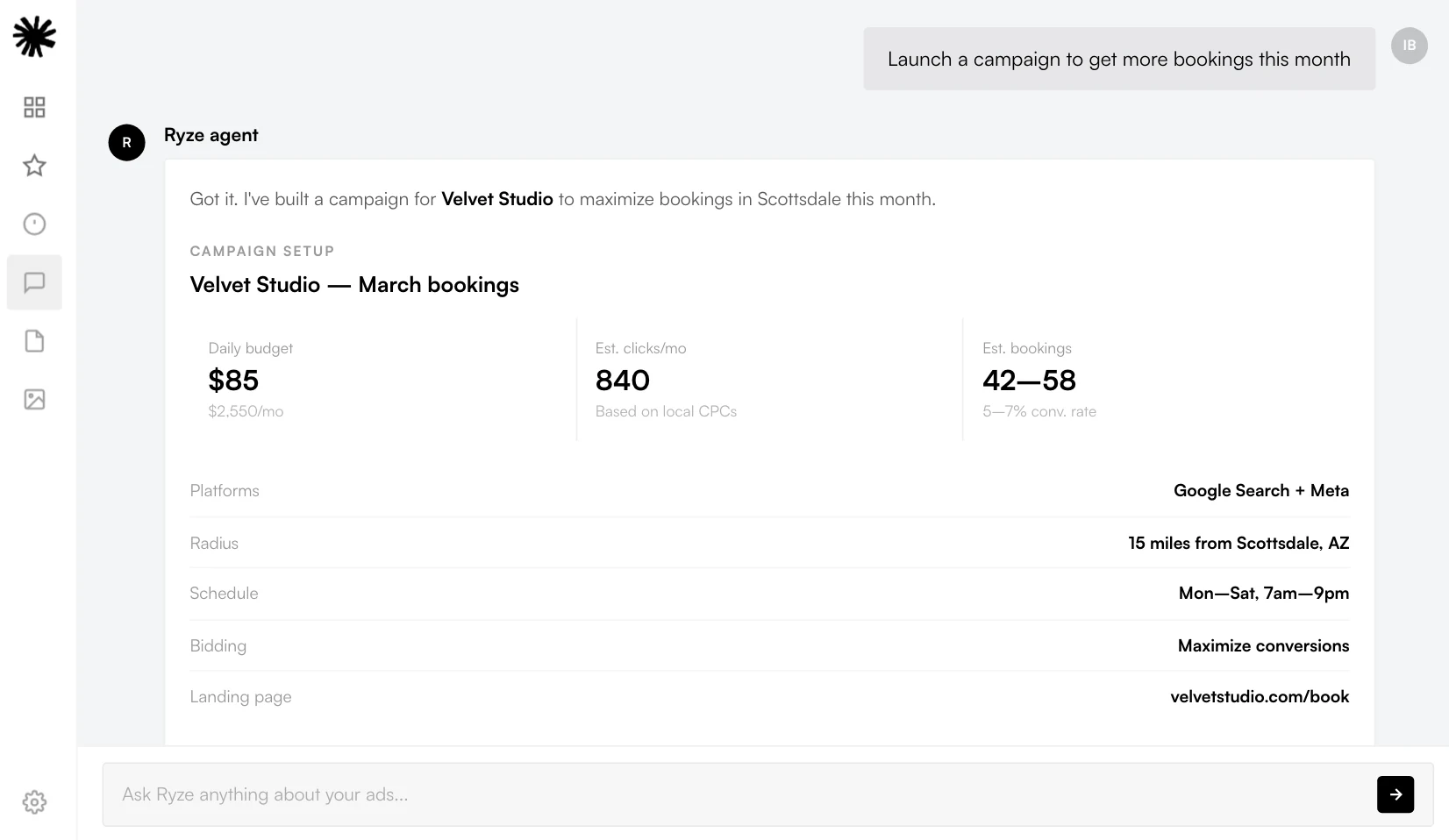
That approval depends on where you use it. In Claude, you set Ryze's write tools to Needs approval yourself. In Ryze's own chat, the approvals setting starts on Skip all approvals, and scheduled tasks run without an approval step.
Ryze says improvements its agent finds on its own wait in an Inbox until you approve them.
I've tried it. It's well built for the person it was built for: someone who has never run a PPC campaign and wants the machine to follow a proven structure. For a specialist running twelve accounts, following a vendor's skill tree puts you in the wrong seat.
You want your own judgement with the agent doing the typing. Ryze is an AI marketer, not a tool for a marketer, and if you already know what good looks like, you're paying for a curriculum you'll ignore.
My verdict: good for someone learning paid ads. If you use its own chat, switch approvals on before anything else.
AdKit

AdKit saves every change as a draft first, and each AI connection gets one of four access levels: Disabled, Read-only, Draft only, or Draft + Publish.
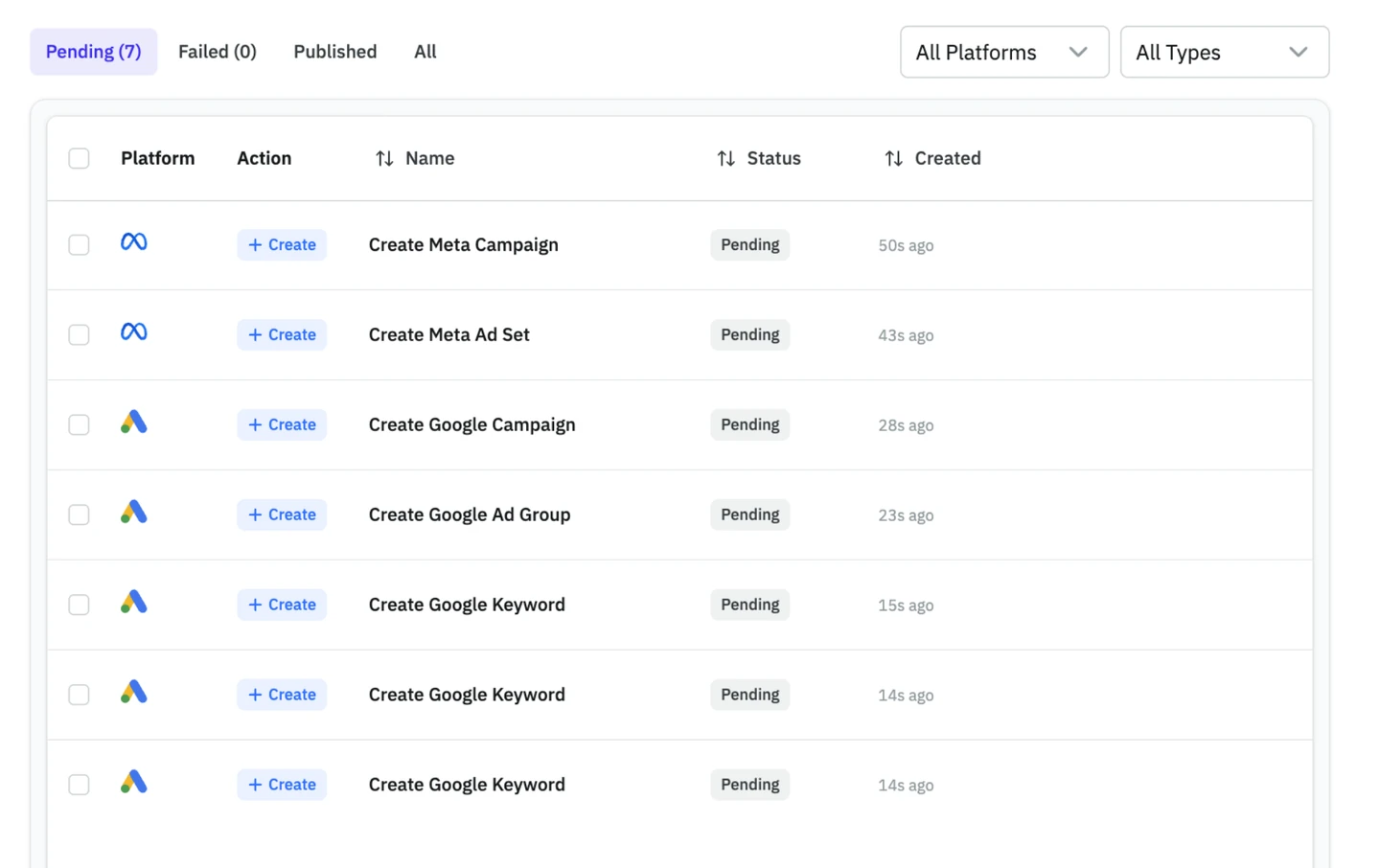
The default matters. New projects start on Draft + Publish, so the agent can publish its own drafts when you ask in the chat. On Draft only, nothing goes live until you click publish in AdKit's dashboard.
On the read side, AdKit has reporting, its own ad library and competitor tracking. It's $29 a month for one ad account per platform, or $49 for unlimited ad accounts, with a seven-day trial and no free plan.
Of everything here, AdKit's drafts board is closest to how I'd want an agency to work: the agent prepares, a person publishes. I just wish the safe setting wasn't the one you have to go looking for.
My verdict: a sensible drafts queue at a fair price, as long as you switch it to Draft only on day one.
GoMarble

GoMarble comes in two shapes. Its open-source Facebook Ads MCP server is free, MIT-licensed and read-only: 21 tools you install yourself, with your own token. The hosted product puts agents and dashboards on top of your accounts.
The hosted plans are capped by ad spend, ad accounts and seats. Copilot is $139 a month for read-only agents on up to $50K of ad spend, five ad accounts and one seat. Changes to live campaigns start at Operator, $399 a month for up to $500K of ad spend, 15 ad accounts and five seats, and each change goes through approval gates you set up.
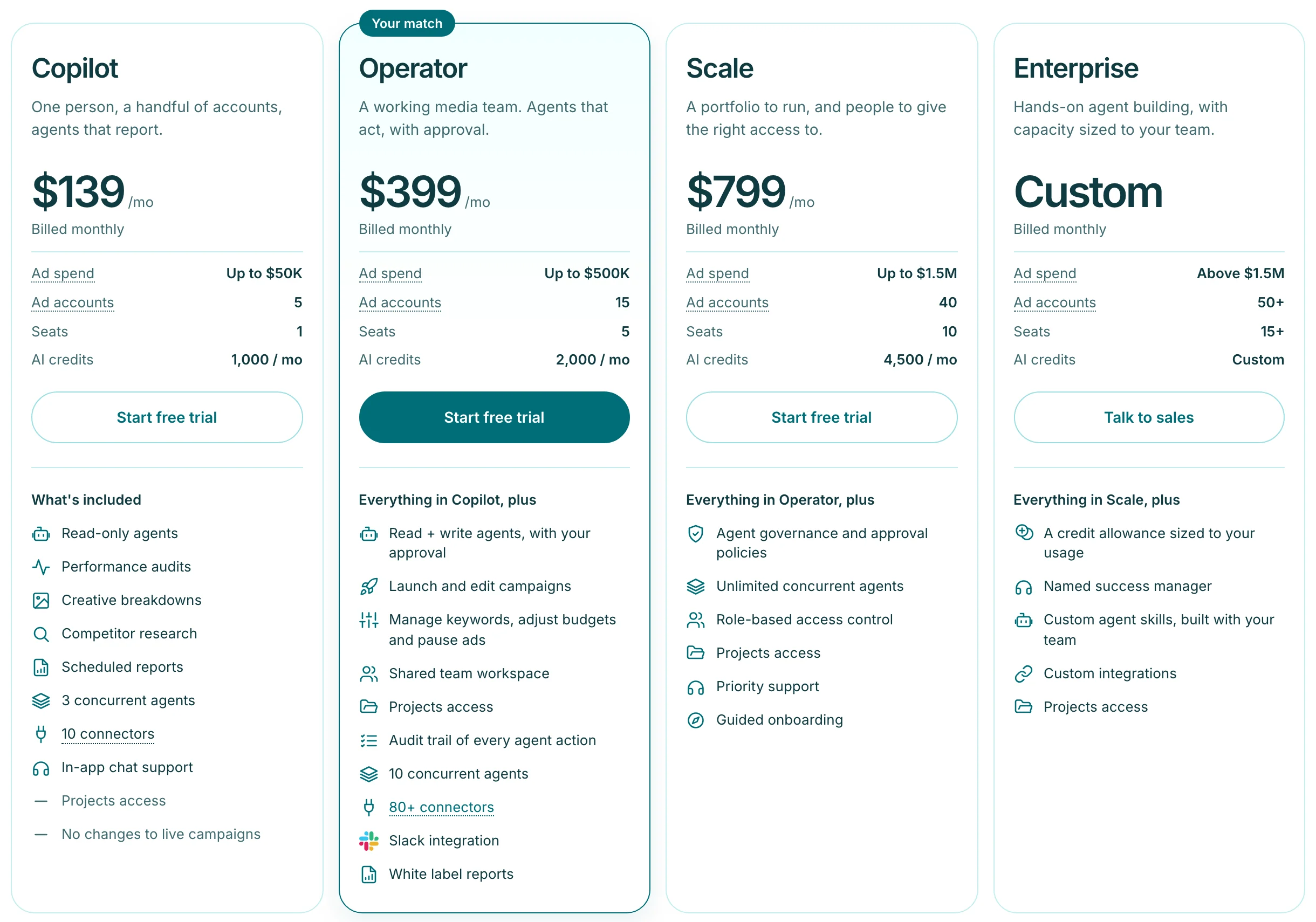
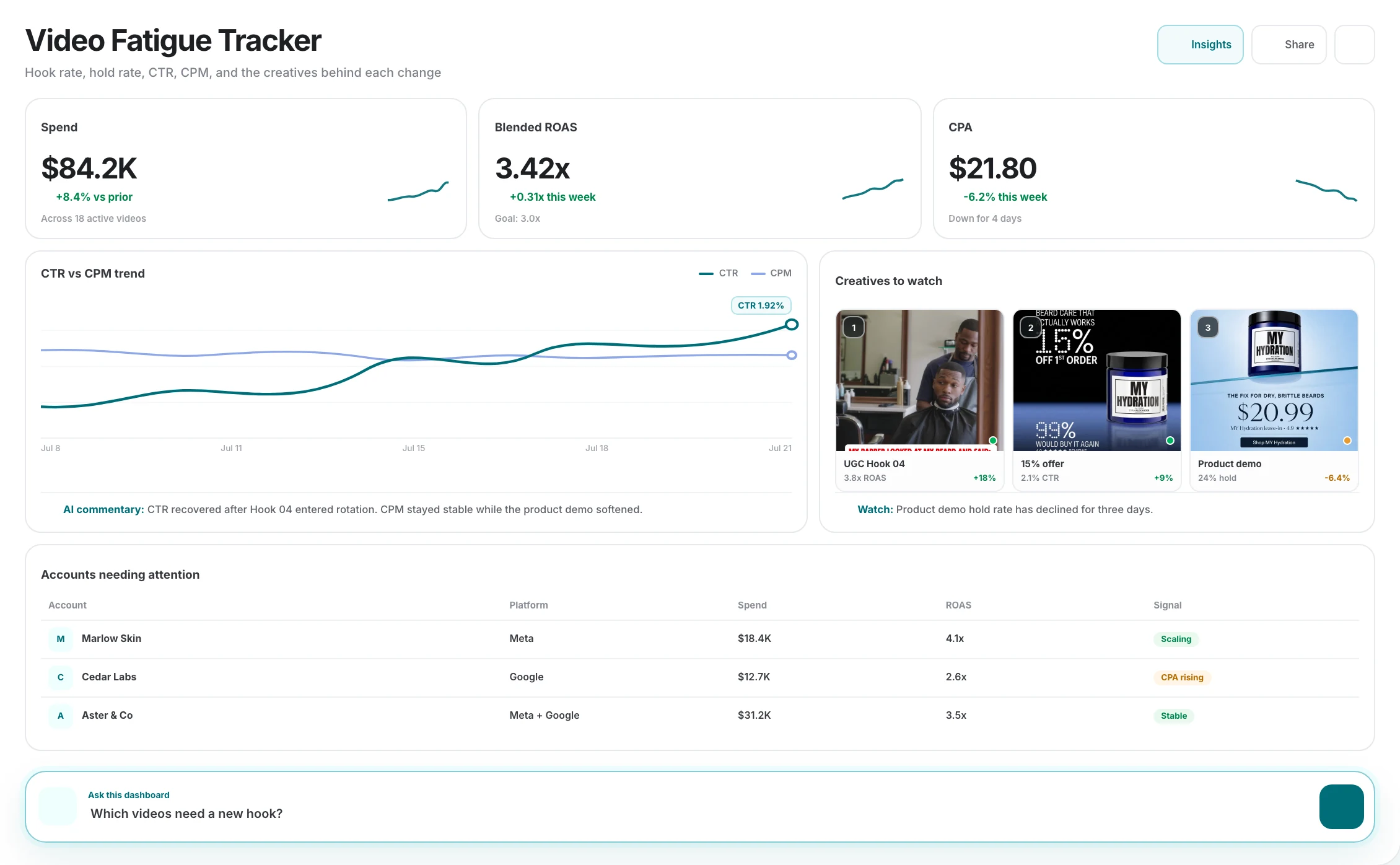
GoMarble builds good-looking dashboards, but the prices are steep: $139 a month to read five accounts, and $399 before an agent can change anything.
With AdPlug you can start from $0 a month. The free plan reads unlimited ad accounts on one platform, Meta included, and Claude builds a dashboard like that from your live Meta data with the weekly report skill in AdPlug's free Marketing plugin.
When a team joins, View only per teammate comes on AdPlug's team plans, where GoMarble keeps role-based access for its $799 Scale plan.
My verdict: the open-source server is a fair free option if you only want to read and don't mind installing it. Writes start at $399 a month, the steepest entry price on this list.
Meta's official connector vs third-party servers
Meta's official server has first-party trust on its side. Meta builds and hosts it, and Meta's Help Center says "It's safe to connect your ad account through Meta's ads MCP server".
For an agency, it runs into four limits.
- The rollout. Meta switches it on ad account by ad account, and you can't hurry it.
- Your own app. Claude and ChatGPT connect without one, but any other AI app goes through your own Meta developer app. That means App Review for Advanced Access on the ads_mcp_management permission, and Meta asks for Business Verification before it grants Advanced Access.
- One account at a time. In my own use there's no portfolio view across client accounts, and no seat management for a team.
- The rules belong to the portfolio owner. Since 16 July 2026, whoever has full control of the business portfolio can set ads MCP server rules for what AI agents may do on an ad account. They're set one ad account at a time in Business Suite, or through the Marketing API since 22 September 2026. On a client's account, that person is often the client, not you.
That's the gap the third-party servers are selling into: many client accounts, seats for a team, and one connector across ad platforms.
If you're looking for a Meta Ads MCP on GitHub, two of these servers publish code. Pipeboard's Meta server is source-available under the Business Source License 1.1, and GoMarble's read-only server is MIT-licensed.
With AdPlug you don't need a developer app of your own, whichever AI app you use: you sign in with Facebook and pick the accounts to share. The Meta Ads MCP integration page has the setup.
Use Meta's connector on an account or two of your own, and a third-party server once clients, teammates or other platforms come into it.
Read-only vs write access on a live budget

The most expensive mistake I see on Meta is the extra zero. Someone means to type a £50 daily budget and types £500.
Meta doesn't flag it. It spends.
Go live on a Friday afternoon, nobody opens the account again until Monday, and an ad set meant to spend £150 over the weekend spends about £1,500 instead. That's £1,350 nobody approved, from one keystroke, one person, one weekend.
Meta won't stop it, because none of it breaks Meta's own rules. On a given day Meta may spend up to 75% over a daily budget, so £500 can become £875 (more with ad set budget sharing on). Over each week ending Saturday at midnight, it won't spend more than 7 times the daily budget, which at £500 is £3,500.
Fixing it costs too. An ad set leaves the learning phase after about 50 results in the week after its last significant edit, and Meta says a budget change may or may not count as significant, depending on its size. Cutting £500 back to £50 can put the ad set back into learning.
The backstop is the ad account spending limit, a cap on total spend from the day you set it. Accounts that pay from prepaid funds can't set one, but they can't spend more than you've loaded either.
A read-only server can't change a budget at all. One with write access can, which is why the step between your request and the change matters more than the tool count.
Can a Meta Ads MCP server get your ad account banned?
Meta's Help Center says using its ads MCP server on its own doesn't put your account at risk, and that a ban simply for using it is unlikely. The bigger risk, as I see it, is an agent with unchecked write access, or a tool that logs in as you instead of going through Meta's own sign-in.
The story agency people still quote is a Reddit post from 3 April 2026, "Claude Code got my Meta ads account permanently banned. Don't make the same mistake I did." The poster had connected Claude Code straight to Meta's API, before Meta launched its own server, and let it pull data, generate creatives and shift budgets. About a week later the account was gone, and with it the campaigns, custom audiences and pixel history.
They blame API calls that came too fast, budget changes that looked like a bot and creatives published without a person checking them, and they couldn't get the account back. Meta hasn't said publicly what caused it, but those are the habits to keep away from a client's account.
If you run a Meta Ads MCP in Claude or ChatGPT, start any chat that might change the account with this.
Before you change anything in my Meta ad account, show me the campaign, ad set or ad by name and ID, the setting, its current value, the new value and what it does to spend over the next week. Wait for my OK. Flag any change that could send an ad set back into the learning phase, budget changes included. Never switch on anything that's paused.
Set an ad account spending limit before any server gets write access, so a typo has a ceiling.
What to check before you connect a client's ad account
Work through this before an agent sees a client's money. It takes twenty minutes and it's the difference between a pilot and an incident.
- Get the client's OK in writing. Name the server, the AI app and what it may change.
- Find out who has full control of the business portfolio. On Meta's own connector that person sets the agent rules, and it may be the client rather than you.
- Set or check the ad account spending limit. Prepaid accounts can't have one, but they can't spend more than the funds you've loaded either.
- Start read-only. A week of reports shows you whether the server's numbers match Ads Manager.
- Ask how each write lands. Draft, paused or live, and which changes skip the queue, such as a pause on Meta's own connector.
- Switch on your AI app's approval prompt. In Claude, set every write tool to Needs approval in the connector's settings, and keep write tools out of scheduled tasks.
- Keep a person in charge of switching things on. Decide who publishes drafts and activates paused campaigns, and make sure it's a human.
- Know where the record is and how to cut access. Check which tool calls the server logs, and where to disconnect it and remove its app in Facebook.
If a server can't answer item five, keep it read-only.
The three Meta checks worth automating first
All three only read or stop at a preview, they come round every week or more often, and each ends in a decision you should make yourself.
1. Which ads are getting tired
An ad wears out when the same people see it too often. Frequency climbs, click-through rate drops, and cost per result usually follows.
Which Meta ads are getting tired? Find the ones where frequency climbed and link click-through rate dropped over recent weeks, rank them by spend, say if cost per result rose too, and tell me what they have in common and what to test next.
2. Ad sets that didn't spend their budget
Underspend is easy to miss because nothing looks broken. The causes run from a small audience or a low bid cap to an ad stuck in review or a payment problem, and not all of them are yours to fix.
Which Meta ad sets, or campaigns on Advantage+ campaign budget, spent well under budget yesterday, and is it a one-off or a pattern? Group the causes and split what's mine to fix from what's on Meta's side. Leave out anything I paused.
3. Ad sets spending with nothing to show for it
This one finds money to move. The prompt stops at a preview, so you decide what gets paused or cut.
Which Meta ad sets got no results last week but spent more than a result usually costs me? Show spend, CPM, click-through rate and landing page, check the page loads and the pixel fires, and suggest pausing or cutting each. Show me the change before you make it. Don't change anything yet.
The Meta Ads guide walks through connecting Meta Ads to Claude, step by step. To have checks like these run while you're away, the Meta Ads to Claude Duet guide does the same for Claude Duet, Anthropic's agent that checks your connected apps every few hours.
Run these on read-only access for a few weeks before you let any server change a budget.
The same server for Google, LinkedIn and Microsoft Ads?
Meta's official server covers Meta only. A question like "cost per lead on Meta against Google Search last month" needs a second connector, or a server that covers both.
On a paid plan, AdPlug's all-platforms connector carries Google Ads, Meta Ads, LinkedIn Ads, Microsoft Ads and Reddit Ads, so that cost-per-lead question goes through one connector. Pipeboard, Ryze AI, AdKit and GoMarble connect more than Meta too, so check each one's own list.
For the same comparison on other platforms, see the best Google Ads MCP servers and the best LinkedIn Ads MCP servers. For the wider stack, grouped by job, there's the best MCP servers for marketing.
If you report across channels, check which platforms a server covers before you compare its Meta tools.
Free vs paid: what each one costs
All prices are in US dollars, billed monthly.
- AdPlug: Free is $0 forever, read-only on one platform with unlimited ad accounts, 500 requests in the first 5 days and 50 a month after that. Pro is $29 a month for every platform, with 5,000 AI requests and 200 AI edits a month and a seven-day trial. Max is $89 with unlimited requests and edits and three team members, and Agency is custom, priced per seat with a DPA included.
- Meta's official Ads MCP server: no price listed during the open beta. You pay for your AI app's plan.
- Pipeboard: Free gives you 30 AI tool runs a week on two ad accounts. Pro is $29.90 a month for three accounts, Premium $99 for ten and Agency $199 for 25, with unlimited runs on paid plans and $10 a month for each extra account.
- Ryze AI: no free plan. Paid Ads is $89 a month (750 credits, up to three workspaces, unlimited ad accounts) and Agency is $279 (3,000 credits, unlimited workspaces, white label).
- AdKit: no free plan. After a seven-day trial it's $29 a month for one ad account per platform or $49 for unlimited.
- GoMarble: the open-source server is free and read-only. Copilot is $139 a month for five ad accounts and one seat, Operator $399 for 15 accounts and five seats, and Scale $799 for 40 accounts and ten seats, each with a free trial.
The pricing axis that bites is accounts and seats, not tools.
AdPlug works on unlimited ad accounts on every plan, so a dozen client accounts cost the same as one. The full plans are on the AdPlug pricing page.
At the same dozen, Pipeboard comes to $119 a month (Premium plus two extra accounts), AdKit's unlimited plan is $49, and Ryze AI's $89 plan covers the accounts but only three workspaces, where Ryze suggests one per client. GoMarble needs Operator at $399 because Copilot stops at five accounts, and Meta's connector has no listed price and no seats.
Count the client accounts and teammates you'll put on the plan before you compare prices.
Sources
I checked every source on 8 November 2026. The dates after the titles are when each one was published.
- Meta, Introducing Meta Ads AI Connectors: Manage Your Meta Ads From the AI Tools You Already Use, 29 April 2026.
- Meta for Developers, Ads MCP Server overview, and the developer blog post on any AI app and ads MCP server rules, 16 July 2026.
- Meta Business Help Center, managing ads from an AI agent (draft mode, rollout and account safety), how Meta spends your daily budget, the learning phase and ad account spending limits.
- Meta for Developers, permissions reference (Advanced Access and Business Verification).
- PPC Land, Meta opens its ad system to Claude and ChatGPT with new AI connectors, 1 May 2026.
- Pricing pages: Pipeboard, Ryze AI, AdKit and GoMarble, plus Ryze AI's Meta Ads help page, AdKit's access levels docs and GoMarble's GitHub repository. The screenshots above were taken on 9 November 2026.
- u/SurfaceLabs on r/FacebookAds, Claude Code got my Meta ads account permanently banned. Don't make the same mistake I did., 3 April 2026.
If a vendor has changed a price or a feature since 8 November 2026, its own page is right and this one is out of date.