AI PPC management: what to hand the AI, what to keep, and the free agents I use
Quick answer: AI PPC management means using AI to monitor, report on and change your paid ads. It works in three layers: the platforms' own automation (Smart Bidding, Performance Max, Advantage+), rules and scripts, and an AI such as Claude or ChatGPT connected to your live accounts. Hand the AI the checks and the reports. Keep the goals and approve every change.
I've spent 12 years in PPC and managed over $100M in ad spend, and I want AI to take the scaffolding, not the judgement. This is the split I use, the weekly routine that goes with it, and three free agents built on the same rules.


AI PPC management means handing the checks and reports to an AI and keeping the decisions yourself.
In 2026 it runs in three layers. The ad platforms' own automation sets the bids and picks the placements. Rules and scripts run the same check on a timetable.
The third layer is the new one: Claude or ChatGPT connected to your live accounts, reading every account, writing the reports and proposing changes that wait for your yes. That's the layer this page is about.
The pulling, sorting and formatting go to the AI. What the account is for, where the money goes and what the client hears stay with a person.
Below is the split I use, a weekly routine with a prompt for each job, and three agents that run it for you, free with an AdPlug account. If you came for a list of tools, I've written two: the best AI tools for PPC agencies and the best AI tools for Google Ads.
What AI PPC management means in 2026
AI PPC management is any use of AI to monitor, report on or change paid search and paid social accounts. In practice that's three layers, and they stack rather than compete.
| Layer | Examples | Good at | Watch out for |
|---|---|---|---|
| The platforms' own automation | Smart Bidding, Performance Max and AI Max in Google Ads, Advantage+ campaigns on Meta | Setting bids, matching searches and choosing placements auction by auction | It optimises for whatever conversion you give it, right or wrong |
| Rules and scripts | Automated rules in Google Ads and Meta, Google Ads scripts, rule-based PPC tools | The same check on every account, on a timetable | A rule only catches what someone wrote a rule for, and many act without asking |
| An AI connected to your live accounts | Claude or ChatGPT with an MCP connector to Google Ads, Meta Ads, LinkedIn Ads and the rest | The question nobody scheduled, across every platform and account, and a draft of the change | An AI is only as careful as the connector's approval step, so pick a connector that previews every change |
Smart Bidding still sets the bids when Claude is connected, and it won't ask whether it's chasing the right conversion. Noticing that is Claude's job. Deciding what to do about it is yours.
The connection in the third layer is usually MCP, the Model Context Protocol (think of it as a plug socket for AI). You ask in plain English, and the AI reads the account or drafts the change. No exports, no CSVs, no clicking six levels deep to find one number.
What I hand the AI and what I keep
This is the split I work to. The AI reads, sorts and drafts. Anything that spends money, changes what you count or reaches a client waits for a person.
| Job | The AI does | You decide | Why |
|---|---|---|---|
| Daily health checks | Checks every account each morning against a normal day and flags only what's broken | What to fix first | It runs the same check on account 14 as on account 1 |
| Search terms and negatives | Reads every search term, groups the waste and drafts negatives checked against your keywords | Which negatives go in, and at what level | A wrong negative quietly blocks searches you wanted |
| Reporting | Pulls the numbers, compares them with target and last period, and writes the first draft | What the client reads, and the reason behind a bad week | You know what was agreed in the meetings. The AI only knows what you tell it |
| Budget pacing and moves | Projects month-end spend, flags overspend and underspend, and proposes moves of about 20% | Every budget change | The client agreed a number with you, not with the AI |
| Creative fatigue and new ads | Spots tired ads and drafts new ones, created paused | Which angle to test, and what goes live | Claims and brand voice are on you, and the AI doesn't know what legal signed off |
| Bidding | Watches Smart Bidding's status, targets and learning, and flags problems | The target CPA or ROAS, and when to change strategy | Bidding is the platform's job. Yours is giving it the right goal and enough data |
| Tracking and conversion setup | Spots a tag gone quiet or the wrong conversion goal on a campaign | What counts as a conversion, and the fix | If the conversions are wrong, every number after them is wrong too |
| Strategy, goals and margin | Drafts options from the data and the brief you give it | The goal, the target and the margin you can live with | Margin, sales capacity and the client's appetite for risk aren't in the ad account |
| Client calls | Preps the numbers and the questions to expect | Everything said on the call | The client trusts the person who answers for the account |
Read down the AI's column and it's all reading and drafting. The job is in the You decide column.
The weekly AI PPC system, day by day
The most useful part of AI PPC management is the boring part: the same checks on every account, every week, without anyone having to remember them.
| When | The AI's job | Your job |
|---|---|---|
| Every morning | Checks every account for what broke since yesterday | Read the flags, if there are any |
| Monday | Search terms, tired ads and the client report | Pick the negatives and the new ads, then send the report |
| Midweek | Budget pacing and settings that drifted | Approve the fixes you agree with |
| Start of the month | The monthly report, and whether last month's changes worked | Budget moves and next month's tests |
| New client | A full audit | What to fix first |
Every morning: the five-minute check
Every account, every morning, against a normal day. Compare yesterday with the same weekday last week, because Mondays aren't Sundays.
- Spend, clicks and conversions against a normal day.
- Campaigns that stopped spending or converting.
- Conversion tracking that went quiet.
- New disapprovals.
- Ads pointing at pages that 404.
- Settings changed after launch: search partners on, display expansion, location set to presence or interest, the wrong conversion goal.
That last one sounds dull until search partners is on and nobody noticed (it has been me).
In my morning brief, check every ad account I've connected: spend, clicks and conversions against a normal day, campaigns that stopped spending or converting, tracking that went quiet, disapproved ads, and ads pointing at pages that 404. Flag only what needs me.
On a quiet day the reply should be one line. In the free agents further down, it's "Nothing on fire."
Every Monday: search terms, tired ads and the client report
Read the search terms. Add the negatives. The AI does the reading and groups the waste, and you choose which negatives go in.
Find search terms that spend without converting and suggest negatives. Don't add them yet.
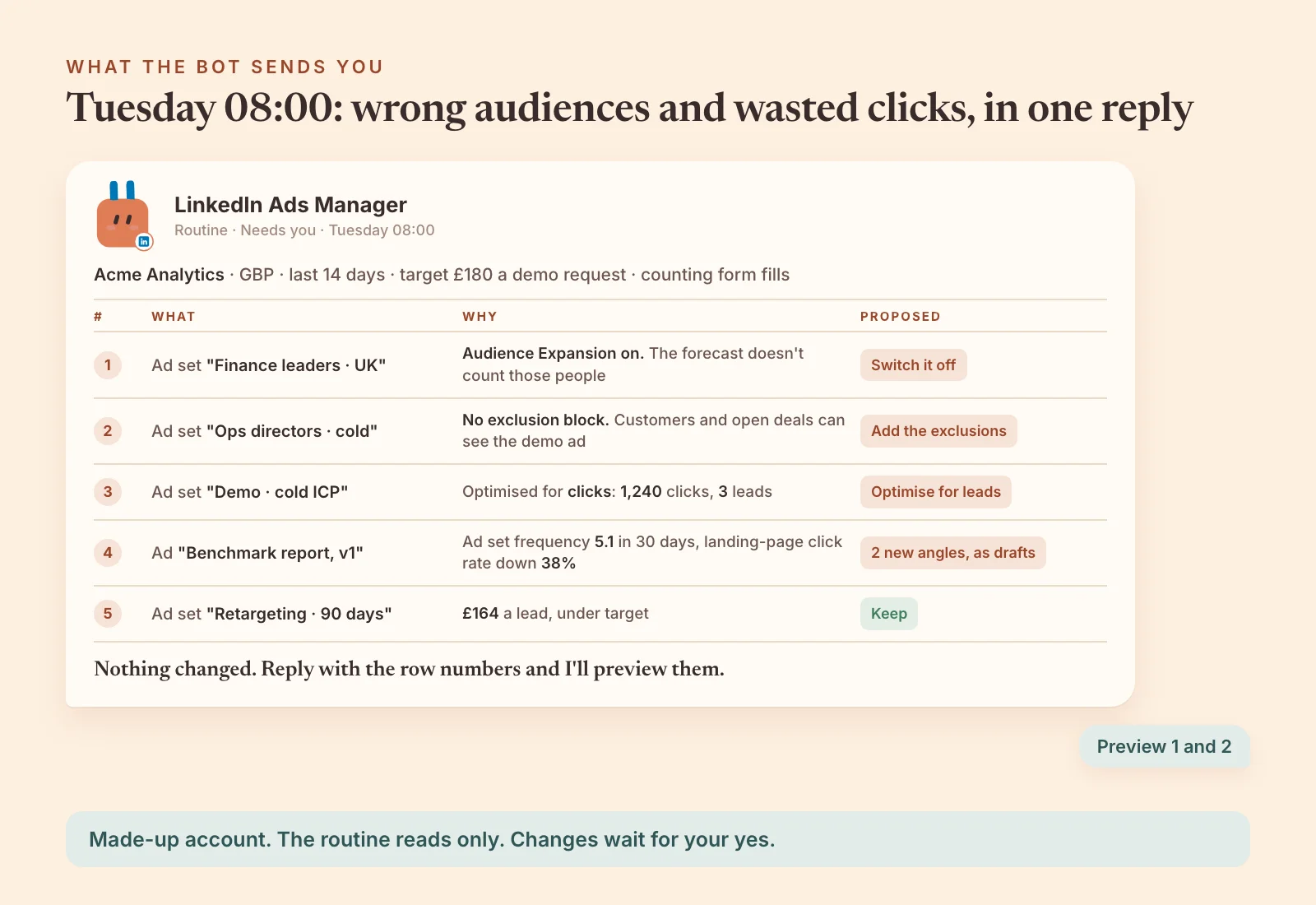
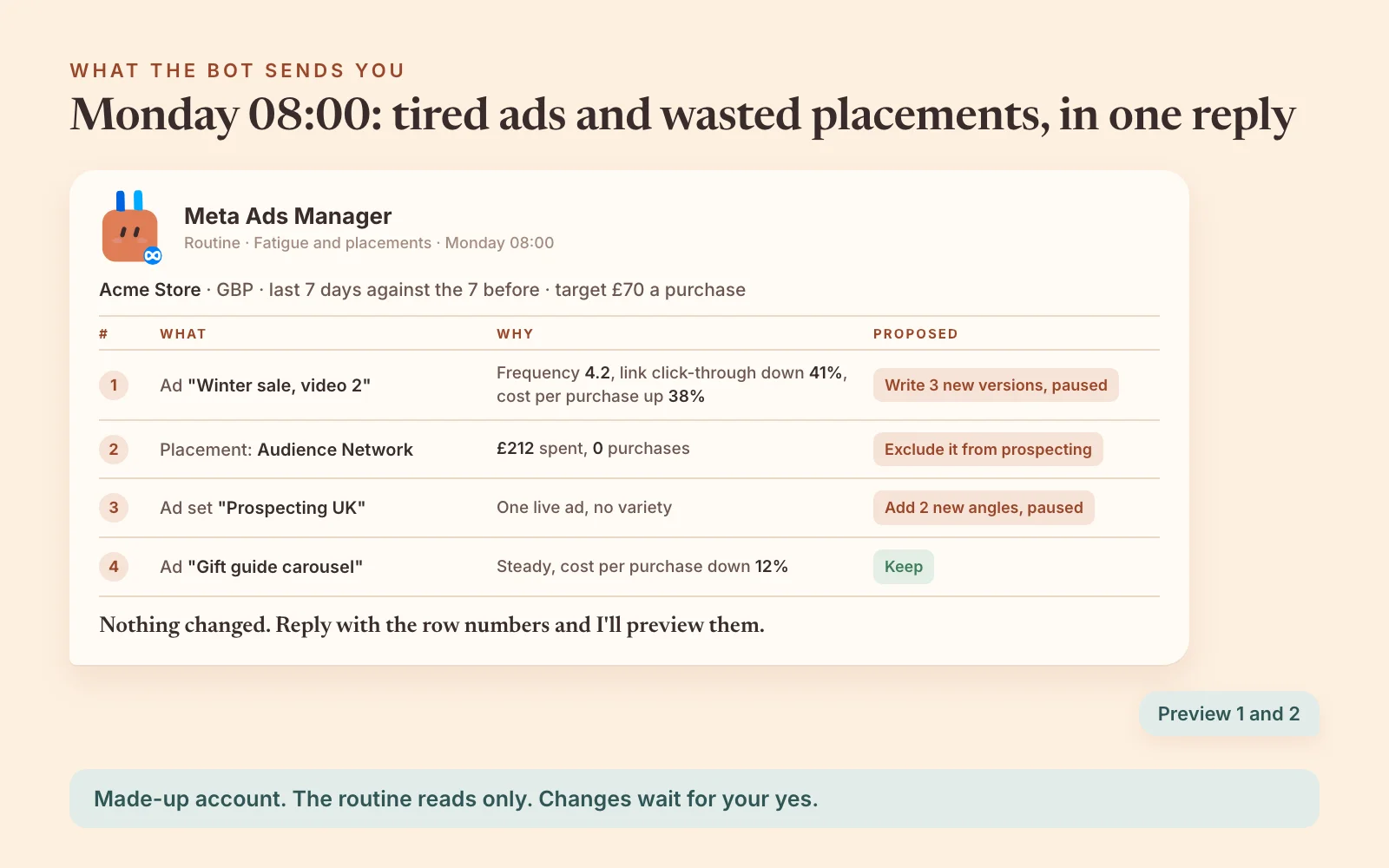
On Meta and LinkedIn, Monday is for creative fatigue. I judge it on three numbers moving together on the same ad, last 7 days against the 7 before: frequency up, link click-through down and cost per result up. I never pause on frequency alone.
Which Meta and LinkedIn ads are wearing out, and what would you test instead?
On LinkedIn, I also want to know which job titles and seniorities bring the leads, and which ones just spend:
Which LinkedIn job titles and seniorities bring leads at the best cost over the last quarter, and which am I paying for without a single lead? Preview any exclusions first.
Then the report, as a PDF or a shareable dashboard, never a spreadsheet:
Every Monday morning, build a client-ready PDF for each client on last week's ads across their platforms: results against target and the week before, what changed and why, and what we change next.
Midweek: pacing and settings drift
The daily budget in the platform is a setting. The monthly budget is what the client agreed to, so give the AI that number before it projects anything:
Which Google Ads campaigns will overspend or underspend this month? Ask me the monthly budgets first.
The morning prompt leaves settings out to stay short. Check them on Google Ads once a week:
Check every Google Ads campaign for settings that drifted after launch: search partners on, display expansion on, location set to presence or interest, or the wrong conversion goal. Preview the fixes.
Once a month: the report and the change log
Every change goes in a log with a date to check it: two weeks for a pause or an exclusion, four weeks for structure, bidding, budgets and new ads. The monthly pass reads that log and says which changes worked.
It's also when I look at moving budget between campaigns. I move budgets in steps of about 20%, and I see the move before anything changes:
Where would extra budget work hardest across my campaigns, and where would you take it from? Show me the preview before anything changes.
A new client: the audit first
Before any of the routine, a new account gets an audit: structure, tracking, settings, wasted spend and quick wins. Tracking comes first. If the conversion's wrong, the rest of the audit is reading the wrong numbers.
Audit my Google Ads account and tell me where I'm wasting money.
The full method is in the AI Google Ads audit guide, and the Senior Google Ads audit playbook has a longer prompt.
Put the routine on a schedule
Claude's scheduled tasks, ChatGPT's scheduled tasks, Grok Bot's routines and OpenAI Dots can each run these checks on a timetable and send you the result. End every scheduled prompt by asking the AI to change nothing, and read the first run to check it reached your accounts.
Each run uses AdPlug requests. A daily check uses about 5 a run (Meta Ads Manager's comes to about 150 a month), and the free plan has 50 a month after its first 5 days. On Free, keep the weekly and monthly reports and pause the rest.
Free AI agents for Google Ads, Meta Ads and LinkedIn Ads
The routine above is built into three agents, one per platform. They're the rules I run accounts by, written down, and they're free with an AdPlug account.
Each agent asks its first questions before any audit, such as which account, what you sell, the conversion that counts, and the budget and target. Its routines only read and report, and a change waits for a preview and your yes.

Google Ads Manager
Free with an AdPlug account
Catches a stopped campaign or a quiet conversion tag at 07:30, and groups the search terms worth excluding every Monday.
15 skills · 9 routines
Set it up in

Meta Ads Manager
Free with an AdPlug account
Finds tired ads and wasted placements every Monday, and proposes the next ads, which it creates paused once you say yes.
15 skills · 8 routines
Set it up in
LinkedIn Ads Manager
Free with an AdPlug account
Shows which seniorities and job functions your ads reached, and flags customers and open deals still in your prospecting audiences.
13 skills · 6 routines
Set it up in
Pick your AI on the card: Claude, ChatGPT, Claude Code, Codex, OpenAI Dots or Grok Bot. The setup steps for that AI open after you sign up.
The Claude plugin and the ad copy skill
Two more, free the same way:

AdPlug Marketing
Free with an AdPlug account
The morning check, budget pacing, search terms, client reports and audits as Claude skills, plus SEO, email and HubSpot.
39 skills · For Claude
Ads Generator
Free with an AdPlug account
Writes two responsive search ads per ad group from your live landing pages, plus sitelinks, callouts and snippets, in one Google Sheet to review.
Google Ads · Microsoft Ads version too
Plugins need a paid Claude plan. Nothing from the Ads Generator touches the account until you approve it.
Playbooks: prompts you can copy now
AdPlug's playbooks are public pages, each with a ready prompt for one PPC job. The ones I'd start with:
- Senior Google Ads audit
- Wasted-spend search terms as negatives
- Weekly Google Ads performance recap
- Meta Ads account analysis and the top 5 fixes
- Meta Ads creative fatigue, by ad and by angle
- LinkedIn Ads performance recap
- Cross-platform weekly digest
All 54 are on the playbooks page.
Set up AI PPC management in three steps
- Connect your ad accounts to AdPlug. Create a free account, then connect each platform on the Connections page with its own sign-in: Google for Google Ads, Facebook for Meta Ads, LinkedIn for LinkedIn Ads. One sign-in reaches every account that login can see, so a Google Ads manager account brings all its clients.
- Get the agent for your AI. Pick it on a card above, or open Agent templates in your AdPlug dashboard and choose the platform and your AI. Its setup steps add AdPlug to your AI as well, so there's nothing to add separately. Then answer its first questions.
- Run the first check. On the free plan you connect one platform, so name just that one.
Prompt Check my Google Ads, Meta Ads and LinkedIn Ads over the last 30 days, put together a performance snapshot, and come back with the top 5 fixes ranked by impact.
Rather ask in your own words, without an agent? In Claude, open Plugins, click Add, then Add custom connector, and paste https://api.adplug.app/mcp. In ChatGPT, install AdPlug from ChatGPT's plugin directory. The guides go step by step for Google Ads, Meta Ads and LinkedIn Ads, and there's a checklist for connecting Claude to Google Ads safely.
The free plan is view only, so the AI reads and previews but can't apply anything. That's a sensible way to meet an account you don't know yet.
AdPlug starts at $0. The free plan connects one ad platform, view only, with 500 requests in your first 5 days and then 50 a month. Pro is $29 a month with 5,000 requests and 200 changes, Max is $89 a month with unlimited requests and changes and 3 team members, and Pro and Max start with a 7-day free trial. Every plan includes unlimited ad accounts (checked on the pricing page on 18 November 2026).
The approval rules that keep AI PPC management safe
Trust in an AI on an ad account comes from constraints, not a cleverer model. Even a very good model makes the odd wrong call, and these rules are there so a wrong call stops at a preview.
- Preview every change. AdPlug shows the exact change as a preview and tells the AI to wait for your yes. On Google Ads, AdPlug won't run a change that wasn't previewed.
- Make your AI ask before every change. In Claude, set AdPlug's change tools to Needs approval (each connector tool can be Always allow, Needs approval or Blocked). In ChatGPT, open Settings, Plugins, AdPlug, Permission and choose Allow read-only tools, and ChatGPT then asks before every change.
- Create everything paused. New campaigns and most new ads start paused through AdPlug, or as drafts on LinkedIn, so switching one on is a decision of its own.
- Give teammates and juniors View only. On Max and Agency, the team owner sets each teammate to View only or Can edit on each platform.
- Keep platform rules to stop-losses and alerts. Meta checks an automated rule every 30 minutes and acts without asking, so a rule is a standing change. Never let a rule raise a budget, change a bid or turn something back on.
- Move budgets in steps of about 20%. On every platform, and only after the preview.
- Log every change with a date to check it. Every call and change lands in AdPlug's Usage and Audit Log, so the record is there when you come back to judge it.
- Change one account at a time. Read across every client at once, but approve changes account by account, so a yes meant for one client never lands on another.
- Set a spending limit on the account. Where the platform offers one, such as Meta's account spending limit, it puts a ceiling on what any mistake can cost.
I built AdPlug for my own accounts first, because no connector did what I wanted. Every change my AI suggests comes to me as a preview first, and that's the part that lets me sleep.
AI PPC management software: the three kinds
PPC management software splits the same way as the layers. For each kind, the useful question is what it can change and what stops it.
- The platforms' own tools. Already in your account: Smart Bidding, Performance Max, Advantage+ and the recommendations. Treat recommendations as flags beside your numbers, never something to apply for a better score (a higher optimisation score has never paid an invoice).
- Rules, audit and reporting suites. Paid tools that run checks on a timetable, test ads and build dashboards. They do the same thing every day, and catch only what someone wrote a rule for.
- AI connectors. They plug Claude or ChatGPT into the live accounts, so the AI can answer the question nobody scheduled and draft the change. Google, Microsoft and Meta now publish connectors of their own, alongside independent ones such as AdPlug.
I've compared the tools in each kind, with prices, in the best AI tools for PPC agencies and the best AI tools for Google Ads. For Meta, the best Meta Ads MCP servers compares the connectors, and automated Facebook ads covers what to automate there.
Before paying for any of them, I'd ask three things. What can it change without me? Does it show me the change first? Can I set a teammate to view only?
Will AI replace PPC managers?
No. AI replaces the scaffolding: pulling reports, building the same Monday report and reading the search terms (including the 8,000 we've all been meaning to get to since March).
It doesn't replace the judgement. What the account is for, what margin the client can live with and how bad a month they'll sit through all live outside the ad platform, and an AI only knows what you tell it.
Small budgets are harder than big ones, and that's where judgement matters most. Meta wants about 50 optimisation events a week before an ad set leaves learning (Meta's figure). A small account may never get there, so somebody has to decide what to run instead.
If most of your week is pulling numbers, that part is going. The part where you decide what the numbers mean isn't.