Automated Facebook ads: what to automate, what to keep and the rules I use
Quick answer: Automated Facebook ads run on three layers. Meta's Advantage+ decides who sees your ads and where, automated rules act on their own when a number crosses a line, and an AI like Claude or ChatGPT, connected to the account, checks it and prepares changes. Let Advantage+ do the buying, keep rules to stop-losses and alerts, and approve every AI change.
I've spent 12 years in PPC and managed over $100M in ad spend, and I run Meta with the same rules I use on Google Ads and LinkedIn Ads. Here's how I split a Meta account between Advantage+, a few rules and an AI, and what I'd never let any of them decide.


Automated Facebook ads now run on three kinds of automation, and the job is choosing which one gets each decision.
Meta's Advantage+ does the buying: who sees the ads, where they show and which ad set gets the money. Automated rules in Ads Manager act on their own when a number crosses a line you set.
The newest layer is an AI, such as Claude or ChatGPT, connected to the ad account. It reads every campaign, ad set and ad, and through Meta's own Ads MCP server or a connector like AdPlug, it can change them too.
Advantage+ is good at buying and bad at knowing your margin. Rules are blunt: Meta checks them about every 30 minutes, and they do what you told them whether or not it still makes sense. An AI is good at the reading, and I only let it change what I've seen first.
I can run Meta, I just don't enjoy its daily checks. They're also the easiest part to hand over, as long as nothing changes without my yes. So here's how I split a Meta account: what each layer decides, the rules I use, the prompts I'd start with, and an agent that runs the week's checks for you (free with an AdPlug account).
What automated Facebook ads means in 2026
In 2026, automated Facebook ads means three layers of automation on one Meta ad account, the same account that runs your Instagram ads. Here's what each layer decides, what stays with you and where each one goes wrong.
| Layer | What it decides | What you still decide | Where it goes wrong |
|---|---|---|---|
| Advantage+ (Meta's AI) | Who sees the ads, where they show and which ad set gets the budget, plus small edits to your creative if enhancements are on | The event it optimises for, the offer, the creative, the budget and the target | It chases whatever event you give it, so a campaign set to link clicks buys plenty of cheap link clicks |
| Automated rules (Meta's if-this-then-that, in Ads Manager) | Whether to pause, notify, change a budget or bid, or switch something back on, once a number crosses your line | The line, what each rule watches, and which rules exist at all | It acts without asking, on its own schedule, so a rule that raises budgets skips your judgement |
| An AI connected to your account (Claude or ChatGPT, through Meta's official Ads MCP server or a connector like AdPlug) | What to flag and what to suggest. It reads every campaign, ad set and ad, writes the reports and prepares changes | Which changes happen | When it's set up to apply changes without showing you each one first |
The split I use: Meta finds the people and the placements, two kinds of rule guard the downside, and the AI does the reading and brings me the decisions. What counts as a result, and what it's worth, stays with me.
For Google Ads and LinkedIn Ads next to Meta, see AI PPC management.
What happened to Facebook's Automated Ads
Facebook's Automated Ads was the guided builder you started from a Facebook or Instagram Page. You answered a few questions about your goal, and Meta built the ads.
In October 2025, Meta said it was phasing Automated Ads out in favour of Advantage+, and that the option would leave Ads Manager over the following months (Social Media Today, 1 October 2025). Meta said campaigns already running on it would keep delivering for the time being.
If you used Automated Ads
Rebuild it as one sales or leads campaign, optimised for the event that matches the button on your page or your lead form: a purchase for a shop, a lead for a form.
Under about $3,000 a month, I'd run one prospecting campaign on that one event. Build it paused, check the event and the budget, then switch it on yourself.
Advantage+: what Meta decides and what you still decide
Advantage+ sales isn't a campaign type you pick. It's a state a sales campaign reaches when three settings line up: the budget sits on the campaign, Advantage+ audience is on, and no placement is excluded (Meta's Advantage+ campaigns documentation).
Moving the budget to the ad sets, fencing the audience or excluding a single placement turns it into a manual campaign. Meta now defaults new sales, leads and app campaigns to that setup (Meta for Developers, 13 February 2026).
What Advantage+ can't know is your business. It optimises for the event you choose, towards the target you set, and it only knows your margin if you built the target from it.
| Lever | Meta decides | You decide |
|---|---|---|
| The event | Nothing. It optimises for whatever you pick | The event that matches the button on the page or the lead form. Link clicks, landing page views and ThruPlays aren't a purchase or a lead |
| The audience | Who sees each ad. It can reach beyond your audience settings when it expects more results | The limits it keeps: location, minimum age, language and the customers you exclude |
| Placements | Where the ads show, across Meta's placements | Whether a placement is waste, judged on results, not on a higher average cost |
| Budget | Which ad set gets the money, with the budget on the campaign | The total, changed in steps of about 20% |
| Creative | Which of your ads to show, and small edits if enhancements are on | The ads themselves, and whether enhancements and multi-advertiser ads are on |
| The target | How to bid towards it, if you set a cost per result goal | The number, worked out from your margin |
Where I let Meta widen the audience: a broad offer, a purchase event that works, and enough volume to teach it. On a narrow offer, or when the buyer is a defined group, I keep the audience as a limit, which makes it a manual sales campaign.
Two defaults I keep either way. Exclude existing customers from prospecting when you have a list, because an exclusion is a limit Meta keeps and the campaign stays Advantage+.
And every new ad goes out with Advantage+ creative enhancements and multi-advertiser ads off, unless you choose them. Meta's API leaves multi-advertiser ads on by default, which can show your ad next to other brands' ads.
How much volume an ad set needs to leave learning
An ad set needs about 50 optimisation events in the 7 days after its last significant edit to leave the learning phase (Meta's guide to the learning phase). A daily budget of about seven times your cost per result buys about 50 a week for each ad set, so at $40 a purchase that's about $280 a day, or about $8,500 a month.
Fewer ad sets with more ads in each learn faster than lots of thin ones. Switching the event to add to cart or link clicks doesn't fix thin volume. It buys more of the cheaper event, which isn't your goal.
To see which campaigns run as Advantage+, and what turned it off on the others:
Which of my Meta campaigns aren't running as Advantage+, and what turned it off? Tell me what each one optimises for and which you'd switch back. Don't change anything yet.
And for ad sets that never spend what you give them:
Which Meta ad sets aren't spending their budget, and what's holding each one back? Tell me what you'd change, and show me the preview first.
Facebook automated rules: the two kinds I use
Facebook automated rules live in Ads Manager, under Automated rules. A rule watches a number on your campaigns, ad sets or ads, and when it crosses your line, Meta pauses something, notifies you, changes a budget or bid, or switches something back on.
On the Continuously schedule, Meta checks a rule about every 30 minutes and acts without asking. So a rule is a standing change, and it's as happy to act at 3am as at 3pm.
Before you add one, list the rules already on the account, so a new rule doesn't fight an old one. And I only use two kinds:
- A stop-loss. It pauses an ad that's spending with nothing to show. My line: more than twice the target cost per result spent, with zero results, over the last 7 days.
- Alerts. Notify-only rules that tell you when spend or results cross a line, and change nothing. Meta shows them in Ads Manager's notifications.
I never set a rule that raises a budget, changes a bid or turns anything back on. A rule like that skips the 20% step I use for budgets and the yes I want before any change.
Setting up the rules with AdPlug
Through AdPlug, a rule has one condition and it's created switched off, so turning it on is a yes of its own. One condition is enough for the simple ones: pause any ad whose cost per purchase goes over a line in the last 7 days, or tell you when spend crosses one.
The stop-loss needs two conditions, spend and zero results, so build that one in Ads Manager. The AI can give you the settings in words.
Two catches. On a leads account, don't build the rule on cost per result, because AdPlug's cost trigger watches cost per purchase. Use spend or results instead.
And Meta restricts cost and click-rate conditions on some accounts. If Meta refuses one, use spend, impressions, clicks or results.
List the automated rules on my Meta Ads account and what each one does. Then suggest a stop-loss and alerts worth adding, nothing that raises budgets or turns ads on. Preview each one, created switched off.
The longer version, which asks for your goal and target first, is the stop-loss and alert rules playbook.
Claude and ChatGPT for Meta ads: Meta's own server or a connector
An AI connected to your Meta ad account can report, find tired ads and wasted placements, and build or edit campaigns. Claude, ChatGPT and other AI apps connect through MCP (the Model Context Protocol, a plug socket for AI), either to Meta's own server or to a connector like AdPlug.
Meta's official Ads MCP server
Meta's official Ads MCP server launched in open beta on 29 April 2026, as part of Meta's ads AI connectors, and it lives at mcp.facebook.com/ads. Claude and ChatGPT connect to it without a developer app (Meta's developer overview).
Since 6 October 2026, its draft mode stages new work, and edits to live campaigns, as a draft in Ads Manager until it's published. Meta's tool tells the AI never to publish without your explicit approval.
Two exceptions are worth knowing. A pause applies to the live item straight away, and a new campaign published from the draft goes live switched on, not paused.
Meta switches the server on ad account by ad account, and accounts outside the rollout get a "not enabled" error (Meta's help page on managing ads from an AI agent).
AdPlug, the connector I built
I built AdPlug for my own accounts first, because no connector did what I wanted. Its Meta Ads MCP has 10 tools that read the account and make 37 kinds of change, and the safeguards come first:
- A preview, then your yes. AdPlug tells the AI to show you each change and wait for your yes. On most campaign, ad set and ad changes, the preview also runs through Meta's own dry run, so a change Meta would reject fails before anything moves.
- Everything new starts paused. Campaigns, ad sets and ads are created paused, and automated rules switched off. Turning either on is a change of its own.
- A lock in your AI app. In Claude, set AdPlug's change tools to Needs approval in the connector's settings. In ChatGPT, open Settings, then Plugins, then AdPlug, then Permission, and choose Allow read-only tools, so ChatGPT asks before every change.
- View only per teammate. On Max and Agency, a team owner can set any teammate to View only on Meta, so their AI reads and reports but can't change a thing.
- Every client from one sign-in. One Facebook sign-in reaches every ad account you pick, with no developer app or token, and every plan has unlimited ad accounts (more in AdPlug for agencies).
- Meta next to your other platforms. On a paid plan, AdPlug's all-platforms connector carries Meta next to Google Ads, LinkedIn Ads, Microsoft Ads and Reddit Ads.
AdPlug starts at $0. The free plan reads and previews one ad platform, which can be Meta, and applying changes starts on Pro at $29 a month. The setup guides cover connecting Meta Ads to Claude and connecting Meta Ads to ChatGPT.
Meta's server and AdPlug, side by side
| Meta's official Ads MCP server | AdPlug | |
|---|---|---|
| How a change lands | As a draft in Ads Manager until it's published. A pause applies at once | As a preview in the chat. The AI is told to wait for your yes |
| A new campaign | Goes live switched on when it's published from the draft | Created paused. Switching it on is its own change |
| Which ad accounts | The ones Meta has switched on | The ones you pick when you sign in with Facebook |
| Other ad platforms | No, Meta only | Google Ads, LinkedIn Ads, Microsoft Ads and Reddit Ads, on paid plans |
| Price | No price listed during the open beta | Free plan, view only. Pro $29 a month, Max $89 |
Meta's own server suits a solo advertiser with an account or two that Meta has switched on. For client accounts, or Meta next to Google and LinkedIn, I'd use AdPlug (I built it, so weigh that accordingly). Six servers are compared in full in the best Meta Ads MCP servers.
A week of automated Facebook ads, the way I run it
I split the checks across the week, one job each, and none of them changes anything. They read, report and list the decisions for you.
| When | The check | What it covers |
|---|---|---|
| Every day, 07:30 | Daily check | Alarms only. On a normal day the whole reply is “Nothing on fire.” |
| Monday, 08:00 | Fatigue and placements | Ads wearing out, and placements spending with no results |
| Monday, 09:00 | Weekly report | Last week, written so you can forward it |
| Tuesday, 08:00 | Needs you | The event, results against target and break-even, learning and pace |
| Thursday, 08:00 | Lists and structure | Customer exclusions, remarketing windows, overlap and the Advantage+ state |
| Friday, 08:00 | Ads and breakdowns | What to keep and retire, the age breakdown and disapprovals |
| 1st of the month, 09:00 | Monthly report | Last month, ready for the client or your boss |
| 2nd of the month, 08:00 | Monthly check | The month-end pass: money, learning, creative, tracking, lists, placements and rules |
The agent further down sets all eight up for you. Here are the prompts to run the main ones yourself.
First: the account analysis
Before any routine, get one look at the whole account, with the fixes ranked by what each is worth:
Analyse my Meta Ads over the last 30 days at campaign, ad set and ad level: what's delivering, what isn't, what's wearing out and what's over target. Give me the top 5 fixes ranked by impact, and what you'd do about each.
Every morning: alarms only
The morning check compares yesterday with the same weekday last week (Mondays aren't Sundays). It flags the account blocked or near its spending limit, a campaign that stopped, spend far off its usual for that weekday, new disapprovals and a pixel or goal event gone quiet.
It also flags an ad set knocked back into learning, and frequency climbing on a live ad whose link click-through is already down.
Each morning, check my Meta Ads: spend and results against the same weekday last week, campaigns that stopped, new disapprovals, a pixel gone quiet, ad sets knocked back into learning, the spend cap and ads pointing at pages that 404. Flag only what needs me. Change nothing.
With the agent, a normal day's reply is one line: “Nothing on fire.”
Every Monday: tired ads and wasted placements
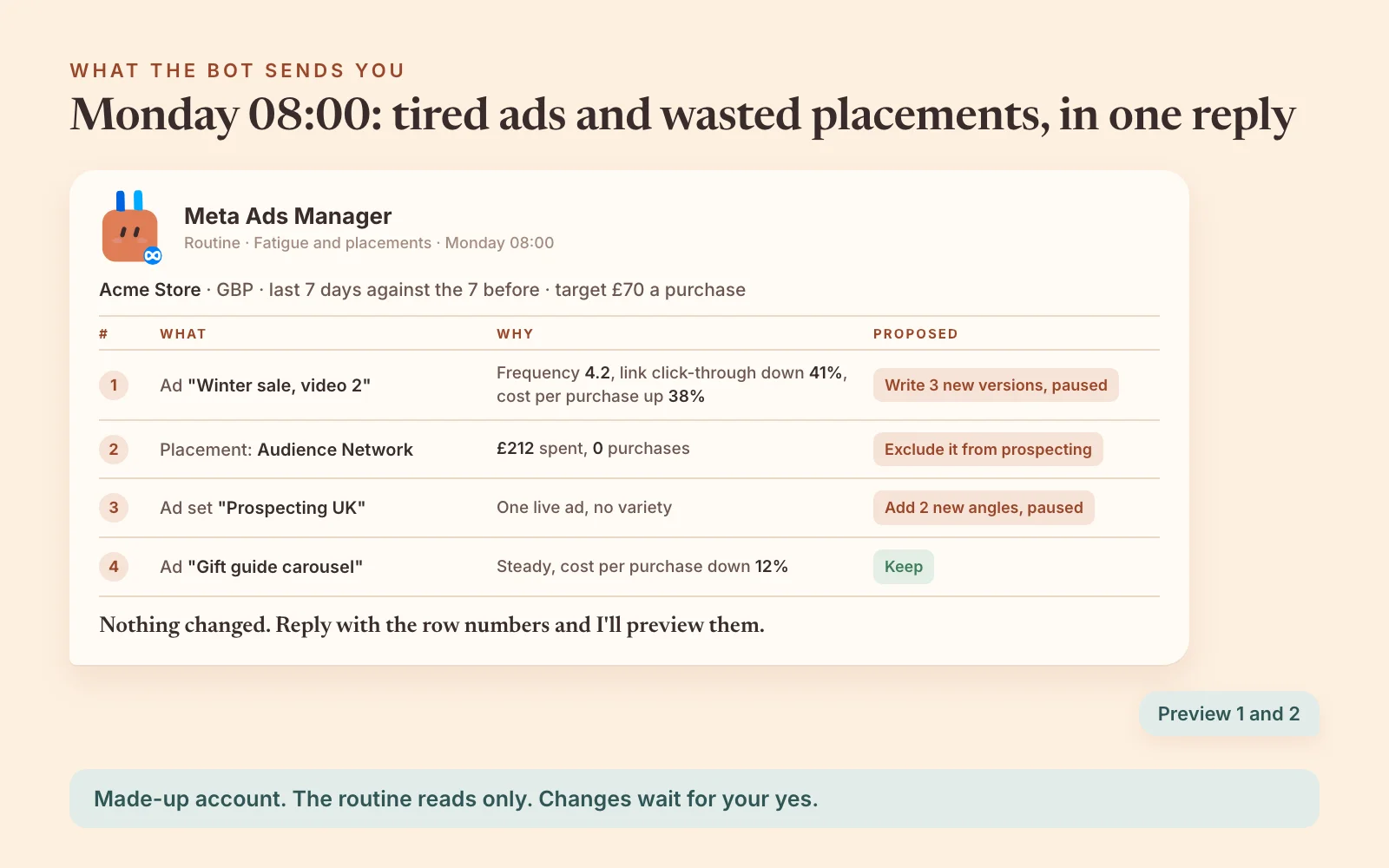
I judge fatigue on three numbers moving together on the same ad, last 7 days against the 7 before: frequency up, link click-through down and cost per result up. Link click-through is link clicks divided by impressions, not Meta's all-clicks CTR, which also counts likes and profile taps.
My working lines: judge an ad only after it has spent about twice the target cost per result, and call it fatigue when link click-through is down 20% or more and cost per result is up 20% or more (or 1.5 times its own 30-day level). I never pause on frequency alone, and a rising CPM on its own isn't fatigue.
The first fix is a materially different creative, not a new headline on the same picture. Meta counts exposures per image or video across every campaign on the Page, so copying a tired video into a new ad set doesn't reset it.
I count two ads as different ideas only if they differ on at least two of four things: the format, the person on screen, the setting and the angle.
Every Monday morning, show me the Meta ads wearing out: frequency up, link click-through down and cost per result up against the week before. Suggest the next ad for the worst ones. Don't create anything yet.
The same Monday pass checks placements. I call a placement waste only when it has spent about two to three times the target cost per result with none of the goal event. Audience Network, rewarded video and the right-hand column are the ones to watch.
A higher average cost isn't waste on its own, because Meta optimises at the ad set, not per placement. And since October 2025, on sales and leads campaigns, Meta can spend up to 5% of the budget on each placement you excluded when it expects better results (Meta for Developers, 8 October 2025), so check the ad set rather than assume zero.
Since August 2026, advertisers have also reported ad set placement exclusions disappearing from Ads Manager, account by account (Meta hasn't announced a date). Where that's reached you, use the account-level placement controls in Ads Manager instead.
Every change gets a date to check it
Every change I approve goes in a log with a date to check it: two weeks for a pause or an exclusion, four weeks for structure, bidding, budgets and new ads.
Meta's own recommendations sit beside your numbers as flags. I never apply one just to lift Meta's opportunity score.
Get the Meta Ads Manager agent free
That week is built into AdPlug's Meta Ads Manager agent: 15 skills and 8 routines, with the rules on this page. It's free with an AdPlug account, and you set it up in Claude, ChatGPT, Claude Code, Codex, OpenAI Dots or Grok Bot.

Meta Ads Manager
Free with an AdPlug account
Checks your Meta account every morning, finds tired ads and wasted placements on Mondays, and writes the weekly and monthly reports. Nothing changes without your yes.
15 skills · 8 routines
Set it up in
Free, you get it when you sign up. Pick the AI you use on the card.
Before any audit, it asks for the six things it needs: agency or in-house, which ad account, what you sell, the goal you judge it on, the button on your page or the lead form, and the budget with a target cost or return. Its routines only read and report.
On AdPlug's free plan it reads and previews one platform, and changes need Pro ($29 a month). A daily check uses about 5 requests a run, about 150 a month, and the free plan has 50 a month after the first five days. So on the free plan, keep the weekly and monthly reports and pause the rest.
Rather run the jobs one at a time? The same checks are public playbooks you can paste into any AI connected to Meta:
- Meta Ads account analysis and the top 5 fixes
- Meta Ads morning check across every account
- Creative fatigue, by ad and by angle
- Placement and platform waste
- Learning limited and learning resets
- Ad sets not spending their budget
- Pixel and goal event check
- Stop-loss and alert rules
- Weekly Meta Ads report for a client
Running Hermes Agent instead? Its setup is in Hermes Agent for Meta Ads.
Three mistakes that make Facebook ads automation expensive
- Optimising for clicks when the goal is sales. Meta optimises for the event you pick, and link clicks, landing page views and ThruPlays aren't a purchase or a lead. If volume is thin, switching to add to cart won't fix it. Fewer ad sets, with more budget each, are the better fix.
- A rule that raises budgets on its own. Meta checks it about every 30 minutes, at night too, and it never asks. Keep rules to stop-losses and alerts, and move budgets in steps of about 20% after a yes.
- Calling fatigue on frequency alone. A frequency of 2 can be fine on broad prospecting and already high on a small remarketing pool. Wait for frequency, link click-through and cost per result to move together, then make a different ad, not a copy of the tired one.