How to find keyword search volume for free, with Google Keyword Planner's own numbers
Quick answer: Google Keyword Planner finds keyword search volume for free, with Google's own average monthly searches for the keywords you give it. Google asks for billing details before you can use it, but you don't have to run a campaign or spend anything. In Keyword Planner, choose Get search volume and forecasts for a list or Discover new keywords for ideas. To get the same numbers in Claude or ChatGPT, connect Google Ads to a free AdPlug account and ask in plain English.
I still run Google Ads for B2B companies, after 12 years in PPC and over $100M in ad spend managed. For search volume, Keyword Planner is the tool I'd start with, because the numbers are Google's own. Here's how to use it on Google's website, and the quicker way: a few prompts in Claude through AdPlug, the connector I built. There are real screenshots of both.


To find keyword search volume for free, use Google Keyword Planner. The numbers come from Google itself.
You'll need a Google Ads account with billing details entered. You won't need to run an ad or spend anything. For each keyword, Keyword Planner gives you the average monthly searches, the month-by-month trend and what advertisers have paid to show at the top of the page.
You can use it on Google's website, or connect Google Ads to AdPlug and get the same numbers from Claude or ChatGPT with a prompt or two (free, with Google Ads as your one platform). This guide shows both, with real screenshots. It also has six prompts to copy and shows how I read the numbers, so they don't fool you.
Free ways to find keyword search volume
Here are five free ways to find or check keyword search volume. Only two give you Google's own search volumes, and both are Google Keyword Planner: on Google's website, or in Claude or ChatGPT through AdPlug.
| Free option | What you get | Real Google numbers? | Limits |
|---|---|---|---|
| Google Keyword Planner (website) | Average and month-by-month searches, competition and top-of-page bids, for your own list or for new ideas | Yes, rounded | Needs a Google Ads account with billing details. Accounts that spend little often see ranges such as 1K to 10K |
| Keyword Planner in Claude or ChatGPT, with AdPlug | The same Keyword Planner data, asked for in plain English, with the AI sorting and reading it. Up to 1,000 keywords a request | Yes, through the Google Ads API, which returns a whole number rather than a range | Needs a Google Ads account with billing details. AdPlug's Free plan gives 500 requests in the first 5 days, then 50 a month, with Google Ads as your one platform |
| Google Trends | Interest over time on a 0 to 100 scale, by country or region, including the last few weeks | Google's data, but relative, not a count of searches | No search volumes, so you can compare keywords but not size them |
| Google Search Console | Impressions, clicks and average position for the searches your own site already appears in | Yes, for your own site | Says nothing about searches your site doesn't show up for yet |
| Free search volume checkers and SEO tools' free tiers (Ahrefs, Semrush, Ubersuggest) | Estimated search volumes and related keywords, with no Google Ads account needed | No, modelled estimates | A limited number of free lookups, and estimates that can differ from Keyword Planner's |
My pick: Keyword Planner for how big a search is, Google Trends for how it's moving in the last few weeks, and Search Console for what your own site already gets. If you came looking for a free keyword research tool, Keyword Planner is the one I'd start with, because the numbers are Google's.
How to find search volume in Google Keyword Planner, step by step
Google Keyword Planner sits inside Google Ads. Google calls it “a free resource to help advertisers build keyword lists” (Google's Keyword Planner page), and looking up keywords costs nothing. Getting in is the fiddly part.
- Create a Google Ads account and skip the campaign. You don't need one. Google Ads Help explains how to create an account without a campaign.
- Enter your billing details. Google Ads Help says: “You must complete your account setup by entering your billing information to access basic features like ‘Get ideas for new keywords’” (Google's Keyword Planner help). Entering them doesn't start any spending. Google Ads costs come from ads that run, and you won't have any.
- Open Keyword Planner from the Tools menu. It offers two options: one for a list you already have and one for new ideas.
- For your own list, choose Get search volume and forecasts. Paste your keywords. Google adds a forecast, but for this job the search volume is the bit you want.
- For new keywords, choose Discover new keywords. Start with a few words, or with a website (any site works, a competitor's too).
- Set the location and language before you read anything. Google bases the averages on the months, location and network you select, so a US figure tells you nothing about the UK.
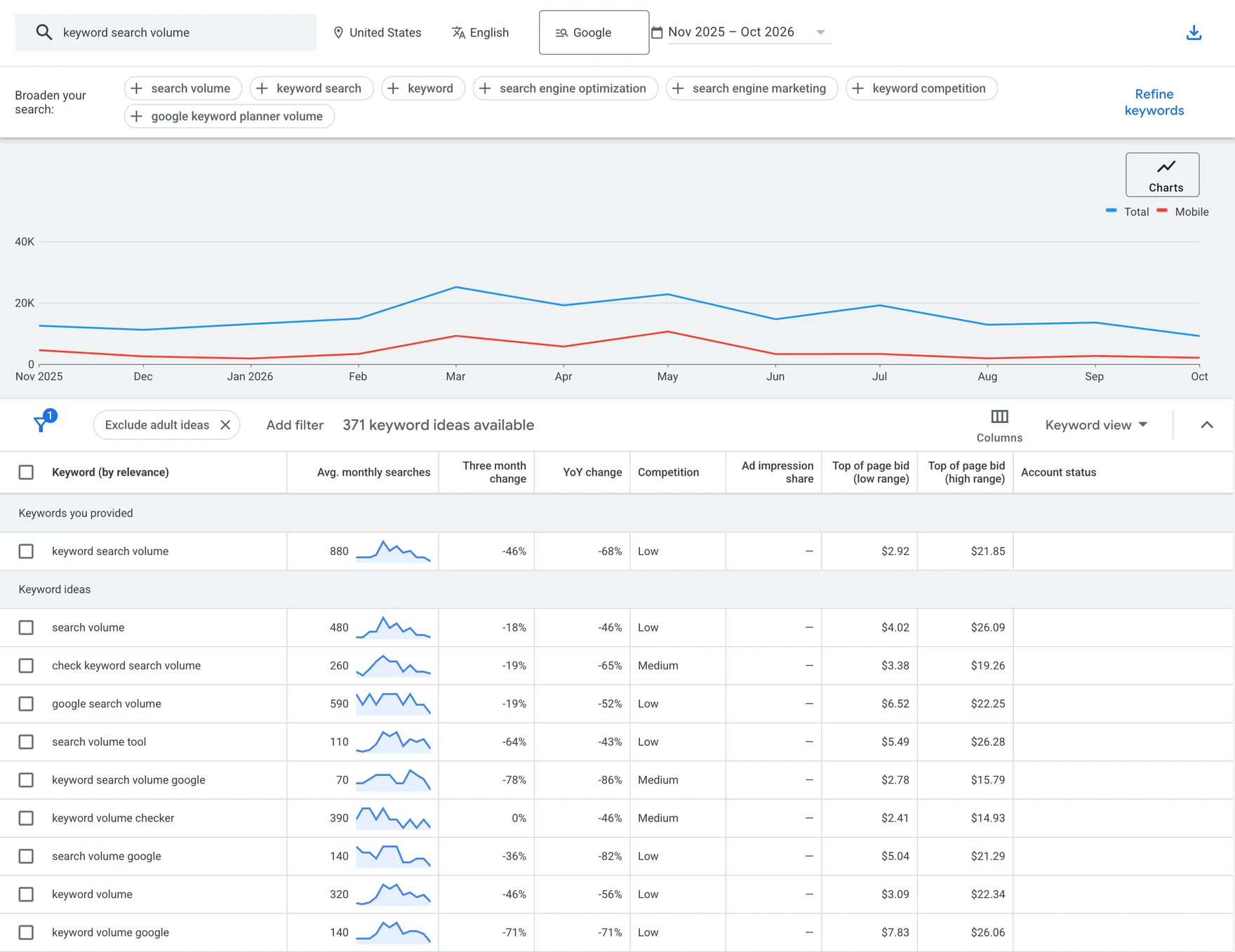
- Read the average as an exact-match figure. Google says historical stats like average monthly searches “are only shown for exact matches” (Google's guide to Keyword Planner's metrics). So “keyword search volume”, at 880 a month in the US, counts that search and its close variants, not every longer search that contains it.
A small warning: Google's pages disagree on whether you need a campaign. The FAQ on Keyword Planner's product page says to create one, and Google Ads Help lets you skip it. Billing details you can't skip.
What it looks like in Keyword Planner
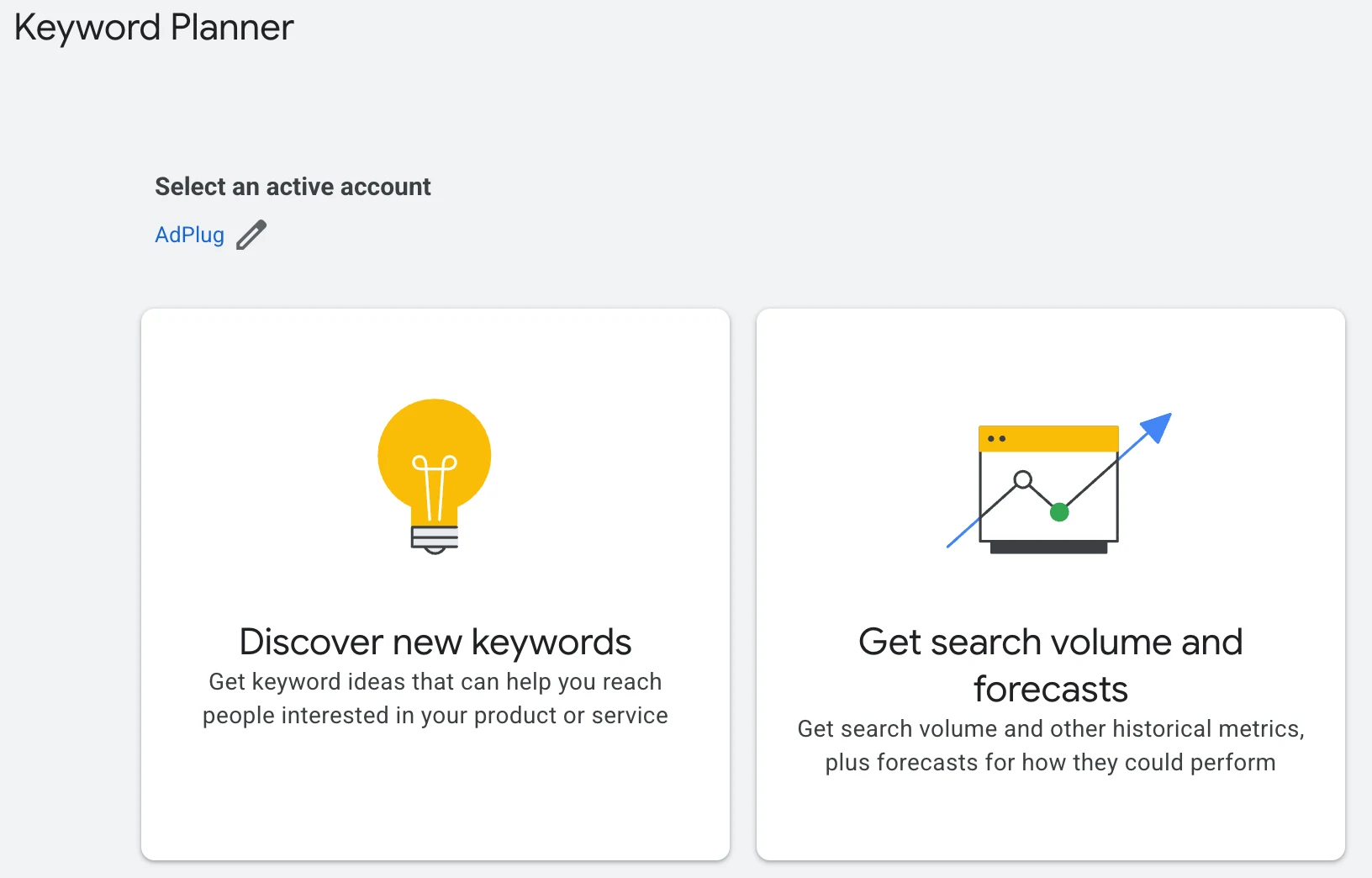
Keyword Planner opens with its two options:
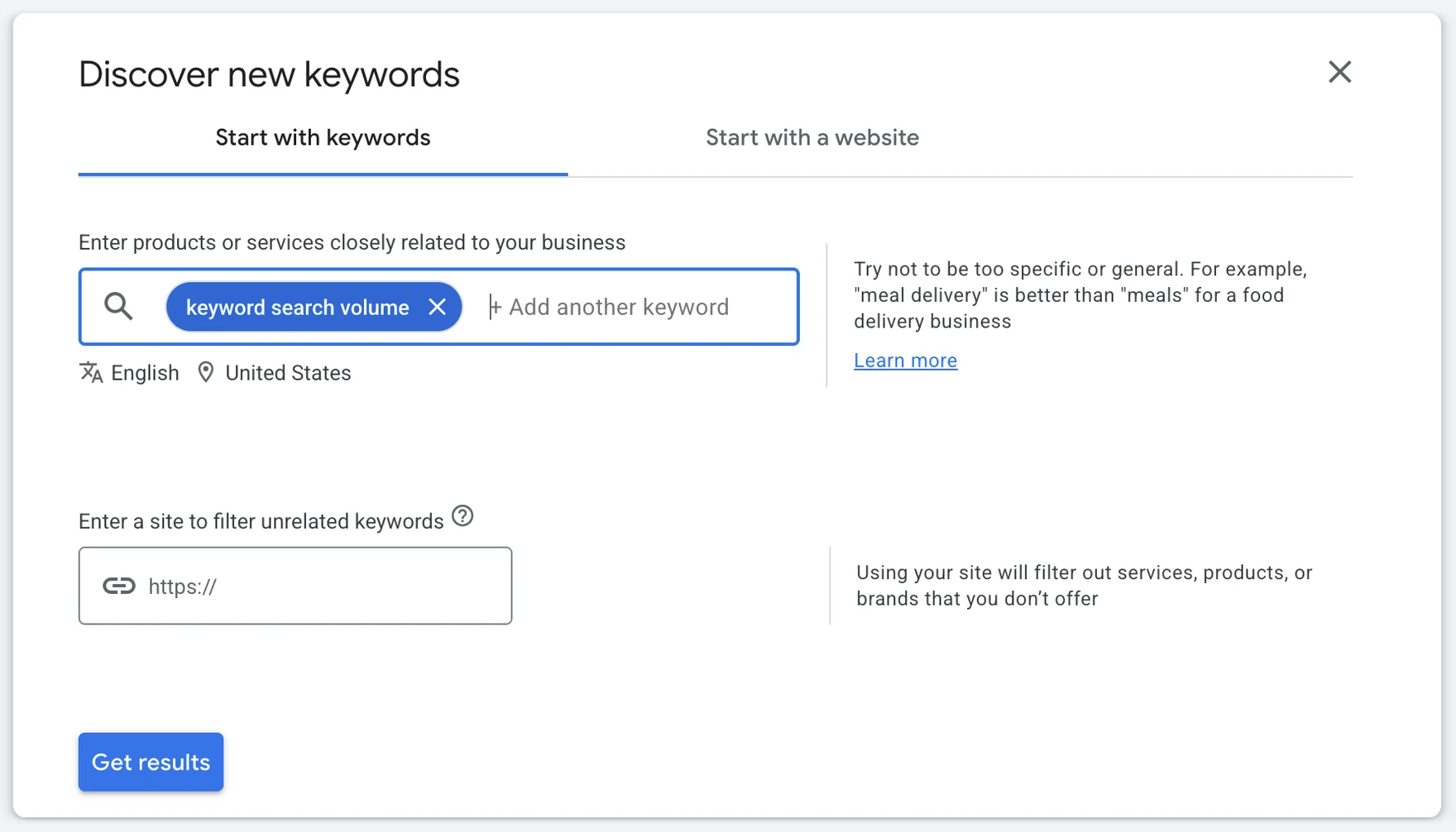
Discover new keywords takes a few words or a website. The language and location sit under the box, in small type, and they decide every number you get back:
And this is what comes back for “keyword search volume” in the US:
What Keyword Planner's numbers mean
- Avg. monthly searches. “The average number of times people have searched for a keyword and its close variants”, for the months, location and network you picked. Rounded.
- Monthly searches. The figure for each month behind the average. This is where the season shows up, and the average hides it.
- Competition. How many advertisers showed on the keyword compared with all keywords across Google. It's about ads, not organic rankings.
- Top of page bid, low and high range. Roughly the 20th and 80th percentile of what advertisers have historically paid for a top-of-page bid on that keyword, for your location and network.
Google's own definitions are in its guide to Keyword Planner's metrics, and Claude or ChatGPT reads back the same four through AdPlug.
Why Keyword Planner shows ranges such as 1K to 10K
If your results say 1K to 10K instead of a number, nothing's broken. Keyword Planner's website often shows ranges to accounts that spend little, and Google doesn't publish the threshold.
The Google Ads API has no range field. Its average monthly searches field is a whole number, the “approximate number of monthly searches on this query, averaged for the past 12 months” (Google Ads API reference). That's the field AdPlug reads, and the next section shows what came back on two small accounts.
Find keyword search volume in Claude or ChatGPT (free with AdPlug)
AdPlug connects Google Ads to Claude or ChatGPT, so you can ask for Keyword Planner's numbers in plain English and have the AI read the trend for you.
AdPlug is a remote MCP server (think of MCP as a plug socket for AI). When you ask, AdPlug runs Google Keyword Planner through the Google Ads API, so the figures are Keyword Planner's, not the AI's.
Next to the website, it's the same Keyword Planner and Google's own numbers, but you ask one question instead of clicking through six steps:
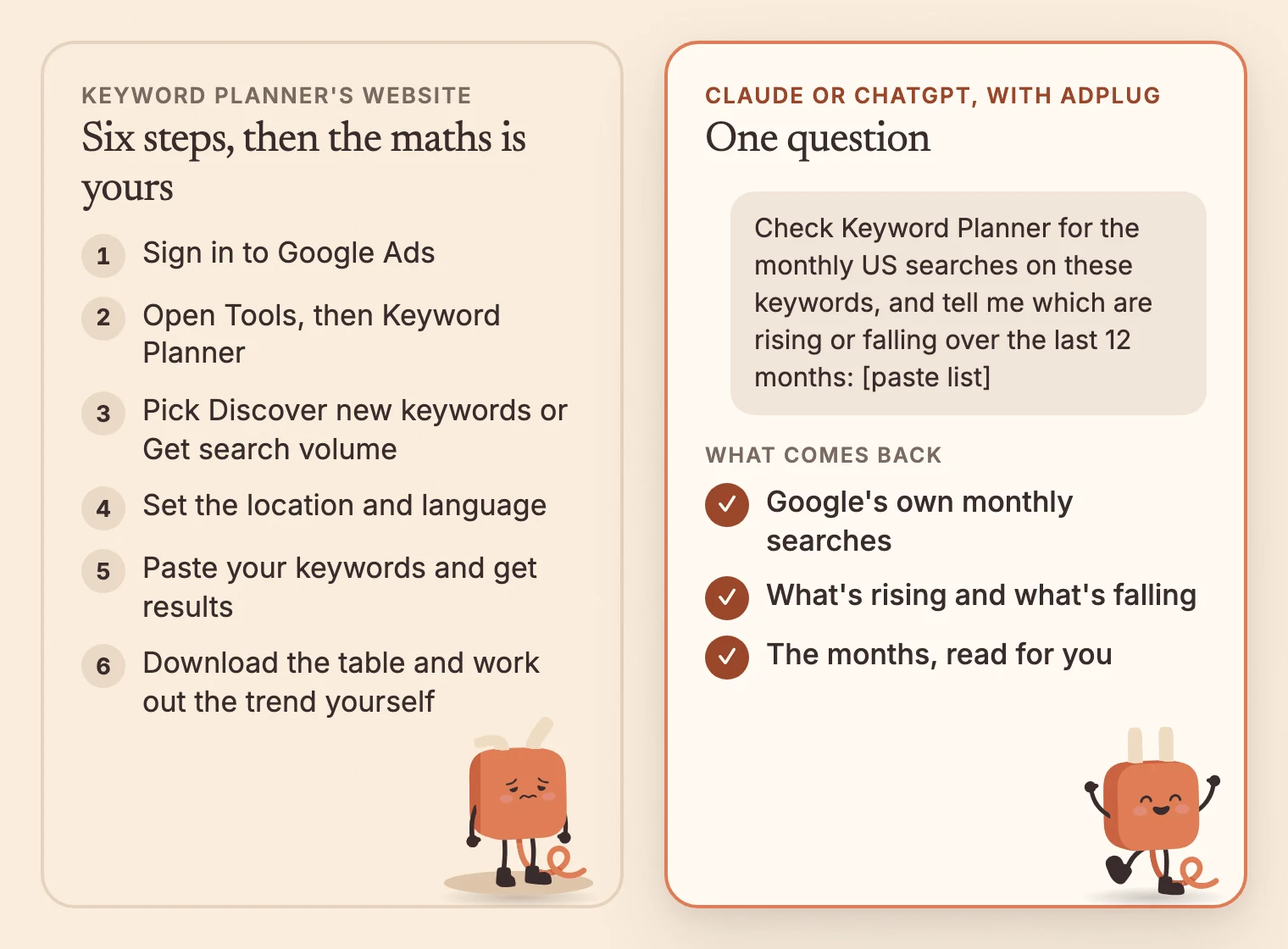
Set it up in three steps
- Create a free AdPlug account. Sign up free, no card needed.
- Connect Google Ads with your usual Google sign-in. If you don't run ads, connect the account you set up for Keyword Planner, with its billing details entered.
- Add AdPlug to Claude or ChatGPT. The step-by-step guides cover Google Ads in Claude and Google Ads in ChatGPT. It works on Claude's Free plan as a custom connector. In ChatGPT, what a plugin can do depends on your ChatGPT plan.
If the AI comes back with Google's CUSTOMER_NOT_ENABLED error, that Google Ads account isn't enabled: either its setup was never finished or it's been closed. If it's the setup, enter the billing details in Google Ads and ask again.
AdPlug's Free plan connects one platform, so make it Google Ads. You get 500 requests in your first 5 days, then 50 a month. Each Keyword Planner lookup is one request and covers up to 1,000 keywords, so a free account can look up thousands of keywords a month (plans are on the pricing page).
The two jobs: look up your list, or find new keywords
- Look up your list. Give the AI up to 1,000 keywords. Keyword Planner returns exactly those, each with its searches month by month, the average, competition, the top-of-page bid range and the close variants Google counted with it.
- Find new keywords. Give it a few seed words, a website (any site, a competitor's too) or both. You get up to 1,000 ideas a request, each with average monthly searches, competition and top-of-page bids, plus month-by-month figures when you ask for them.
Both take any country, region or city (Bavaria works, for example) and any language Google Ads targets. With none named, AdPlug uses the United States and English. The months go back up to 4 years.
What it looks like in Claude
Here's the first prompt from the list below, run in Claude on four keywords from this guide's own research:
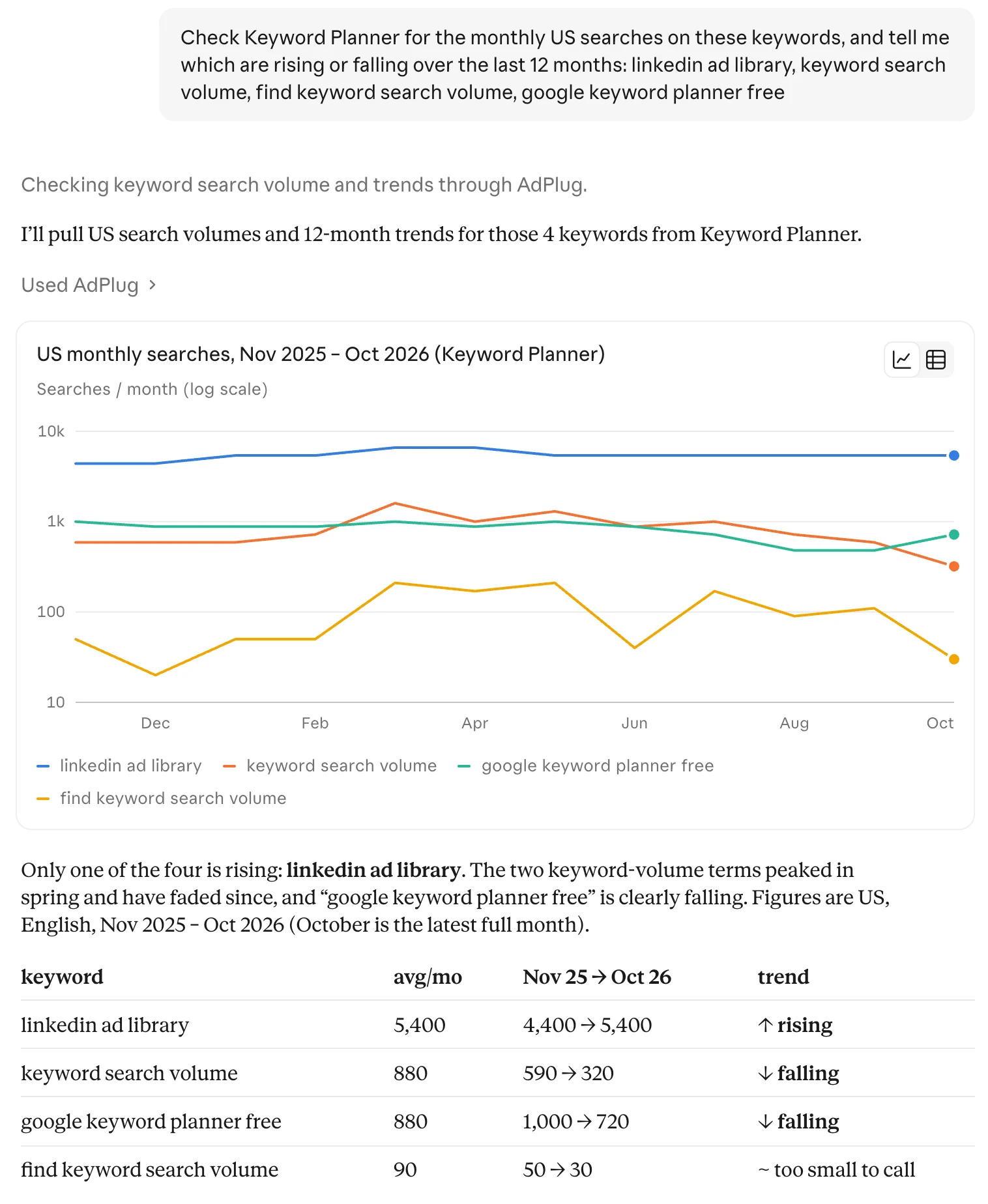
Then it reads the months for you, which is the part you'd otherwise do in a spreadsheet:
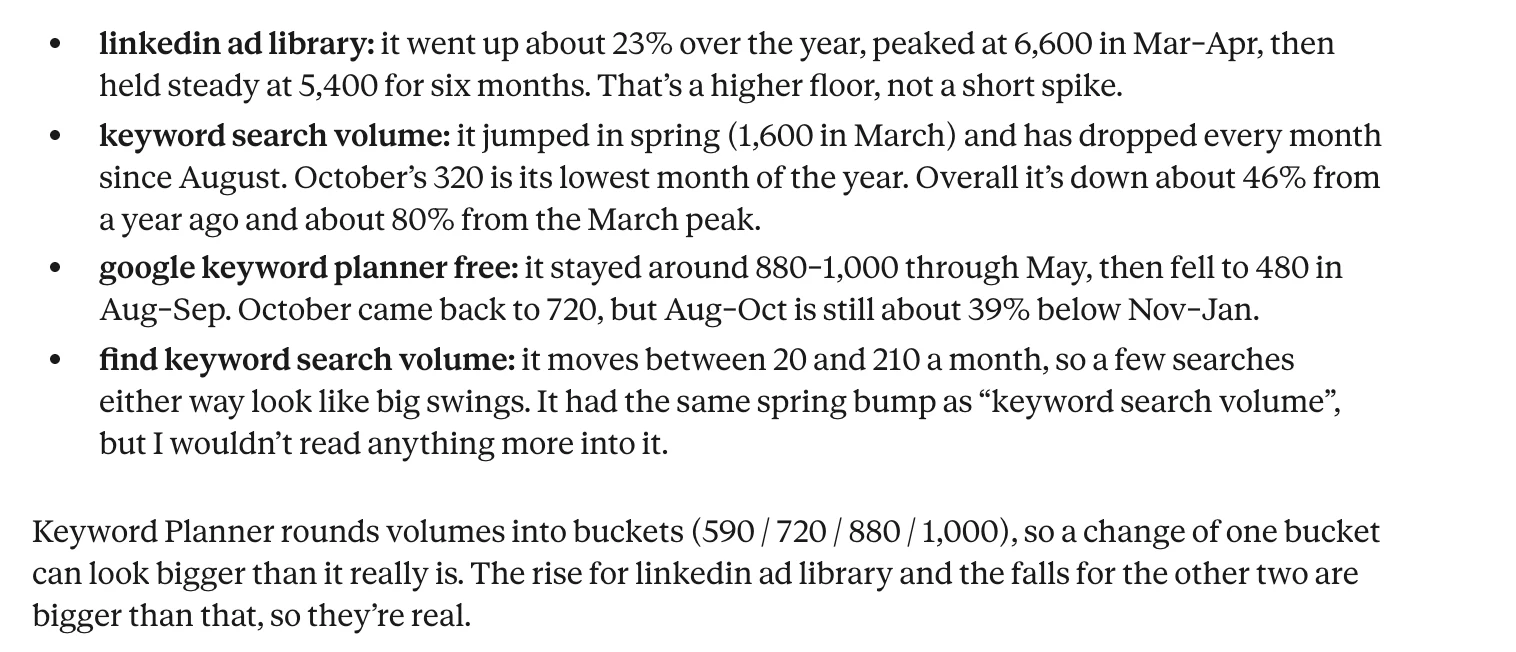
That's the bit that saves time. “keyword search volume” averages 880 a month, which looks steady, and the average hides a fall from 1,000 in July to 320 in October.
Finding new keywords works the same way
Ask for ideas instead of a list, and the AI can sort them into ad groups too. Here's an example of the answer in ChatGPT, built from the real ideas in the Keyword Planner search for “keyword search volume” shown earlier:

 ChatGPT
Pull keyword ideas for “keyword search volume” from Keyword Planner, with US search volumes and top-of-page bids, and group them into themes I could build ad groups from.
google_ads_keyword_ideas AdPlug
Keyword Planner · ideas for “keyword search volume” · US · English
| Theme | Ideas (avg monthly searches) | Top-of-page bid |
|---|---|---|
| The head terms | keyword search volume 880, search volume 480, keyword volume 320 | $2.92 to $26.09 |
| Checkers | keyword volume checker 390, search volume checker 320, check keyword search volume 260 | $2.41 to $19.26 |
| Google's own numbers | google search volume 590, search volume google 140, keyword volume google 140 | $5.04 to $26.06 |
| Tools | keyword search volume tool 210, search volume tool 110, google keyword search volume tool 70 | $4.21 to $29.06 |
Keyword Planner came back with 371 ideas, and these four themes would each make a tight ad group. The checkers are the cheapest to show for, from $2.41 at the low end. The tool searches have the highest top-of-page bids, up to $29.06, which suggests people comparing tools before they pay for one. “search volume” (480 a month) is the broadest, so I'd run it on phrase match and keep an eye on its search terms.
Why an AI with no connection makes the numbers up
An AI that can't reach Keyword Planner can only quote other websites' estimates or invent figures.
ChatGPT shows the problem. Asked how to find keyword search volume for free, with web search on and no connection, it gave a sensible list of tools, then a table of example volumes that it labelled “illustrative figures, not live search-volume results”. Fair play for the label, but the numbers were still made up.
With Google Ads connected through AdPlug, ChatGPT can look your keywords up in Keyword Planner instead, and the figures are Google's.
Single numbers, even on small accounts
I checked whether small accounts get single numbers through AdPlug, on two accounts of mine, each with under $1,500 spent in its lifetime and one with its only campaign paused.
Both returned single figures, identical to the last digit: 5,400 for “linkedin ad library”, 880 for “keyword search volume”, 880 for “google keyword planner free” and 260 for “how to find keyword search volume”.
That's what I saw on two accounts, not a promise about yours. Google hasn't said whether an account that spends little gets less detail through the API.
Six prompts to copy
The first two prompts name Keyword Planner on purpose. Without that, the AI may answer from web estimates instead of looking the numbers up, so add “in Keyword Planner” to any prompt where it starts quoting websites.
Every one needs a Google Ads account connected to AdPlug. That goes for SEOs and founders who don't run ads too: set up the account with billing details entered, no campaign needed. Locations default to the US unless you name one.
Start with the keywords you already have:
Check Keyword Planner for the monthly US searches on these keywords, and tell me which are rising or falling over the last 12 months: [paste list]
For seasonality, ask for the full history (Keyword Planner goes back up to 4 years):
Show me monthly searches for [keyword] as far back as Keyword Planner goes, and tell me when demand peaks each year.
Before you test Google Ads in a new country:
Is there enough UK search demand for [product] to test Google Ads, and what would it cost to show at the top of the page?
For ideas from any website, a competitor's included (swap globex.com for the site you want):
Pull keyword ideas from globex.com with search volumes and top-of-page bids, and group them into themes I could build ad groups from.
The last two also need a Google Ads account with live keywords and search terms, because they join your own account's data to Keyword Planner's. Both stop before changing anything, and on AdPlug's Free plan the AI can preview a change but can't apply it.
Which converting search terms aren't keywords yet, and how many monthly searches does each get? Suggest which to add, but don't add them yet.
Which of my Google Ads keywords are marked low search volume, and what would you bid on instead? Don't change anything yet.
For a longer research prompt that groups ideas into themes with match types and starting bids, use the Keyword planner deep-dive playbook. What else Claude and ChatGPT can do with your Google Ads account is on the Google Ads integration page.
How I read keyword search volume (so it doesn't fool you)
Keyword Planner's search volume looks like a precise count. It isn't, and that's where people get caught. Here's how I read one.
It's a rounded bucket, not a count
Google says plainly that “your search volume statistics are rounded” (Google's guide to Keyword Planner's metrics). You'll see the same figures again and again: 260, 880, 5,400. Those are Keyword Planner's steps.
That's fine for deciding whether a keyword is worth a test. It's useless for forecasting clicks to the unit.
Close variants are already merged
“linkedin ad library” and “linkedin ads library” both show 5,400 a month, with identical figures for every one of the 12 months. That's one figure for both, because Google counts a keyword together with its close variants.
Add them up and you've counted the same searches twice. When you look up a list through AdPlug, each keyword comes back with the close variants Google merged into it, so you can see what was counted together.
The average hides the season
“keyword search volume” averages 880 a month in the US. In the same 12 months it ran from 1,600 in March to 320 in October. Only one month, June, came in at the average.
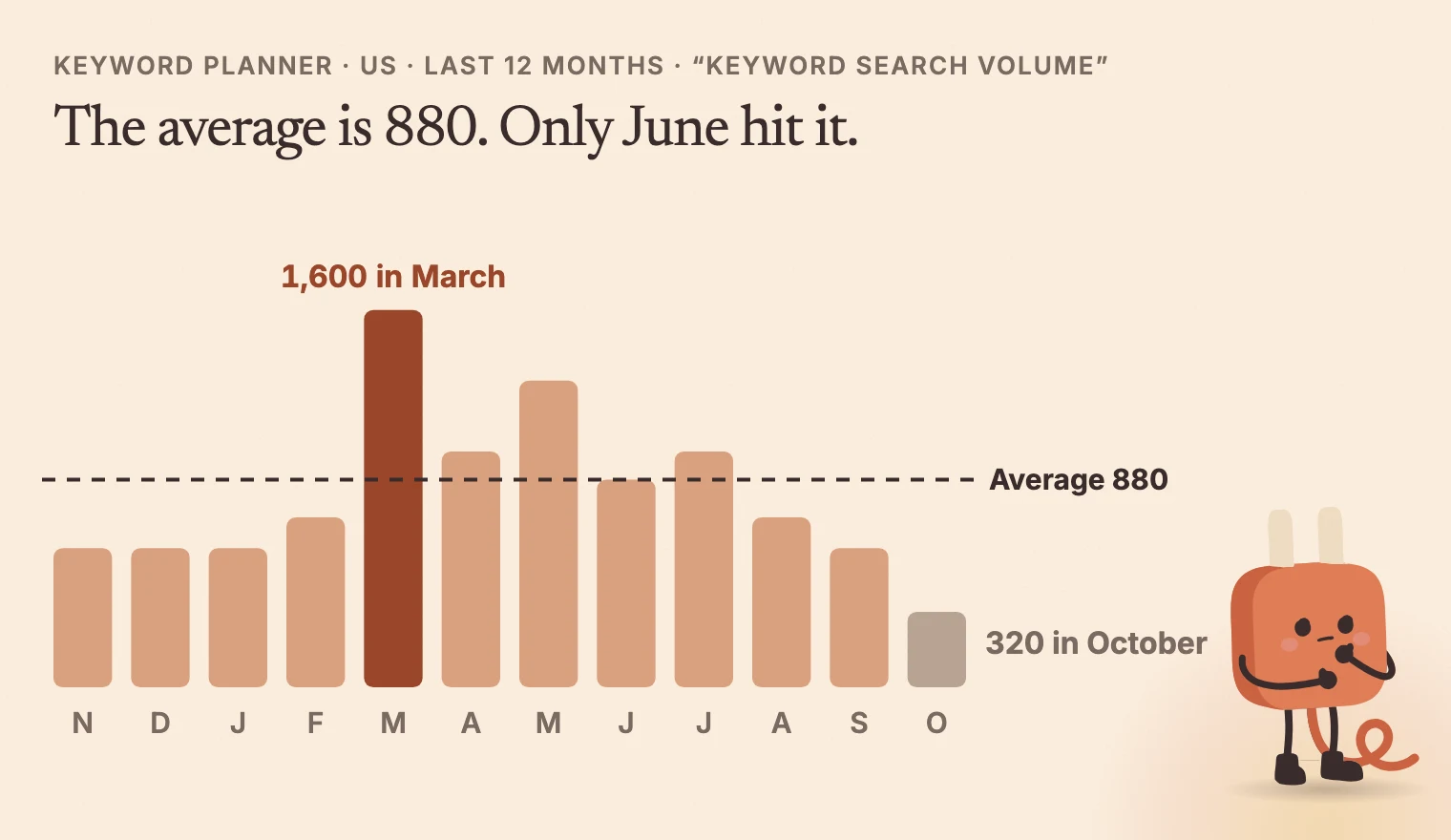
Big keywords swing too. “google keyword planner” averages 49,500 a month, with 90,500 in September and 22,200 in October. Ask for the months every time.
The newest month lags
Keyword Planner adds each month a few weeks after it ends. So for the first couple of weeks of a month, last month's numbers usually aren't there yet.
For the last few weeks, use Google Trends. It scores interest from 0 to 100 instead of counting searches, but it's close to real time.
The bid tells you who's searching
The top-of-page bid range is what advertisers have historically paid to show at the top of the page. It's a good clue to how commercial a search is.
“linkedin ad library” runs from $67 to $380, which says B2B advertisers pay a lot to reach the people typing it. “keyword search volume” runs from $2.92 to $21.85, which reads to me like students and bloggers.
Keyword Planner rates competition for “linkedin ad library” as low. Competition is “the number of advertisers that showed on each keyword relative to all keywords across Google” (Google's definition), so low competition with high bids means few advertisers, paying a lot.
Zero isn't always zero
“keyword planner without ads” comes back as 0, with no monthly figures (slightly unhelpful, given it's a question this guide answers).
Google says keywords with very low search volumes, or on sensitive topics, aren't discoverable (Google's Keyword Planner help), so a zero can mean too few searches to show, not none at all. For searches your site already appears in, Google Search Console shows the impressions, though it hides the rarest queries too. AdPlug has a Search Console connector as well (with Google Ads, that's two platforms, so AdPlug Pro).
In a live Google Ads account, Google marks keywords with very few searches as low search volume. The sixth prompt above finds them and asks what to bid on instead.
SEO tools and Keyword Planner disagree on small keywords
DataForSEO, an SEO data provider, puts “find keyword search volume” at 110 a month and “check keyword search volume” at 320. Keyword Planner says 90 and 260.
The SEO tool I use listed “find keyword search volumes” at 320 a month, more than three times Keyword Planner's 90.
On a keyword that small, the gap can decide whether it's worth a page or an ad group at all. When they disagree, I'd go with Keyword Planner, because the numbers come from Google.
Search volume for SEO vs PPC
In PPC, volume decides whether an ad group can get data at all. A keyword with 90 searches a month won't give an ad group much to learn from on its own, so it usually belongs in a bigger theme.
Before a PPC test, read three things together: the volume in the country you'd target, the top-of-page bid range, and the months, in case the season is about to turn. The third prompt above asks for the first two in one go.
In SEO, volume is one input next to difficulty and intent. “keyword search volume” gets 880 searches a month in the US, and DataForSEO's keyword difficulty score puts it around 80 out of 100. “find keyword search volume” gets 90, and its page one is mostly free checkers and tool pages. A guide to Google's own numbers stands out there, which is why this one goes after the 90.
Both jobs should read the bid too. A small keyword with a big top-of-page bid often has buyers behind it, and that can be worth more than a big keyword nobody bids on.
What Keyword Planner won't tell you
Google Keyword Planner is the best free source of search volume I know, and it still has gaps.
- Google only. No Bing. Microsoft Advertising has its own keyword planner, and the Microsoft Ads keyword planner playbook has a prompt for it.
- Rounded figures. Steps such as 260 and 880, averaged over 12 months.
- Very small keywords are hidden. A keyword with too few searches shows up as 0, or not at all.
- A month behind. The newest month arrives a few weeks after it ends.
- No ranking difficulty. Competition is about advertisers. Keyword Planner doesn't say how hard a search is to rank for in organic results.
- Billing details first. No campaign needed, but without billing details there's no Keyword Planner (and through the API, Google's
CUSTOMER_NOT_ENABLEDerror).