LinkedIn Ad Library: how to search it, what it shows, and how to read competitors' ads
Quick answer: The LinkedIn Ad Library (linkedin.com/ad-library) is a free, public database of LinkedIn ads, and you don't need a LinkedIn account to search it. It covers ads from 1 June 2023 onwards, each kept for a year after its last impression. Search by company or advertiser name, payer name or keyword, and narrow it by country and date range, to see each ad's preview, format, advertiser and payer. Ads that target the EU also show the dates they ran, estimated impressions by country and the targeting used, and no ad shows spend, clicks or conversions.
I run LinkedIn Ads for B2B SaaS and services companies (12 years in PPC and over $100M in ad spend managed). Before I plan a new campaign for a client, I go through their competitors' ads in the LinkedIn Ad Library and look at the creatives themselves, to understand what works better. The library is free, and it gives the client a competitive advantage before the new campaign spends a dollar. This is how I do it, step by step, plus the quicker way: asking Claude through AdPlug, the connector I built.


The LinkedIn Ad Library is a free, public database of ads that have run on LinkedIn, and anyone can search it.
It's at linkedin.com/ad-library (some people call it the LinkedIn Ads Library), and you don't need a LinkedIn account or a login. Search a company, a payer or a keyword, and each ad comes up with its preview, its format and who paid for it.
Ads that target the EU come with more: the dates they ran, estimated impressions by country and the targeting used. Spend, clicks and leads aren't there for any ad, yours included.
Below is how to search it, what it shows and hides, how I read a competitor's LinkedIn ads and why some companies don't turn up. You can also search the LinkedIn Ad Library from Claude or ChatGPT with AdPlug, which uses LinkedIn's official API, and there's a real search further down to show what comes back.
What the LinkedIn Ad Library is (and why it exists)
LinkedIn does have an ad library, and it's public. LinkedIn's Help page calls it "a publicly available database that gives you information about ads that have run on LinkedIn".
The LinkedIn Ad Library includes ads that ran on LinkedIn after 1 June 2023. Each ad stays in it for a year after its last impression, so paused and finished ads are still there, not just the live ones.
A new ad typically appears "shortly after the ad receives its first impression", in LinkedIn's words. So you won't see a competitor's ad before it has started serving.
It's free and open to everyone. LinkedIn's engineering team says the library is "available to all LinkedIn members and the public", and that it has helped LinkedIn comply with laws such as the EU's Digital Services Act (LinkedIn Engineering, January 2025).
That's also why ads that target the EU carry extra detail. LinkedIn shows the analytics and targeting "for countries where the law requires it", and ads that don't target the EU don't get them.
How to search the LinkedIn Ad Library, step by step
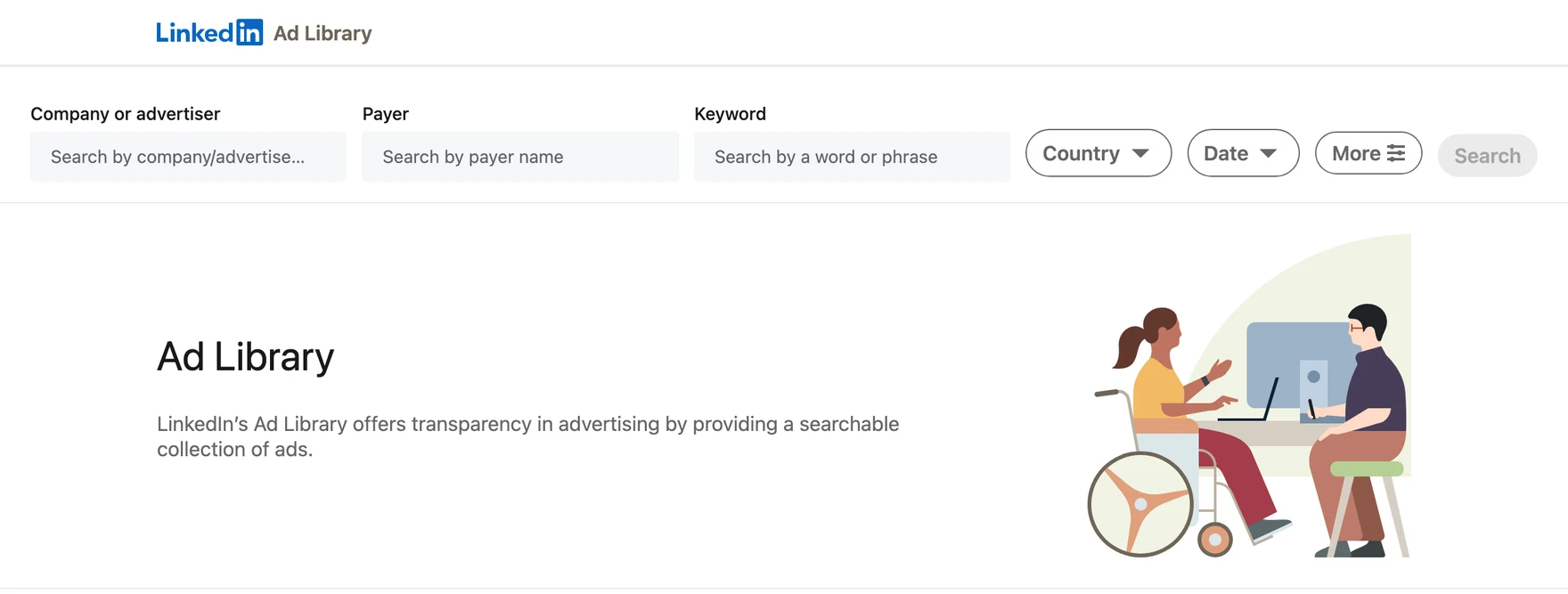
Searching the LinkedIn Ad Library works the same way for any company:
- Open linkedin.com/ad-library. No sign-in needed.
- Search by company or advertiser name, payer name or keyword. Any of the three works.
- Pick a country and a date range to narrow it down, or leave them open to see everything.
- Open an ad for its details: the preview, format, advertiser and payer, plus the dates, impressions and targeting if it targeted the EU.
- Click More to filter ads that target the EU. It adds two filters: impression range and ad targeting parameters.
Two search tips
Search the payer as well as the company. On a Thought Leader Ad, the advertiser is the person whose post it is and the payer is the company behind it. A company search can still find some of these (the third ad in the Semrush results below is one, marked Promoted by Semrush), and a payer search finds more.
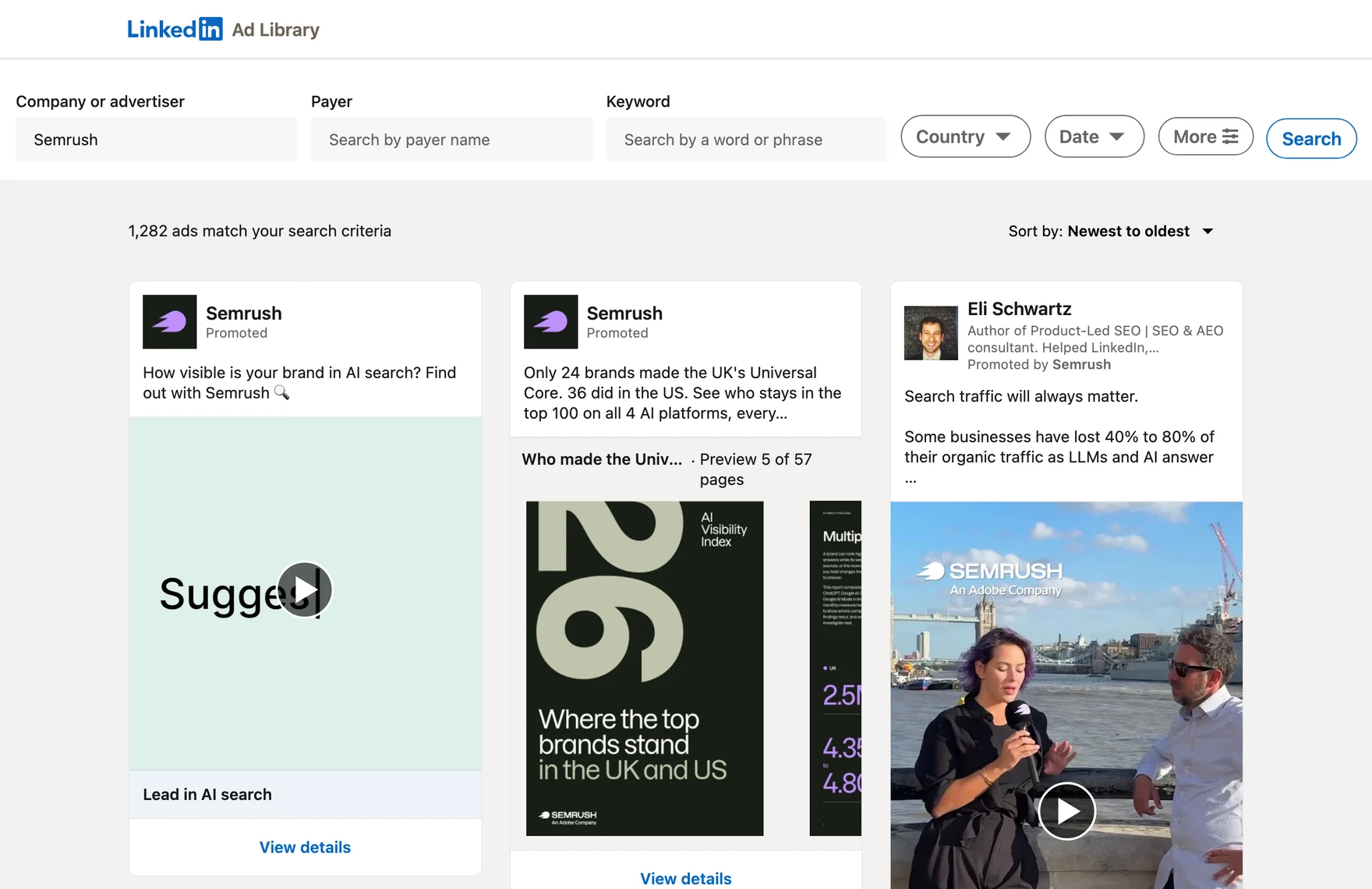
Search the brand as a keyword too. It finds ads that mention the brand even when they run under another name, plus other companies' ads that mention it, such as review sites and agencies.
Finding LinkedIn ad examples by topic
The keyword search is also a good free source of LinkedIn ad examples. Search a topic your buyers care about, such as a job, a problem or a software category, and you'll see how different advertisers pitch it, format by format.
What the LinkedIn Ad Library shows and what it hides
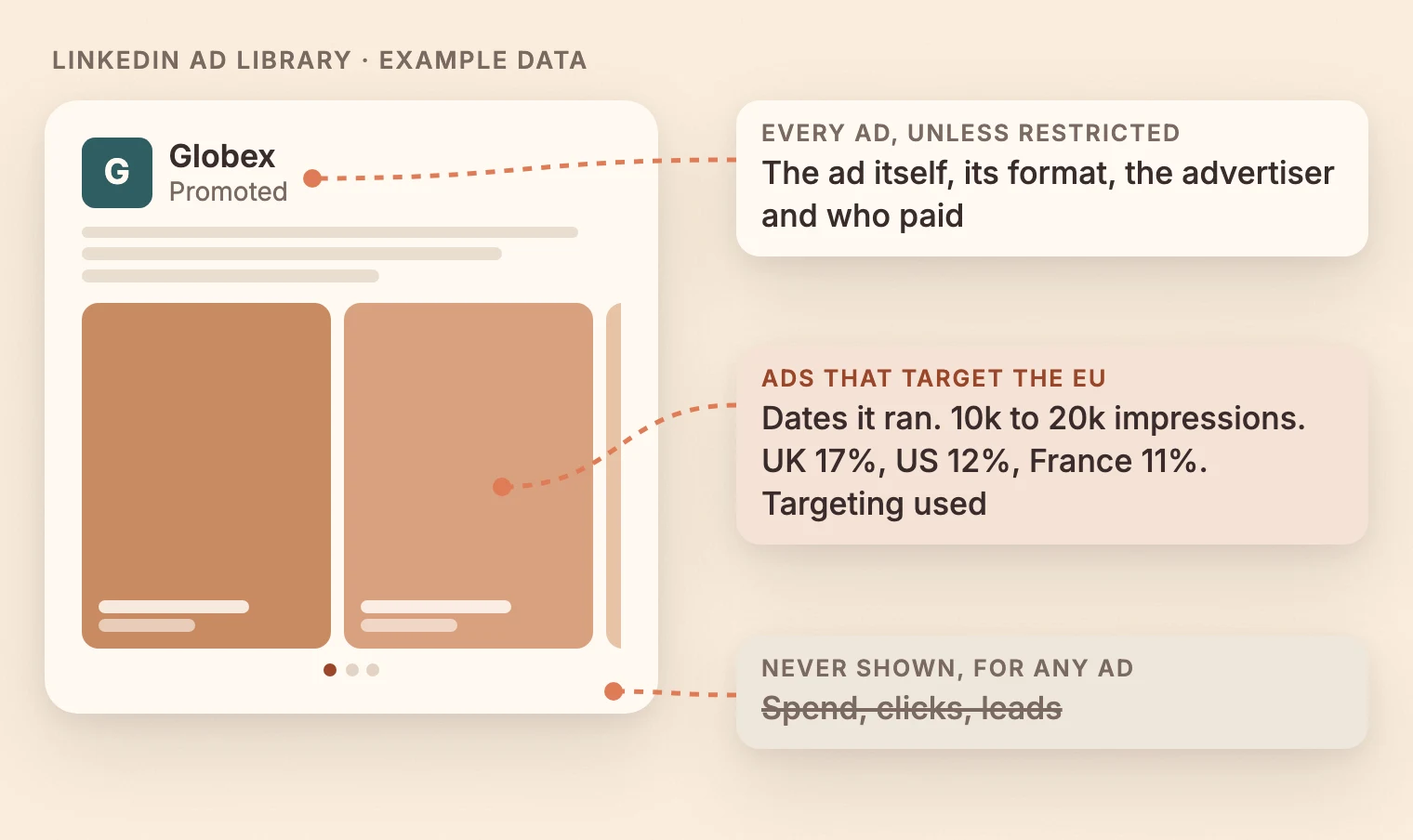
What the LinkedIn Ad Library shows depends on whether the ad targeted the EU. Every ad gets the basics, EU-targeted ads get dates, impressions and targeting on top, and no ad gets spend or results.
| What you see | Ads that don't target the EU | Ads that target the EU |
|---|---|---|
| Ad preview (the creative) | Yes, except restricted ads | Yes, except restricted ads |
| Ad format | Yes | Yes |
| Advertiser name | Yes, except restricted ads | Yes, except restricted ads |
| Payer name | Yes, except restricted ads | Yes, except restricted ads |
| Whether the ad is restricted | Yes | Yes |
| Dates the ad ran | No | Yes |
| Estimated impressions, and the share by country | No | Yes |
| Targeting categories used, to include or exclude | No | Yes |
| Spend or budget | Never | Never |
| Clicks, click-through rate, leads or conversions | Never | Never |
Sources: LinkedIn's Help pages on the Ad Library and on targeting parameters and impressions.
Restricted ads are the exception. To comply with the law, LinkedIn doesn't display the preview, the advertiser name or the payer name for them, but it still shows that the ad is restricted.
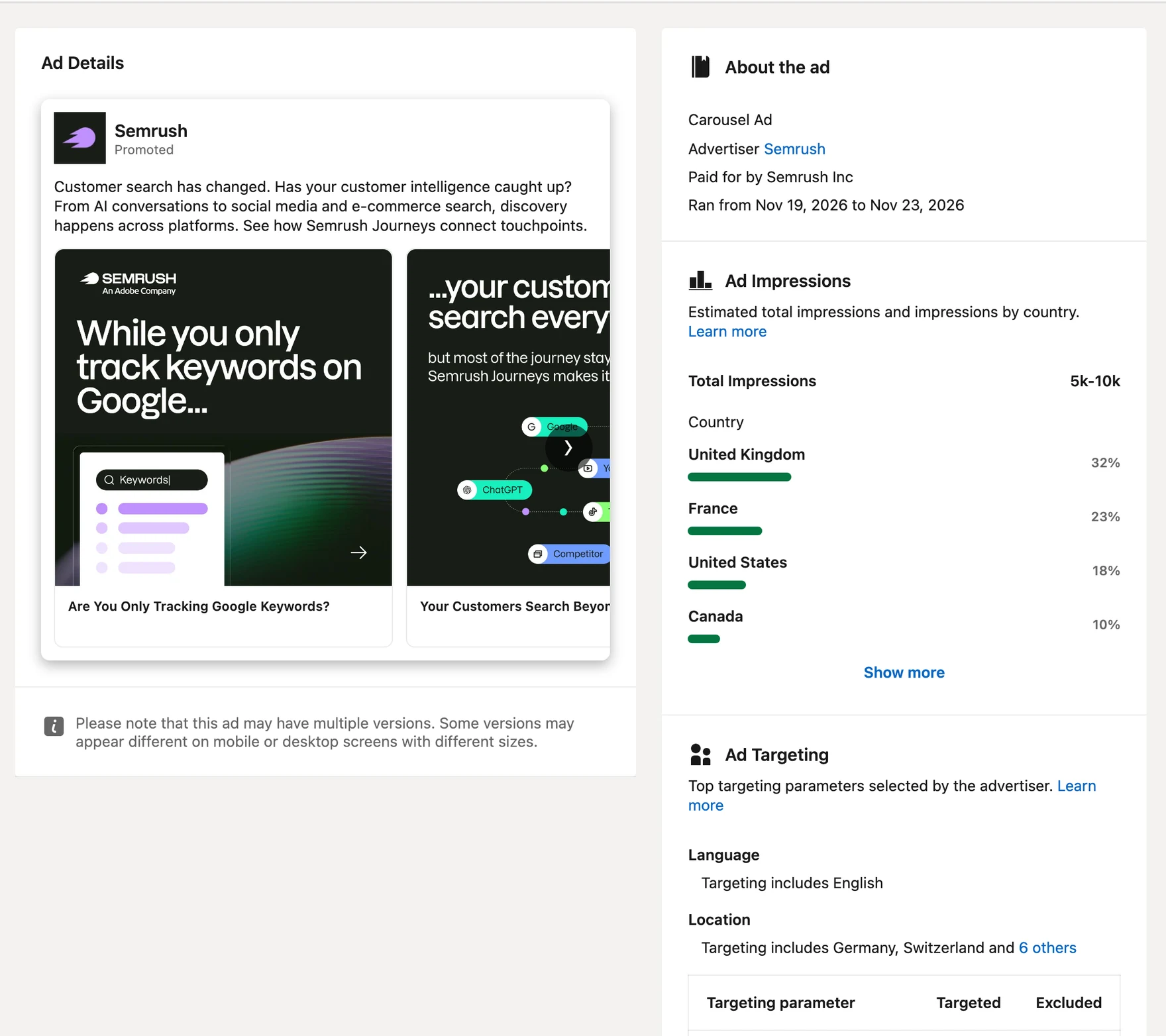
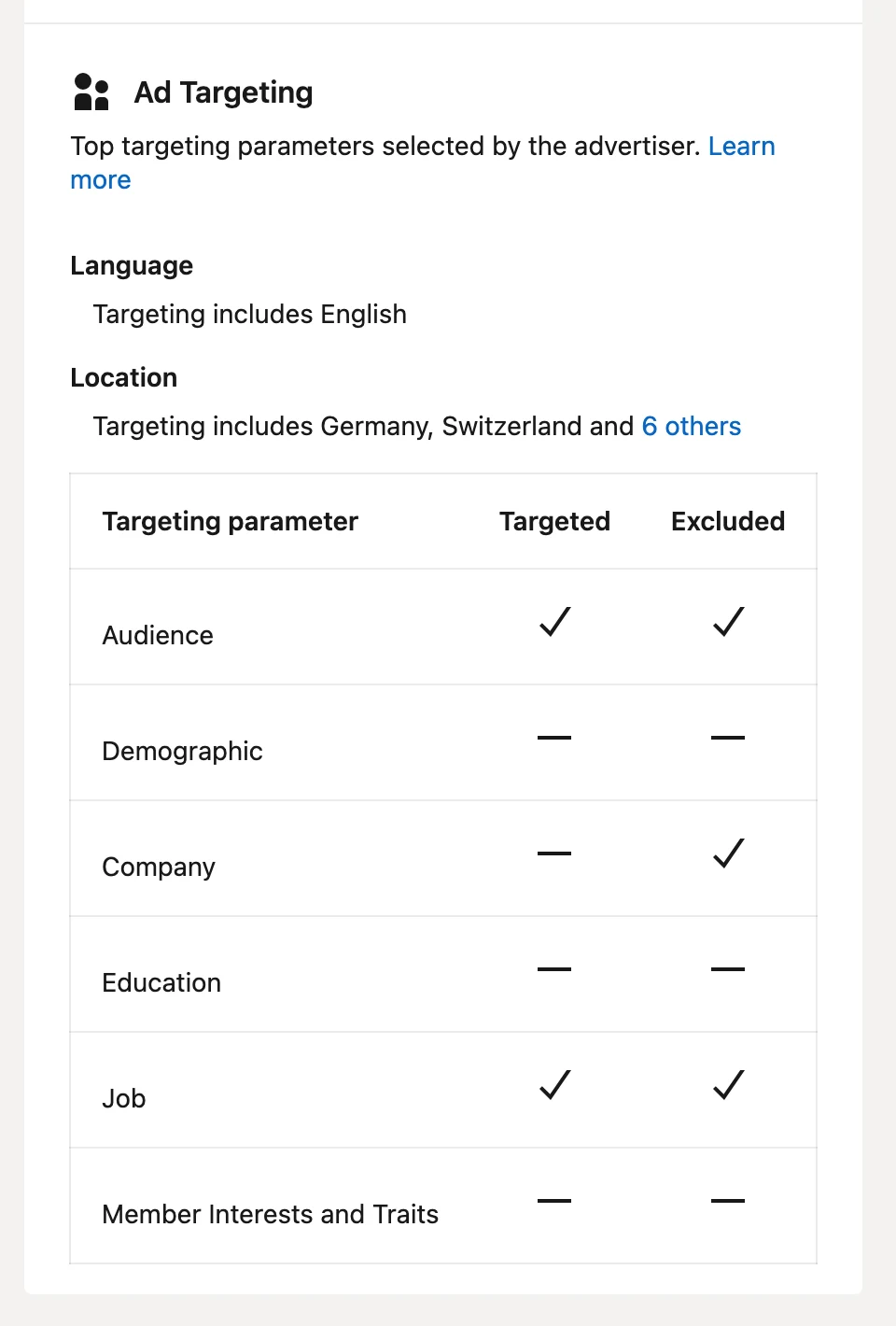
Here's a real ad that targeted the EU. This Semrush carousel targeted Germany and seven other countries, so its page in the library shows when it ran, roughly how many impressions it got and where they went:
Reading the EU numbers
- Impressions are estimates. LinkedIn shows "the estimated total impressions of the ad and impression breakdown by country". Each country is rounded to the nearest percent, and anything between 0 and 1% shows as <1%.
- They update once a day. LinkedIn's engineering team says the figures are calculated daily through an offline job, so they don't move in real time.
- Countries can surprise you. Impressions can land in countries the advertiser didn't target, when members travel or have an out-of-date location on their profile. So a small share from a country they never picked doesn't mean they targeted it.
- Targeting is mostly yes or no. LinkedIn lists 12 targeting categories, from job and company to audience expansion, and marks each one as used for inclusion, exclusion or both. It tells you a competitor used job targeting, not which job titles. Through the API, location and language come with their values.
How I use the LinkedIn Ad Library to research competitor ads
Before I plan new LinkedIn campaigns for a client, I go through their competitors' ads in the LinkedIn Ad Library. It shows me what we're up against before anything goes live.
Not to copy them. I want to know what the category already sounds like, so the client can sound different.
This is what I look at, roughly in this order.
Formats: what they're betting on
The format mix tells you what a competitor believes works. A mix heavy on document ads says they think their content earns the lead. Thought Leader Ads say they think a person's post beats one from the company Page.
Then compare the mix with yours. If every competitor runs single image ads and so do you, a document ad or a Thought Leader Ad is the obvious test.
Creatives: what they say and show
I also look at the creatives themselves, to understand what works better. A creative shows what a competitor believes will land: the hook in the first line, the visual, the proof they lean on and the call to action. Put them next to your own, and if every ad in the category looks the same, yours shouldn't.
For ads that target the EU, the best clue is a pair: two ads with the same targeting, where one stops and the other keeps running. That's as close as the library gets to showing you a winner. In the real search further down, Claude found exactly that for Ahrefs: a document ad and a single image ad with the same targeting, and only the single image still running.
Offers: what they ask for
The offer matters more than the design. Read what each ad asks the buyer to do: book a demo, start a trial, download a report, join a webinar.
If every competitor asks for a demo, that's where a different offer has the most room.
Thought Leader Ads: advertiser versus payer
When the advertiser is a person and the payer is a company, you're looking at a Thought Leader Ad. Note who the company sponsors: the founder, the sales team, customers, or someone outside the business.
A company that sponsors its people's posts is betting on them more than on its brand. I've covered how the format works, its rules and what it costs in LinkedIn Thought Leader Ads.
Dates and impressions: what's new and what has weight
For ads that target the EU, the first and latest impression dates give you a real launch date and tell you whether the ad is still serving. The impressions range tells you how much weight is behind it.
That works for companies outside the EU too, as long as the ad targeted EU countries. In the real search further down, a US company's carousel came back with its launch date and an impressions range for exactly that reason.
Countries: where the impressions go
Impressions by country are the closest the library gets to showing where the money goes. If a competitor's UK share keeps growing from one check to the next, the UK is where they're pushing.
Targeting: the shape of the audience
The targeting categories tell you the shape of the audience, not the names in it. Company targeting can mean named target accounts, but it can also mean industry, company size or followers, so don't read it as account-based marketing on its own.
Audience means matched audiences, such as retargeting or an uploaded list. Audience Expansion switched on tells you they're letting LinkedIn reach people beyond the audience they set.
How long it has run: a weak signal
You can only see how long an ad has run if it targeted the EU. An ad that has run for months might be profitable. Someone might also have forgotten to switch it off (more often than anyone admits).
So I treat longevity as a weak signal. A long-running ad in a format they keep adding to says more than one old ad on its own.
What I do with it
I look for the angle nobody in the category is using, then check which formats the client isn't testing yet.
Then I go back to the client's own account. A competitor's ad tells you what they tried, not what worked, and your own reports are the only place you'll find your cost per lead.
The quicker way: ask Claude
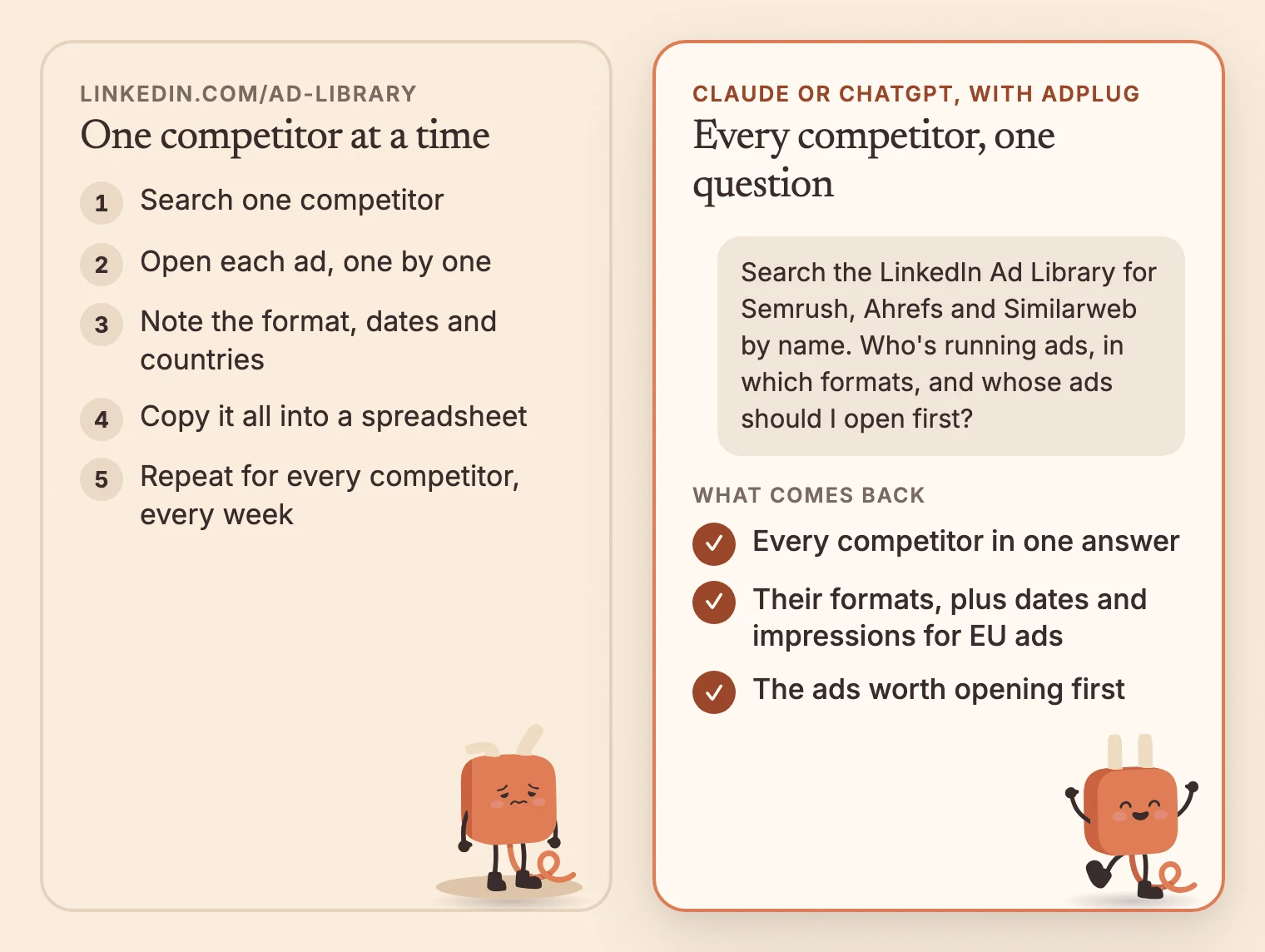
By hand, you do all of this one competitor at a time. Search, open every ad, note the format, dates and countries, copy it into a spreadsheet, then do it all again next week.
There's a simpler way. With AdPlug's LinkedIn Ads MCP server connected, Claude or ChatGPT searches the LinkedIn Ad Library for you. Name your competitors in one prompt, and the research comes back in one answer: who's advertising, in which formats, and which ads to open first.
Search the LinkedIn Ad Library from Claude or ChatGPT
AdPlug connects LinkedIn Ads to Claude and ChatGPT, and it can search the LinkedIn Ad Library too, for ads from any advertiser, not only the accounts you manage. The searches go through LinkedIn's official Ad Library API, with no scraping.
You need LinkedIn connected in AdPlug. Then you ask in plain English, and the AI runs the search, reads the results and tells you which ads to open.
Competitor research in one prompt
Here's a real chat in Claude. I asked about three marketing data tools' LinkedIn ads, by name: Semrush, Ahrefs and Similarweb.
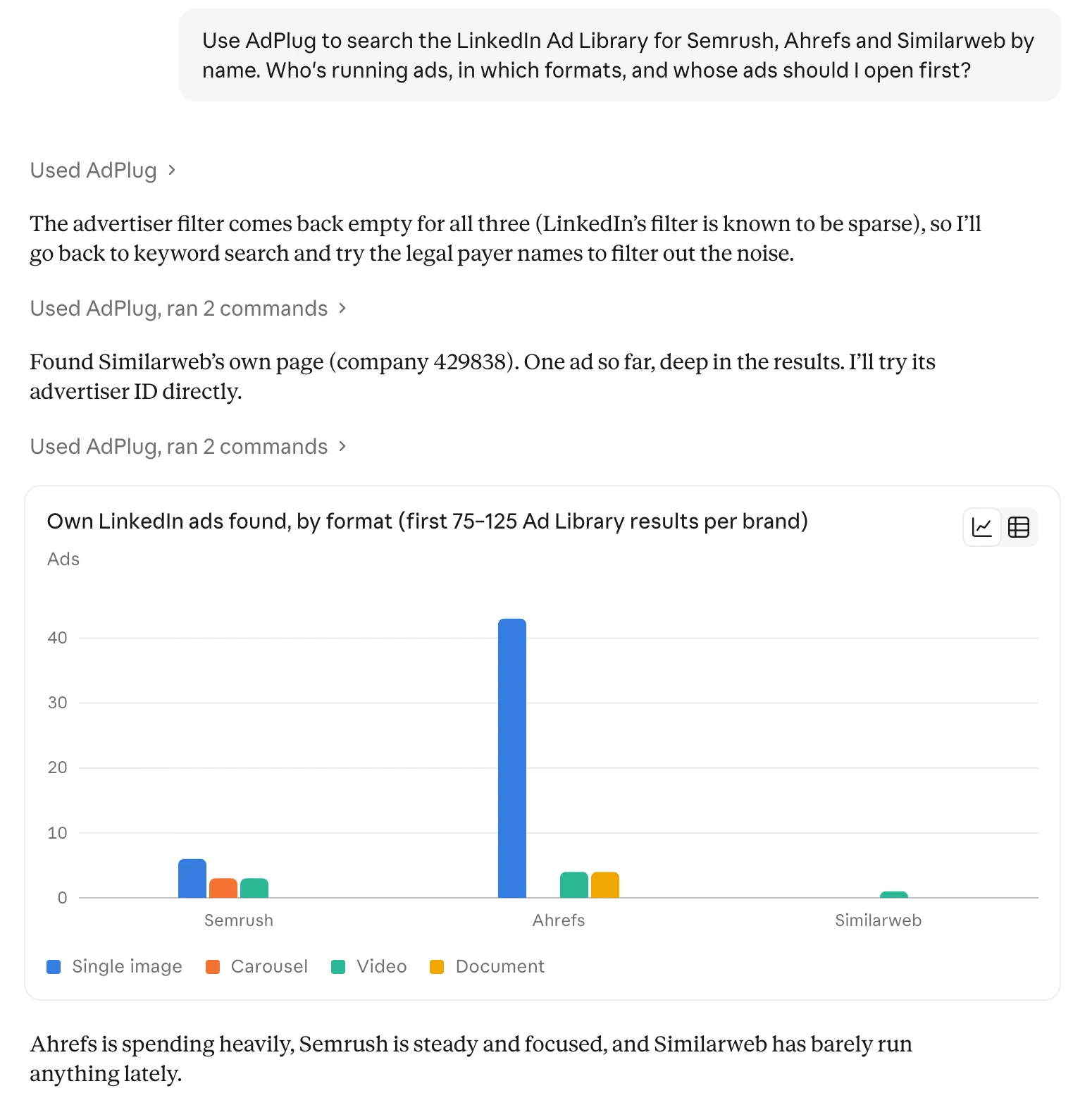
Claude searched each name, paged through the results, kept each brand's own ads and charted them by format. (“Spending heavily” is Claude reading the ad count and impressions. The library has no spend figures, for anyone.) Then it told me which ads to open first, and why:
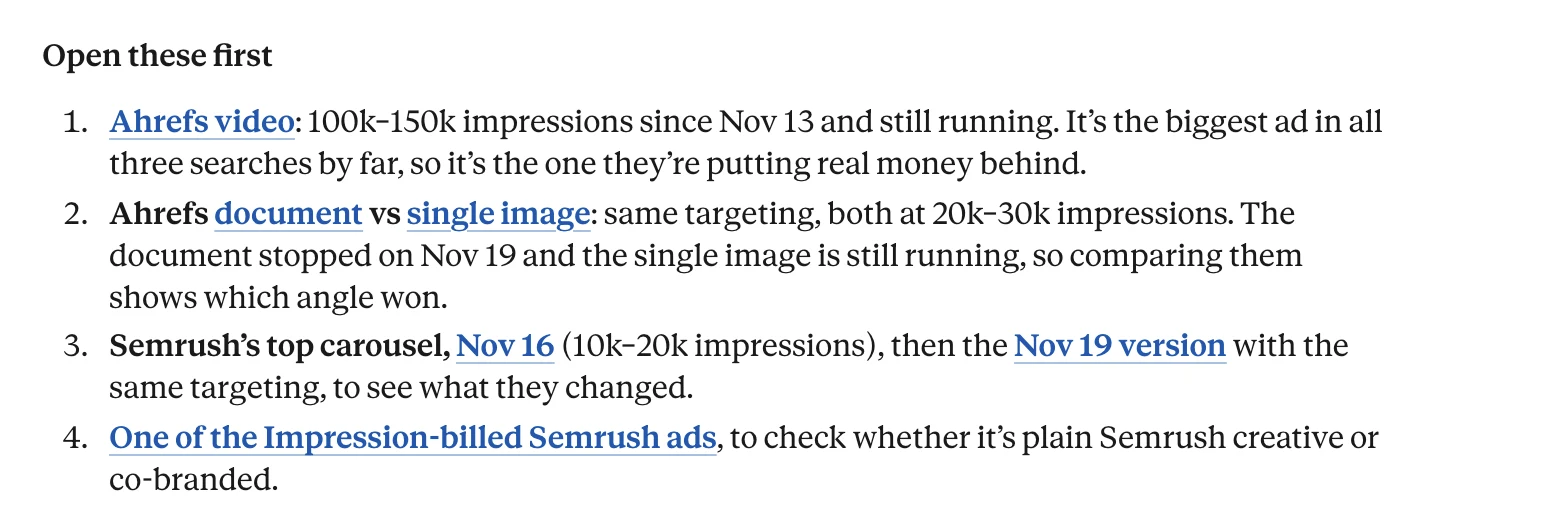
That was one prompt. By hand, it's three searches, a few hundred ads to scroll through and a spreadsheet.
What comes back, and what doesn't
- For every ad: a link to the ad's page in the library, its format, the advertiser (a person's profile for Thought Leader Ads), the payer and whether it's restricted.
- For ads that target the EU: the first and latest impression dates, a total impressions range, the share of impressions by country (not only EU countries, so the UK and the US show up too) and the targeting.
- Targeting detail: language and location come with values. Job, company, audience and demographic targeting only say whether they were used, to include or exclude, not which titles or companies.
- Not included: the ad copy, headline, call to action, image or video. LinkedIn's API doesn't return them, so the AI hands you each ad's link to open.
Results come up to 25 ads a page, and the AI can page through more. For a quick count there's a summary mode, which returns the number of matching ads and three sample links.
LinkedIn's Ad Library API has no country or date filter, though the website has both. The API's advertiser filter also often comes back empty for companies that clearly advertise. AdPlug's tool instructions tell the AI to switch to a keyword search when that happens, which is what Claude did in the chat above, and the prompts below say “by name” for the same reason.

 Claude
Search the LinkedIn Ad Library for Semrush. How many ads come up, and what's Semrush running itself?
linkedin_ad_library_search LinkedIn Ads - AdPlug
LinkedIn Ad Library · keyword: Semrush · Semrush's own carousel
| Field | What LinkedIn returned |
|---|---|
| Ads matching Semrush | 2,985, from Semrush and others |
| Format | Sponsored Content carousel |
| Advertiser / payer | Semrush / Semrush Inc |
| First / latest impression | Four days apart |
| Impressions | 10,000 to 20,000 |
| By country | UK 17%, US 12%, France 11%, Canada 5%, Germany 4%, Netherlands 2%, Switzerland 2%, Austria <1% (LinkedIn listed no other countries) |
| Targeting | Language: English. Locations: Germany, Switzerland, Netherlands, United States, France, Canada, Austria, United Kingdom. Job and audience: used. Company: used to exclude. No values for those three |
2,985 ads match Semrush, but they aren't all Semrush's. G2 runs a Sponsored Message that mentions it, agencies mention it, and some are Thought Leader Ads where a person is the advertiser and an agency pays. One of Semrush's own ads, a carousel paid for by Semrush Inc, had 10,000 to 20,000 impressions in the four days between its first and latest impression. Of the countries LinkedIn lists, the UK has the biggest share at 17%, then the US at 12% and France at 11%. The copy and images aren't in LinkedIn's API, so open the ad from its link to see them.
That one search shows three things I'd want anyone to know before trusting a number from the LinkedIn Ad Library.
- A brand search also finds other advertisers' ads. 2,985 ads matched Semrush, including G2's Sponsored Message, agencies' ads and Thought Leader Ads where a person is the advertiser and an agency pays. To see only Semrush's own, look at the payer.
- The EU data reaches companies outside the EU. Semrush is US-based, but this carousel also targeted EU countries, so it came with a real launch date and an impressions range. It's a different carousel from the one in the screenshot further up, with the same eight-country targeting, which is why their numbers differ.
- Impressions by country show where an ad delivers. The UK took 17% of this ad's impressions, more than the US at 12%, and both were targeted.
Summary mode is the quick version. A keyword search for HubSpot came back as a count of 66,519 matching ads and three sample links, with nothing else to wade through.
Prompts to try
Start with one competitor. Globex is a made-up name, so swap in a real one.
Use AdPlug to search the LinkedIn Ad Library for Globex by name. What have they been running lately, in which formats, and are any Thought Leader Ads? Tell me which ads to open first, and for ads that target the EU, which are still running and which have run longest.
Then line their formats up against yours. This one reads your own LinkedIn Ads account as well as the library.
Use AdPlug to search the LinkedIn Ad Library for Globex by name and compare their ad formats with mine. Which formats am I not testing, and which of mine get the best cost per lead?
For a whole set of competitors at once:
Use AdPlug to search the LinkedIn Ad Library for each of these competitors by name. Who's running ads, in which formats, and whose ads should I open first? [paste list]
To see who else mentions your brand in their ads:
Search the LinkedIn Ad Library for ads that mention [our brand] but aren't ours. Who's running them, and which should I open first?
And to find LinkedIn ad examples on a topic, from anyone:
Search the LinkedIn Ad Library for recent ads about [topic]. Who's running them, in which formats, and which of them should I keep an eye on?
Keep the counts in perspective. A company-name search also returns other advertisers' ads that mention the name, as the Semrush search above shows, so the total isn't how many ads Globex runs. To count only Globex's own, the AI has to page through the results and keep the ones Globex paid for, and each page of 25 is one request (about 120 for Semrush's 2,985).
Put it on a schedule
The last prompt is a weekly check:
Every Monday morning, check the LinkedIn Ad Library for EU-targeted ads Globex started showing since last Monday, and flag any new format, Thought Leader Ad or country.
It needs an AI that runs scheduled tasks, such as Claude's scheduled tasks, ChatGPT's tasks or an agent. LinkedIn's API has no date filter, so the AI works out what's new from each ad's first impression date.
Dates, impressions, countries and locations exist only for ads that target the EU. For a competitor whose ads never target the EU, this check comes back empty every Monday.
Set it up in three steps
- Connect LinkedIn to AdPlug. Create a free account, then connect LinkedIn on the Connections page with your usual LinkedIn sign-in.
- Add AdPlug to your AI. In Claude, open Plugins, click Add, then Add custom connector, and paste https://api.adplug.app/mcp/linkedin-ads (Claude's free plan allows one custom connector). In ChatGPT, install AdPlug from ChatGPT's Plugin Directory. The guides go click by click for LinkedIn Ads in Claude and LinkedIn Ads in ChatGPT.
- Ask. Paste the first prompt above with a real competitor's name.
On AdPlug's free plan, LinkedIn can be your one platform. The Ad Library search only reads, so nothing in your account changes. Free includes 500 AI requests in your first 5 days, then 50 a month, and each search or page of results the AI fetches is one request (plans are on the pricing page).
The rest of what AdPlug does on LinkedIn, from reports to draft campaigns, is on the LinkedIn Ads integration page, and the LinkedIn Ads MCP comparison covers the other ways to connect LinkedIn Ads to an AI.
Why you can't find a company's ads in the LinkedIn Ad Library
If a company's ads don't show up in the LinkedIn Ad Library, it's usually one of these:
- The ads are restricted. LinkedIn hides the preview, advertiser name and payer name on restricted ads, so they won't come up under the company's name.
- They're too old. The library starts at 1 June 2023, and an ad drops out a year after its last impression.
- The ad hasn't served yet. An ad typically appears shortly after its first impression, so one that hasn't been shown isn't there.
- They don't advertise on LinkedIn. Not every competitor does, and that's useful to know too.
- A person is the advertiser. On a Thought Leader Ad, the advertiser is the person whose post it is. If a company search misses one, put the company's name in the payer field.
- Someone else pays. If an agency or a parent company pays for the ads, a payer search for the brand won't find them. Search the brand as the advertiser or as a keyword.
- The name doesn't match. The advertiser might be a trading name, an old name or a regional Page. Try a keyword search, and try the payer field.
- Your filters are too narrow. A country or date range can hide ads, and the filters under More only cover ads that target the EU.
Searching from Claude or ChatGPT adds one more. The advertiser filter in LinkedIn's API often returns nothing for companies that clearly advertise, so search the company name as a keyword instead.
Other ad libraries worth checking
The LinkedIn Ad Library isn't the only public ad library. If your competitors also run paid social or paid search, these two are free to search:
- Meta Ad Library. Active ads across Facebook, Instagram and Meta's other apps, with more detail on ads shown in the EU.
- Google Ads Transparency Center. An advertiser's ads across Google Search, YouTube and Display.
AdPlug's Meta Ads connection can search Meta's Ad Library from Claude or ChatGPT too. Meta's API returns commercial ads that reached the EU or the UK, and Meta asks you to verify your identity once before the first search. Details are on the Meta Ads integration page.
AdPlug's free plan connects one platform, so searching both libraries needs Pro ($29 a month, with a 7-day free trial).