Claude ads skills: what they are and how to use them safely on Google Ads, Meta and LinkedIn
Quick answer: Claude ads skills are folders of instructions, built around a SKILL.md file, that teach Claude a paid media job such as a launch check or a search terms review. Claude loads one only when your request matches it. A skill has no access of its own to Google Ads, Meta Ads or LinkedIn Ads: it works through access Claude already has, usually a connector, and the connector's rules decide what Claude can read or change. To use ads skills safely, read every third-party skill before you install it, keep changes behind a preview you approve, and let only people you trust publish skills to your team.
My best automation is a skill I run the moment a campaign goes live. It checks every setting, because after 12 years in PPC and over $100M in ad spend managed, I don't trust myself to remember to exclude search partners any more. This is what I'd want another PPC specialist to know before installing their first ads skill: what it can touch, how to build one, and how to keep every change yours to approve.


A Claude ads skill is a saved set of instructions that teaches Claude one paid media job, done your way.
Claude ads skills cover the jobs you repeat: the check after a launch, the search terms review, the client report. Claude loads one only when your request matches it, so you stop pasting the same long prompt into every chat.
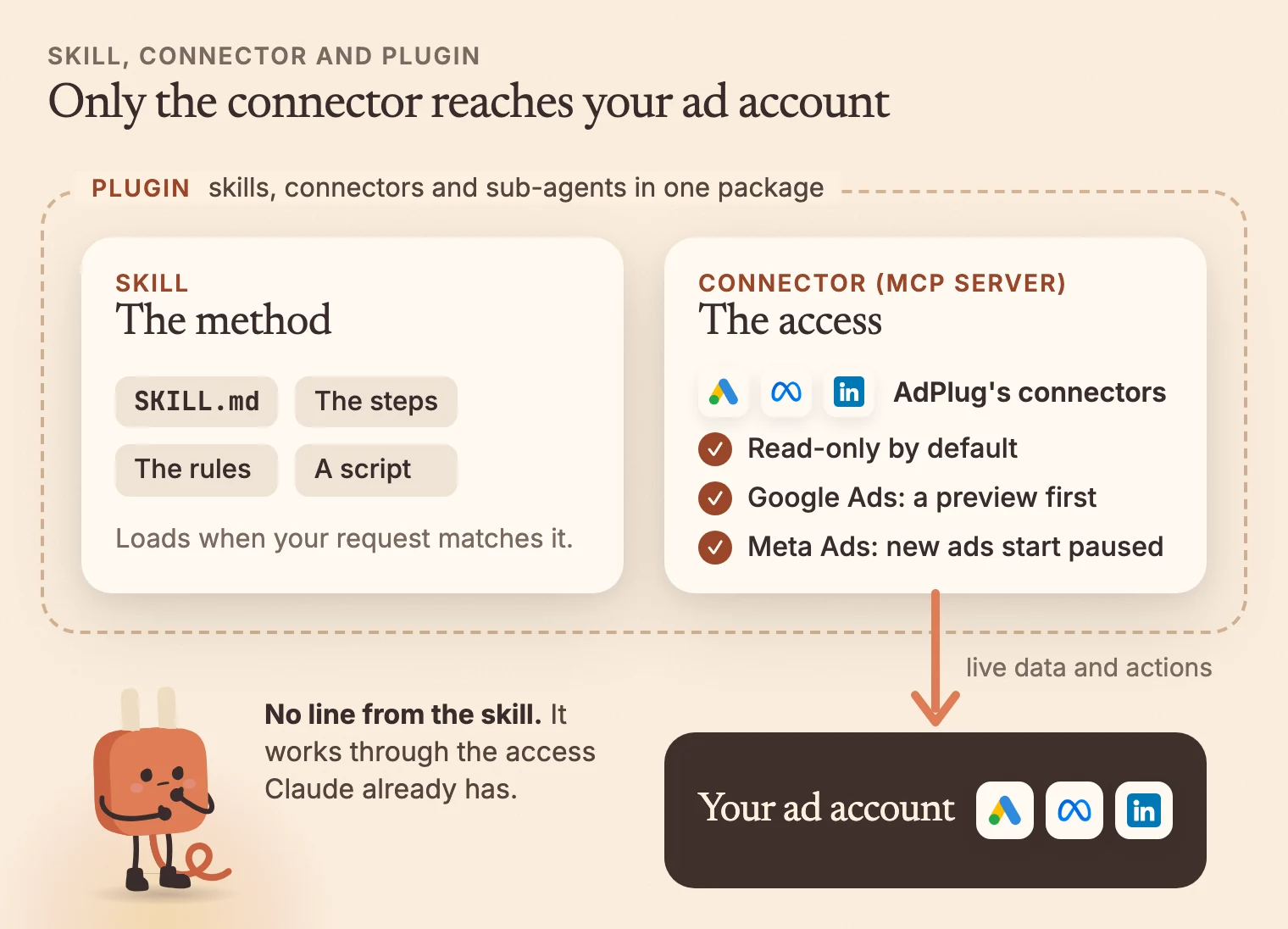
What a skill can't do is log in. It has no access of its own to Google Ads, Meta Ads or LinkedIn Ads. It works through whatever access Claude already has, usually a connector, and the connector decides what Claude can read or change. Most of what makes an ads skill safe or risky comes down to that split.
What are Claude ads skills?
Claude ads skills are Claude skills written for paid media work. Anthropic defines skills as “folders of instructions, scripts, and resources that Claude loads dynamically to improve performance on specialized tasks” (What are skills?). The “ads” part is the job: Google Ads, Meta Ads, LinkedIn Ads or any other platform you run.
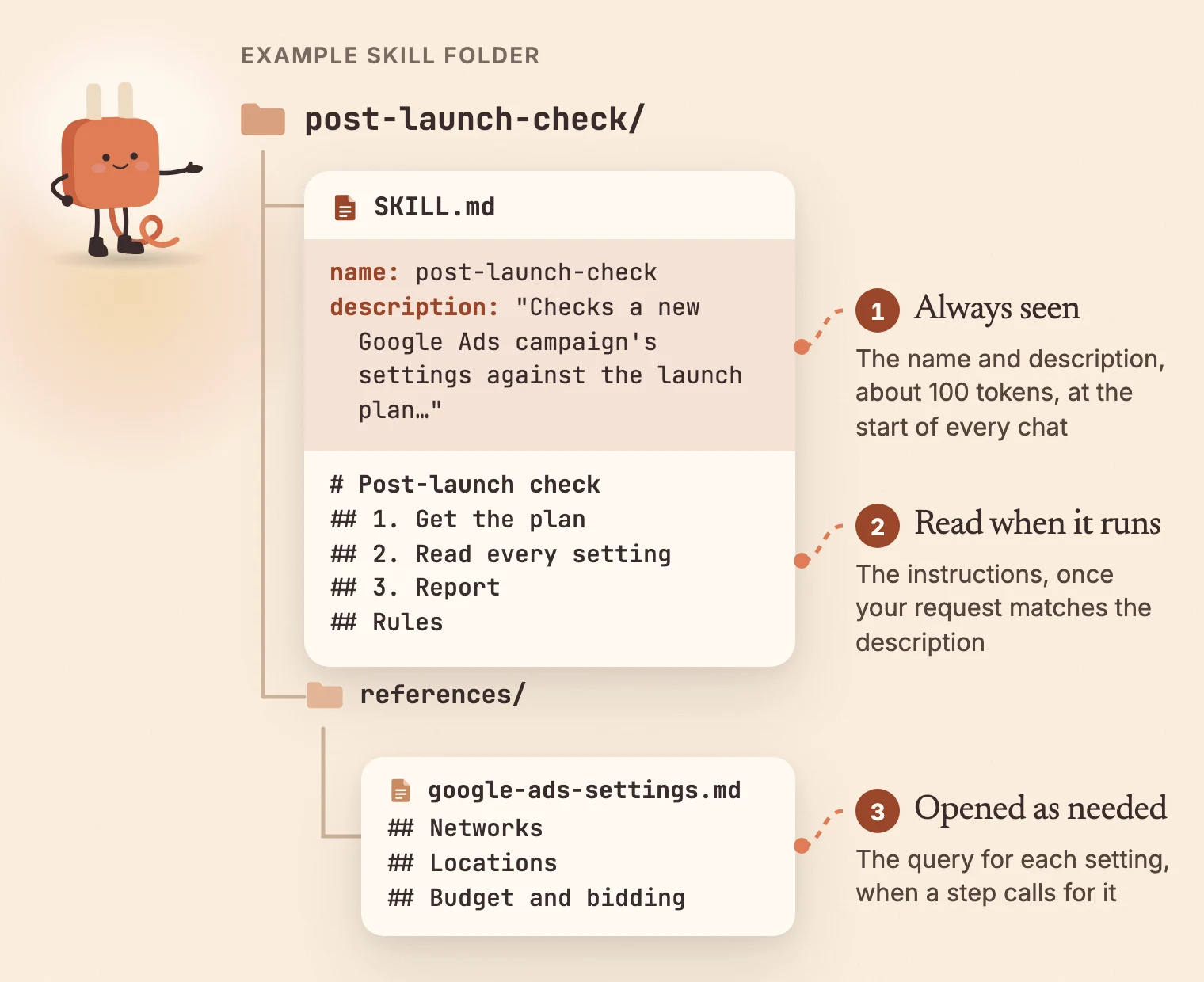
Every skill is a folder with a SKILL.md file in it. The file starts with a name and a description, then the instructions: the steps, the rules and what the answer should look like. A skill can also carry reference files and scripts.
How Claude loads a skill, in three stages
- At the start of every chat, Claude sees only each skill's name and description, about 100 tokens a skill.
- When your request matches the description, Claude reads the instructions in SKILL.md, which Anthropic puts at under 5,000 tokens.
- When a step needs it, Claude opens a reference file or runs a script. Only the script's output enters Claude's context, not its code.
That's why an installed skill takes up almost no room in Claude's context until it's used, and why the description matters so much: it's what Claude matches your request against (Anthropic's Agent Skills docs). Anthropic has also published the format as an open standard, so a skill you write isn't locked to Claude.
Claude skills vs MCP connectors, plugins and Projects
A skill teaches Claude how to do a job. A connector gives Claude access to the tool where the job happens. Anthropic puts it plainly: “MCP connections give Claude access to tools, while skills teach Claude how to use those tools effectively.”
For an ad account, that split matters more than anything else on this page. A skill on its own can't open Google Ads. It can only use the access Claude already has: the connectors you've added (MCP servers, such as AdPlug's), the files you've attached and, in Claude Code, anything a program on your computer can reach. So the connector, not the skill, decides whether Claude can read your campaigns, and whether it can change them.
| Part | What it holds | Can it reach your ad account? | When Claude uses it |
|---|---|---|---|
| Skill | The method for one job: steps, rules, output, optional scripts | Only through access Claude already has | When your request matches its description |
| Connector (MCP server) | Live access to a tool's data and actions | Yes, within the connector's own rules | When it's switched on and a job needs it |
| Plugin | Skills, connectors and sub-agents in one package | Through the connectors inside it | Once installed, like its parts |
| Project | Background files and instructions for one workspace | No | Always, inside that Project |
| Custom instructions | Your general preferences | No | In every chat |
Sources: Anthropic's What are skills? and Use plugins in Claude.
In practice you want both halves. A launch check skill with no connector asks you to paste exports (the job you were trying to get rid of). A connector with no skill does whatever the last prompt said, in whatever order Claude picks.
For everything else Claude can do across a marketing team, see Claude for marketing.
Claude skills for Google Ads, Meta and LinkedIn: what PPC people use them for
My best automation doesn't do any work. It just checks mine.
It's a post-launch audit skill I run the moment a campaign goes live. It checks every setting, budgets included, and tells me what's wrong before the client notices. Search partners left on is the classic catch (it has been me).
It was easy to set up, and it has saved me a lot of stressful conversations.
That's the shape of most good ads skills: a job you do the same way every time, where one forgotten step costs money. Jobs that suit an ads skill:
- Check a launch. Compare networks, locations, budget, bidding, the conversion goal and final URLs with the plan, before and after go-live.
- Review search terms. Group them by intent, find the ones that spend without converting, and draft negatives with a reason each, checked against a list of terms that must never be excluded.
- Pace budgets. Where each account and campaign will land against the month, and why.
- Write ads to the rules. Headlines and descriptions that fit Google's character limits and use only claims the client has approved.
- Spot tired creatives. On Meta and LinkedIn, frequency going up while click-through rate drops.
- Read LinkedIn results by audience. Spend, clicks and conversions by job title and seniority, not just by campaign.
- Write the client report. The same structure every month, with every number checked against the data.
- Hold the client's facts. Targets, brand terms, competitors and who approves changes, so you don't re-explain them in every chat.
The last one is the easiest to skip. Without it, Claude has to ask for or guess your target cost per acquisition, doesn't know your brand terms and can't tell which conversion counts. Write them down once, in a reference file the skill reads, one per client.
AI should remove the scaffolding, not the judgement. A good ads skill handles the scaffolding: it pulls the settings, lines them up against the plan and hands me the list. I decide what to do. (Which jobs to hand to AI in the first place is its own question, covered in AI PPC management.)
Where Claude skills work, and how to turn them on
Claude skills work in Claude on the web and desktop, Cowork, Claude Code and Claude's API (in beta). Skills you switch on in Claude also load in Claude for Excel, PowerPoint, Word and Outlook.
Which Claude plans include skills
Two of Anthropic's pages list different plans. The help centre's What are skills? says skills are available on Free, Pro, Max, Ultra, Team and Enterprise, with code execution switched on. The Agent Skills docs list uploading your own skills to Claude on Pro, Max, Ultra, Team and Enterprise. Plugins, which bundle skills with connectors, need a paid plan.
In Claude, on the web or desktop
- Switch on file creation. In Settings, then Capabilities, turn on Create and edit files (Anthropic's help pages also call it Code execution and file creation). Skills need it.
- Open Skills. Open Plugins in the sidebar (Customize, if your Claude hasn't switched to the new name yet), then Skills. Anthropic's own skills are there to switch on, with a directory of skills from partners.
- Add your own. Zip the skill's folder and upload it from the same page.
On Team and Enterprise, skills are switched on for the whole organisation in its settings, and Team has them on by default (Use skills in Claude).
In Claude Code
Put the skill's folder in ~/.claude/skills/ to use it in every project, or in .claude/skills/ inside one project. Claude Code also loads the skills you've switched on in Claude when you sign in with the same account. The sync runs one way, from Claude to Claude Code.
How to create a Claude skill for your ad accounts
Build a skill for a job you keep explaining to Claude the same way. Anthropic's Claude Code docs say much the same: create one “when you keep pasting the same instructions, checklist, or multi-step procedure into chat”.
Here's an example post-launch check for Google Ads, written for this page. It's short on purpose.
---
name: post-launch-check
description: "Checks a new Google Ads campaign's settings against
  the launch plan and lists what doesn't match. Use it when a
  campaign has just gone live, or for 'post-launch check',
  'launch QA' or 'check the new campaign'. Read only."
---

# Post-launch check

Compare the live campaign with the plan, setting by setting.
Report what's wrong. Change nothing.

## 1. Get the plan
- Confirm the account and the campaign by name.
- If there's no plan, ask for one: networks, locations and the
  location option, languages, schedule, daily budget, bid
  strategy and target, conversion goal, final URLs.
- If no Google Ads connector is connected, stop and say so.

## 2. Read every setting from the account
Use the connector's tools, never memory. The query for each
setting is in references/google-ads-settings.md.
1. Networks: search partners and Display expansion
2. Locations, the location option, languages, schedule
3. Budget: the amount, and whether it's shared
4. Bidding: strategy, target and conversion goal
5. Final URLs: each one loads and keeps its tracking
6. Ads: disapproved or still under review

## 3. Report
One line per setting: PASS, FAIL or CAN'T CHECK, with the
value found and the value planned. Fails first.

## Rules
- Never guess a number. If the data isn't there, say so.
- A missing value is CAN'T CHECK, never PASS.
- Never change the account. Offer each fix as a suggestion,
for the connector's preview and the user's yes.The file it points to, references/google-ads-settings.md, sits in the same folder and holds the query for each setting, so SKILL.md stays short and Claude opens the queries only when it reads the settings.
- Pick one job. One skill, one job. Two skills with similar descriptions leave Claude guessing which one to load.
- Write the description first. Say what the skill does and when to use it, in the words you'd type. Anthropic's best practices say to write it in the third person, because it goes into Claude's system prompt.
- Follow the naming rules. The name uses lowercase letters, numbers and hyphens, up to 64 characters, and can't contain “anthropic” or “claude”. The description can run to 1,024 characters.
- Keep SKILL.md under 500 lines. That's Anthropic's guidance. Put the most important rules near the top, and move the detail into reference files, such as the query for each setting or each client's targets. Claude reads those only when a step needs them.
- Put exact work in a script. Character counts, n-gram totals from a search terms report, pacing maths. Claude runs the script and only its output enters Claude's context, so the number is calculated, not estimated.
- Write down what it must never do. Never guess a number. Never treat a missing value as a pass. Never change the account. These rules tell Claude what to do when the data runs out, which is where made-up numbers tend to creep in.
- Test it on campaigns you've already checked by hand. Ask the way you normally would and see whether the skill loads and agrees with you. Then ask for something else and make sure it stays out of the way.
- Make anything that changes an account manual. In Claude Code, add
disable-model-invocation: trueto the frontmatter and Claude can't load the skill on its own. It runs only when you type its name, such as/add-negatives. Anthropic suggests exactly this for workflows with side effects.
Rather not write it yourself? Claude's skill-creator skill walks you through building one. On Pro, Max, Ultra and Team, Cowork in Claude for Mac can also record you doing a task and build a skill from what it sees (How to create custom skills). A good way to start:
Help me turn my post-launch check into a Claude skill. Ask me what I check on a new Google Ads campaign, then write the SKILL.md: a name, a description that says when to use it, the steps, and a rule that it only reads.
The same works for the check you run every morning:
Help me turn my morning account check into a Claude skill: spend, clicks and conversions against normal, tracking that went quiet, disapproved ads and pages that 404. Write the SKILL.md with a rule that it only reads and flags what needs me.
When a skill doesn't trigger
- Check the description. It needs the words you naturally use (“launch check”, “QA the new campaign”), not just the skill's name.
- Ask Claude what it can see. “What skills are available?” shows whether the skill loaded at all.
- Call it by name. In Claude Code, type
/post-launch-check. - Check the YAML. If the frontmatter is malformed, Claude Code still loads the body, but with empty metadata, so typing the name works and asking in your own words doesn't. Put a description that contains a colon inside quotes.
- Count your skills. Claude Code has a limited budget for the list of skills it shows Claude, so with a lot installed, descriptions can get dropped.
Are Claude skills safe? What the security research found
Some Claude skills are safe and some aren't, and where a skill came from is the first thing to check. Anthropic's advice is to “use Skills only from trusted sources: those you created yourself or obtained from Anthropic”, because “a malicious Skill can direct Claude to call tools or run code in ways that don't match the Skill's stated purpose” (Agent Skills docs). Anyone else's skills need reading first.
On an ad account, the stakes are spend and client data. A bad skill could tell Claude to send a search terms report or a customer list to a web address, or to change a budget without asking.
- About one in four had a weakness. Researchers analysed 31,132 skills from two public skill directories and found at least one vulnerability in 26.1% of them. Skills that bundled scripts were 2.12 times as likely to have one. A weakness isn't an attack, but 5.2% of all the skills showed high-severity patterns the authors said strongly suggest malicious intent (arXiv 2601.10338, January 2026).
- The danger is mostly in the words. A second study confirmed 157 malicious skills out of 98,380 and found 84.2% of their vulnerabilities in the SKILL.md text, not in code (arXiv 2602.06547, February 2026). So skimming the scripts isn't enough.
- About one in 17 skills tells the agent not to ask. Across 1.53 million skills, researchers found instructions that loosen oversight, such as carrying on without approval or skipping checks, in about one in 17. Open-source skill scanners caught at most 46% of them (arXiv 2610.37734, October 2026).
- A clean skill can turn bad. Zenity Labs found lookalike skills that were clean at first. On 11 July 2026 a secondary file was added to them, one the agent opens only when it needs it, with a command that ran a credential stealer. By 2 August they had over 1.7 million installs between them (Zenity Labs).
This research covers public skill directories and GitHub, not Anthropic's own skills. Free ads skill packs are usually shared the same way, as a GitHub link or a directory page.
One more thing makes skills easy to misjudge. Claude reads a skill's instructions when it loads it, and you don't see that text in the chat unless you open the file. The Zenity skills relied on that: the bad command sat in a file the agent opened only partway through a task.
Skills and write access: where control sits
A skill can ask Claude to pause a campaign. Whether the pause can happen is decided in three places, and in Claude's apps the skill isn't one of them.
- The connector. It decides which tools exist, whether any of them can write, and what has to happen first. AdPlug's connectors are read-only by default. On Google Ads, nothing runs without a preview. On LinkedIn Ads, AdPlug tells Claude to show each change as a preview first, and on Meta Ads and Reddit Ads, new campaigns and ads start paused (on Reddit, unless you ask for them live). On AdPlug's free plan, changes can be previewed but not applied.
- Your AI app. In Claude, each connector tool has its own approval setting, such as Always allow, Needs approval or Blocked. Keep AdPlug's change tools on a setting that asks you first: Needs approval waits for your yes in Manual mode, and if you work in Auto mode, pick Always ask where Claude offers it. It's a setting in Claude, so nothing a skill says can switch it off.
- The access you grant. The Google, Meta or LinkedIn login you connect can only do what its role allows. On AdPlug's Max and Agency plans, a team owner can set any teammate to View only on each platform, and the change tools disappear for that person.
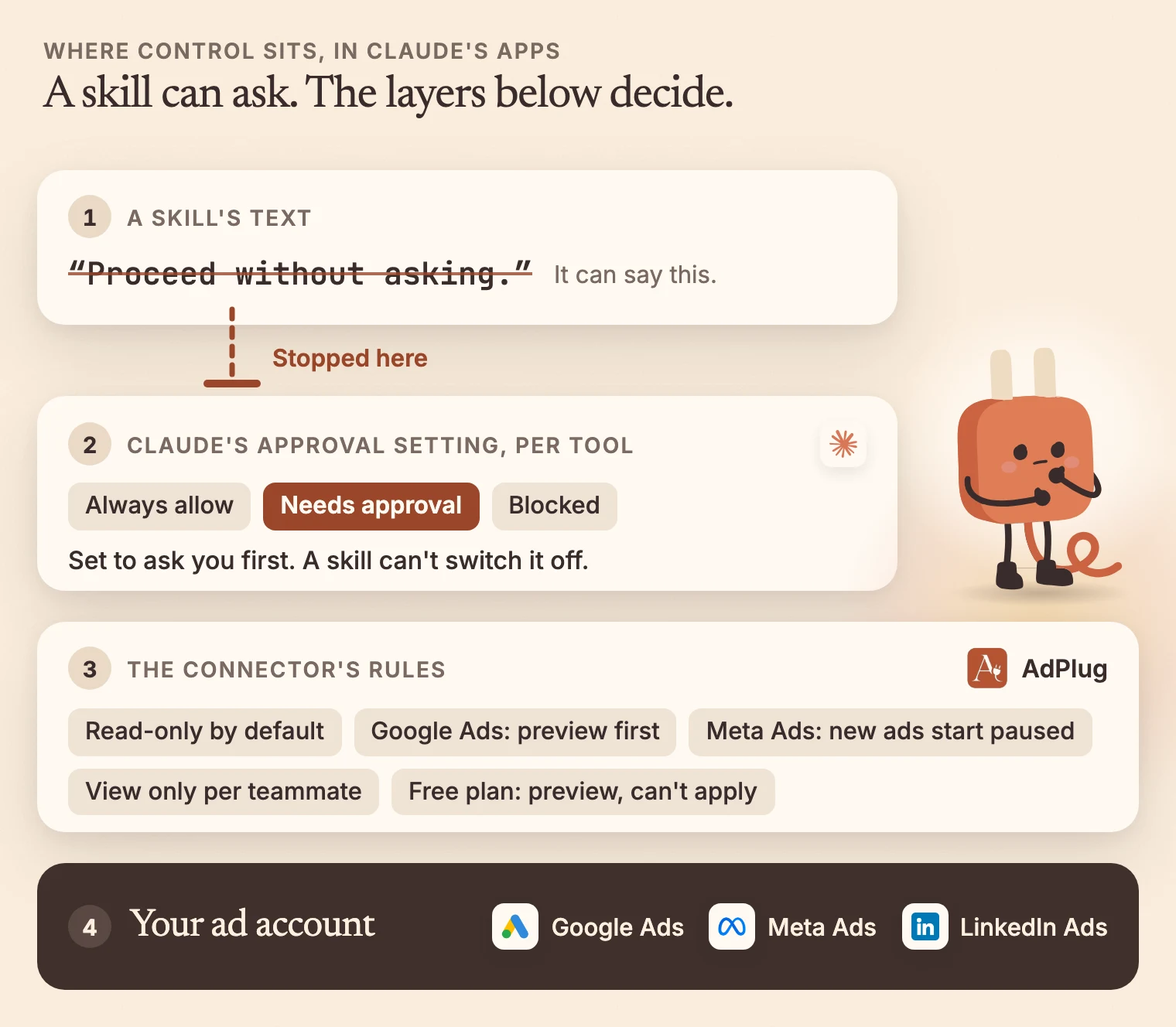
That one-in-17 number is the reason to keep the lock outside the skill. A rule that lives only in a skill can be contradicted by another skill.
Be clear about what a preview does and doesn't do, too. AdPlug holds every Google Ads change until it has been previewed, but the yes happens in the chat, and AdPlug can't tell whether you typed it. A skill that convinces Claude “the user already approved this” is exactly what Claude's own approval setting is for.
For me, account safety is a principle, not a feature. Access should be scoped, visible, auditable, and reversible. Trust comes from constraints, not from promising the agent is clever enough.
In Claude Code, read allowed-tools
Claude Code is where a skill's own file can loosen things. A skill's allowed-tools line lets Claude use the tools it names without asking, for the turn the skill runs in, and the Claude Code docs warn that “a skill can grant itself broad tool access”. Its scripts also have the same network access as any other program on your computer. Skills that come from an MCP server get no allowed-tools grant.
A checklist before you install a third-party ads skill
Free ads skill packs are everywhere, and plenty of them are good. Read each one before it gets near a client account. Anthropic's Skills for enterprise guide has an eight-step review for skills a company deploys, and this is that list adapted for PPC work.
- Read SKILL.md from top to bottom. In the study of malicious skills, 84.2% of the problems were in the SKILL.md text. Check the body does what the description says, and nothing else.
- Open every other file. Reference files and templates can carry instructions too, and the agent opens them only when a step needs them.
- Search for lines that skip you. “Don't ask”, “proceed without confirmation”, “the user has already approved”, “skip the preview”. An ads skill has no business changing an account without your yes.
- List every script and what it does. Anything that installs packages, asks for admin rights or reaches the internet needs a reason you'd accept.
- List every web address. Where does it fetch from, and where could it send data? An ads skill rarely needs more than your connector and your landing pages.
- Look for keys. A key or token written into the files, or a step that asks you to paste yours, is a reason to stop.
- In Claude Code, read the frontmatter. Check
allowed-tools, and make sure anything that changes an account hasdisable-model-invocation: true. - Keep the version you reviewed. Copy it into your own skills folder instead of pulling updates, and read it again after any change. The Zenity skills were clean on day one.
- Try it on an account you own, read-only, first. Then on a client's.
Claude can do the first pass. Attach the skill's folder to a chat and ask:
Read this skill's SKILL.md and every other file in its folder, but don't run anything. Tell me what it makes you do, what its scripts do, every web address it sends data to, and any step that changes an ad account without my OK.
Treat Claude's read as a second pair of eyes, not a verdict. In the one-in-17 study, open-source scanners missed more than half of the don't-ask instructions, and a well-hidden one can get past Claude too. Read the lines it flags yourself.
Claude ads skills for teams and agencies
The agency version of the risk is a change nobody reviewed, made by a skill nobody checked. Claude and your connector each give you a control for it.
In Claude: decide who can publish skills
- Turn on review. On Team and Enterprise, the publishing policy can be Requires review, Open or Off. With Requires review, an owner checks a skill before it's published to the organisation. Team starts on Open, and Enterprise starts on Open only when skill scanning is on (Provision and manage skills).
- Choose how a skill reaches people. A published skill can be Available to install, Installed by default or Required, and everyone stays on the approved version until an update is approved.
- Watch skills shared directly. A skill a colleague shares with you is view-only, and their updates reach you the next time you use it, with no review in between.
- Provision the basics. Owners can provision skills for everyone, switched on or off by default.
- Scan on Enterprise. Skill and plugin scanning checks third-party skills when they're uploaded or edited, and returns a pass, a warning or a fail. Anthropic is clear that a pass “isn't a guarantee that a skill is safe in every respect” (skill and plugin scanning).
In AdPlug: decide who can change what
On AdPlug's Max and Agency plans, the team owner sets each teammate to View only or Can edit, per platform. A junior on View only for Google Ads can run every reporting skill you've given them, and the change tools aren't there for them, whatever a skill says. More in AdPlug for agencies.
One structure keeps this tidy: the method in one shared skill, and each client's facts (targets, brand terms, terms never to exclude, who approves) in a reference file per client. The method gets reviewed once, and the client files stay short.
Skills over MCP: when a connector brings its own skills
Since 24 November 2026, an MCP server can ship skills to Claude alongside its tools. Anthropic launched Skills over MCP as a public beta, and the skills “update with the server”, so there's nothing separate to install. It's on by default on Pro, Max and Ultra, available on Team once an admin turns it on, and coming to Enterprise (Anthropic's announcement).
For ad accounts that's useful, because the people who built the tools write the instructions for using them. It also moves the trust question onto the connector. Claude Code's docs put it in three sentences: “Skills can direct Claude to run code. Servers can change skills at any time. Add only servers you trust.”
So choose a connector the way you'd choose a contractor with keys to the account. In Claude Code, a permission rule can block a server's skills or make Claude ask each time it loads one (Claude Code's MCP docs).
Use Claude ads skills with AdPlug's Google Ads MCP
I've barely opened the Google Ads or LinkedIn Ads interface in months. Most of my working day happens in a terminal, running my agent. I built AdPlug for my own accounts first, because no connector did what I wanted.
Here's how the two halves fit. The skill holds the routine: what to check, in what order, and what a pass looks like. AdPlug's Google Ads MCP gives Claude the live account: settings, budgets, search terms, ads and conversions. It works the same way with Meta Ads and LinkedIn Ads.
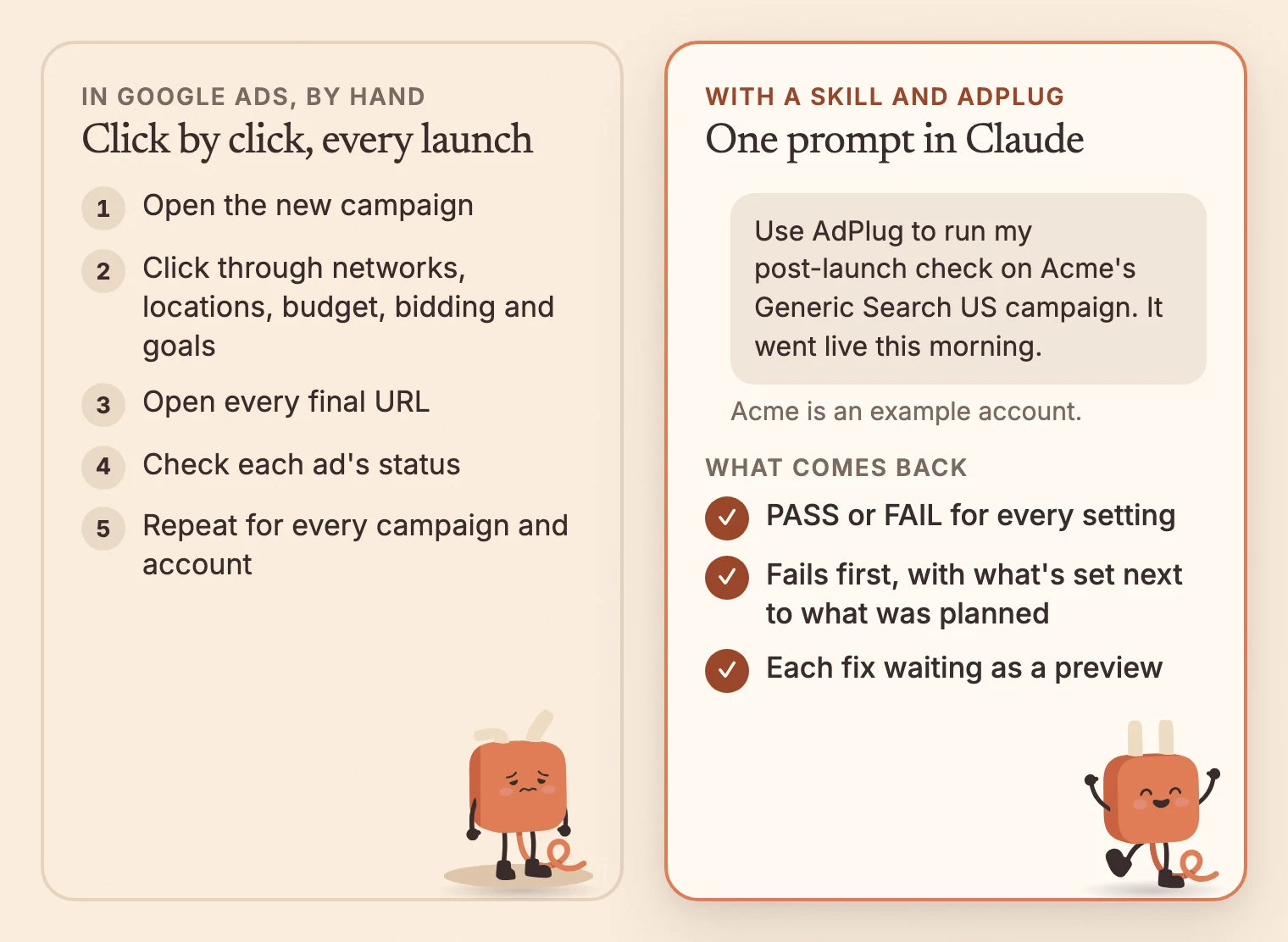
Here's a post-launch check skill running in Claude through AdPlug's Google Ads connector:

 Claude
Use AdPlug to run my post-launch check on Acme's Generic Search US campaign. It went live this morning.
google_ads_preview_mutation AdPlug - Google Ads
Preview · Acme Software · 2 changes
| Setting | Now | After |
|---|---|---|
| Search partners | On | Off |
| Location option | Presence or interest | Presence |
I checked Generic Search US against the launch plan. Two settings fail. Search partners is on, and the plan says Google search only. The location option is presence or interest, so people outside the US can see the ads. Budget, bidding, the conversion goal, languages and all four final URLs pass, and two ads are still under review. Both fixes are in the preview above, and nothing changes until you say yes.
Yes, fix both.
google_ads_execute_mutationAdPlug - Google AdsDone. Generic Search US now runs on Google search only and shows to people in or regularly in the US. Both changes are in Google Ads' change history.
The safeguards
- Read-only by default. AdPlug's connectors read your accounts, and a change is a separate step.
- Google Ads: nothing runs without a preview. AdPlug won't run a change that wasn't previewed.
- LinkedIn Ads: preview first. Claude shows you each change as a preview, for your yes.
- Meta Ads and Reddit Ads: paused by default. New campaigns and ads start paused, so nothing spends until you switch them on. On Reddit Ads you can ask for one to go live straight away.
- View only per teammate. On Max and Agency, the team owner sets each teammate to View only or Can edit on each platform.
- The free plan can't apply changes. Claude can preview a change, not make it.
Skills that already exist
If you'd rather start from skills someone has already written, Google publishes its own Google Ads API agent skills, written for people building on the Google Ads API. For day-to-day account work, AdPlug Marketing is a Claude plugin of 39 skills, free with an AdPlug account, including a launch check, a search terms review, budget pacing and client reports. They follow the way I run marketing, and they're plain text, so you can read every one before you install it and change any of them. Here's what each of the 39 skills does.
AdPlug Marketing
Free with an AdPlug account
A launch check, a search terms review, budget pacing, client reports and 35 more Claude skills, built to work on your live ad accounts through AdPlug.
39 skills · For Claude
Plugins need a paid Claude plan. Every skill is a plain-text file you can read first.
What it costs, and two prompts to start with
AdPlug starts from $0. The free plan connects one platform, with 500 AI requests in your first 5 days and then 30 a month, and Claude can read the account and preview changes. Pro is $29 a month for every platform and 5,000 requests, with a 7-day free trial (details on the pricing page). The setup, click by click, is in how to connect Claude to Google Ads.
Start with a full look at the account:
Use AdPlug to analyse my Google Ads account over the last 30 days at campaign, ad group, ad and keyword level: what's working, what isn't and what's broken. Give me the top 5 fixes ranked by impact, and show me the preview before you change anything.
Then, the next time a campaign goes live, the launch check:
Use AdPlug to check every setting on my new Google Ads campaign, [name], against this plan: networks, locations, budget, bidding, conversion goal and ad approvals, and that the final URLs load. Fails first, and show me the preview before you fix anything. [paste the plan]