LinkedIn Ads API: what it does and how to get access
Quick answer: The LinkedIn Ads API (LinkedIn's Advertising API, one of its Marketing APIs) lets software read and manage LinkedIn ad accounts: campaigns, ads, targeting, conversions and reporting. It's free but gated: you need a developer app verified by your company's LinkedIn Page, LinkedIn's approval for the Advertising API, and each user's LinkedIn sign-in, since there's no API key that works on its own. Every app starts on the Development tier, which can read every ad account you administer and make changes in up to five. Standard tier is only needed for changes in more than five ad accounts, and LinkedIn says its review can take up to 30 business days.
I run LinkedIn Ads for B2B SaaS and services companies (12 years in PPC, over $100M in ad spend managed). No connector did what I wanted with LinkedIn, so I built AdPlug's on the LinkedIn Ads API and took its app through LinkedIn's Standard tier review. This is what the API does, how to get access and what it takes to keep running, plus the shorter way if you'd rather not build.


The LinkedIn Ads API lets software read and manage LinkedIn ad accounts. It's free, but you have to apply for it.
Officially it's the Advertising API, one of LinkedIn's Marketing APIs. It covers ad accounts, campaigns, ads, targeting and conversions, and its Ad Analytics endpoint is the reporting side. Some people call it the LinkedIn Campaign Manager API, because it does in code what Campaign Manager does on screen. LinkedIn used to call the whole set the Marketing Developer Platform, and a few of its pages still do.
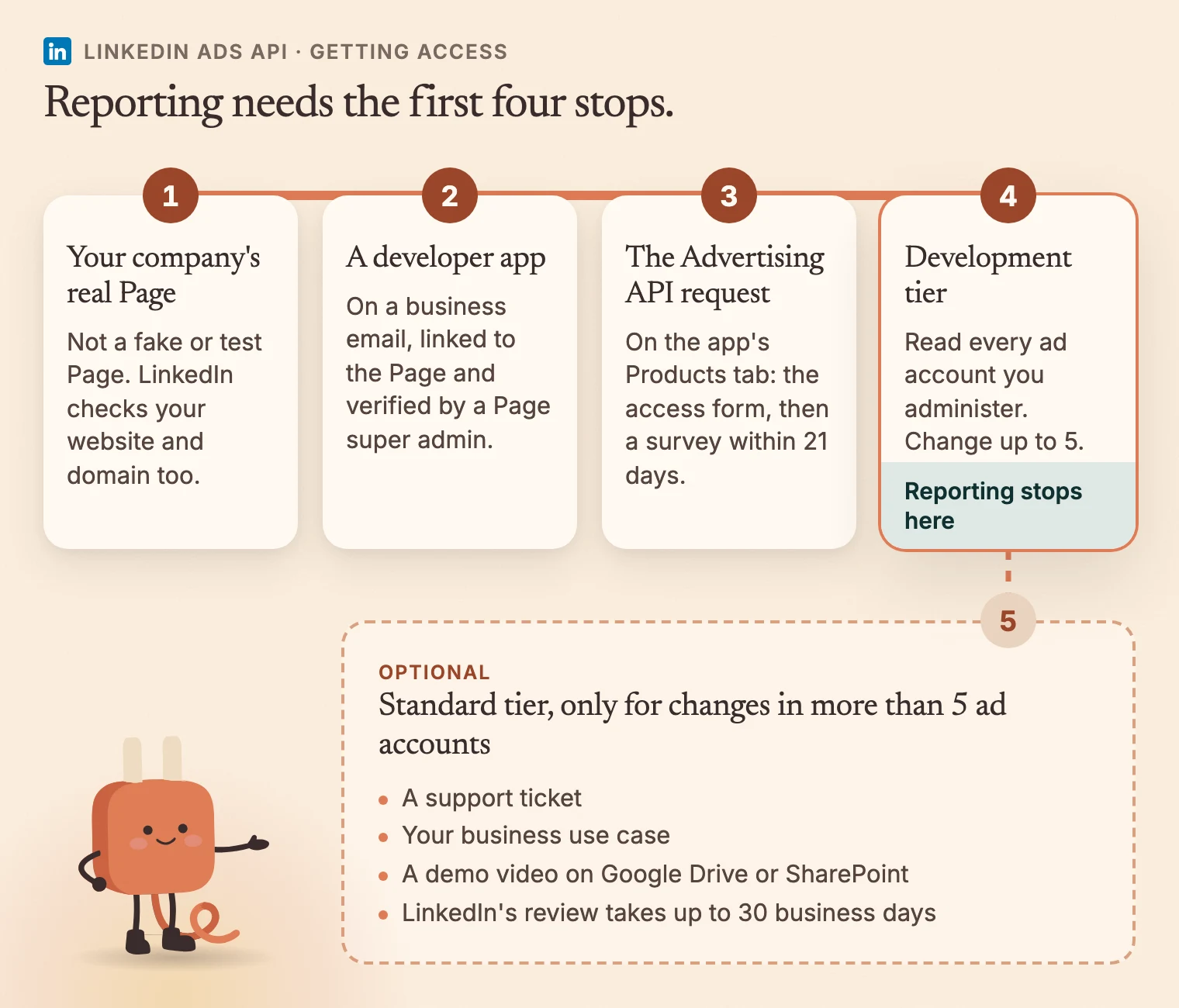
If all you want is reporting, you need a developer app, a company Page that verifies it and LinkedIn's approval, and the Development tier covers the rest: it has no limit on reading the ad accounts you administer. Standard tier is only for software that makes changes in more than five ad accounts, and LinkedIn says its review can take up to 30 business days.
The rest covers each part of the API, the access steps, the tokens, versions and limits you'd maintain, and what a build costs. If you'd rather have LinkedIn data in Claude or ChatGPT without building anything, the last section is the shorter route.
What the LinkedIn Ads API is (and the rest of LinkedIn's Marketing APIs)
The LinkedIn Ads API is one of several LinkedIn Marketing APIs. You request each one separately on your developer app, and each comes with its own permissions. The LinkedIn Ads API documentation lives on Microsoft Learn, under LinkedIn Marketing APIs, since LinkedIn is part of Microsoft.
| API | What it does | How you get it |
|---|---|---|
| Advertising API (the LinkedIn Ads API) | Ad accounts, campaign groups, campaigns, ads, targeting, budgets and bids. Its Ad Analytics endpoint is the reporting API | Request it on your app's Products tab. Development tier first, Standard on request |
| Conversions API | Sends online and offline conversions to LinkedIn and ties them to your campaigns | Its own request, or a token from Campaign Manager with no app at all |
| Lead Sync API | The answers people submit in LinkedIn lead gen forms | Its own request |
| Matched Audiences API | Streams companies and contacts into audiences | Its own request, after the Advertising API. Generally available since August 2026 |
| Community Management API | Organic Page activity | Its own request, and it has to be the only product on its app |
| Events Management API | LinkedIn Events | Its own request |
| Audience Insights and Media Planning APIs | Audience research and media plans | Restricted to developers who meet extra criteria |
Sources: LinkedIn's API products and permissions page and its changelog. One more, the Company Intelligence API, isn't taking new applications.
One naming trap: the API keeps LinkedIn's older names. What Campaign Manager now calls a campaign is a campaign group in the API, and an ad set is a campaign.
LinkedIn's Ad Library API is separate again. It searches other companies' public ads rather than your own account, and it has its own guide: how to search the LinkedIn Ad Library.
What you can and can't do with the LinkedIn Ads API
With the LinkedIn Ads API and the right permissions, your software can:
- Report on performance by account, campaign group, campaign, ad and day, with up to 20 metrics a request, from spend and clicks to conversions, leads and video views.
- Break results down by who saw the ads: job title, job function, seniority, industry, company size and company. LinkedIn calls these professional demographics.
- Build and edit campaigns: campaign groups, campaigns and ads, with their budgets, bids, schedules and targeting.
- Plan audiences: search targeting options such as job titles, companies and skills, and check an audience's size before you launch.
- Set up conversion tracking: create conversions and attach them to campaigns.
- Count leads: how many leads each campaign brought in from lead gen forms, and what they cost.
What the LinkedIn Ads API doesn't do on its own:
- Hand over the leads themselves. Names and form answers come through the Lead Sync API, a separate request.
- Make changes in more than five ad accounts until your app has Standard tier.
- Name the people who saw your ads. Reports come as totals (by job title, company and so on), never by person, and LinkedIn's restricted use cases bar member data from uses such as finding "sales or marketing prospects" or building "an audience list".
How to get LinkedIn API access for ads, step by step
Getting LinkedIn API access for ads follows LinkedIn's quick start, plus a few checks from the access pages of its other marketing APIs. LinkedIn says a request that misses one of those checks is rejected.
- Use your company's real LinkedIn Page. LinkedIn's access pages ask you not to use "a fake or test company page", and its review checks your organisation's website and domain too.
- Create a developer app in the LinkedIn Developer Portal, linked to that Page. Use a business email address: LinkedIn says personal ones "won't pass the review process".
- Have a super admin of the Page verify the app.
- Request the Advertising API on the app's Products tab, and fill in the access form.
- Complete the vetting survey within 21 days. For products that need vetting, LinkedIn generates a survey in the Developer Portal when you apply, and a request without it is marked incomplete.
- Start on Development tier. Reading works across the ad accounts you administer. For changes, add up to five ad accounts under Products, then View Ad Accounts.
- Build the sign-in. Each person whose ad accounts your app will reach signs in with LinkedIn and approves its permissions (more on that below).
The same access pages ask you to keep LinkedIn's and Microsoft's names and logos out of your app, down to "Linked" or "In". If a request expires or comes back for missing details, a Reapply button in the Developer Portal (added in May 2026) reloads your form, so you don't need a new app. For a rejection with no option to appeal, the Conversions API access page's answer is a new developer app and a new request.
On Development tier, a 403 error when you change an ad account often means it isn't on your app's list yet. LinkedIn's FAQ says it "may indicate the ad account hasn't been added to your app in Developer Portal" and points you to Products, then View Ad Accounts. AdPlug's app saw exactly that before Standard: reports worked, and changes were refused on any ad account that wasn't on the list.
Development vs Standard tier, and how long approval takes
The LinkedIn Ads API has two access tiers, and most of the difference is about making changes, not reading data.
| What you get | Development tier | Standard tier |
|---|---|---|
| Reading data | No limit on the ad accounts you administer | No limit on the ad accounts you administer |
| Making changes | Up to 5 ad accounts you administer | No limit |
| Creating ad accounts through the API | 1 test account (real ones are made in Campaign Manager) | No limit |
| Data | Live production data | Live production data |
| How you get it | Your Advertising API request is approved | A support ticket with a business use case and a demo video, reviewed in up to 30 business days |
Sources: LinkedIn's access tiers page and its API partner support guide.
Reporting never needs Standard tier
If all you want is reporting, Development tier covers it. LinkedIn's support guide says "There is no limit on the number of accounts you can call to retrieve data or analytics", and then: "Do not apply for a tier upgrade for data or analytics use cases only." Those requests, it adds, "are rejected". The FAQ says the same from the other side: you don't need Standard "unless you plan to build a campaign management solution for multiple ad accounts".
There's no sandbox on either tier. LinkedIn says "all API Calls at all access levels are made on production data", so test changes on an ad account you own.
How to request Standard tier
LinkedIn's support guide gives the steps:
- In the Developer Portal, open My Apps, pick the app and go to Products.
- Check the Advertising API's current tier.
- On Development, ask for Standard in a support ticket. LinkedIn's support requests go through its Developer Support Request Form.
- Describe your business use case: what your app offers customers and how it uses the API.
- Add a demo video, as a Google Drive or Microsoft SharePoint link, showing campaign creation, campaign editing and campaign optimisation. If you'll create ads for more than five ad accounts, show that clearly in the video.
"The review process can take up to 30 business days due to the high volume of requests", in LinkedIn's words. Make sure the request and the video show what your app does to campaigns, because a reporting-only request is the kind LinkedIn says it rejects.
How AdPlug's Standard request went
I took AdPlug's app through this. I sent the Standard tier request on 25 April 2026, and Standard was in place by 15 June 2026.
The request led with reporting, but it also covered managing ads across many accounts, so it wasn't the reporting-only kind LinkedIn's guide says it rejects. Alongside that went my background as a working PPC marketer, an unlisted demo video, how AdPlug handles data (matching its privacy policy) and a test ad account.
If you're applying now, two things differ from mine: requests go through the Developer Support Request Form (LinkedIn set its old Zendesk route to close on 30 June 2026), and LinkedIn wants the video as a Google Drive or SharePoint link, where mine was an unlisted YouTube video.
Conversions API, Lead Sync and Matched Audiences are separate requests
Approval for the LinkedIn Ads API doesn't include LinkedIn's other marketing APIs. Each one is its own request on your app's Products tab, with its own permission.
LinkedIn Conversions API
The LinkedIn Conversions API sends online and offline conversions to LinkedIn, from your website, CRM or backend, so LinkedIn can credit them to your campaigns. Through a developer app it needs the rw_conversions permission.
An advertiser sending their own conversions can skip the app. LinkedIn's Conversions API access page says advertisers can generate a token in Campaign Manager (Data, then Signals Manager, then Direct API), and "don't need to create a developer application or apply for the Conversions API through the developer portal". Those tokens "don't expire".
Lead Sync API
The LinkedIn Ads API tells you how many leads a campaign brought in and what they cost. The Lead Sync API returns the leads themselves, the answers people submit in your lead gen forms, with the r_marketing_leadgen_automation permission.
Matched Audiences API
You may not need the Matched Audiences API at all. Uploading a company or contact list as a CSV works under the Advertising API's rw_ads permission, and Matched Audiences is for streaming companies and contacts into audiences. You need Advertising API access before you can apply for it. LinkedIn's pages disagree on who can get it. The overview still calls it a private API that needs extra approval, and the FAQ sends you to an interest form, saying LinkedIn will be in touch "up to 60 days after the form submission" if you qualify. The changelog says "Starting August 2026, the Matched Audiences API is now generally available", with the request made in the Developer Portal. Go by the changelog.
Community Management API
The Community Management API is LinkedIn's API for organic Page activity, and LinkedIn requires it to be "the only product associated with a developer application". So organic and ads work need two apps. Its Development tier has a deadline too: apply for Standard within twelve months or, in LinkedIn's words, "we'll remove your API access due to inactivity".
No API key: permissions, 60-day tokens and monthly versions
There's no LinkedIn Ads API key that works on its own. Your developer app has a client ID and a client secret, but every call also needs an access token from a LinkedIn member who signed in to your app and approved what it asks for (three-legged OAuth, in the jargon). LinkedIn says two-legged auth "is not available for marketing use cases". The permissions that matter for ads:
r_adsreads the ad accounts where the person has a role, Viewer included.rw_adsmanages them, if the person is an Account Billing Admin, Account Manager, Campaign Manager or Creative Manager on the account.r_ads_reportingretrieves reporting for ad accounts.
So the API reaches only what the person who signed in can reach in Campaign Manager, and a Viewer gets reports but can't change anything. Ads with images also need w_organization_social, the permission to post as the company Page, because LinkedIn builds those ads from a post by that Page.
Tokens: 60 days, then a year
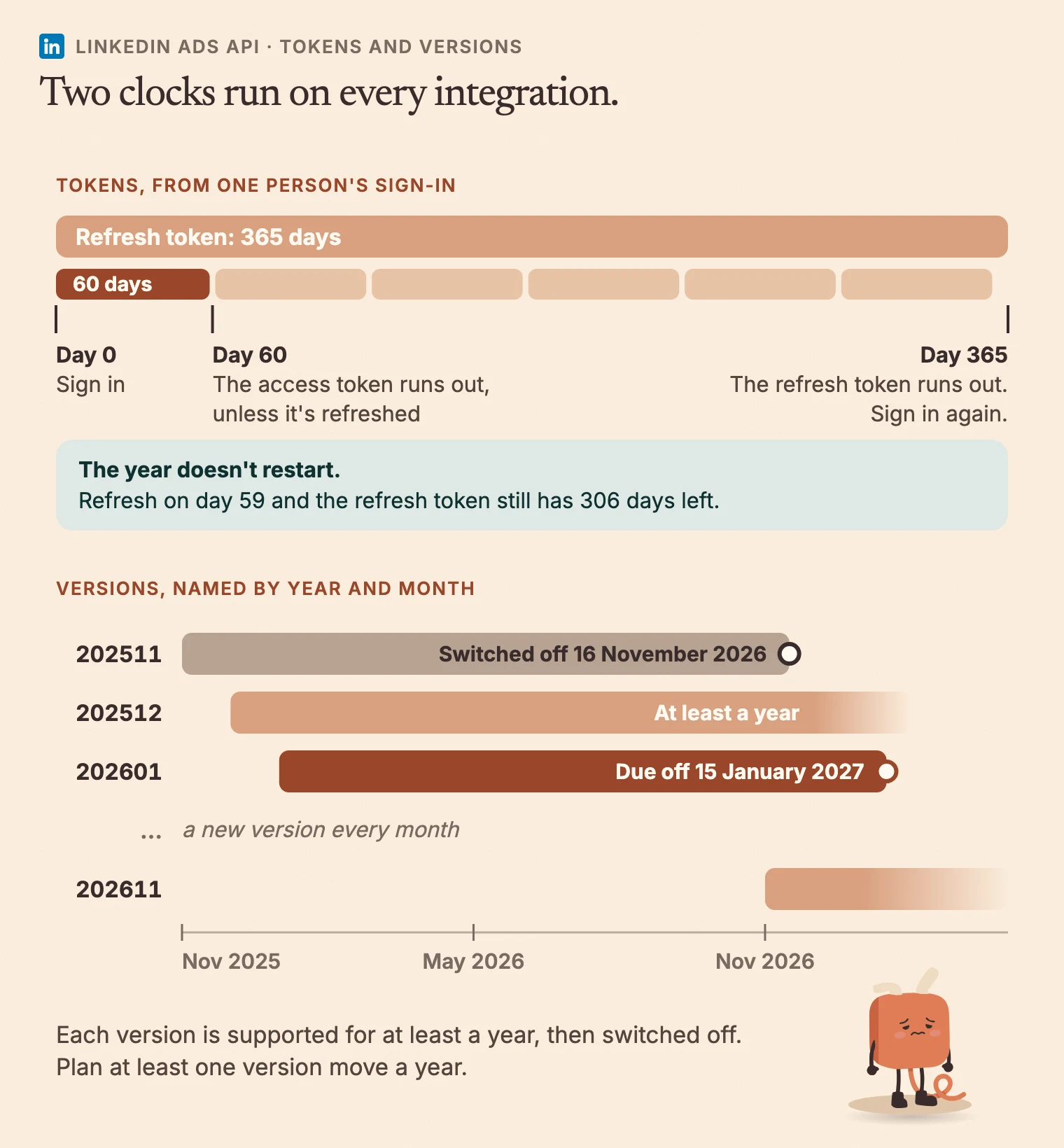
Access tokens last 60 days. Refresh tokens, which get a new access token without a new sign-in, last a year, and that year doesn't restart when you use one. In LinkedIn's own example, a refresh on day 59 leaves the refresh token 306 days. When it runs out the person signs in again, and LinkedIn "reserves the right to revoke Refresh Tokens or Access Tokens at any time".
Two LinkedIn pages disagree on who gets refresh tokens. The refresh tokens page says they're for "all approved Marketing Developer Platform (MDP) partners", and the sign-in flow page says they're "available for a limited set of partners". Without them, everyone who connected has to sign in again every 60 days.
Versions: a new one every month
LinkedIn releases a new version of its Marketing APIs every month, named by year and month (202611 is November 2026). Every call names its version in a LinkedIn-Version header, because "the latest version is not applied by default", and a call without one gets an error.
Each version is supported "for a minimum of one year", then it's switched off and calls that name it get an error. LinkedIn's migrations page shows 202511 switched off on 16 November 2026, and 202601 goes on 15 January 2027. LinkedIn says integrations work best when they're "regularly maintained (at least once per year)", so plan at least one version move a year.
The LinkedIn Ads reporting API and the limits that bite
Reporting goes through the Ad Analytics endpoint (adAnalytics), the LinkedIn Ads reporting API. These are its limits, from LinkedIn's Ad Analytics docs and rate limits page:
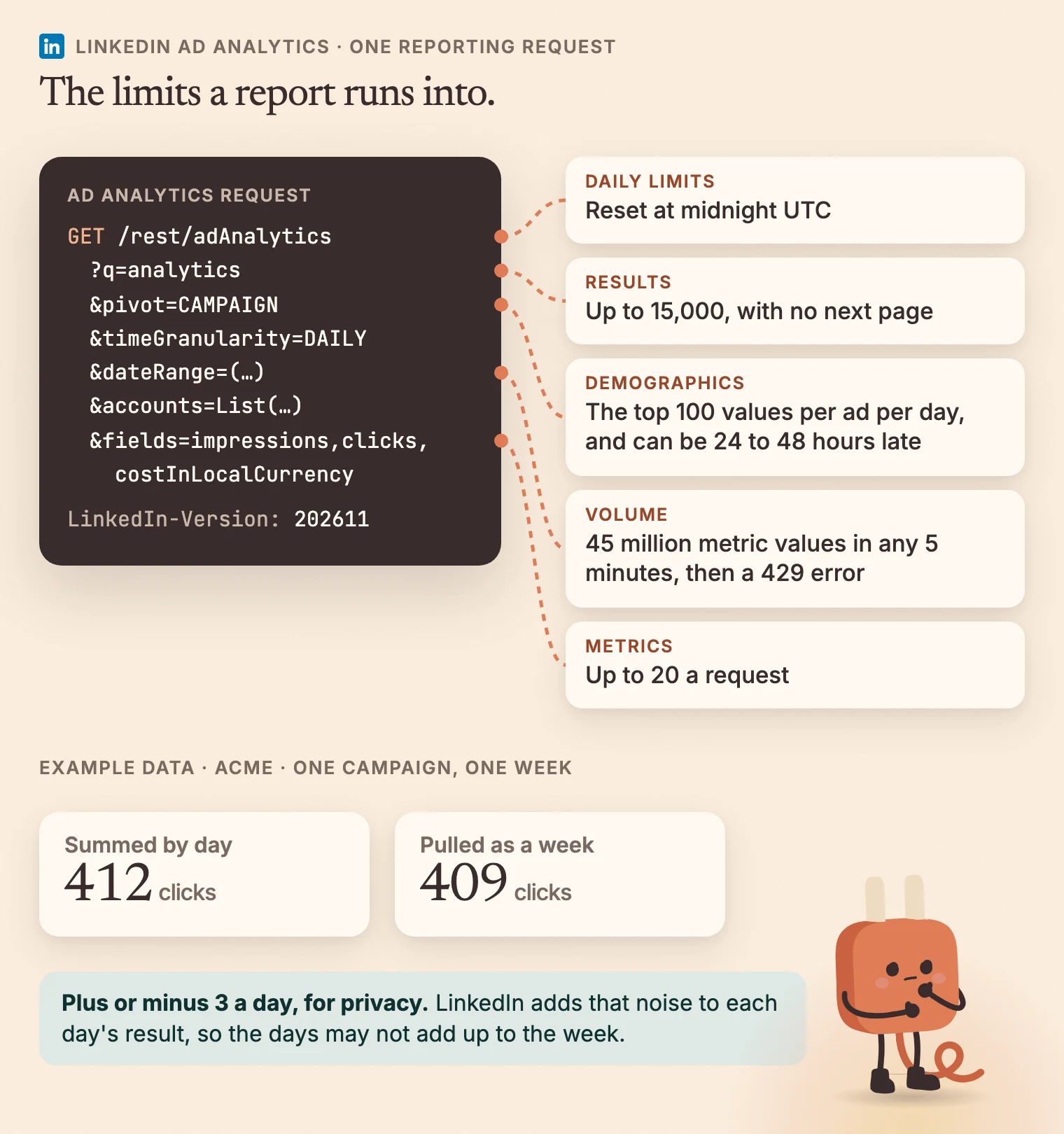
- 20 metrics a request. Ask for none and you get impressions and clicks only.
- 15,000 results a response, with no pagination. A bigger report has to be split, by date range or by campaign, into requests that each fit.
- 45 million metric values in any 5 minutes. Past that, LinkedIn answers with a 429 error.
- Demographics are trimmed and late. Professional demographic reports return the top 100 values for each ad each day, can run 24 to 48 hours behind, and only go back two years (other performance data goes back ten). How long you may keep a copy is a separate rule, covered below.
- Daily rate limits reset at midnight UTC. LinkedIn says the limits "are not published in documentation": your app's Analytics tab in the Developer Portal shows each endpoint's limit once you've called it that day. A request over it gets a 429, and LinkedIn emails the app's developer admins when usage passes 75% of a limit.
Why API numbers don't match Campaign Manager
Pull the same week twice, once day by day and once as a whole, and the totals can differ. That's on purpose. LinkedIn adds noise of plus or minus 3 to each day's result when you query a campaign by day, holds back metrics below a minimum of 3, and approximates demographic numbers to within three units in almost all cases.
LinkedIn's advice, in its FAQ, is to pull the full period rather than adding up days, and the highest level you need (the account, say) rather than adding up campaigns. A dashboard that sums daily rows will drift from Campaign Manager, and someone will ask why on a Monday morning.
How long you can keep the data
LinkedIn's data storage requirements list advertising accounts' admin and reporting data with an allowed storage duration of one year. Lead gen form responses have no time limit, and the rules don't apply to data your clients give you themselves rather than data pulled through the API. If the plan is years of LinkedIn history in a warehouse, read that page before you build.
What I learned building on the LinkedIn Ads API
I've built two connectors that let AI assistants such as Claude use the LinkedIn Ads API (MCP servers, in the jargon): AdPlug's and an open-source one. Three things from that are worth knowing before your developer writes the first line:
- Campaigns and ads live under the ad account's own address. Creating or changing a campaign group, campaign or ad has to name the ad account in the request path (
/rest/adAccounts/{id}/…). LinkedIn retired the older addresses that didn't, and they now answer with an error, so code copied from an older tutorial can fail on its first change. - The Insight Tag goes by another name. When you create a conversion, the method for the Insight Tag is
IMAGE_PIXEL(the other isCONVERSIONS_API), andINSIGHT_TAG, the name you'd guess, is refused. Objectives are singular too:WEBSITE_VISITworks andWEBSITE_VISITSdoesn't (one letter, one refused request). - Check the ad set's format before creating an ad. Some ads, event ads among them, start as a post by the company Page, and LinkedIn only checks the ad against the ad set's format once that post exists. Get the format wrong and you get an error plus a leftover post. AdPlug reads the ad set's format first for exactly this reason.
What the LinkedIn Ads API costs, and when to build on it
The LinkedIn Ads API costs nothing to call. LinkedIn's API Terms of Use say LinkedIn "currently does not charge" for its APIs, though it may in the future.
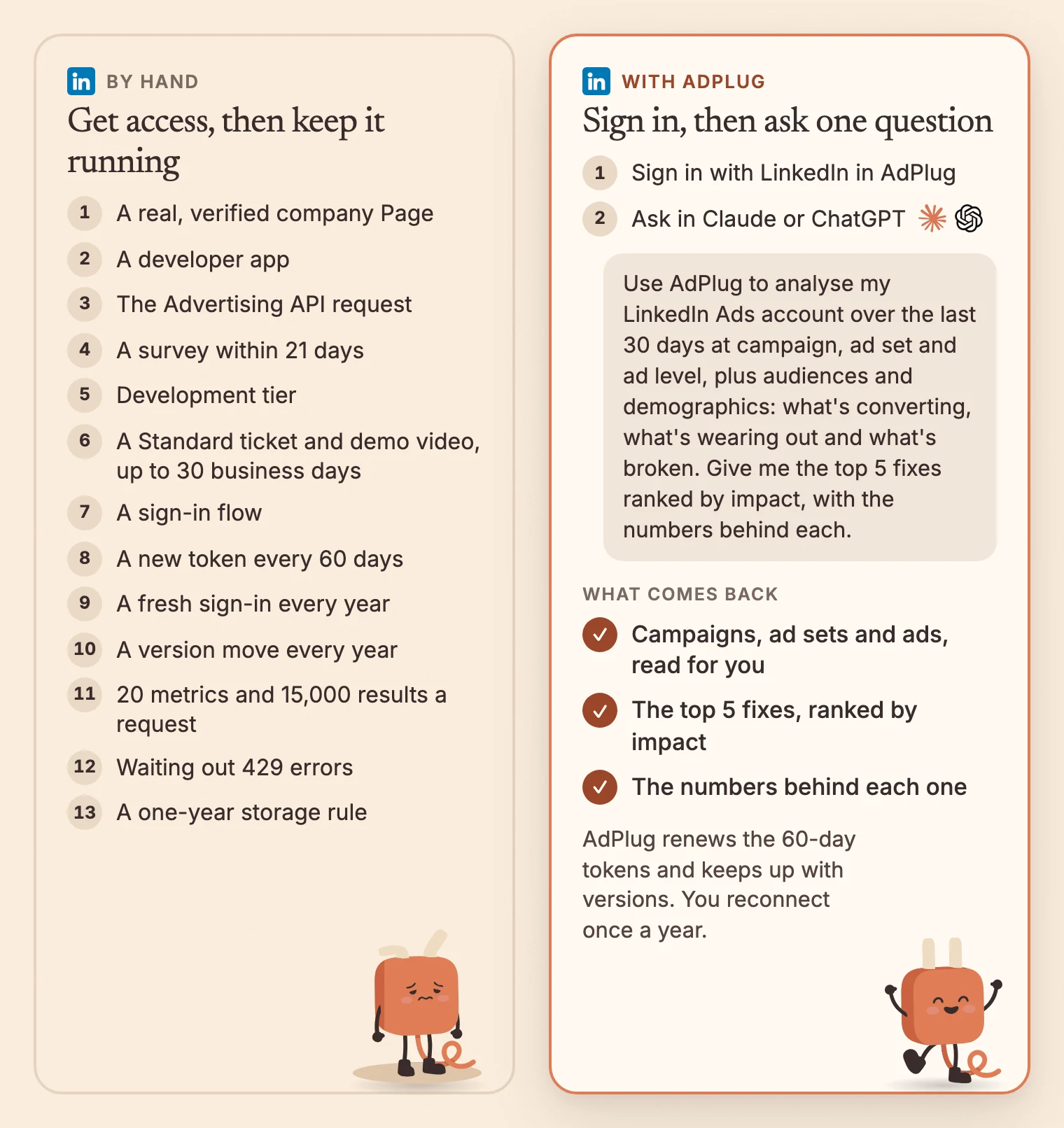
The cost is the build and the upkeep. A LinkedIn Ads integration that stays up needs:
- A developer app, a verified Page and an approved Advertising API request, plus Standard tier (up to 30 business days) for changes in more than five ad accounts.
- A sign-in flow for everyone whose accounts you read, a new access token before each 60-day one runs out, and a fresh sign-in once a year.
- A move to a newer API version at least once a year, before yours is switched off.
- Reporting code that stays under 20 metrics and 15,000 results a request, and waits when it gets a 429.
- Storage that follows LinkedIn's one-year rule for ad reporting data.
- Separate requests for Lead Sync, the Conversions API or Matched Audiences, if you need them.
Miss one and the usual symptom is a report that quietly stops updating.
| What matters | Build on the LinkedIn Ads API | Use a ready connector |
|---|---|---|
| Best for | Your own product, or a warehouse shaped your way | Reports, audits and changes from Claude or ChatGPT |
| What you need | A developer, an app, a verified Page and LinkedIn's approval | A LinkedIn login with access to the ad accounts |
| Changes in more than five ad accounts | Standard tier, through a support ticket | Covered if the connector's app has Standard |
| Tokens, versions and limits | Yours to look after | The connector's job |
| Cost | Free API, plus build and upkeep time | The connector's plan (AdPlug starts at $0) |
Build it when LinkedIn data has to land in your own product or warehouse, shaped your way, and you have a developer who'll own it. For a nightly copy of every metric into BigQuery, an AI connector is the wrong tool: build it, or use a data pipeline tool that already has LinkedIn access.
Use a ready connector when the job is reports, audits and campaign changes, above all across client accounts. If you're choosing between connectors rather than building, I compared them in the best LinkedIn Ads MCP servers.
The simpler way: use the LinkedIn Ads API through AdPlug
AdPlug's LinkedIn Ads MCP is the short way round everything above. It runs on LinkedIn's official Marketing API, through an app that already has Standard tier, so you connect LinkedIn with one sign-in: no developer app, no tier request, and no tokens or versions to look after. (MCP is the standard Claude and ChatGPT use to plug into other tools. Think of it as a plug socket for AI.)
AdPlug renews LinkedIn's 60-day tokens for you and keeps up with LinkedIn's versions. LinkedIn's refresh tokens still run out after a year, and when that happens you reconnect LinkedIn on AdPlug's Connections page.
Through AdPlug, your AI can:
- Report by campaign, ad set, ad and day, with conversions, lead gen, message ads, demographics and reach.
- List your campaigns, ad sets, ads, conversions, lead forms and audiences.
- Search targeting options and check an audience's size before you launch.
- Search the LinkedIn Ad Library for any company's ads.
- Create Insight Tag conversions and attach them to the ad sets that should count them.
- Create and change campaigns, ads and audiences, with the AI showing you each change as a preview first. New campaigns, ad sets, ads and lead forms start as drafts.
AdPlug is read-only by default. On the Max and Agency plans, team owners can set LinkedIn Ads to View only for any teammate, so that person's AI can report but can't change anything.
Here's a seniority report, the kind you'd otherwise build on Ad Analytics, asked in plain English:

 Claude
Use AdPlug to show last month's LinkedIn Ads results for Acme by job seniority. Where do website conversions cost least and most?
linkedin_ads_performance LinkedIn Ads - AdPlug
LinkedIn Ads · Acme · last month · by job seniority
| Job seniority | Spend | Website conversions | Cost per website conversion |
|---|---|---|---|
| Director | $4,210 | 31 | $136 |
| Manager | $5,880 | 34 | $173 |
| VP | $2,940 | 12 | $245 |
| Senior | $3,150 | 11 | $286 |
| Entry | $1,120 | 3 | $373 |
Directors convert cheapest for Acme, at $136 a website conversion, and managers bring the most, 34 at $173. Entry-level members took $1,120 for 3 website conversions, so I'd exclude them from the prospecting ad sets and give directors an ad set of their own to test. LinkedIn approximates demographic numbers for privacy, so treat the small rows as a direction rather than a verdict. Nothing has changed: say the word and I'll show you a preview.
Behind that answer is LinkedIn's demographics report, with the same privacy approximation any app gets, which is why the small rows come with a warning.
You can start from $0. On AdPlug's free plan LinkedIn can be your one platform, with 500 AI requests in your first 5 days and 30 a month after that, and changes are previewed but not applied. Pro is $29 a month for 5,000 requests and every platform, with a 7-day free trial (all the plans are on the pricing page).
Prompts to try
Start with the full account analysis:
Use AdPlug to analyse my LinkedIn Ads account over the last 30 days at campaign, ad set and ad level, plus audiences and demographics: what's converting, what's wearing out and what's broken. Give me the top 5 fixes ranked by impact, with the numbers behind each.
The seniority report from the chat above, with job function and company added:
Use AdPlug to break down last month's LinkedIn Ads by job seniority, job function and company. Where do website conversions cost least and most, who are we paying to reach that we'd never sell to, and what would you change? Don't change anything yet.
The monthly client report, without the exports:
Use AdPlug to build a client-ready PDF report on last month's LinkedIn Ads: a short summary, results against the month before by campaign, leads and cost per lead, cost per website conversion by job seniority, and what we change next.
The tracking check behind every number:
Use AdPlug to check my LinkedIn Ads conversion tracking: conversions that recorded nothing last week, and ad sets sending people to my site with no conversion attached. Tell me what needs fixing and preview the fix.
And competitors, through LinkedIn's Ad Library API (the LinkedIn Ad Library guide has more):
Use AdPlug to search the LinkedIn Ad Library for each of these competitors by name. Who's running ads, in which formats, and whose ads should I open first? [paste list]
Setup is a LinkedIn sign-in in AdPlug, then adding AdPlug to your AI. The guide to connecting LinkedIn Ads to Claude goes click by click, and managing LinkedIn campaigns from Claude shows what changes look like once you're connected.